Search...Search plugins and themes...
⌘K
Sign in
  • Get started
  • Download
  • Pricing
  • Enterprise
  • Account
  • Obsidian
  • Overview
  • Sync
  • Publish
  • Canvas
  • Mobile
  • Web Clipper
  • CLI
  • Learn
  • Help
  • Developers
  • Changelog
  • About
  • Roadmap
  • Blog
  • Resources
  • System status
  • License overview
  • Terms of service
  • Privacy policy
  • Security
  • Community
  • Plugins
  • Join the community
  • Discord
  • Forum / 中文论坛
  • Merch store
  • Brand guidelines
Follow us
DiscordTwitterBlueskyThreadsMastodonYouTubeGitHub
© 2026 Obsidian

Meld Calc

meld-cpmeld-cp13k downloads

Do math! Evaluate math expressions within your notes.

Add to Obsidian
  • Overview
  • Scorecard
  • Updates2

This plugin uses https://github.com/5anthosh/fcal to evaluate math expressions within your Obsidian notes.

Using fcal, you can perform basic arithmetic, percentage operations with precision. It features a flexible expression parser with a large set of built-in units, functions and constants.

See https://github.com/5anthosh/fcal/wiki for more information.

Usage

Example 1, insert answer

Write an expression which ends with the equal symbol, like:

PI * 4cm ^ 2 = 

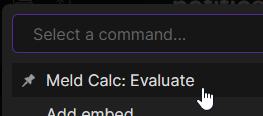
Select the expression and choose evaluate from the command palette:
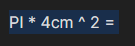
Select the expression Choose evaluate from the command palette

The expression should be evaluated:

PI * 4cm ^ 2 = 50.265482457436691815 Centimeters

Example 2, copy to clipboard

Write an expression without ending it with an equals symbol:

23 % of 1023

Select the expression and choose evaluate from the command palette like done in Example 1 above.

The evaluated expression will be copied to the clipboard.

The evaluated expression will be copied to the clipboard

Example 3, variables and multilines

Variables and multiline expressions are supported.

x=56.43
y=x/2
z+y=

Selecting all 3 lines and running the evaluate command from the palette will result in:

x=56.43
y=x/2
x+y=84.645

Settings

None at present.

Installation

You can install the plugin via the Community Plugins tab within Obsidian by searching for "Calc"

Do you find this plugin useful?

Thank you for your support 🙏

64%
HealthFair
ReviewSatisfactory
About
Evaluate math expressions directly in notes using fcal's parser with arithmetic, units, functions, constants, and variables. End an expression with '=' to replace it with the result, or leave off '=' to evaluate and copy the result to the clipboard; supports multiline and variable assignment.
MathEditingCommands
Details
Current version
1.0.2
Last updated
5 years ago
Created
5 years ago
Updates
2 releases
Downloads
13k
Compatible with
Obsidian 0.12.15+
License
MIT
Report bugRequest featureReport plugin
Sponsor
Buy Me a Coffee
GitHub Sponsors
Author
meld-cpmeld-cp
github.com/meld-cp/obsidian-encrypt
GitHubmeld-cp
  1. Community
  2. Plugins
  3. Math
  4. Meld Calc

Related plugins

Paste URL into selection

Paste URL "into" selected text.

Vimrc Support

Auto-load a startup file with Vim commands.

Quick LaTeX

Simplify and speed up LaTeX math typing.

Code Editor Shortcuts

Add keyboard shortcuts (hotkeys) commonly found in code editors such as Visual Studio Code (VS Code) or Sublime Text.

Slash Commander

Customize the slash command list, assign each command an icon.

Heading Shifter

Easily Shift and Change Markdown headings.

Advanced Tables

Improved table navigation, formatting, and manipulation.

Outliner

Work with your lists like in Workflowy or Roam Research.

Meta Bind

Make your notes interactive with inline input fields, metadata displays, and buttons.

Commander

Customize your workspace by adding commands everywhere, create macros and supercharge your mobile toolbar.