
- Overview
- Scorecard
- Updates6
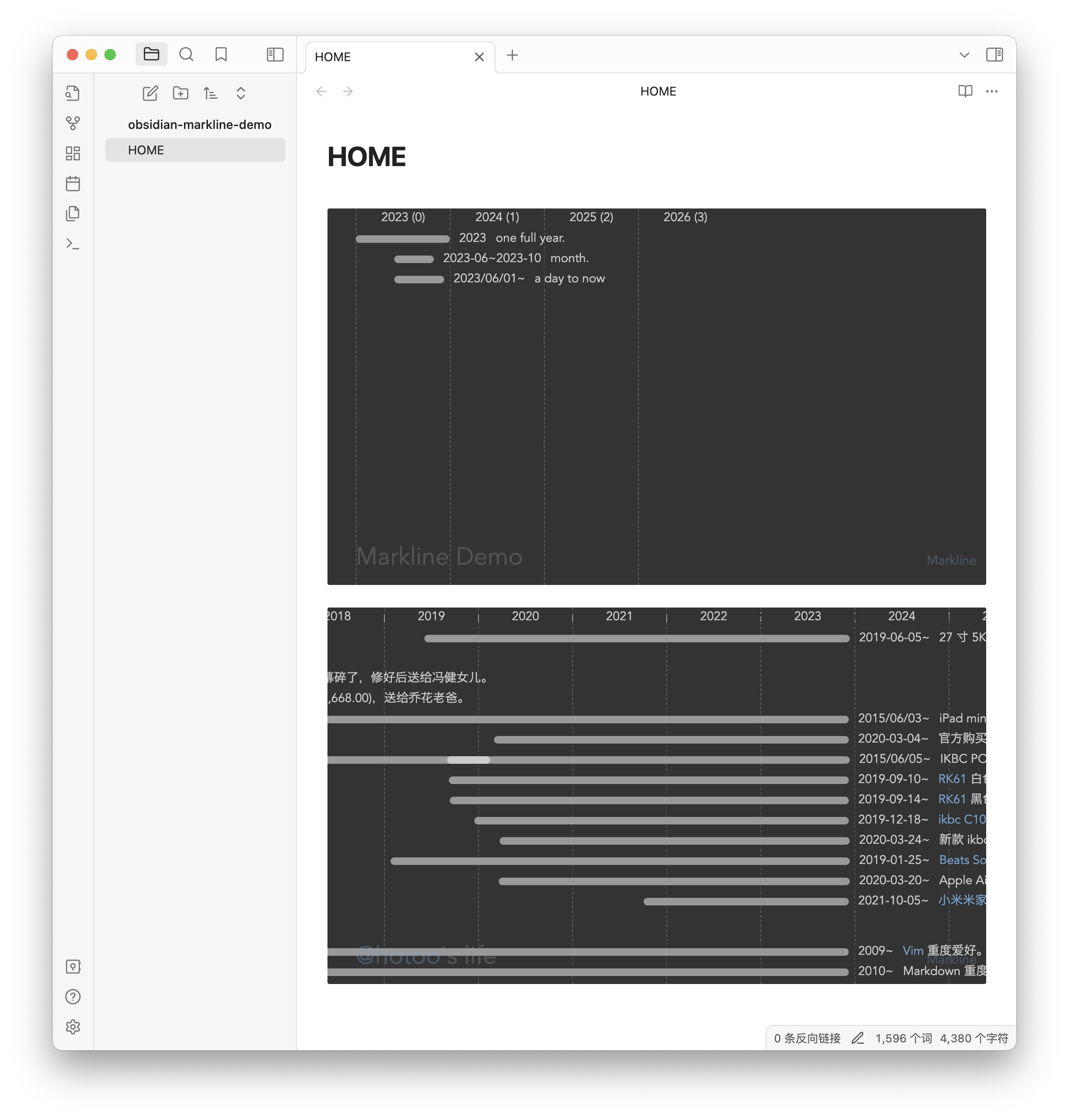
This is fork of Markline, show timeline view from markdown in Obsidian editor.
Feature
- Show timeline view in Obsidian Editor with
marklinecode blockquote. - Add markline code blockquote by command.
Install
Community plugins:
Click link https://obsidian.md/plugins?id=markline to install.
or:
- Menu: Obsidian -> Perferences...
- If "Restricted mode" is off, click "Turn on community plugins" button.
- Click "Browser" button.
- Search "Markline".
- Open and click "Install" -> "Enable" button.
Manual installation:
- Unzip the latest release into your
<vault>/.obsidian/plugins/marklinefolder. - Reload Obsidian.app
- Enable the plugin in the settings of community plugins section.
You can also use the BRAT plugin to install the latest release.
Examples
```markline
# My Documnet Title
## group name (optional)
- 2023 A full year event.
- 2023-01~2023-03 subevent
- 2023-05~2023-08 subevent 2
- 2023-01 month event name.
- 2023-01-02 event name with [link](https://github.com/hotoo/obsidian-markline).
## another group
- 2013 another list item.
- 2013-05-05 yet another list item.
```
Markdown
Markdown is so easy, and so powerful, you can use it to build the timeline graph.
Markline use subsets of markdown now:
Dates
* 1986 for year.
* 1986/06 for month.
* 1986/06/28 is a good day.
* 1986-06-28 you also can use this date format.
Date Ranges
* 2012~2014 year to year.
* 2012~2014/02 year to year.
* 1986/06/28~1986/08/14 from date to another date.
* 2012~ year to now.
Header
# title

## h2 group name
### h3 group name
#### h4 group name
##### h5 group name
###### h6 group name
Meta
Between title and group or lines, we can set meta data in markdown by key-value pair.
# title

- age: show
- date: 2014/01/01
- author: @hotoo
- mention: https://twitter.com/{@mention}

----

# Group 1

* 2014 line 1.
Now we support meta data:
age: show age after year in top header line. default is hide, if want show, set:- age: showmention: set mention enable, and mention base url. default mention is disable.# @Mention Demo - mention: https://github.com/{@mention} ---- - 2014 @hotoo mention @lizzie{@mention}is placeholder for mention name.hashtag and colors: direct use
#FF0000or hashtag custom tags styles.# #HashTag Demo - tags: - #tag-name: background-color, text-color - #life: yellow, #f00 - #job: rgb(255,255,255), rgba(255,0,0,0.5) - #some-tag: red ---- - 2014 this is my #life - 2023 this line color is red #f00 ## Group #F00 - 2023 all events in this group is red. - 2023 red line. ## Group #F00 #0F0 - 2023 all events in this group is red bar and green text. - 2023 red bar and green text.
following meta data support come soon.
theme: set different theme, by build-in theme name, or theme css file url.- theme: light - theme: http://www.example.com/theme.cssyear-length: set date column width.date-type: show date type byyear,month, ordateauthor: set author information.
List
* 2014 list item
  * 2014/01 sub list item

- 2014 another list item
  - 2014/01 another sub list item
Horizontal
for anonymous group.
* 2014 line 1

----

* 2015 line 2
Link
* 2014 this is a [link](url)
* 2014 this is a [[inner link]]
Image
* 2014 this is an image: 
* 2014 this is an internal image: ![[image file]]
Strong
* 2014 this is **strong** text.
* 2014 this is __another strong__ text.
Emphasized
* 2014 this is _emphasized_ text.
* 2014 this is *another emphasized* text.
Delete
* 2014 this is ~delete~ text.
* 2014 this is ~~another delete~~ text.
Want more markdown syntax feature? make issues, fork and pull request.