Search...Search plugins and themes...
⌘K
Sign in
  • Get started
  • Download
  • Pricing
  • Enterprise
  • Account
  • Obsidian
  • Overview
  • Sync
  • Publish
  • Canvas
  • Mobile
  • Web Clipper
  • CLI
  • Learn
  • Help
  • Developers
  • Changelog
  • About
  • Roadmap
  • Blog
  • Resources
  • System status
  • License overview
  • Terms of service
  • Privacy policy
  • Security
  • Community
  • Plugins
  • Themes
  • Discord
  • Forum / 中文论坛
  • Merch store
  • Brand guidelines
Follow us
DiscordTwitterBlueskyThreadsMastodonYouTubeGitHub
© 2026 Obsidian

Markdown shortcuts

julesguesnonjulesguesnon8k downloads

Write Markdown from shortcuts.

Add to Obsidian
  • Overview
  • Scorecard
  • Updates9

Obsidian Markdown Shortcuts

This is a plugin for Obsidian (https://obsidian.md).

Why?

If you're used to software like Notion, going from assisted markdown to plain markdown may be a bit hard if you're not used to it. You'll probably have to work with a cheatsheet open in a tab in order to make sure you're not doing it wrong.

Also some syntaxes are a bit cumbersome to write like the table one.

So, if you're learning markdown or too lazy to write a table, this plugin is for you.

How it works?

Show the commands

All you have to do is to write a > whenever you want in a file, then make your choice.

example.gif

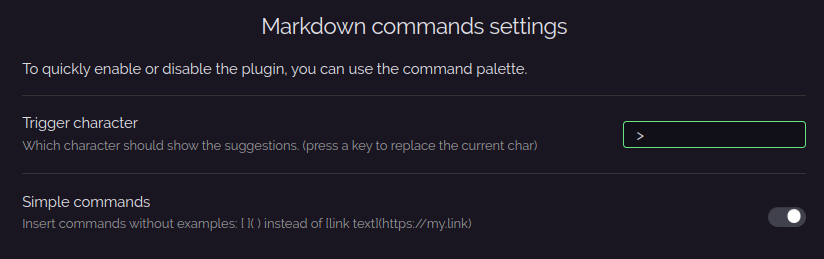
Configure the plugin

  • Trigger character Set the character that will trigger the commands.
  • Simple commands Insert commands without examples.

settings.png

How to install?

First, you need to have Obsidian v0.12.17+.

  • Go to Settings > Community plugins

  • Turn safe mode to off

  • Go to the releases page

  • Download the latest markdown-commands-<version>.zip

  • Put the zip into <vault-folder>/.obsidian/plugins (if the folder plugins doesn't exist you can create it)

  • Extract it

  • Enable the plugin in the settings and you're ready to go

enable.png

Any issue or suggestion?

If you're facing an issue feel free to open a new one and describe as much as possible the issue, the context of the issue, etc...

If you think that the plugin is missing something or could be improved, feel free to open an issue and describe your idea.

65%
HealthFair
ReviewSatisfactory
About
Insert common Markdown elements and templates using a single trigger character to open a command menu. Create tables, blocks, and formatting snippets without memorizing Markdown syntax.
MarkdownTemplatingCommands
Details
Current version
0.4.0
Last updated
4 years ago
Created
4 years ago
Updates
9 releases
Downloads
8k
Compatible with
Obsidian 0.12.17+
Platforms
Desktop, Mobile
License
MIT
Report bugRequest featureReport plugin
Author
julesguesnonjulesguesnon
github.com/JulesGuesnon
GitHubjulesguesnon
  1. Community
  2. Plugins
  3. Markdown
  4. Markdown shortcuts

Related plugins

Fantasy Statblocks

Create, manage and view a Fantasy Bestiary with Dungeons and Dragons style statblocks.

JS Engine

Run JavaScript from within your notes.

QuickAdd

Quickly add new notes or content to your vault.

Templater

Create and use dynamic templates.

Importer

Import data from Notion, Evernote, Apple Notes, Microsoft OneNote, Google Keep, Bear, Roam, and HTML files.

Quick Switcher++

Enhanced Quick Switcher, search open panels, and symbols.

Outliner

Work with your lists like in Workflowy or Roam Research.

Commander

Customize your workspace by adding commands everywhere, create macros and supercharge your mobile toolbar.

Various Complements

Complete words similar to auto-completion in an IDE.

Linter

Format and style your notes. Linter can be used to format YAML tags, aliases, arrays, and metadata; footnotes; headings; spacing; math blocks; regular Markdown contents like list, italics, and bold styles; and more with the use of custom rule options.