Search...Search plugins and themes...
⌘K
Sign in
  • Get started
  • Download
  • Pricing
  • Enterprise
  • Account
  • Obsidian
  • Overview
  • Sync
  • Publish
  • Canvas
  • Mobile
  • Web Clipper
  • CLI
  • Learn
  • Help
  • Developers
  • Changelog
  • About
  • Roadmap
  • Blog
  • Resources
  • System status
  • License overview
  • Terms of service
  • Privacy policy
  • Security
  • Community
  • Plugins
  • Themes
  • Discord
  • Forum / 中文论坛
  • Merch store
  • Brand guidelines
Follow us
DiscordTwitterBlueskyThreadsMastodonYouTubeGitHub
© 2026 Obsidian

Main Tab Commands

jimmycushniejimmycushnie18 downloads

Adds commands to manage the note tabs in your main view without affecting widget tabs in the sidebar.

Add to Obsidian
  • Overview
  • Scorecard
  • Updates4

Has this ever happened to you?

  • You're using Obsidian
  • You have a bunch of tabs open with different notes
  • You press ctrl+W to close the current note
  • But instead it closes a sidebar widget!! What the heck!!!

If you answered yes, then this plugin is for you! It adds commands for tab management (close current tab, go to next/previous tab, etc) that only apply to your note tabs, not to sidebar widget tabs.

Obsidian's built-in tab management commands will apply to the tab group you most recently interacted with. So, most of the time they will affect your note tabs. But if you've just clicked on a sidebar widget, they will affect your sidebar widget tabs instead. I personally hate this behavior and so I made this plugin to make the shortcuts reliably apply to your note tabs.

Bonus feature!

This plugin also has a setting to control which tab is focused after you close the current tab.
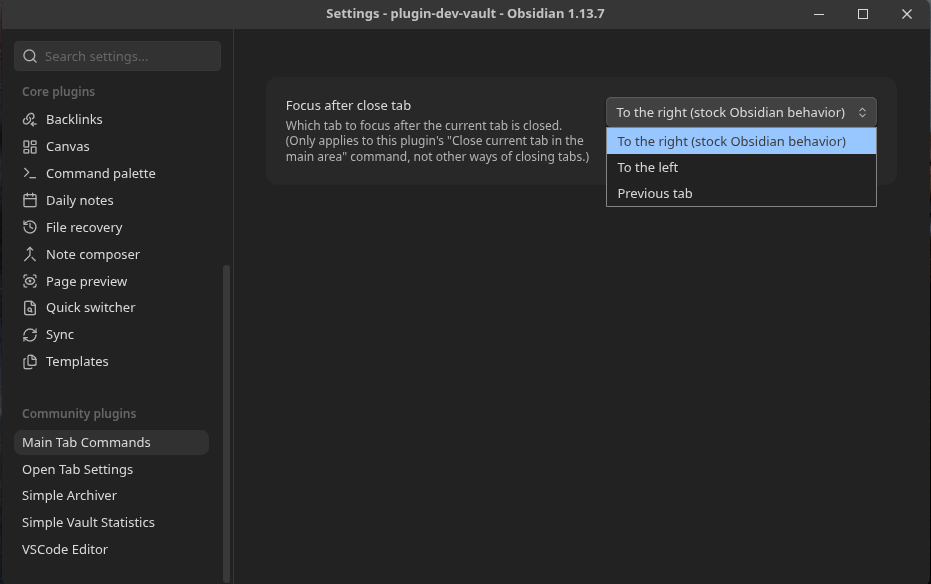
Note that this setting unfortunately only applies when closing the current tab through its "Close current tab in the main area" command. You will still get stock Obsidian behavior if you close a tab with its X button, by middle clicking on it, etc.

Setup

After installing and enabling the plugin, go to settings -> hotkeys and update your hotkeys to use the commands from this plugin instead of the built-in commands.
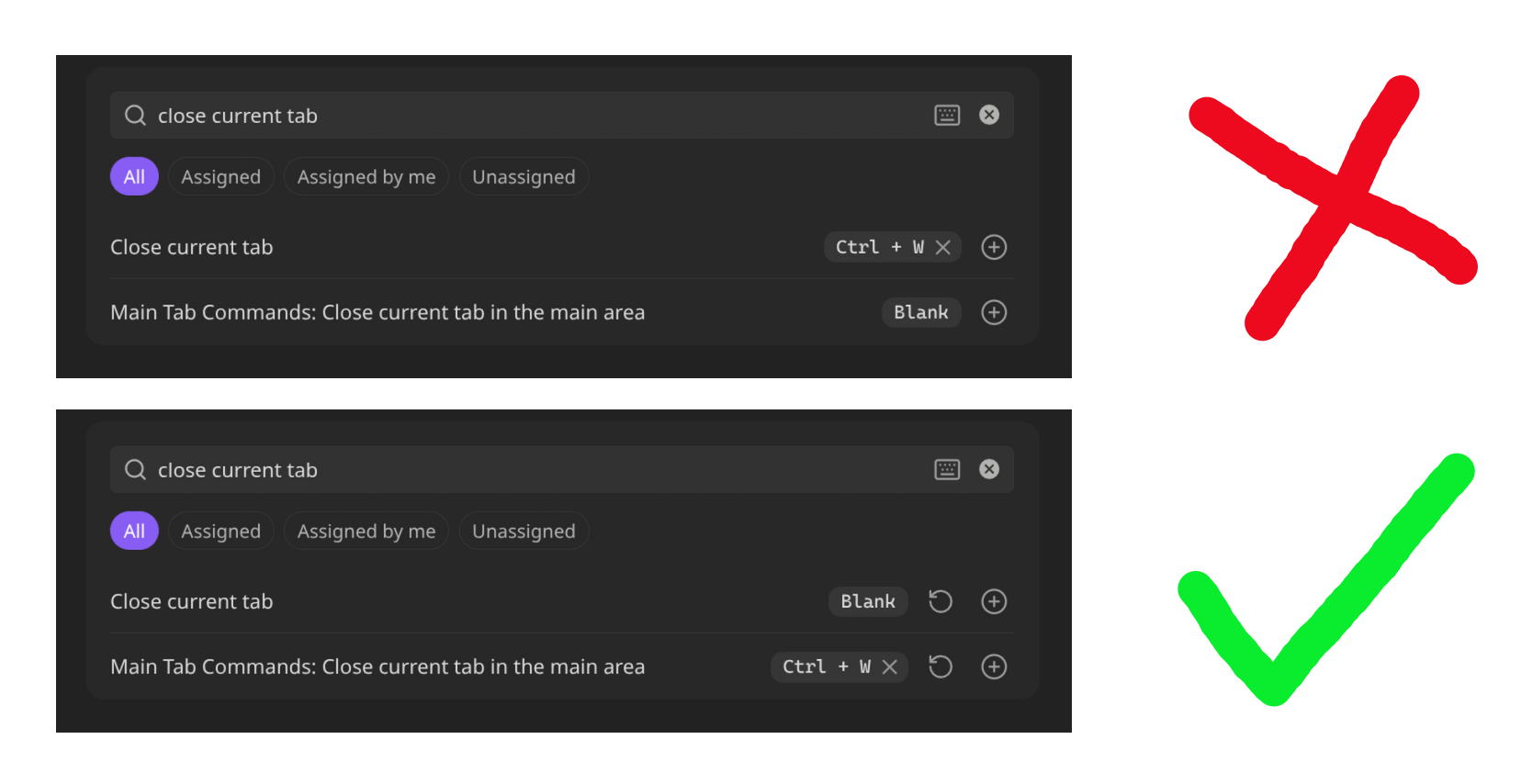
List of commands

This plugin adds the following commands:

  • Close current tab in the main area
  • Go to next tab in the main area
  • Go to previous tab in the main area
  • Go to tab #1 in the main area
  • Go to tab #2 in the main area
  • Go to tab #3 in the main area
  • Go to tab #4 in the main area
  • Go to tab #5 in the main area
  • Go to tab #6 in the main area
  • Go to tab #7 in the main area
  • Go to tab #8 in the main area
  • Go to last tab in the main area
HealthExcellent
ReviewPassed
About
Control main-area note tabs with dedicated commands that ignore sidebar widget tabs. Close the current tab, navigate next/previous, jump to numbered tabs, or go to the last tab without accidentally affecting sidebars. This plugin also has a setting to control which tab is focused after the current tab is closed. You can choose to focus the tab to the right (stock Obsidian behavior), the tab to the left, or the previous tab.
CommandsHotkeysNavigation
Details
Current version
1.1.0
Last updated
1 hour ago
Created
2 days ago
Updates
4 releases
Downloads
18
Compatible with
Obsidian 1.13.7+
Platforms
Desktop only
License
Unlicense
Report bugRequest featureReport plugin
Author
jimmycushniejimmycushnie
jimmywebsite.website
GitHubjimmycushnie
Blueskyjimmywebsite.website
  1. Community
  2. Plugins
  3. Commands
  4. Main Tab Commands

Related plugins

Tab Switcher

Switch your tabs with Ctrl + Tab in recently used order like in a browser.

Leader Hotkeys

Add leader hotkey support to any command (like tmux or vim).

Quick Switcher++

Enhanced Quick Switcher, search open panels, and symbols.

Hotkey Helper

Easily see and access any plugin's settings or hotkey assignments (and conflicts) from the Community Plugins tab.

Tray

Run Obsidian from the system tray for customisable window management and global quick notes.

Keyshots

Add classic hotkey/shortcuts commands from popular IDEs like Visual Studio Code or JetBrains Family.

Code Editor Shortcuts

Add keyboard shortcuts (hotkeys) commonly found in code editors such as Visual Studio Code (VS Code) or Sublime Text.

Notebook Navigator

A better file browser and calendar inspired by Apple Notes, Bear, Evernote and Day One.

Homepage

Open a note, base, or workspace on startup, or set it for quick access later.

Breadcrumbs

Visualise the hierarchy of your vault using a breadcrumb trail or matrix view.