Search...Search plugins and themes...
⌘K
Sign in
  • Get started
  • Download
  • Pricing
  • Enterprise
  • Account
  • Obsidian
  • Overview
  • Sync
  • Publish
  • Canvas
  • Mobile
  • Web Clipper
  • CLI
  • Learn
  • Help
  • Developers
  • Changelog
  • About
  • Roadmap
  • Blog
  • Resources
  • System status
  • License overview
  • Terms of service
  • Privacy policy
  • Security
  • Community
  • Plugins
  • Themes
  • Discord
  • Forum / 中文论坛
  • Merch store
  • Brand guidelines
Follow us
DiscordTwitterBlueskyThreadsMastodonYouTubeGitHub
© 2026 Obsidian

Lock Cards

erezakerezak150 downloads

Lock selected Canvas cards to prevent moving and resizing.
Add to Obsidian
  • Overview
  • Scorecard
  • Updates2

Lock selected Canvas cards to prevent moving and resizing.

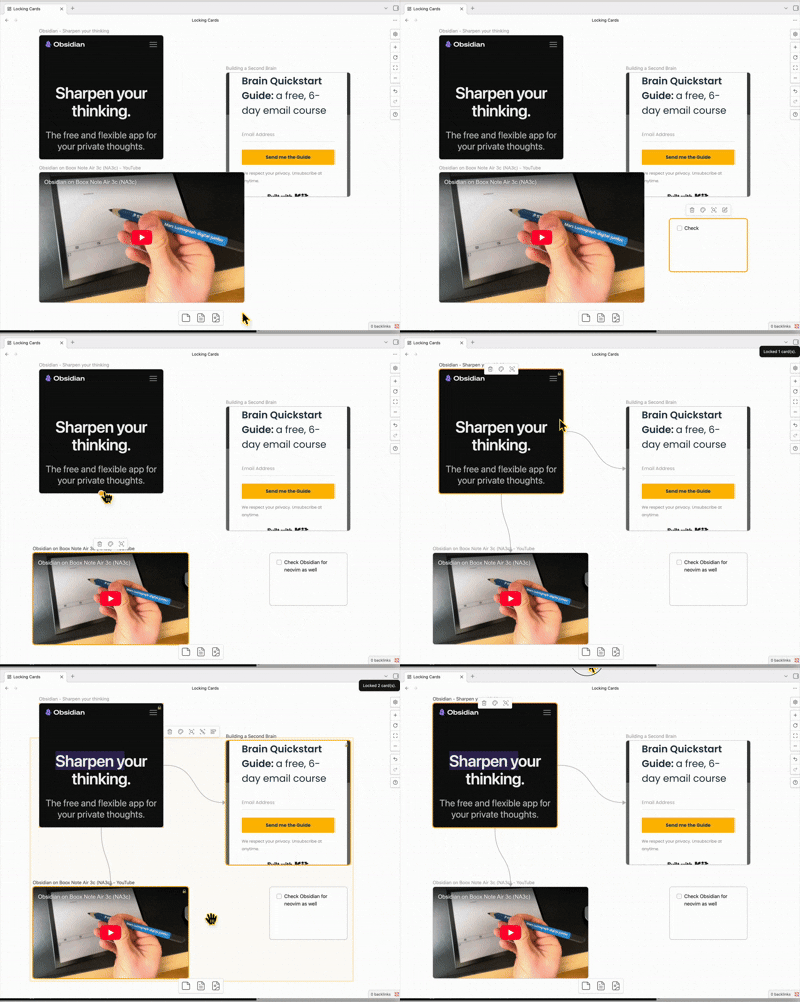
demo

Usage

  1. Open a Canvas.
  2. Select one or more cards.
  3. Run the command Toggle lock for selected canvas cards.

Locked cards are visually marked and attempts to move/resize them are reverted.

Settings

  • Disable lock while shift is held: temporarily allow moving locked cards by holding shift.

Install (manual)

Copy these files into:

<Vault>/.obsidian/plugins/lock-cards/

  • main.js
  • manifest.json
  • styles.css

Then reload Obsidian and enable the plugin in Settings → Community plugins.

Development

  • Install dependencies: npm install
  • Watch build: npm run dev
  • Production build: npm run build
  • Lint: npm run lint

Troubleshooting

  • If commands don’t appear, make sure the plugin is enabled and Obsidian has been reloaded.
76%
HealthGood
ReviewCaution
About
Lock selected Canvas cards to prevent moving and resizing. Mark locked cards visually and revert attempted moves or resizes; hold Shift to temporarily move locked cards.
CanvasCommandsAppearance
Details
Current version
0.4.0
Last updated
5 months ago
Created
5 months ago
Updates
2 releases
Downloads
150
Compatible with
Obsidian 1.5.0+
Platforms
Desktop only
License
MIT
Report bugRequest featureReport plugin
Author
erezakerezak
github.com/erezak
GitHuberezak
  1. Community
  2. Plugins
  3. Canvas
  4. Lock Cards

Related plugins

Note Toolbar

Add customizable toolbars to your notes.

Canvas Send to Back

Move cards in canvas to the top or behind all other cards.

UI Tweaker

Add, hide, or modify various interface elements.

Advanced Canvas

Supercharge your canvas experience. Create presentations, flowcharts and more.

Minimal Theme Settings

Control the colors and fonts in Minimal Theme.

Hider

Hide interface elements such as tooltips, status bar, titlebar, and more.

Quick Switcher++

Enhanced Quick Switcher, search open panels, and symbols.

Commander

Customize your workspace by adding commands everywhere, create macros and supercharge your mobile toolbar.

Style Settings

Adjust theme, plugin, and snippet CSS variables.

Link Favicons

See the favicon for a linked website.