Local Any Files
 shermantsang2k downloads
Extract and download any external files from links to local files
- Overview
- Scorecard
- Updates6
English | 简体中文
A powerful Obsidian plugin that helps you extractExternalLinks,downloadFileLocally and replaceExternalLinks.
It supports a wide range of file types and provides flexible configuration options for organizing your attachments.
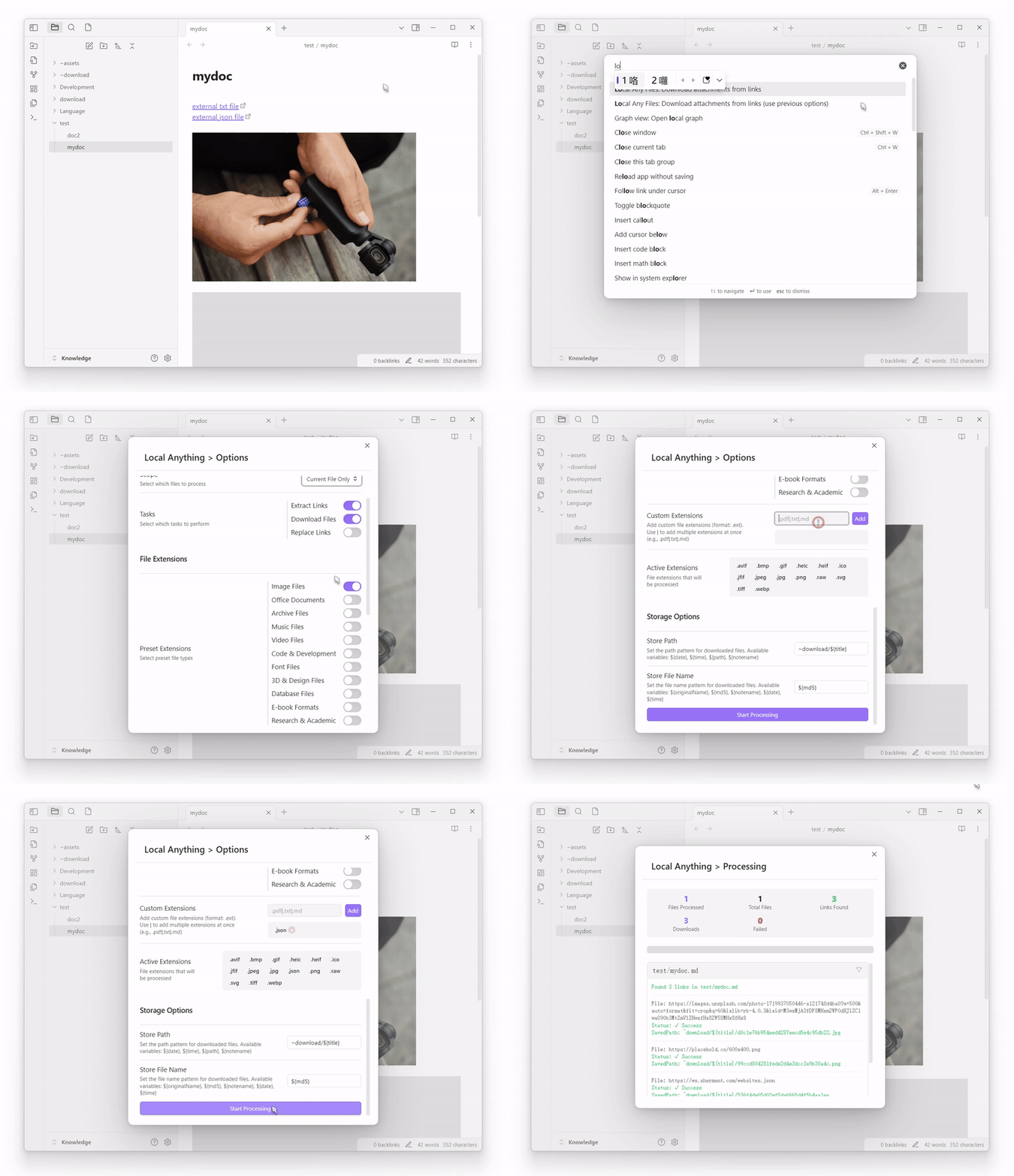
Features
Wide File Type Support: Preset groups for various file types.
- Images:
.png,.jpg,.jpeg,.gif,.bmp,.svg,.webp,.tiff,.ico,.raw,.heic,.heif,.avif,.jfif - Office Files:
.doc,.docx,.xls,.xlsx,.ppt,.pptx,.pdf,.odt,.ods,.odp,.rtf,.txt,.csv,.epub,.pages,.numbers,.key - Archives:
.zip,.rar,.7z,.tar,.gz,.bz2,.xz,.iso,.tgz,.z,.bzip2,.cab - Music:
.mp3,.wav,.flac,.m4a,.ogg,.aac,.wma,.aiff,.alac,.mid,.midi,.opus,.amr - Videos:
.mp4,.avi,.mkv,.mov,.wmv,.flv,.webm,.m4v,.mpg,.mpeg,.3gp,.ogv,.ts,.vob - Code Files:
.js,.ts,.jsx,.tsx,.html,.css,.scss,.json,.xml,.yaml,.yml,.md,.py,.java,.cpp,.c,.cs,.php,.rb,.go,.rs,.swift - Fonts:
.ttf,.otf,.woff,.woff2,.eot - Design Files:
.psd,.ai,.eps,.sketch,.fig,.xd,.blend,.obj,.fbx,.stl,.3ds,.dae - Databases:
.sql,.db,.sqlite,.mdb,.accdb,.csv,.tsv - Ebooks:
.epub,.mobi,.azw,.azw3,.fb2,.lit,.djvu - Academic:
.bib,.tex,.sty,.cls,.csl,.nb,.mat,.r,.rmd,.ipynb
- Images:
Smart Processing:
- Extracts links from your notes
- Downloads files locally
- Automatically replaces links with local paths
Intuitive Process View:
- Real-time progress tracking
- Clear success/failure indicators
- Detailed logs for each operation
- Visual progress bar for better feedback
Flexible Scope Options:
- Process current file only
- Process entire current folder
- Process all files in vault
- Process single items through context menu
Separated Tasks:
Extract External Links: Find all external links in your notesDownload File Locally: Download external files to your vaultReplace External Links: Update links to point to local files- Customize which tasks to run based on your needs
Customizable Store Path and File Name:
- Dynamic store path with variables support:
${path}: Current note's path${notename}: Current note's name
- Flexible file naming with variables:
${originalName}: Original file name${date}: Current date${time}: Current time${random}: Random string${extension}: File extension${year}: Current year${month}: Current month${day}: Current day${hour}: Current hour${minute}: Current minute${second}: Current second
- Dynamic store path with variables support:
Comparison with obsidian-local-images
While obsidian-local-images is a great plugin focused on image attachments, obsidian-local-any-files extends similar functionality to a much wider range of file types:
File Type Support:
obsidian-local-images: Focuses on image files onlyLocal any files: Supports images, documents, archives, media, code files, and many more
Processing Options:
obsidian-local-images: Processes images in the current noteLocal any files: Flexible scope options (current file, folder, entire vault, or single items)
Configuration:
obsidian-local-images: Basic image-focused settingsLocal any files: Extensive configuration options for file types, storage paths, and naming patterns
Organization:
obsidian-local-images: Standard image organizationLocal any files: Customizable storage paths with variables for better organization
Usage
Quick Start
- Install the plugin from Obsidian Community Plugins
- Configure desired file types in settings:
- Enable preset groups (images, documents, etc.)
- Add custom extensions if needed
Processing Files
Method 1: Command Palette
- Open Command Palette (Ctrl/Cmd + P)
- Search for "Local any files" or "Download attachments from links"
- Choose processing options in the modal
Method 2: Context Menu
- Right-click on a link in your note
- Select "Download to local" option
- Configure options in the modal
Configuration
Storage Path
- Default:
assets/${path} - Variables available:
${path}: Current note's path${originalName}: Original filename
Custom Extensions
- Add your own extensions in settings
- Format:
.ext(e.g.,.pdf,.custom) - Multiple extensions:
.pdf|.txt|.md
Support
HealthGood
ReviewSatisfactory
About
Extract external links from notes, download linked files into your vault, and replace remote URLs with local paths. Support a wide range of file types, display real-time progress and detailed logs, and run operations per file, folder, or entire vault.Details
Current version
1.3.5
Last updated
2 years ago
Created
2 years ago
Updates
6 releases
Downloads
2k
Compatible with
Obsidian 0.15.0+
Platforms
Desktop, Mobile
License
MIT