LLM Wiki Tutor
 Elliott Park47 downloads
Learn the basics and build your first LLM Wiki with a pixel cat that walks your workspace, points at what to click, waits until you have done it and helps if you get stuck. No AI key needed.
- Overview
- Scorecard
- Updates3
Learn Obsidian and build your first LLM Wiki with a pixel cat that walks your workspace and teaches you step by step.
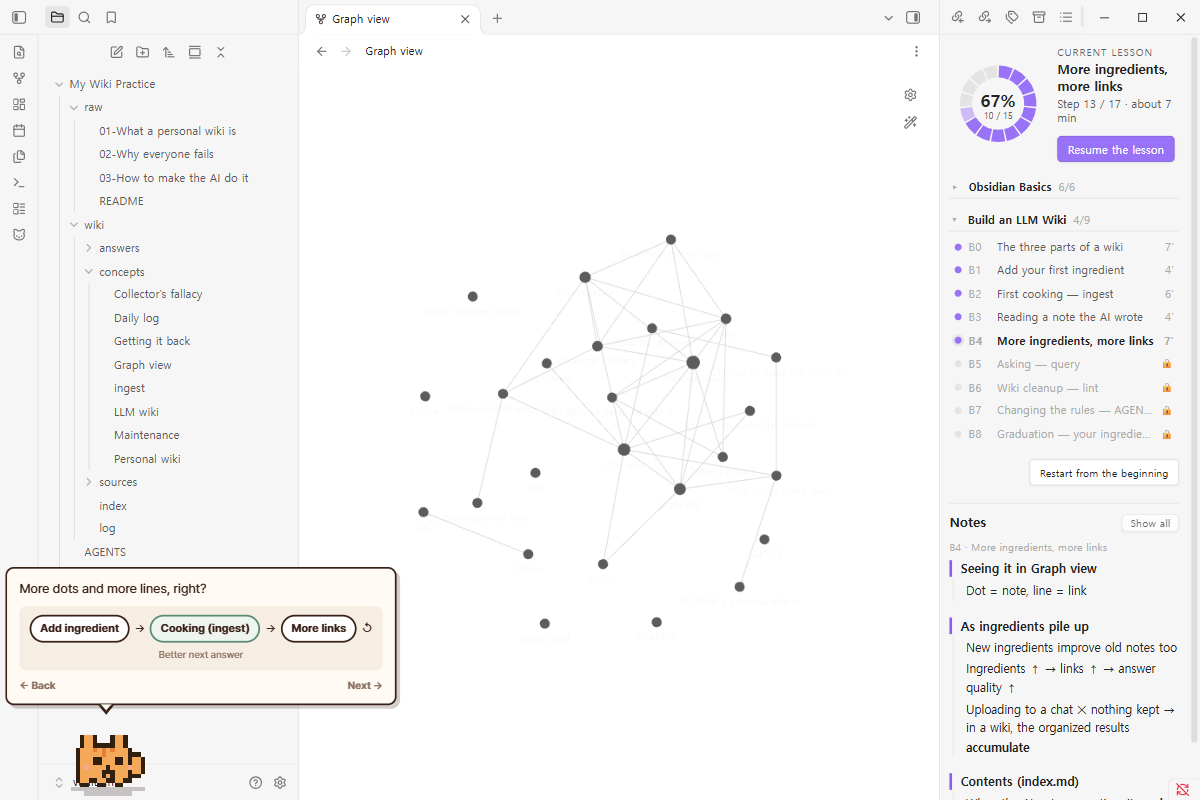
You saw "a wiki the AI keeps for you" somewhere and wanted one — but you don't know Obsidian, and the tutorials assume a terminal. This plugin puts a small cat on the floor of your workspace. It explains one idea at a time in plain words (files in the raw folder are your ingredients, ingest is cooking), points at the exact folder or button, waits until you actually did the thing, and does it for you if you get stuck. A side panel keeps short lesson notes as the cat talks. Everything happens inside one practice folder in your real vault. It never calls an AI itself and never touches your other notes.
What you learn
Course A — Obsidian Basics (6 lessons, ~30 min) A tour of the screen · why write things down · an Obsidian note is just a file · three Markdown symbols · linking notes and the graph view · why an LLM Wiki lives in Obsidian.
Course B — Build an LLM Wiki (9 lessons, ~50 min)
The three parts (raw/ folder, wiki/ folder, AGENTS.md rules file) · putting in a first ingredient · the first ingest · reading a note the AI wrote · more ingredients, more links · query with sources · lint (wiki cleanup) · changing the rules · graduation with your own note and your own AI.
Every lesson is 3–8 minutes and leaves something real in the practice folder. You can stop anytime and resume later; the cat remembers where you were.
Lessons open in order, because later lessons use files made in earlier ones. Course B opens after course A is finished — or after you press Skip next to course A, which marks it done and creates the notes course A would have made (after a preview). Skip this lesson works the same way for a single lesson.
Trial mode and real mode
- Trial mode (default, every lesson): the wiki pages the AI "writes" are prepared in advance and shown page by page while the cat types. No AI, no key, no cost, nothing leaves your computer.
- Real mode (last lesson): one real ingest with the AI you already use.
- Claude desktop app — the cat shows how to connect the vault folder in Cowork and gives you the sentence to paste.
- Any chat AI (ChatGPT etc.) — the cat bundles the rules file, the contents page and your new ingredient into one prompt you copy; you paste the AI's answer back and the plugin splits it into pages (
=== FILE: wiki/… ===blocks) and shows a preview before writing.
After the course the cat stays on the floor and, if you want, reminds you on your ingest day and asks for three lines in the evening (at most twice a day; off in settings).
Where things go
<Practice folder>/ (default My Wiki Practice / 내 위키 연습 / 我的维基练习) — the only place the lessons write.
raw/ your ingredients (+ README.md) · wiki/sources/ summaries · wiki/concepts/ concept notes · wiki/answers/ saved answers · wiki/index.md contents · wiki/log.md work log · AGENTS.md the rules file.
The layout matches the Karpathy LLM Wiki community plugin, so when you outgrow the tutor you can point that plugin at the same wiki/ folder and keep going.
Every write shows a preview first. Restart from the beginning asks whether to reset only the lessons or also the practice notes (notes go to the trash, not permanent deletion). The command Undo this lesson removes only what the current lesson created and restores pages it overwrote.
Commands
| Command | |
|---|---|
| Open the lesson | Opens the progress map and starts or resumes |
| Resume the lesson · Pause the lesson | |
| Restart from the beginning · Skip this lesson · Undo this lesson | |
| Open the progress map | Right sidebar: progress donut (one segment per lesson), current lesson, both courses (fold/unfold), skip course A, lesson notes |
| Show / hide the cat · Reset cat position |
Click the cat to pet it, drag it to move it, double-click to open the map, right-click for size (small · normal · large · extra large) and a small menu. Hover the cat to replay what it last said. Each lesson opens with a short "what you will learn" and some lessons have a "questions?" corner. Clicks on empty floor pass through to Obsidian.
Install
In Obsidian, open Settings → Community plugins → Browse, search for LLM Wiki Tutor, then install and enable it. Or open the directory page and click Add to Obsidian.
Languages
Korean, English and Simplified Chinese. The lesson language follows the plugin setting (first run: your Obsidian language).
Requirements
Obsidian desktop (the cat stage is desktop-only). Nothing else — no API key, no CLI, no account.
Disclosures
- No network access. The plugin never contacts any server. Real mode works through your clipboard and your own AI app.
- Clipboard. Only when you press a "Copy" button, the plugin writes a prompt to the clipboard. It never reads the clipboard; you paste the AI's answer into a text box yourself.
- Writes only inside the practice folder. Folder name is a setting. Writes outside it are refused by the code (
practice.js), and every write is previewed. - Reads
AGENTS.md,wiki/index.mdand files underraw/of the practice folder to build prompts, and the note the current lesson opened to check your progress (for example "three lines written"). It lists file paths in the vault to find the practice folder and to point at folders in the file explorer. - File explorer internals. To walk to a folder and point at it, the plugin reads the file explorer view's item positions (
fileItems). This is not a public API; if it changes, pointing degrades to a spoken hint and the lesson continues. - Data lives in the plugin's
data.json: settings, lesson progress, what each lesson created (for undo), which ingredients were ingested, habit nudges. - Runs no external programs.
Show in system explorerin lesson A2 uses Obsidian's ownshowInFolder. - Vault Pet. If the Vault Pet plugin is also enabled, this plugin asks it to hide its cat during a lesson (
host.hideFor) and shows it again afterwards. Off in settings. - The cat renderer and stage come from Vault Pet (MIT) by the same author. No affiliation with Anthropic, OpenAI or Obsidian.
Development
node tests/run.js        # lesson data, samples, i18n keys, clipboard parser
node scripts/build.js    # src/ → main.js + styles.css
node scripts/demo-vault.js   # a demo vault next to this folder with the plugin installed
Lessons are data (src/core/lessons/), one array of steps per lesson. The step kinds are documented at the top of courseA.js. The cat side runs inside an iframe (src/kit/); the host side is src/plugin/.
한국어
옵시디언을 모르는 사람이, 바닥을 돌아다니는 픽셀 고양이와 함께 옵시디언 기초와 첫 LLM Wiki 를 배우는 입문 코스.
SNS 에서 "AI 가 정리해 주는 위키"를 보고 나도 하고 싶었는데, 옵시디언도 모르고 튜토리얼은 전부 터미널을 전제로 한다면 — 이 플러그인이 그 사이를 메웁니다. 고양이가 옵시디언 화면의 어디에 무엇이 있는지부터 하나씩 짚어 주고, 개념은 제 이름으로 먼저 설명한 뒤 꼭 필요한 비유만 "앞으로 이렇게 부를게" 하고 정해 두고, 눌러야 할 폴더와 버튼을 직접 걸어가 가리키고, 실제로 할 때까지 기다리다가, 막히면 대신 해 줍니다. 모든 실습은 진짜 볼트 안의 연습 폴더 하나에서만 일어나고, 다른 노트는 건드리지 않습니다. 플러그인은 AI 를 직접 부르지 않습니다.
- 코스 A — 옵시디언 사용법 기초 (6레슨, 약 30분): 만남과 화면 둘러보기 · 왜 기록해 둬야 할까 · 옵시디언 노트는 그냥 파일 · 마크다운 기호 세 개 · 노트를 링크로 잇기 · 왜 옵시디언에 만들까.
- 코스 B — LLM Wiki 만들기 (9레슨, 약 50분): 위키를 이루는 세 가지(raw 폴더 · wiki 폴더 · AGENTS.md) · 첫 재료 넣기 · 첫 요리(ingest) · AI 가 쓴 노트 읽기 · 재료가 늘면 연결고리도 는다 · 물어보기(query) · 위키 청소(lint) · 규칙 바꾸기 · 수료.
- 체험 모드(기본): AI 가 "쓰는" 쪽을 미리 만들어 두고 고양이가 타자를 치며 한 쪽씩 보여 줍니다. 키 · 비용 · 설치 없음.
- 실전 모드(수료): 클로드 데스크톱 앱이면 폴더 연결 안내, 그 밖의 AI 면 프롬프트를 묶어 복사 → 답을 붙여넣으면 쪽으로 나눠 미리보기 → 적용.
- 수료 뒤엔 ingest 요일과 저녁 세 줄을 챙깁니다(하루 2번까지, 설정에서 끔).
- 레슨은 순서대로 열립니다. 코스 B 는 코스 A 를 마치거나 "건너뛰기"를 누르면 열리고, 건너뛰면 코스 A 에서 만들었을 노트를 미리보기 뒤 만들어 둡니다.
연습 폴더의 raw/ · wiki/sources/ · wiki/concepts/ · wiki/index.md 는 Karpathy LLM Wiki 플러그인과 같은 자리라, 나중에 그 플러그인으로 이어 쓸 수 있습니다. 네트워크 접근 없음 · 클립보드는 "복사" 버튼을 눌렀을 때만 쓰기 · 연습 폴더 밖 쓰기 없음 · 모든 쓰기 미리보기 · 되돌리기는 휴지통으로.