Search...Search plugins and themes...
⌘K
Sign in
  • Get started
  • Download
  • Pricing
  • Enterprise
  • Account
  • Obsidian
  • Overview
  • Sync
  • Publish
  • Canvas
  • Mobile
  • Web Clipper
  • CLI
  • Learn
  • Help
  • Developers
  • Changelog
  • About
  • Roadmap
  • Blog
  • Resources
  • System status
  • License overview
  • Terms of service
  • Privacy policy
  • Security
  • Community
  • Plugins
  • Themes
  • Discord
  • Forum / 中文论坛
  • Merch store
  • Brand guidelines
Follow us
DiscordTwitterBlueskyThreadsMastodonYouTubeGitHub
© 2026 Obsidian

LLM docs

shane-lambshane-lamb837 downloads

Simple LLM (AI chat) client using pure markdown documents

Add to Obsidian
  • Overview
  • Scorecard
  • Updates4

A plugin for Obsidian (https://obsidian.md) that lets you chat with LLMs in plain markdown files!

Features

  • Use the same Obsidian markdown editor you know and love to chat with LLMs and freely edit conversation history
  • Integrates with the OpenAI API (with plans to support other providers like Google and Anthropic)
  • Also works with self-hosted/local LLMs that expose an OpenAI-compatible API, like Ollama (https://ollama.com)
  • Can follow links to other Obsidian documents included in your prompt, making it easier to include additional context
  • Supports linked/embedded images in prompt

Advantages over similar plugins

The core feature of this plugin is that all chatting is done in plain markdown files which can be freely edited and persisted in your vault along with all your other documents. Most plugins featuring LLM chat aren't built this way, and instead make use of a separate window/UI to facilitate chat. Having said that, there is another great Obsidian plugin called ChatGPT MD which shares this design principle.

Compared to ChatGPT MD, an advantage is that this plugin includes visual overlays like a "complete" button to execute your query and a loading indicator to let you know your query is being executed. The headings for user and assistant responses have also been stylized to make it easier to read and scan through the document. Also, I've supported inline images and linked documents (markdown files) being included as context in the prompt.

In the future I plan to add even more great features, including:

  • Support for other LLM provider APIs, such as Google and Anthropic
  • Tool use, enabling "agentic" behaviour

How to use

1. Update your configuration

Open the Obsidian settings window and select "LLM docs" under "Community plugins":
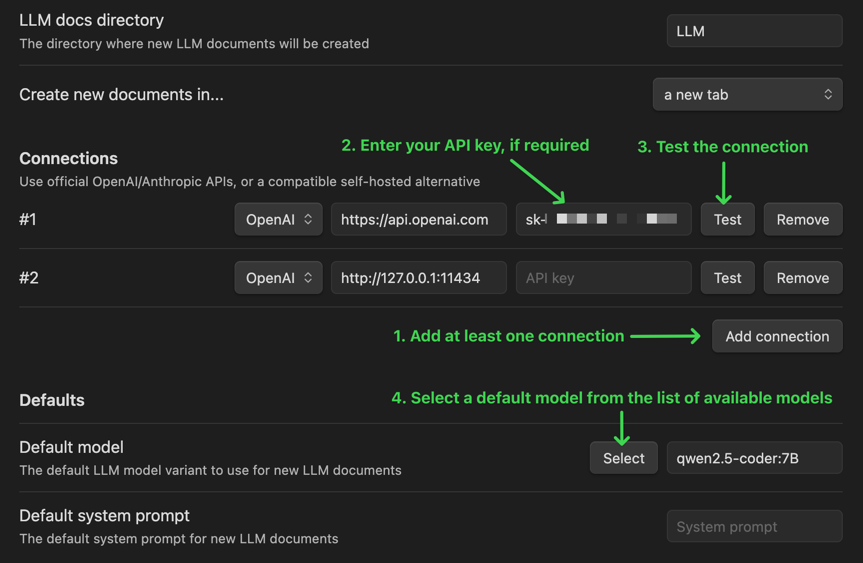
settings.png

2. Create an LLM document

Create a new document by clicking the LLM docs icon (looks like a robot) in the sidebar, or running the "Create new LLM document" command (use it from the command palette, or assign a keyboard shortcut)

3. Prompt the LLM

Type in your prompt and click "Complete" to generate a response! (or bind a keyboard shortcut)
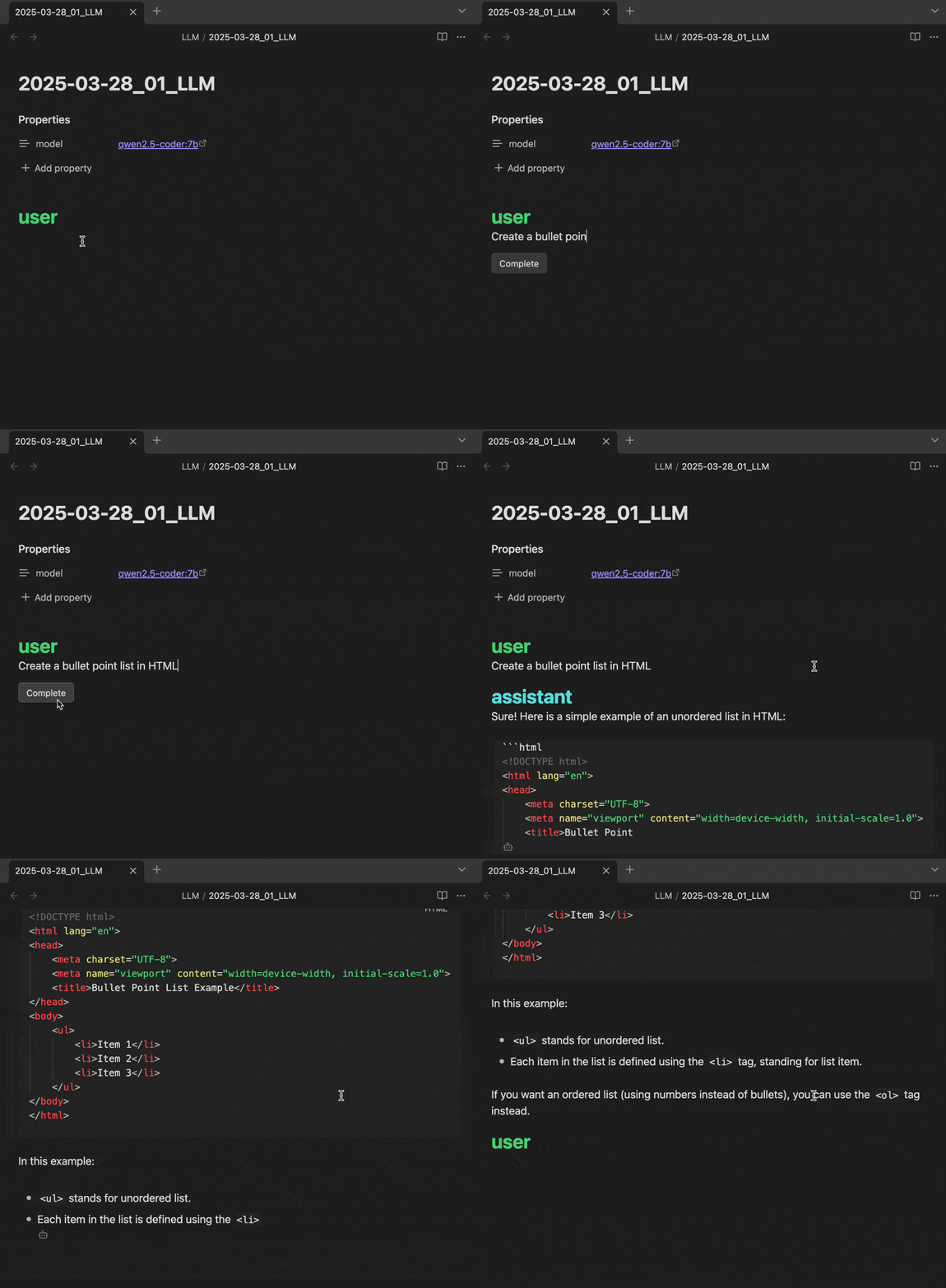
completion-example.gif

If you like it, I'm grateful for your support!

73%
HealthGood
ReviewCaution
About
Chat with LLMs directly inside plain Markdown files and edit conversation history inline. Include linked Obsidian notes and images as prompt context and connect to OpenAI or OpenAI‑compatible local models like Ollama. Display execution controls and loading indicators for clearer interactions.
AIMarkdownIntegrations
Details
Current version
1.3.0
Last updated
10 months ago
Created
Last year
Updates
4 releases
Downloads
837
Compatible with
Obsidian 1.7.0+
Platforms
Desktop only
License
GPL-3.0
Report bugRequest featureReport plugin
Sponsor
Ko-fi
Author
shane-lambshane-lamb
lambo.land
GitHubshane-lamb
  1. Community
  2. Plugins
  3. AI
  4. LLM docs

Related plugins

Agent Client

Chat with Claude Code, Codex, Gemini CLI, and more via the Agent Client Protocol — right from your vault.

Smart Composer

AI chat with note context, smart writing assistance, and one-click edits for your vault.

Custom Frames

Turn web apps into panes using iframes with custom styling. Also comes with presets for Google Keep, Todoist and more.

AnyBlock

Take any fragment as a block and render it into multiple effects.

Local REST API & MCP Server

Unlock your automation needs by interacting with your notes over a secure REST API.

Importer

Import data from Notion, Evernote, Apple Notes, Microsoft OneNote, Google Keep, Bear, Roam, and HTML files.

Copilot

Your AI Copilot: Chat with Your Second Brain, Learn Faster, Work Smarter.

Claudian

Embeds Claude Code/Codex as an AI collaborator in your vault. Your vault becomes agent's working directory, giving it full agentic capabilities: file read/write, search, bash commands, and multi-step workflows.

Smart Connections

AI link discovery copilot. See related notes as you write. Lookup using semantic (vector) search across your vault. Zero-setup local model for embeddings, no API keys, private.

BRAT

Easily install a beta version of a plugin for testing.