Lite Tabs
 Azona771k downloads
A lightweight panel for tabs. Supports vertical, card and masonry layout. Performance first.
- Overview
- Scorecard
- Updates22
English | 中文
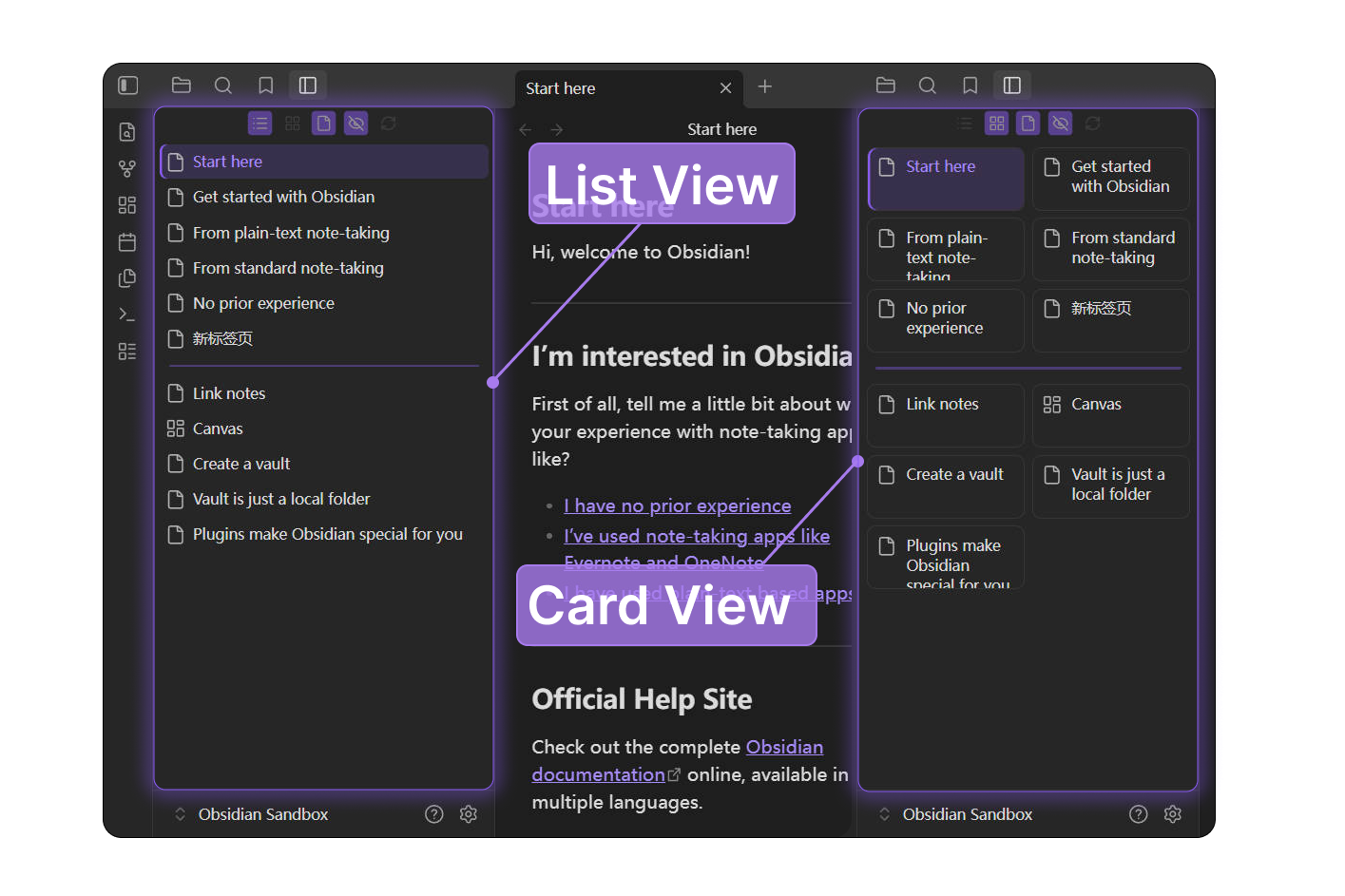
Lite Tabs is a lightweight Obsidian plugin that displays the tabs currently open in the editor area in an independent sidebar panel, with a focus on fast switching, simple visual organization, and low runtime overhead.
Features
- Vertical list, card-style, or masonry-style tab view, with layout and ordering controls grouped in a compact menu.
- Display tabs in workspace order, by name, or by recently modified file time.
- Local title filtering through the compact search control or the
Focus searchcommand. - Click to activate a tab, middle-click or use the close button to close a tab, and drag to reorder tabs while using workspace order.
- Minimal display options: hide file icons or inactive tabs, and float, dock, or hide the toolbar.
- Customizable styles: list/card/masonry size, font size, divider size, and basic highlight style.
- File-backed tabs expose
data-pathon.lite-tabs-itemfor custom CSS targeting. - Optional single-pane mode shows only the active tab group in the main workspace without closing or moving the hidden groups.
[!NOTE] Lite Tabs is designed for managing tabs that are already open in the editor area. It is not intended to replace a full file explorer, workspace manager, or project navigation system.
Performance
- Event-driven updates with no polling.
- Uses
requestAnimationFrameto batch refreshes. - Reuses existing item DOM elements whenever possible.
- Updates only the active-state class when the active tab changes.
- Recently modified order reads file timestamps only for currently open file-backed tabs.
- Masonry layout uses measured CSS grid spans and batched refreshes instead of a persistent layout cache.
- Does not maintain large persistent caches or synchronize custom group titles.
[!TIP] The plugin intentionally avoids heavy state synchronization and broad workspace abstraction. This keeps the runtime behavior predictable and the maintenance scope small.
Security boundary
Lite Tabs keeps its behavior limited to tab display and workspace tab operations.
- Does not access the internet or open external URLs.
- Does not read from or write to the clipboard.
- Does not read, write, rename, or delete vault files.
- Persists only this plugin's settings through Obsidian's plugin data API.
- Changes only the workspace tab state when you activate, close, or reorder tabs.
[!IMPORTANT] Run
npm run check:boundariesbefore release to check for common forbidden APIs.
Compatibility and scope
[!WARNING] Lite Tabs is built primarily for the author's personal workflow. Releases are checked before publishing, but bugs, compatibility regressions, or security issues may still exist.
Issue reports are welcome, but not every request will be implemented, especially advanced or broad feature requests outside the plugin's intended lightweight scope.
If you need behavior tailored to your own workflow, you are encouraged to fork the project and adapt it yourself, including with AI-assisted coding tools.
Custom CSS
File-backed tabs include a vault-relative data-path attribute on .lite-tabs-item, so snippets can target folders or specific files:
.lite-tabs-item[data-path^="ExamplePath/"] {
    background-color: #441111;
}
[!NOTE]
data-pathis available only for vault files. Non-file tabs may not expose adata-pathattribute.
Installation
Download main.js, manifest.json, and styles.css from the release, then place them in:
Vault/.obsidian/plugins/lite-tabs/
Restart Obsidian and enable Lite Tabs under Community Plugins.
Build
npm install
npm run build
The production build outputs main.js to the repository root.
Commands
Open: Open the Lite Tabs panel.Open in main workspace tab: Open Lite Tabs as a regular main workspace tab.Focus search: Open the panel and focus its tab search field.Refresh panel: Rebuild the panel based on the current workspace state.
中文
Lite Tabs 是一个轻量级 Obsidian 插件,用独立侧边栏面板展示当前编辑区打开的标签页,重点关注快速切换、简单整理和低运行开销。
功能
- 支持垂直列表、卡片和瀑布流标签页视图,布局与排序选项集中在精简菜单中。
- 支持通过精简搜索控件或
Focus search命令输入筛选。 - 单击激活,中键或关闭按钮关闭,拖动排序。
- 提供精简显示选项:隐藏文件图标或非活跃标签页,以及浮动、停靠或隐藏工具栏。
- 支持基础样式自定义:列表/卡片/瀑布流尺寸、字体大小、分割线尺寸和基础高亮样式。
- 基于文件的标签页元素会附带
data-path属性,可通过自定义 CSS 进行样式修改。
[!NOTE] Lite Tabs 主要用于管理已经在编辑区打开的标签页,不替代完整的文件管理器、工作区管理器或项目导航系统。
性能
- 事件驱动更新,不使用轮询。
- 使用
requestAnimationFrame合并刷新。 - 尽量复用已有条目 DOM。
- 活跃标签变化时仅更新活跃状态 class。
- 瀑布流布局使用测量后的 CSS grid span 和合并刷新,不维护持久布局缓存。
- 不维护大体量持久缓存,不同步自定义分组标题。
[!TIP] 插件避免复杂的状态同步和大范围工作区重构,以保持运行行为可预测,并控制维护范围。
安全边界
Lite Tabs 的行为范围限定在标签页显示和工作区标签页操作内。
- 不访问互联网,也不打开外部 URL。
- 不读取或写入剪贴板。
- 不读取、写入、重命名或删除仓库文件。
- 仅通过 Obsidian 插件数据 API 保存本插件设置。
- 仅在激活、关闭或排序标签页时改变工作区标签页状态。
[!IMPORTANT] 发布前建议运行
npm run check:boundaries,用于检查常见的禁用 API 调用。
兼容性与维护范围
[!WARNING] Lite Tabs 主要基于作者个人工作流开发。发布前会进行基础检查,但仍不保证完全没有 bug、兼容性回退或安全问题。
欢迎提交 issue,但不保证所有需求都会被实现,尤其是超出轻量定位的高阶功能或大范围功能请求。
如果你需要更贴合自己工作流的行为,建议 fork 本项目并自行调整,也可以借助 AI 编程工具进行改写。
自定义 CSS
基于文件的标签页在 .lite-tabs-item 上包含相对于仓库路径的 data-path 属性,可以针对特定文件夹或文件进行样式设置:
.lite-tabs-item[data-path^="ExamplePath/"] {
    background-color: #441111;
}
[!NOTE]
data-path仅适用于基于仓库文件的标签页。非文件视图可能不会暴露相对于仓库的路径。
安装
从 release 下载 main.js、manifest.json 和 styles.css,放入:
Vault/.obsidian/plugins/lite-tabs/
重启 Obsidian 后,在第三方插件中启用 Lite Tabs。
构建
npm install
npm run build
生产构建会把 main.js 输出到仓库根目录。
插件命令
Open:打开或显示 Lite Tabs 面板。Focus search:打开面板并聚焦标签搜索框。Refresh panel:根据当前工作区状态重建面板。