List Vibes
 D98 downloads
A native-feeling list/to-do extension for Obsidian for those who dont want to be using pure markdown for everything.
- Overview
- Scorecard
- Updates17
A native-feeling list/to-do extension for Obsidian for those who dont want to be using pure markdown for everything. Born out of my fustration for Reminder Apps/Todo List apps that are not syncable, easy to use or ergonomic. (honestly, how the hell do we have AI but no reliably decent way to do lists/todos)
The extension uses a folder of markdown files. One file is a list. One line is a task. There is no database, no index and no cache — open any of these files in the editor and you are looking at exactly what the plugin is looking at.
For context I dog-food this extension as I am all in on it. I do try to test and squash bugs as much as I can and improve the extensions as much as I can but feedback and help is always appreciated to try make this the best example of how lists/todos should be done!
Features
Lists
- A folder of
.mdfiles is your lists. Add a file, get a list. - Each list gets an icon and a colour. The icon can be a leading emoji in
the filename (
💼Work.md) or set from the list menu; both are stored in the file's frontmatter. - Rename in place — double-click a list's name. It renames the file, and every open tab follows.
- Delete a list, through the vault's own "Deleted files" setting rather than a choice of ours.
- Drag to reorder the lists themselves. The order lives in settings, never in your markdown.
- Tidy titles turn
my-work-list.mdinto "My work list" for display, without touching the filename. Toggleable if you want the true name. - Open a list in the sidebar or as a tab. In tab mode the sidebar stays a picker, the way the file explorer works. It can open on startup, on whichever side you keep it.
- Tap a list file anywhere — the explorer, a link, the quick switcher — and it opens as a list rather than as markdown. Only files in the lists folder; the rest of your vault is untouched. Open as markdown is on the file's menu and the list's, because the frontmatter this reads lives in the text. Toggleable if you would rather these files open as text.
Tasks
- Tick, add, rename, delete, and drag to reorder — between groups too, and on the post-it wall as well as in rows.
- Steps — nested subtasks with an "n of m" counter. Can be switched off.
- Descriptions — write as much as the task needs under it, with the first line shown faintly beneath the title in the list. Paragraphs, bullets and fenced code keep their shape, and a checkbox you type into one stays part of the description instead of becoming a step.
- The description sits at the top of the detail panel, under the title rather than behind the steps and the metadata, and its links are live.
- Importance — a single star, or a 1–5 star rating if you prefer more room.
- Due dates, scheduled dates, reminders, and My Day.
- Repeating tasks —
🔁 every week. Ticking one writes the next occurrence. - Starred at the top — starring lifts a task into a band above the rest. A band in the view, never a heading in your file.
- Completed section — collapsed, expanded, or hidden, per your setting.
- Completion and creation stamps, optionally with the time:
✅ 2026-08-26T14:32. - Undo —
Cmd/Ctrl+Zinside a List Vibes view walks back the last fifty changes it made, because a view is not an editor and Obsidian's own undo cannot reach a file that is open nowhere.
Groups
A ## heading is a group, and groups are a real part of the file rather than a
view over it.
- Fold, rename in place, move up and down, or drag the heading to reorder — the tasks travel with it.
- Drag a task between groups, in rows or on the wall. Hold near the edge and the list scrolls to meet you.
- Delete a group from the heading's menu and its tasks join the group above. Taking them with it is a separate, confirmed choice.
- Add where you are looking — the add row names the group a new task joins, and lets you change it, No group included.
- Sorting keeps them. Groups are a view of the file, so any sort reorders the rows inside each heading rather than dissolving the headings.
- Order the groups separately from the tasks inside them — file order, A–Z or Z–A, in the same menu. A group has no due date of its own, so the two are chosen rather than one being inferred from the other.
- Tasks in no group get a band of their own below the groups and above Completed — named and counted, and only there when something is in it. A band rather than a group: there is no heading in the file to rename or move.
- Adding defaults to no group, not to whichever heading happens to be last.
- An empty group is drawn so it can be dropped into, and can be tidied away by itself if you switch that on.
- Turn groups off —
groups: hiddenon a list, or the setting for all of them. The list goes flat and each row carries its heading as a badge, so where a task lives is shown rather than lost.
Views
- My Day, Important, Planned and Tasks — cross-list views that read every list in the folder.
- Rows, or the post-it wall — a card wall instead of a list, chosen per list or as a default. The wall is experimental and off by default: it is finished on the desktop and not yet on a tablet or a phone. Turn it on under Experimental in settings.
- Sorting — custom order, importance, due date, date created (newest or oldest), or alphabetical. Remembered per list.
- Confetti and glints — a short burst in the list's own colour when a task is completed, and a sparkle from the star when you mark one important. Each has its own switch, and both are off automatically if your system asks for reduced motion.
The detail panel
- Tapping a task opens it in Obsidian's own right panel — the same one Backlinks and Outline use. It docks, collapses, resizes and, on a phone, swipes away, because it is a real Obsidian view rather than an overlay pretending to be one.
- Opened from anywhere else, it offers a fuzzy task search across every list.
- Fields grow as you type rather than sitting at a fixed size.
It stays markdown
- Reads both the Obsidian Tasks emoji dialect and Dataview inline fields. Writes whichever you choose.
- Files are edited one line at a time — never re-serialised from a parsed model — so nothing the plugin does not understand is ever rewritten or lost.
- Promote any task to its own note when a single line stops being enough. The line becomes a link; the list still shows it inline.
Everywhere
- One view on desktop, tablet and phone. The layout collapses from three panes to two to one as the space runs out.
- No colours of its own. Every colour comes from an Obsidian token, so the plugin follows your theme — including ones it has never seen. There is a test suite that repaints the whole palette and fails if a single colour ignores it.
Commands
Open List Vibes · Open My Day · Open a list in a new tab · Add a task ·
Add a task to My Day · Undo last change
How it works
The decisions underneath — why files are edited one line at a time, why undo is the plugin's own, why every colour comes from your theme, and why there are no runtime dependencies — are in DESIGN.md.
Storage format
List settings live in YAML frontmatter. Task metadata lives inline, because it has to fit on one line.
---
icon: 💼
sort: manual
showCompleted: collapsed
groups: shown
---

- [ ] Take screenshots for review
- [ ] Write update to review ☀️ ⏰ 11:00 📅 2026-08-24 ➕ 2021-01-08 ⏫
    - [x] take screenshots
    - [ ] crop and prep screenshots
    Remember the product entry needs the new pricing table.
- [x] Draft the outline ✅ 2026-08-20
| Field | Written as | Standard |
|---|---|---|
| Due | 📅 2026-08-24 |
Obsidian Tasks |
| Scheduled | ⏳ 2026-08-24 |
Obsidian Tasks |
| Repeat | 🔁 every week |
Obsidian Tasks |
| Important | ⏫ / 🔺 |
Obsidian Tasks |
| Created | ➕ 2021-01-08 |
Obsidian Tasks |
| Completed | [x] + ✅ 2026-08-20 |
Obsidian Tasks |
| Steps | nested - [ ] |
plain markdown |
| Note | indented text under the task | plain markdown |
| My Day | ☀️ |
this plugin |
| Reminder | ⏰ 11:00 |
this plugin |
Most of that is the Obsidian Tasks emoji dialect, so existing vaults parse with
no migration and the files stay readable by the Tasks plugin, TaskForge and
Finalist. Dataview inline fields ([due:: 2026-08-24]) are always parsed too;
the setting only controls which format gets written, so switching it never breaks
anything already on disk.
An emoji at the start of a filename (📺Movies & TV.md) is used as the list icon
and removed from the display name.
## headings are groups. Nothing else is written for them — a group is the
heading, so renaming one rewrites that line and moving one moves the block
beneath it. Which group a task is in is decided by where its line sits, not by
anything recorded on the task.
Two things that look like groups are not, and are never written to the file: the Starred band and Completed. Both are views over whatever happens to be starred or done, which is why a task shown in either carries the name of the group it came from.
Colour and layout are written to the list's frontmatter. That write goes through
our own single-key editor rather than Obsidian's processFrontMatter, which
round-trips the whole block through a YAML parser and can reorder keys — these
files are yours, and one of them is a Kanban board whose plugin reads its own
frontmatter back. Only the line being set is ever touched.
Folder
Default lists/, configurable.
Do not use a dot-prefixed folder like .lists/.
Development
npm install
npm run dev      # watch build
npm run build    # typecheck + production build
npm test         # 540 tests: parsing, groups, sorting, merges, undo, writes
npm run test:ui  # drives drags, groups, renames, titles and mobile typing
npm run shot     # renders every pane to harness/shot-{light,dark}.png
Running it in Obsidian
One-off install into a vault:
./install.sh "/path/to/your/vault"
Then in Obsidian: Settings → Community plugins → enable List Vibes. On a fresh vault you have to turn off Restricted mode first.
For an actual dev loop, build straight into the vault instead:
npm run dev:vault -- "/path/to/your/vault"
esbuild watches src/ and writes main.js, manifest.json and styles.css
into <vault>/.obsidian/plugins/list-vibes/ on every save. Only those three
files land in the vault; the repo stays outside it so node_modules is never
somewhere Obsidian would try to index.
It also drops a .hotreload marker in the plugin folder. Install the
Hot Reload community plugin (pjeby/hot-reload) and Obsidian will pick up
each rebuild without a restart. Without it, toggle the plugin off and on in
settings after a change.
For mobile, app.emulateMobile(true) in the desktop console (Ctrl/Cmd+Shift+I)
renders the real WorkspaceMobileDrawer, which exercises the same code path the
phone uses. To get it onto an actual phone you need the built files inside the
vault's .obsidian/plugins/list-vibes/ and that folder syncing to the device —
note that Obsidian Sync excludes plugin files unless you explicitly enable it.
AI
This app is co-created with AI and has been vibe coded.
Licence
MIT
Screenshots
Desktop, tablet and phone. One view, one codebase: the layout collapses from three panes to two to one as the space runs out, and the task detail docks in Obsidian's right panel or opens as a drawer, whichever the device has.
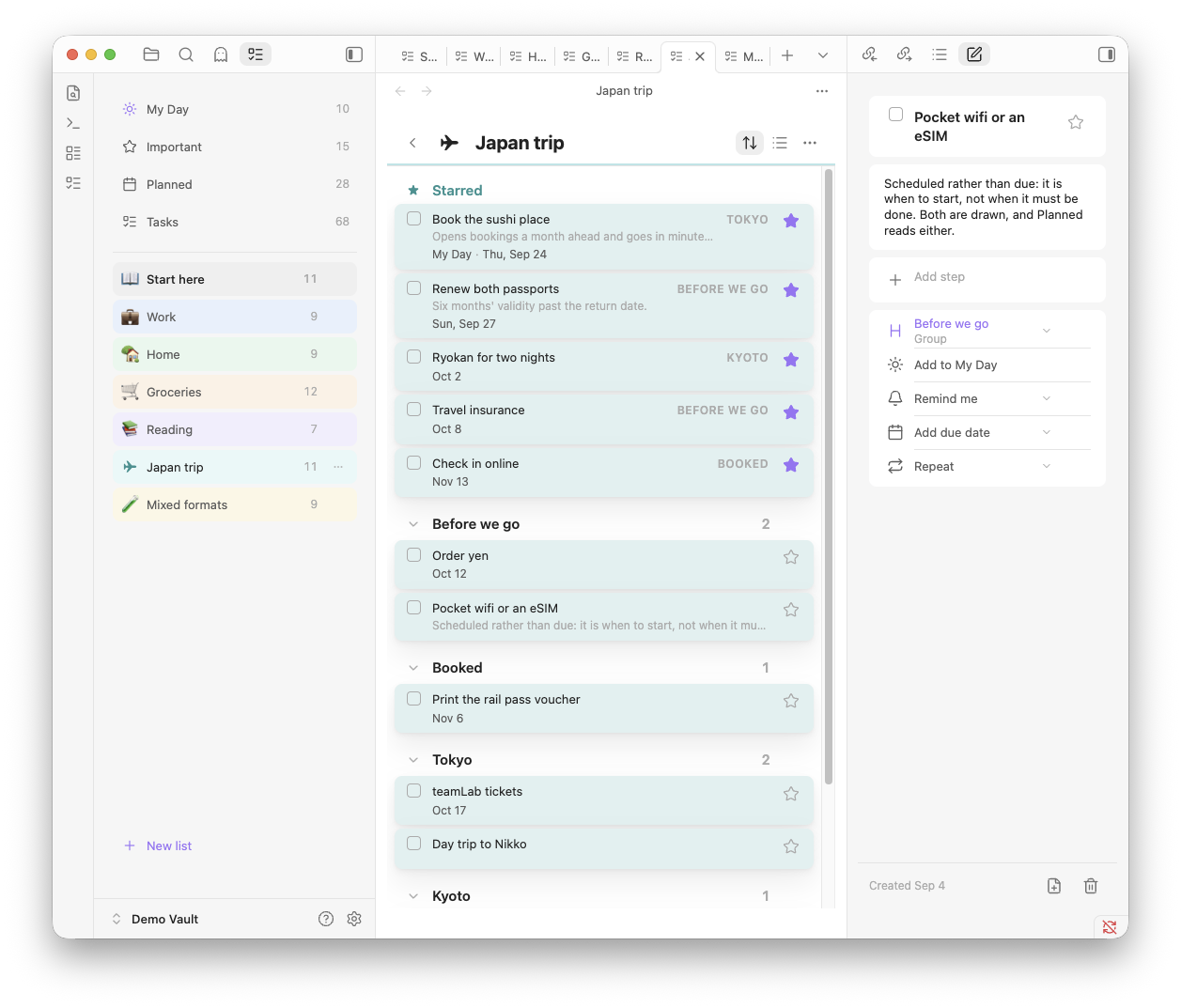
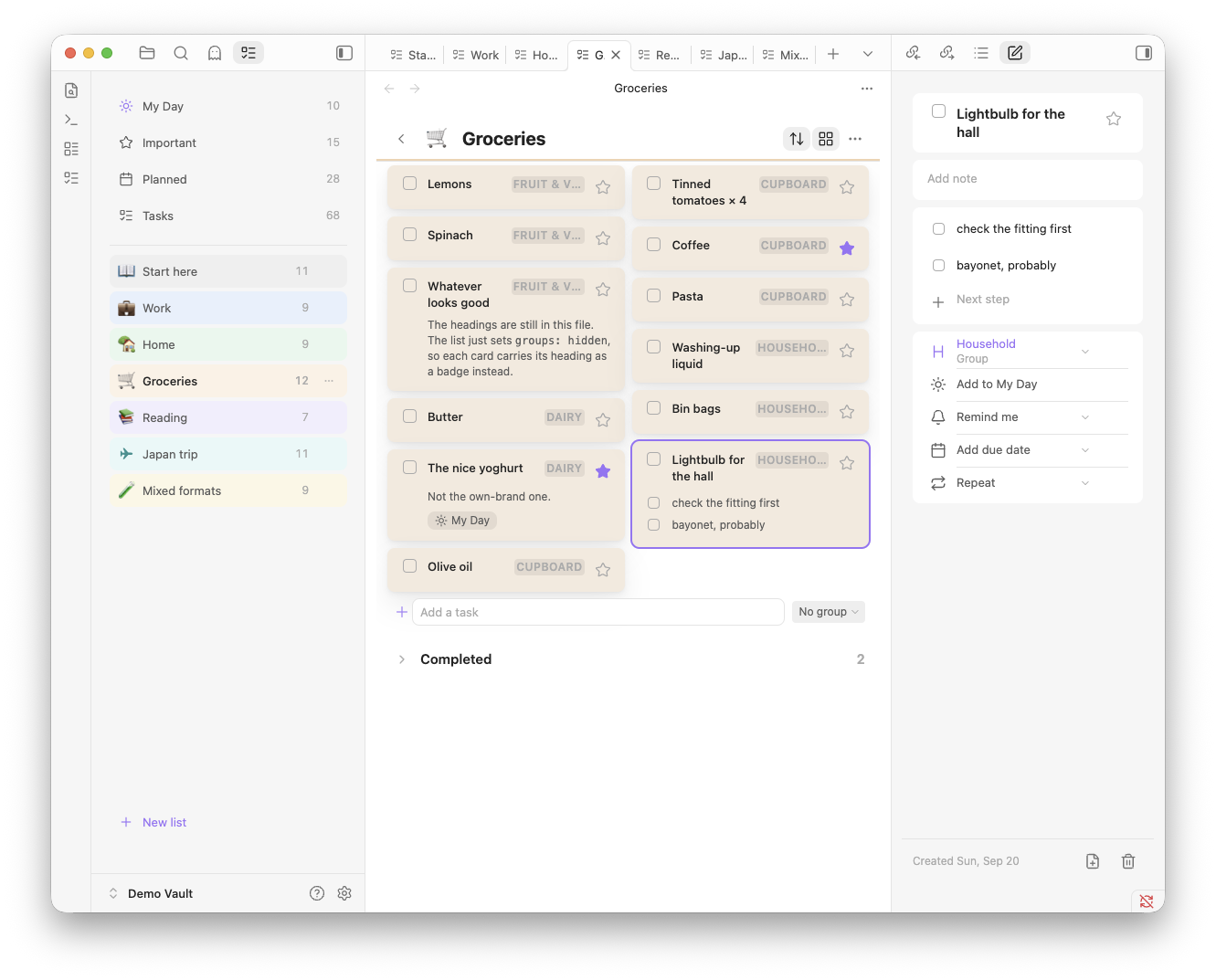
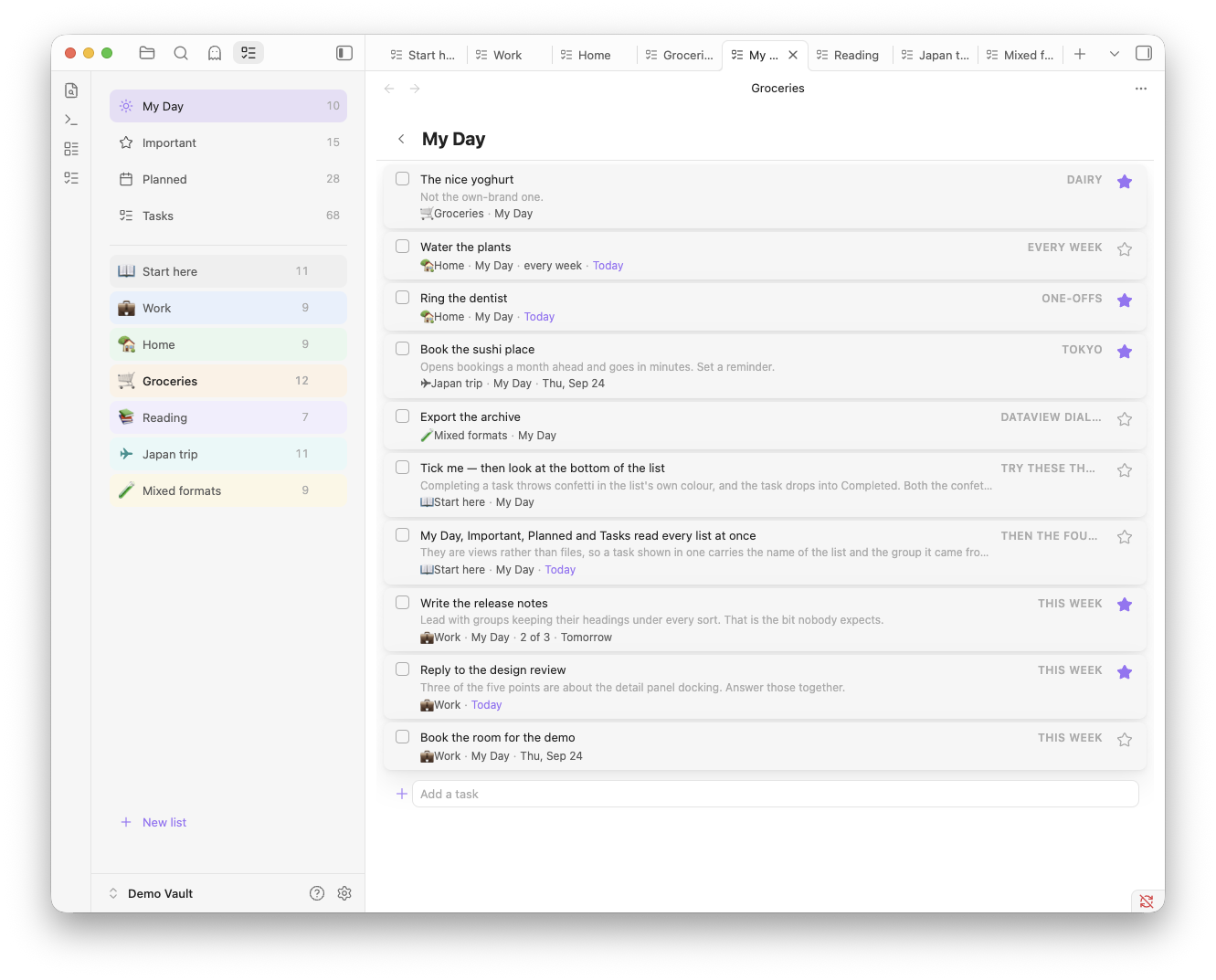
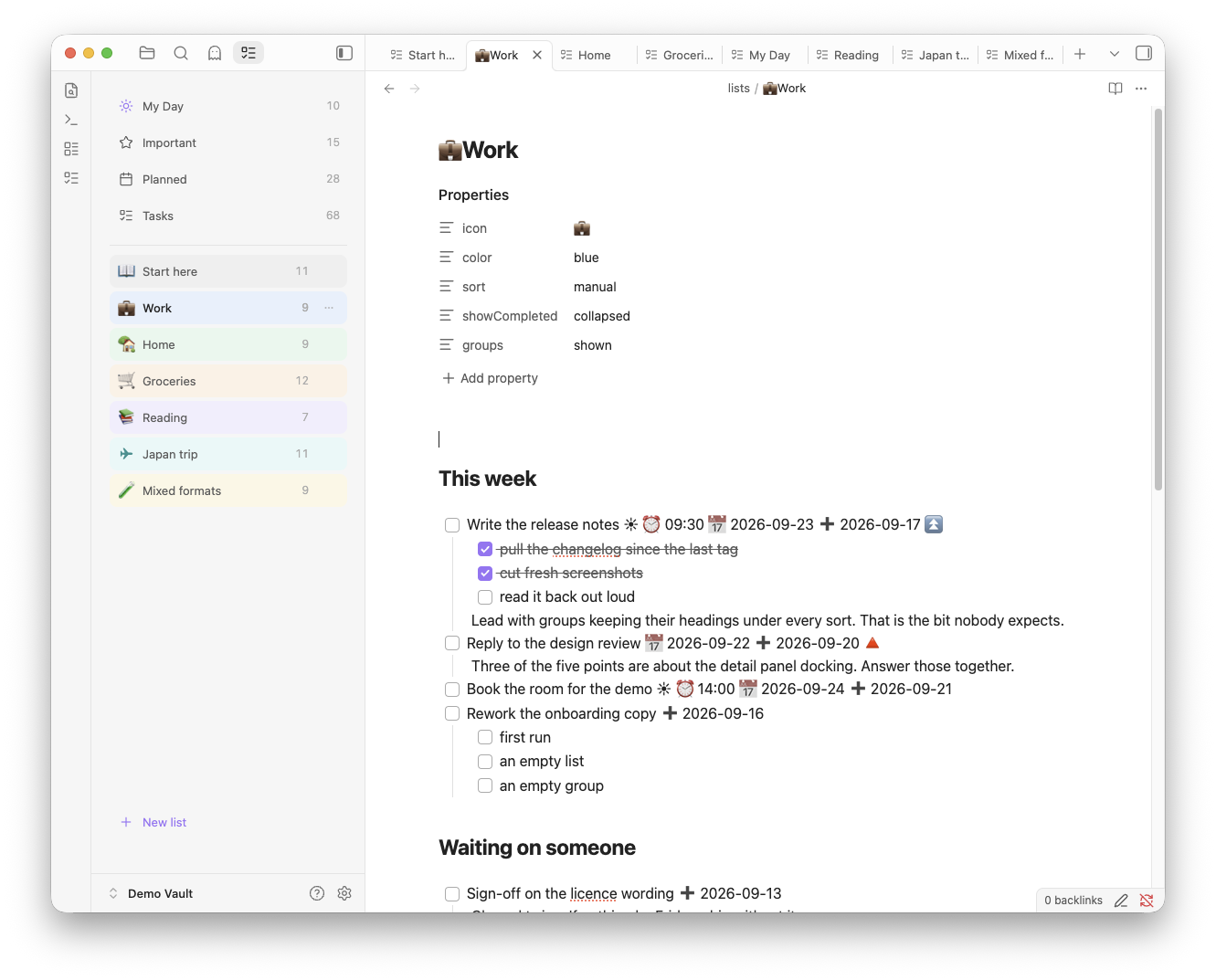
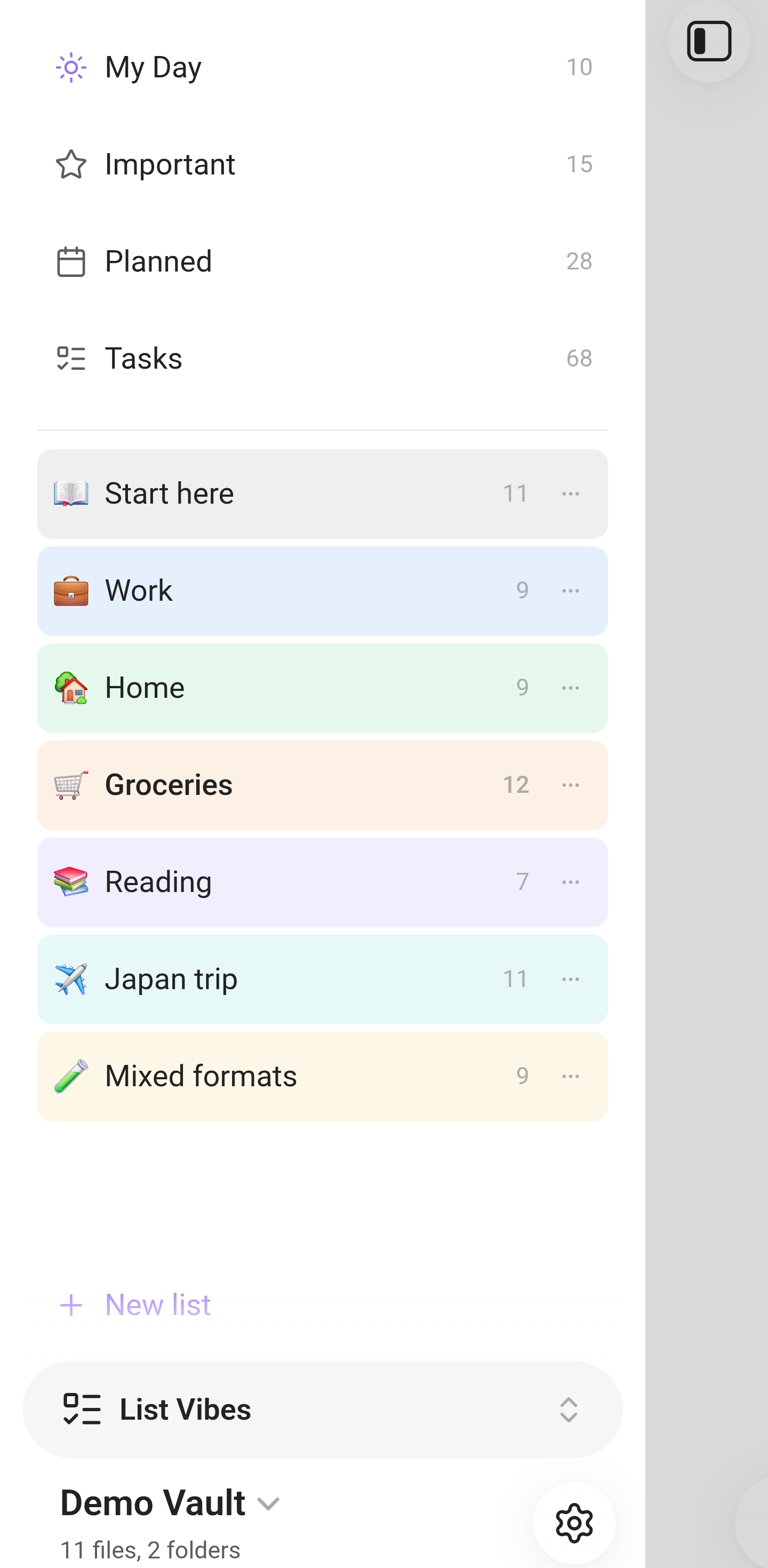
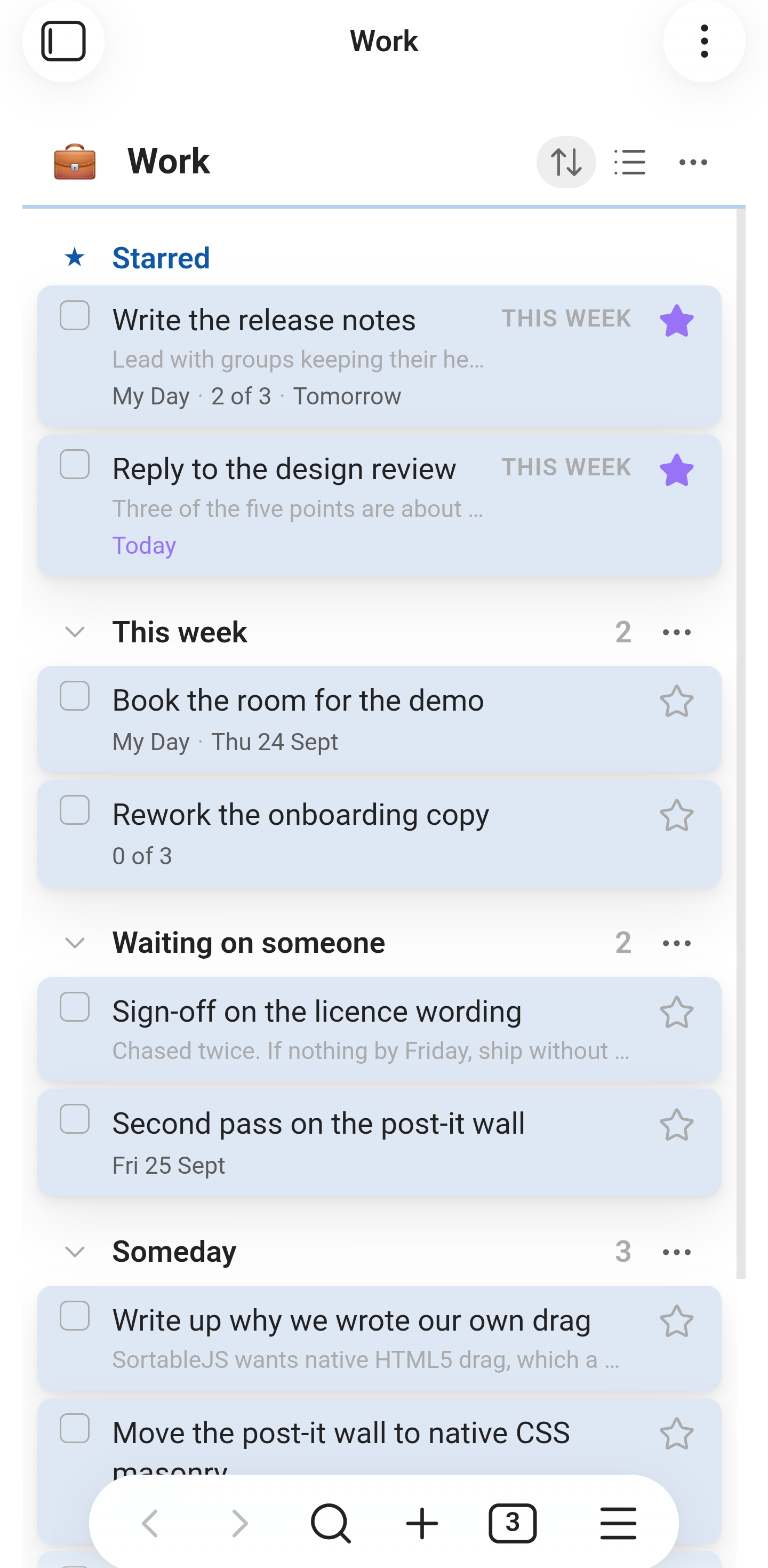
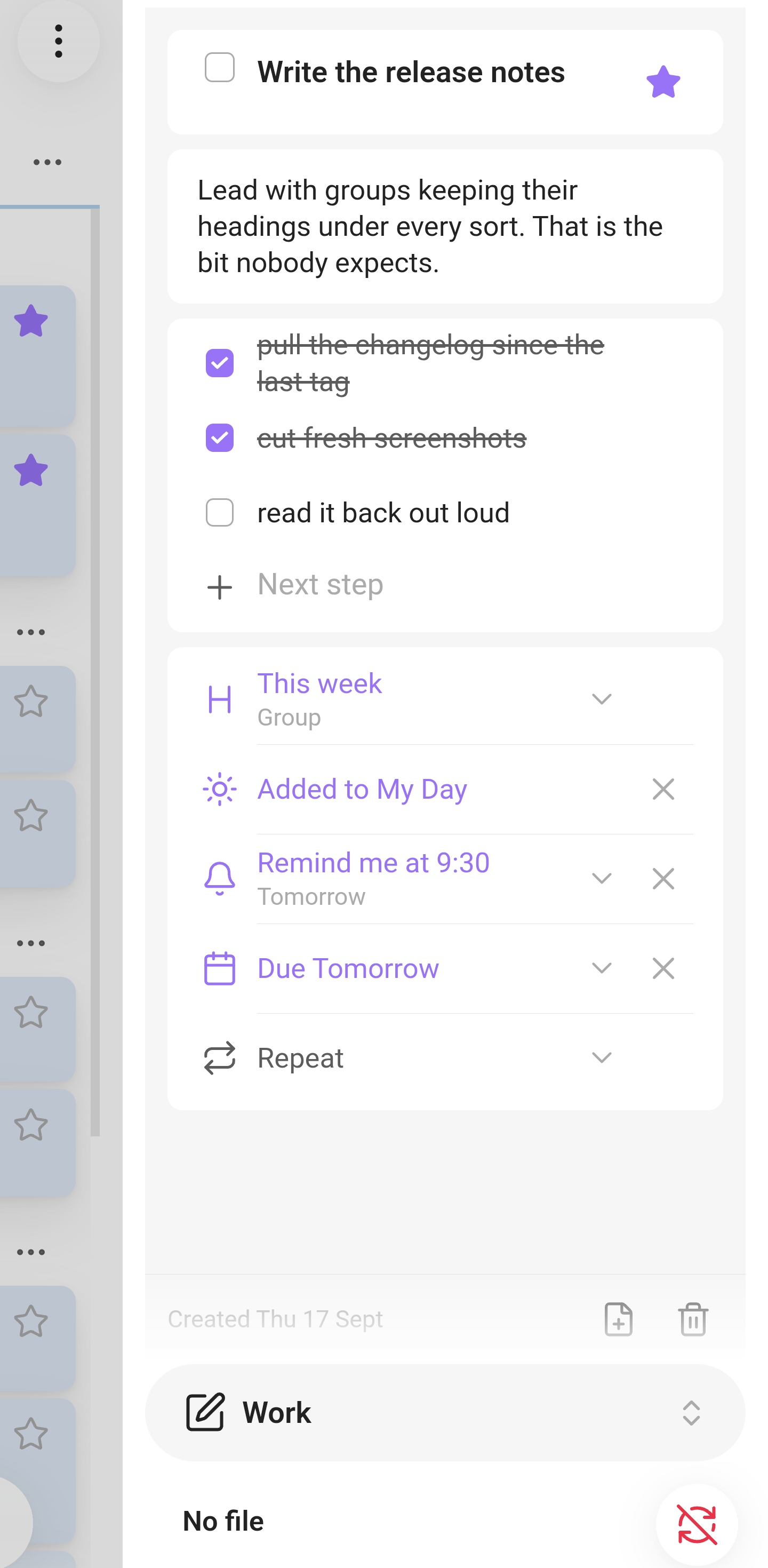
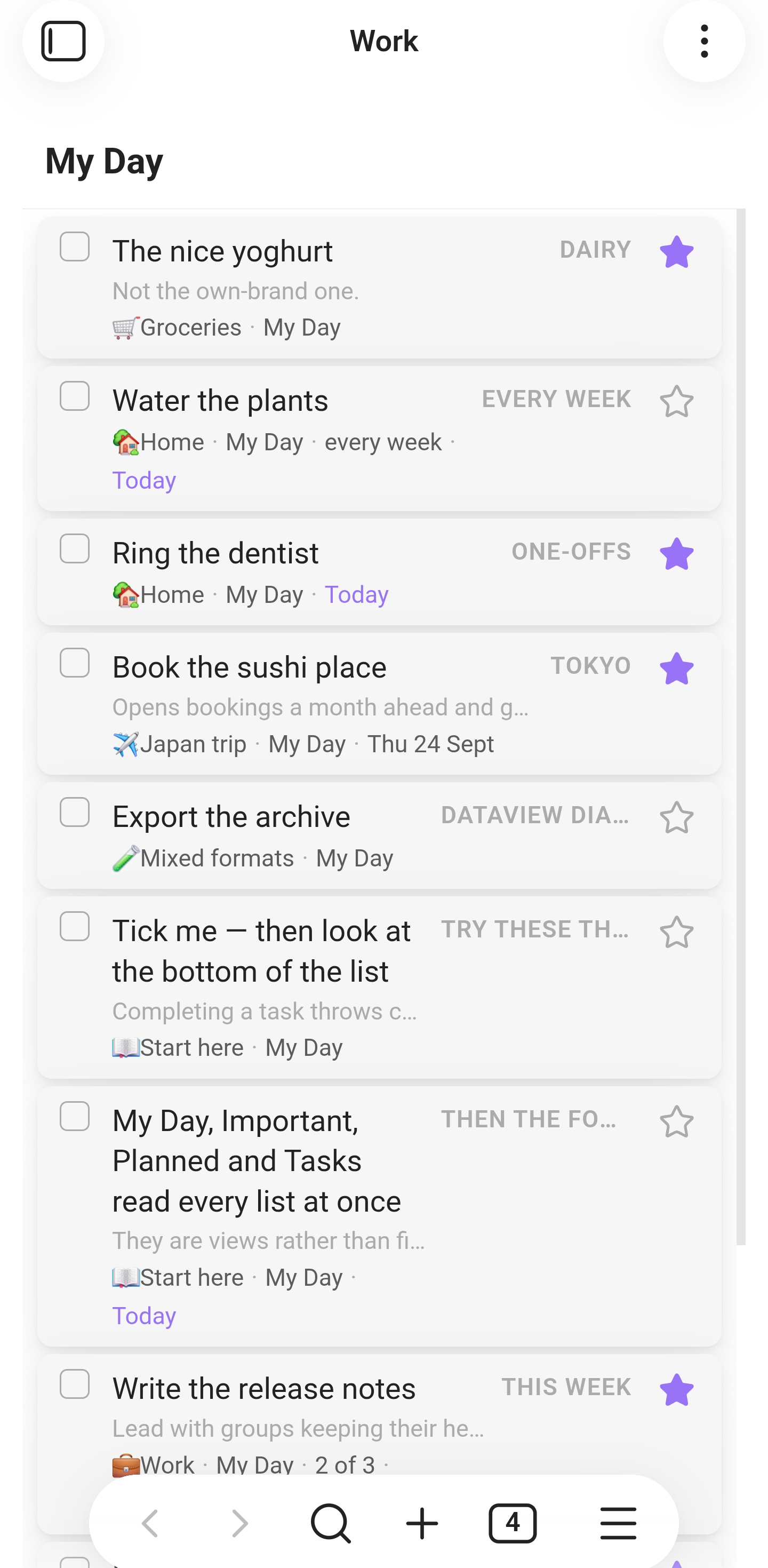
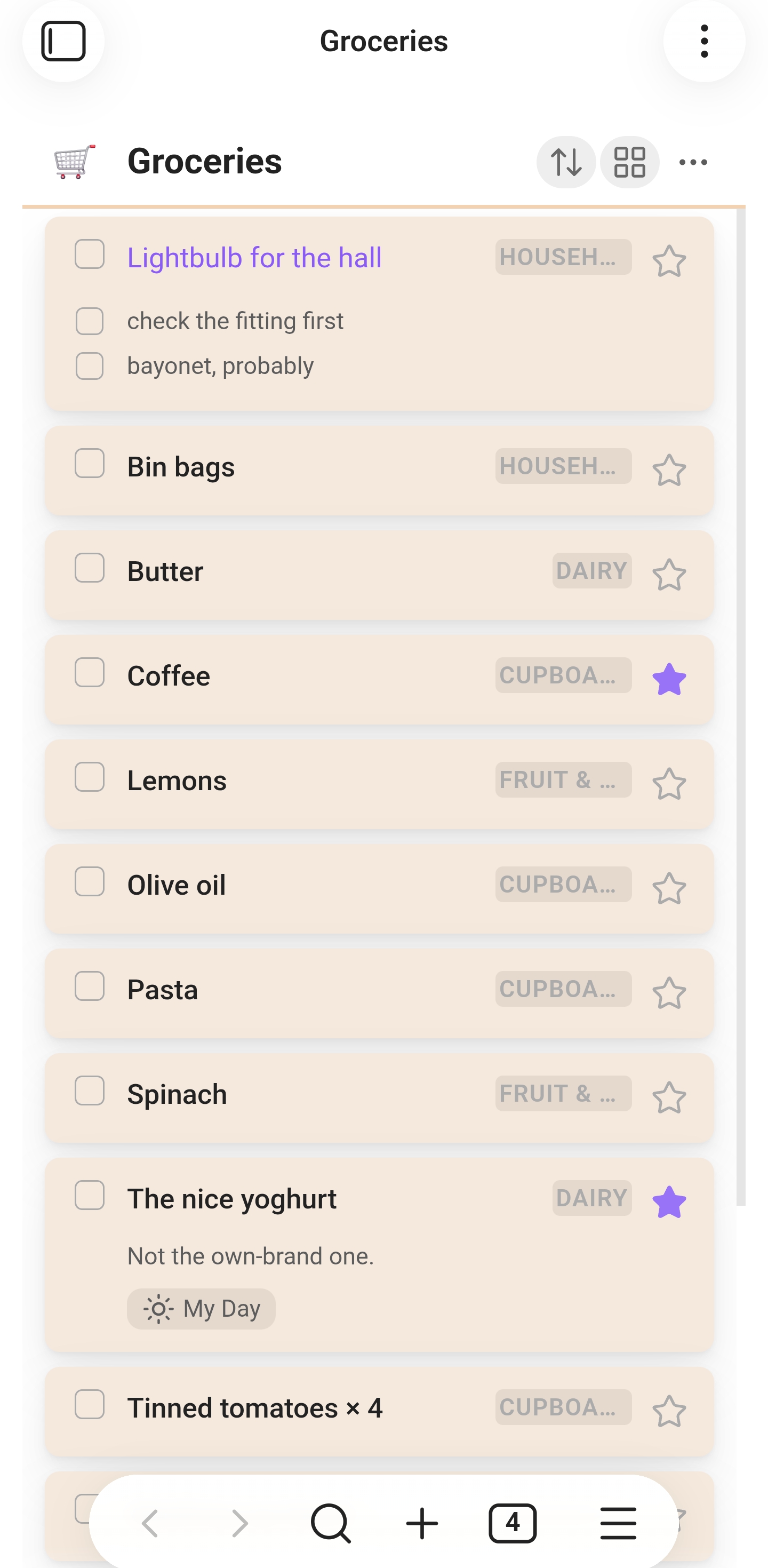
Captured from List Vibes 0.11.0 — desktop on macOS, phone on Android, both running the demo vault.