Search...Search plugins and themes...
⌘K
Sign in
  • Get started
  • Download
  • Pricing
  • Enterprise
  • Account
  • Obsidian
  • Overview
  • Sync
  • Publish
  • Canvas
  • Mobile
  • Web Clipper
  • CLI
  • Learn
  • Help
  • Developers
  • Changelog
  • About
  • Roadmap
  • Blog
  • Resources
  • System status
  • License overview
  • Terms of service
  • Privacy policy
  • Security
  • Community
  • Plugins
  • Themes
  • Discord
  • Forum / 中文论坛
  • Merch store
  • Brand guidelines
Follow us
DiscordTwitterBlueskyThreadsMastodonYouTubeGitHub
© 2026 Obsidian

Canvas List Splitter

mindaugas3mindaugas389 downloads

Split a list in a Canvas card into separate cards.

Add to Obsidian
  • Overview
  • Scorecard
  • Updates1

A small Obsidian utility plugin for splitting and merging lists in Canvas cards.

Example
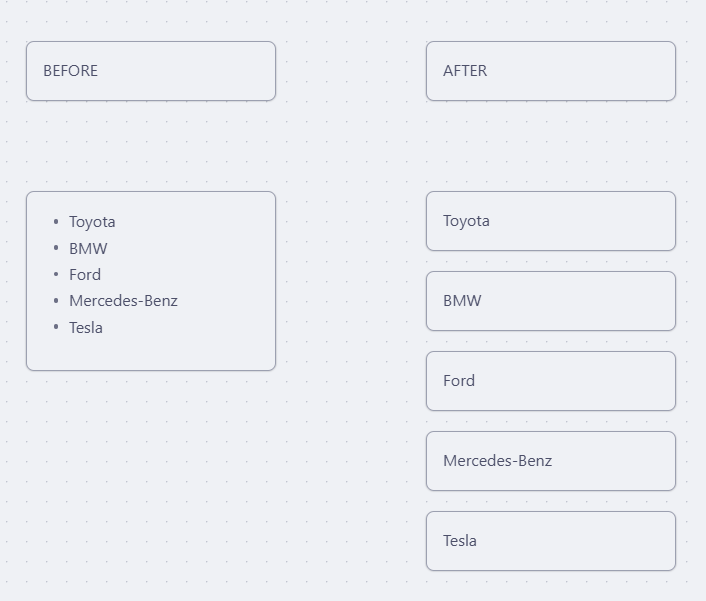
Split list into cards

A card containing a bulleted list is split into individual cards, one per item.

Commands

Split list into cards

Select a Canvas text card containing a bulleted or numbered list and run the command. Each list item becomes its own card, stacked vertically starting at the original card's position.

Supported list formats:

  • Unordered: - item, * item, • item
  • Ordered: 1. item, 1) item

List markers are stripped — cards contain plain text only.

Merge cards into list

Select 2 or more Canvas text cards and run the command. The cards are combined into a single bulleted list card placed at the top-left card's position. Cards are ordered top-to-bottom, then left-to-right.

Keybindings are configurable in Settings → Hotkeys.

Installation

Copy main.js and manifest.json to your vault:

<vault>/.obsidian/plugins/list-splitter/

Then enable the plugin in Settings → Community plugins.

Development

npm install
npm run dev     # watch mode
npm run build   # production build
npm run test    # run Mocha tests
82%
HealthExcellent
ReviewSatisfactory
About
Split bulleted or numbered lists in Canvas text cards into individual plain-text cards, one per list item, stacked vertically at the original card's position. Merge two or more Canvas text cards into a single bulleted list card placed at the top-left card's position, ordering cards top-to-bottom then left-to-right; supports -, *, •, 1. and 1) markers.
CanvasEditingCommands
Details
Current version
1.0.0
Last updated
2 months ago
Created
2 months ago
Updates
1 release
Downloads
89
Compatible with
Obsidian 1.1.0+
Platforms
Desktop only
License
MIT
Report bugRequest featureReport plugin
Author
mindaugas3mindaugas3
GitHubmindaugas3
  1. Community
  2. Plugins
  3. Canvas
  4. Canvas List Splitter

Related plugins

Paste URL into selection

Paste URL "into" selected text.

Vimrc Support

Auto-load a startup file with Vim commands.

Canvas Send to Back

Move cards in canvas to the top or behind all other cards.

Code Editor Shortcuts

Add keyboard shortcuts (hotkeys) commonly found in code editors such as Visual Studio Code (VS Code) or Sublime Text.

Slash Commander

Customize the slash command list, assign each command an icon.

Advanced Tables

Improved table navigation, formatting, and manipulation.

Advanced Canvas

Supercharge your canvas experience. Create presentations, flowcharts and more.

Quick Switcher++

Enhanced Quick Switcher, search open panels, and symbols.

Meta Bind

Make your notes interactive with inline input fields, metadata displays, and buttons.

Outliner

Work with your lists like in Workflowy or Roam Research.