Letterboxd Recent Films
 Jasper Mceligot48 downloads
Show a Letterboxd user's recent diary posters as one clickable collage image in notes.
- Overview
- Scorecard
- Updates2
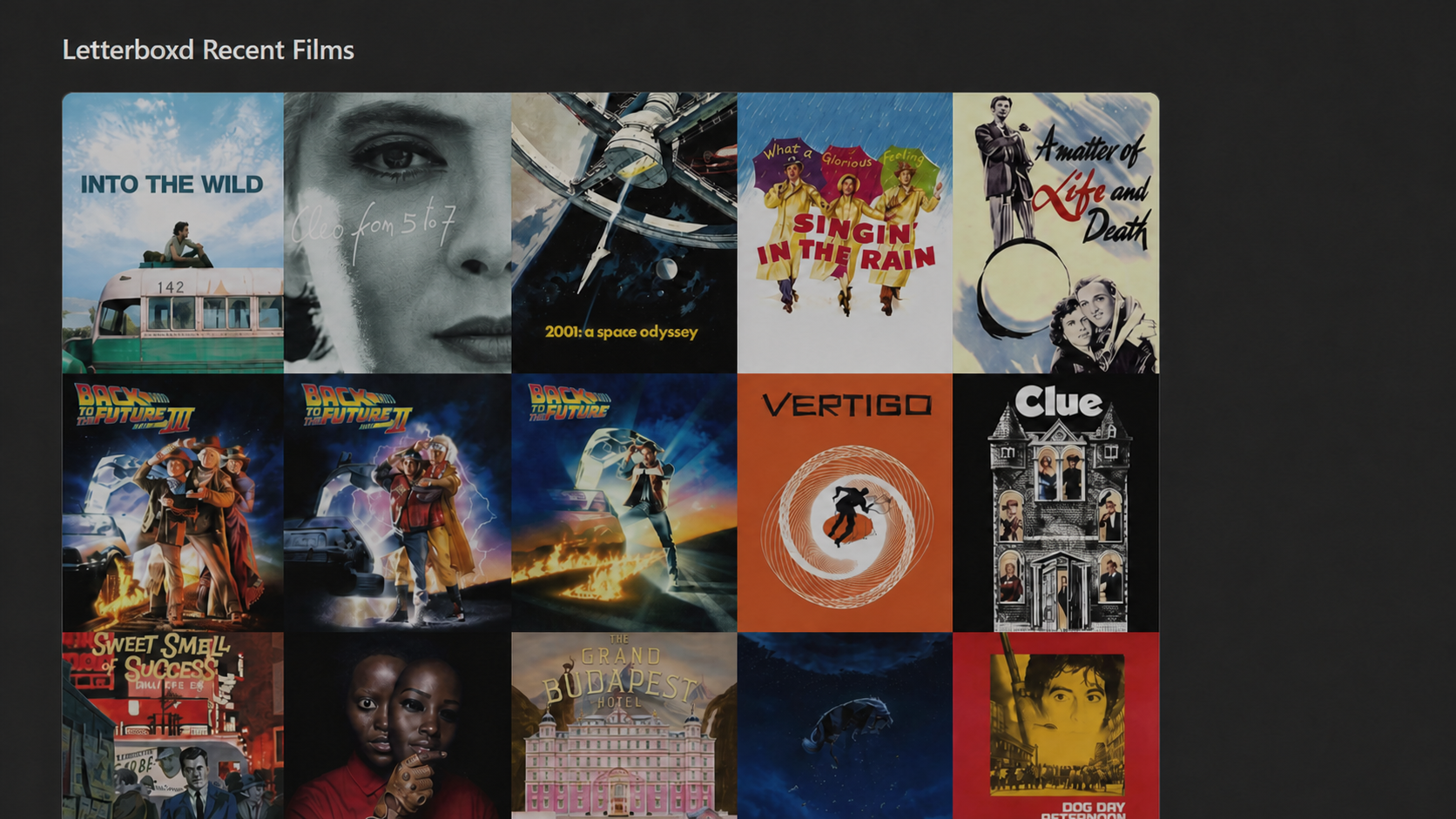
Show a Letterboxd user's latest public diary entries as one clickable poster collage inside any Obsidian note. The plugin composes the selected posters into a PNG image in memory, supports optional heading and tooltip details, inherits your Obsidian theme, and keeps the last successful feed result available offline.
This is an unofficial community plugin. It is not affiliated with, endorsed by, or connected to Letterboxd or Obsidian.
Install and set up
After installing the plugin, enable Letterboxd Recent Films under Settings → Community plugins. Open the plugin settings and enter a public Letterboxd username. Usernames are validated using Letterboxd's documented rule: 2–15 letters, numbers, or underscores.
Add an empty block to use all global settings:
```letterboxd-recent
```
Or override settings for one gallery:
```letterboxd-recent
username: movie_fan
count: 6
gap: 4
gallery-width: 75
auto-size: false
heading: Recently watched
show-captions: false
show-rating: false
show-date: false
```
Posters open the matching Letterboxd diary entry in a new window or browser tab. The block renders in both Live Preview and Reading view. Switch to Source mode temporarily when you want to edit the raw block configuration.
The count option is final: choose 1–20, or max for every entry returned by the RSS feed. The gallery does not add pagination or hidden older pages.
The collage chooses its own balanced grid. One or two posters stay compact, ordinary sets use a readable row or grid, and large feeds add rows instead of shrinking every poster into a thumbnail.
Automatic sizing is enabled by default. Turn it off to use the 10%–100% width slider, or hover the collage and drag its bottom-right corner horizontally or vertically. Double-click the handle to restore automatic sizing.
Block options
Block values override global settings. Invalid or unknown values are ignored, except an invalid explicit username is shown as a validation error.
| Option | Values |
|---|---|
username |
A valid public Letterboxd username |
count |
1–20, or max |
gap |
0, 2, 4, or 8 pixels |
gallery-width |
10–100 in increments of 5 |
auto-size |
true or false |
heading |
Plain text, up to 120 characters |
show-heading |
true or false |
show-captions |
true or false |
show-year |
true or false |
show-rating |
true or false |
show-date |
true or false |
corner-radius |
0, 4, 6, 8, 12, or 16 |
refresh-interval |
5, 15, 30, 60, 180, 360, 720, or 1440 minutes |
refresh-policy |
open, interval, or manual |
timeout |
5, 10, 15, 20, or 30 seconds |
Setting gallery-width in a block automatically selects manual sizing unless that block explicitly sets auto-size: true.
Settings
Global settings cover the username, newest movies shown, automatic/manual sizing, poster gap, optional heading, under-poster captions, outer corner radius, refresh policy, cache interval, and request timeout. Saved changes refresh open galleries immediately.
The settings screen shows username, movies shown, automatic/manual sizing, and the heading toggle first. Show advanced reveals spacing, the collage's outer radius, optional captions, refresh behavior, and cache tools.
The plugin has one presentation style: a poster collage with square inner poster edges. The corner-radius setting clips only the outside of the complete image. Hover or keyboard focus always shows title, year, rating, and watched date when available. Caption toggles independently control what is drawn below each poster.
Poster URLs are taken directly from each Letterboxd RSS entry. The plugin has no custom-poster system and does not replace or download posters into the vault. The feed does not provide a separate official backdrop, and the plugin does not request one from TMDB.
Test feed requests the configured public feed immediately. Clear cache removes all saved feed results.
Commands
- Insert gallery at cursor inserts an empty gallery block.
- Insert gallery at top of current note places a block after YAML frontmatter when present. It does nothing when the note already contains a
letterboxd-recentblock. - Refresh galleries bypasses the freshness interval and updates all rendered galleries.
- Clear cache removes saved RSS results.
- Copy collage image copies the latest rendered collage as a PNG when the device clipboard supports images.
Loading and offline behavior
The plugin requests https://letterboxd.com/{username}/rss/ with Obsidian's supported requestUrl API, which works on desktop and mobile. It caches parsed diary metadata per username and shares one in-flight request between duplicate blocks. It also reuses the same completed collage image and object URL in memory so Live Preview focus changes do not flash a loader, decode another image, or redraw the collage. When a refresh fails, the last successful result remains visible with an offline notice.
The recommended When a gallery is viewed refresh policy checks the feed when you open/view a gallery and suppresses duplicate requests caused by quick Live Preview remounts. After the cache interval uses the selected freshness interval. Manual only uses the last saved result until you run Refresh galleries; it still makes an initial request when no saved result exists. None of these policies polls Letterboxd in the background.
Large galleries use balanced rows automatically, while manual width changes scale the complete collage without changing its poster order.
The gallery includes dedicated loading, empty, offline, missing-user, timeout, malformed-feed, and invalid-username states. Missing or failed posters use placeholders. Images are lazy-loaded and are never downloaded into the vault.
Privacy and security
The plugin sends the configured username to Letterboxd only to request that account's public RSS feed. Poster bytes are requested from Letterboxd's image hosts and combined into the collage in memory. The generated image is not written into the vault. Parsed feed metadata and poster URLs are stored in the plugin's data.json so the last good result can work offline; depending on your sync configuration, that file may sync with your vault settings.
There is no login, analytics, telemetry, advertising, cookie access, page scraping, private API use, or remote code. RSS description HTML is never rendered. The parser extracts only trusted HTTPS poster URLs and builds the interface with safe DOM methods.
Manual installation
- Download
main.js,manifest.json, andstyles.cssfrom the release matching the version you want. - Create
<your-vault>/.obsidian/plugins/letterboxd-recent-films/. - Copy all three files into that folder.
- Reload Obsidian, then enable Letterboxd Recent Films under Settings → Community plugins.
Development
Node.js 20 or newer and npm are required.
npm install
npm run typecheck
npm run lint
npm test
npm run build
npm run dev watches the TypeScript source and rebuilds main.js. Tests use committed local RSS fixtures and never contact Letterboxd. The production build bundles src/main.ts to main.js and verifies all three required release artifacts.
The project follows the current official Obsidian sample plugin build shape and plugin review guidance.
Releases
- Update
CHANGELOG.md. - Run
npm version patch,npm version minor, ornpm version majoras appropriate. - Run
npm run check. - Push the commit and exact numeric tag (for example,
1.0.0, without avprefix).
The release workflow verifies the tag against manifest.json, reruns every check, and attaches main.js, manifest.json, and styles.css to the GitHub release.
License
MIT © 2026 Jasper