Leadsheet
 chrisamber380 downloads
Render ChordPro lead sheets with transpose, capo shapes, chord diagrams, set lists, and autoscroll.
- Overview
- Scorecard
- Updates7
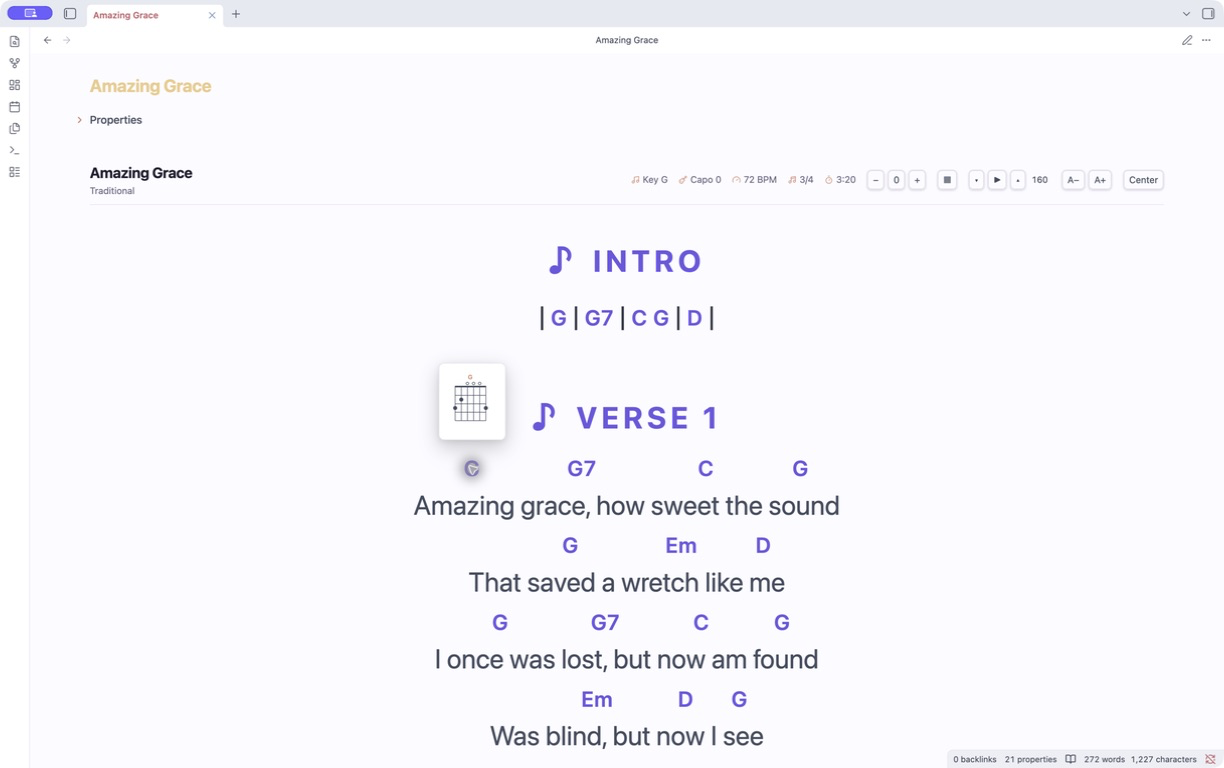
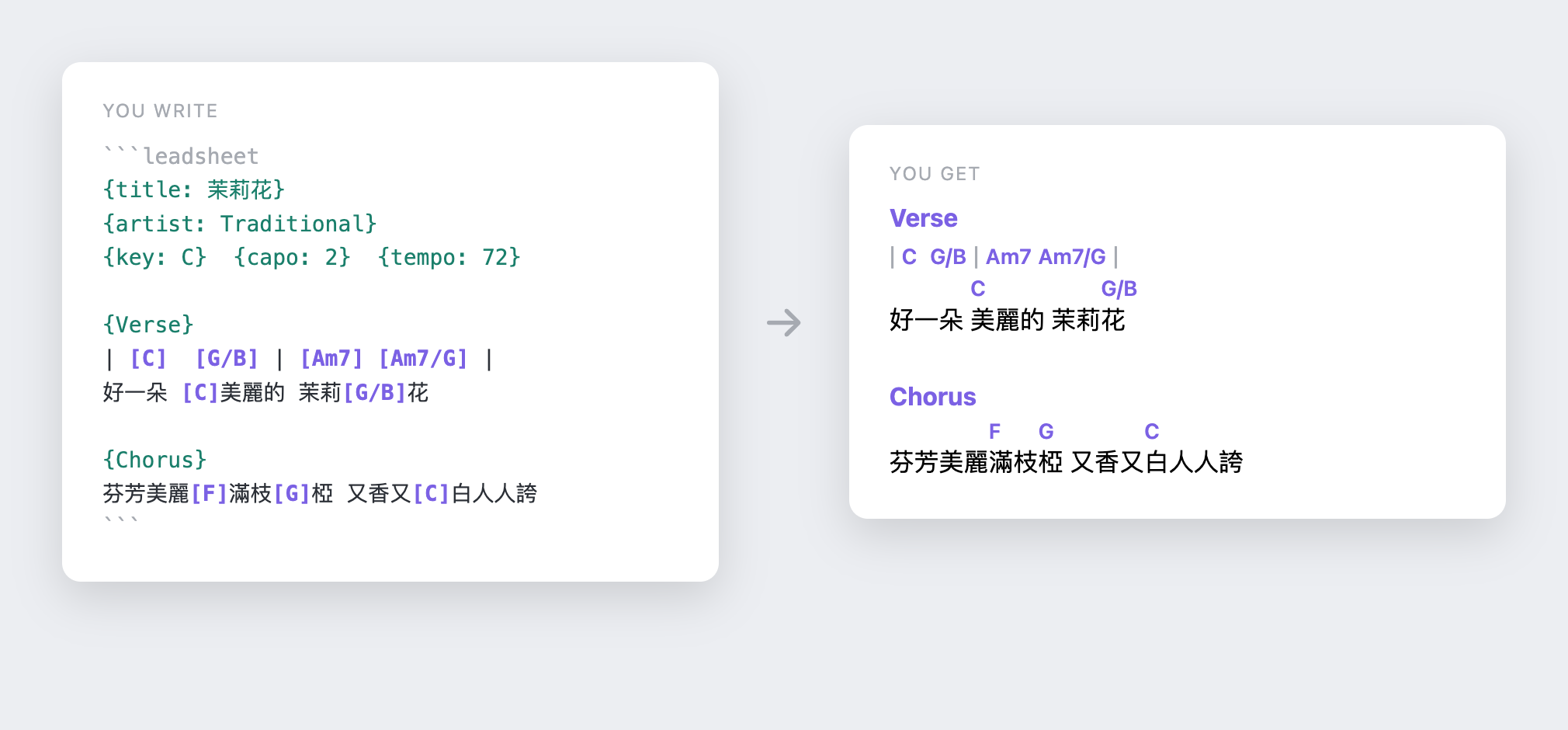
Turn Obsidian notes into performance-ready lead sheets. Render ChordPro with per-file transpose, capo-aware shapes, guitar chord diagrams, set lists, and hands-free autoscroll. Chords align per-syllable, so CJK lyrics work without monospace tricks.
Features
- Chord-over-lyric rendering aligned per-syllable — CJK-safe, no fixed-width fonts.
- Transpose per file, with sharps vs flats following the target key signature.
- Capo-aware shapes — toggle between concert sounding pitch and the shapes your hands play.
- Chord diagrams — hover, focus, or tap a chord for its guitar fingering, or toggle a strip for the whole song. Both follow transpose and capo mode.
- Autoscroll paced from the song's
duration, with tap-to-pause, a music-stand performance mode, and font sizing. - Set lists — one continuous, scrollable view over several songs with Prev/Next.
- Authoring aids — paste-convert chords-over-lyrics,
{Chorus: repeat}shorthand, and live invalid-chord underlining. - CLI — validate, transpose, export to JSONL, and derive chord-progression frontmatter.
Quick start
After enabling Leadsheet:
- Create or open a note.
- Open Obsidian's command palette and run Leadsheet: Insert starter leadsheet. On iPad, open the command palette from the mobile menu.
- Edit the starter text, then tap outside the block or switch to Reading view. Tap any chord to open its diagram.
You can also copy this starter template directly:
```leadsheet
{title: My Song}
{artist: Artist}
{key: C}
{capo: 0}
{tempo: 72}
{time: 4/4}

{Verse}
| [C] | [F] [G] |
[C]Write your lyrics [F]here

{Chorus}
[F]Add a chorus [G]here [C]too
```
The toolbar gives you:
- − / +2 / + — transpose down/reset/up. The offset is remembered per file. The displayed key updates; flats vs sharps follow the target key signature.
- ▶ / ⏸ — autoscroll the note (also the hotkeyable command Leadsheet:
Toggle autoscroll). ▾ / ▴ adjust speed (px/s, in settings too). If the
song's frontmatter has
duration:(seconds), ▶ paces the whole sheet over that time. Tap the sheet body to pause. - A− / A+ — grow/shrink the leadsheet font (global). Leadsheet: Toggle performance mode hides the app chrome, keeps essential controls reachable on mobile, and keeps the screen awake when the platform supports Screen Wake Lock.
- Center / Left — switch the sheet alignment globally.
- Sounding / Shapes — with a
capo:set, toggle between concert pitch and the shapes your hands play. Bad capo values (outside 0–11) are flagged and clamped. - Chord popovers — hover, keyboard-focus, or tap a recognized chord to see its current fingering without showing the full diagram strip.
- ▦ — show/hide guitar chord diagrams for every chord used in the song
(standard tuning). Diagrams follow the current transpose offset and the
Sounding/Shapes capo mode, so in Shapes mode they show the grips you
actually play. Unrecognized chords (e.g.
N.C.) are skipped.
Set lists
A setlist code block renders several songs as one continuous, scrollable view
with Prev/Next navigation:
```setlist
- [[Song A]]
- [[Song B]]
```
Authoring
- Leadsheet: Convert selection: chords-over-lyrics → inline rewrites a pasted
Ultimate-Guitar-style block (chords on their own line above the lyric) into
inline
[C]chords. {Chorus: repeat}re-emits an earlier section instead of pasting it again. Multi-word names work too:{Chorus 2: repeat}.- Invalid chord tokens are marked in the editor.
See SPEC.md for the full schema.
Install
Community Plugins
- Open Settings → Community plugins in Obsidian and select Browse.
- Search for Leadsheet, then select Install and Enable.
Beta updates with BRAT
- Install BRAT from Community plugins.
- In BRAT settings, select Add beta plugin.
- Enter
https://github.com/chrisamber/obsidian-leadsheetand enable Leadsheet.
Manual install
- Download
main.js,manifest.json, andstyles.cssfrom a GitHub release. - Copy them into
<vault>/.obsidian/plugins/leadsheet/. - Enable Leadsheet under Settings → Community plugins.
Please report beta feedback and bugs through GitHub Issues.
CLI
# report unrecognized chord tokens
node cli.mjs validate "My Song.md"
# rewrite chords + {key:} in place
node cli.mjs transpose +2 "My Song.md"
# dump song(s) as JSONL (frontmatter + sections)
node cli.mjs export "My Song.md"
# write chords_used + roman progression to frontmatter
node cli.mjs annotate "My Song.md"
Development
npm install
npm test        # esbuild + tsc + node --test
npm run build emits main.js (the plugin) and per-module .mjs bundles used
by the CLI and tests.
Credits
Chord diagram popovers were inspired by Obsidian Chord Sheets by Marcel Schaeben.
License
MIT — © 2026 chrisamber.
The example song 茉莉花 (Jasmine Flower) is a traditional folk song in the public domain.