LaC.CostSet
 sin511 downloads
Manage your personal inventory as structured data. Track purchase price, dates, tags, recycling value, and see daily cost stats.
- Overview
- Scorecard
- Updates2
Manage your belongings as structured TOML-in-Markdown inside Obsidian. Track price, purchase/end dates, tags, and optional recycle value. Explore daily cost trends, filter by tags, search, sort, and add/edit items with a clean UI.
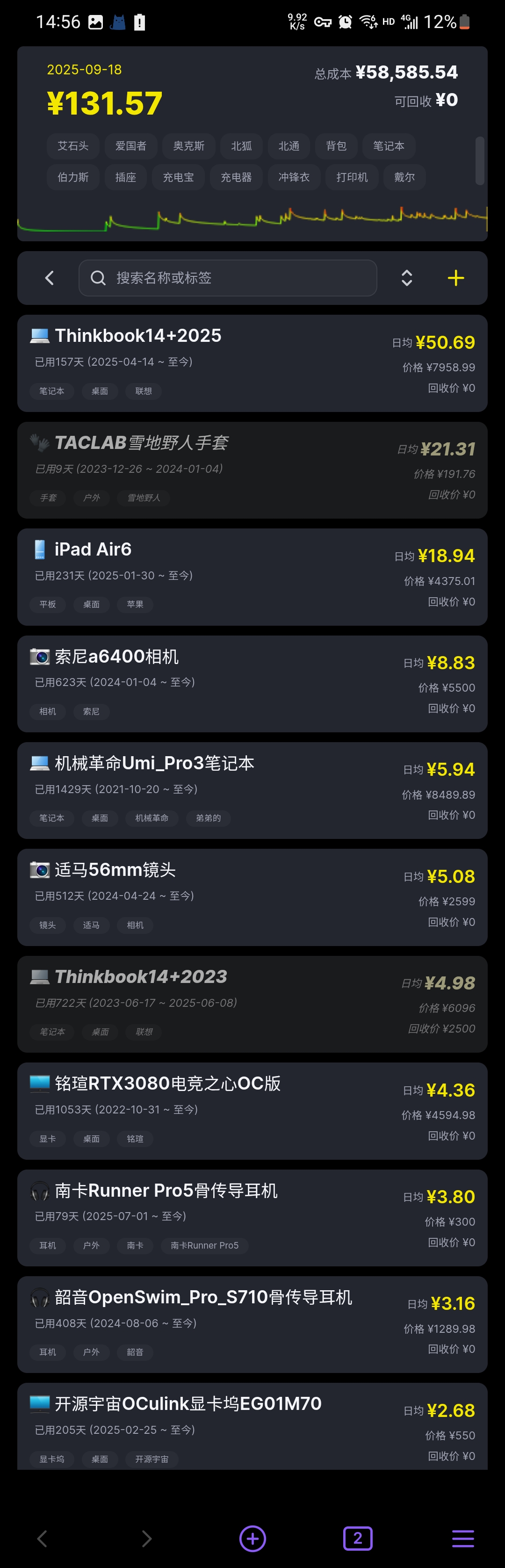
What this plugin does
- Open a dedicated view for an inventory entry file and render your items as cards with totals and a cost trend chart.
- Generate a sample entry + sample items on first run if the configured entry file does not exist.
- Read/write items as TOML (with comments preserved). Wikilinks like
[[ItemName]]are supported inside Markdown; the plugin quotes them only temporarily for parsing. - Filter, search, sort: filter by tags, search by name/tags, sort by daily cost / price / purchase date.
- Add/edit/delete items in place. Long-press a card to temporarily toggle hidden (not persisted).
- Local-first: All data stays inside your vault.
How to open the view
- Command palette: run "Open LaC.CostSet" (command id:
open-lac-costset). The plugin will use the configured entry file (see Settings) and create a sample if missing. - File context menu: right-click a Markdown file and choose "Open with LaC.CostSet" to use that file as the entry (enable this in Settings).
The view type is
lac-costset-view. Obsidian will restore this view as part of your saved layout. The plugin does not auto-open the view if it wasn't in the layout.
Entry file format (required)
The entry file is a Markdown file whose content must satisfy a minimal TOML header plus a body of wikilinks to item files.
Minimal example:
# Top TOML must include
type = "root"
renders = ["costset"]

# Body: list asset filenames using wikilinks (no extension)

[[Keyboard]]
[[Headphones]]
Notes:
- The file extension can be
.md. - Lines starting with
#are comments and will be preserved. - Wikilinks in the body can be unquoted; the plugin quotes them only for TOML parsing internally.
Item note format (TOML)
Each item note is a Markdown file whose TOML keys live at the top level (no extra namespace). The whole note is treated as a costset item. On save the plugin rewrites only the related keys and preserves leading comments.
name = "Thinkbook14p2025"

[style]
icon = "💻"

[detail]
price = 7999
active_from = "2023-01-01"
active_to = ""
recycle_price = 1200
tags = ["computer", "work"]
Daily cost is computed from (price - recycle_price) / daysUsed where daysUsed goes from active_from to the selected date (or active_to if it ended earlier). The trend chart treats recycle_price as 0 until the end date is reached.
UI overview
- Top summary: total daily cost, total price, total recyclable value; tag chips to filter; date picker; cost trend chart with progressive refinement.
- Action bar: search box, sort button (daily cost / price / purchase date), add button.
- Item cards: name, dates, tags, daily cost, price, recycle price; click to edit; long-press to toggle hidden (in-memory); right-click to delete.
Settings
- Entry file: path to the inventory entry Markdown file. Default:
LaC/CostSet/costset.md. - Enable context menu: show "Open with LaC.CostSet" in Markdown file context menu.
- Default sort: none (text order) | daily cost | price | purchase date.
- Default icon: one Emoji for new items. Only the first Emoji is kept when pasting text.
- Language: Auto / 中文 / English.
Installation
Method 1: BRAT
- Install the BRAT plugin from Community plugins.
- Open BRAT settings.
- Click “Add Beta plugin” and enter the repository:
alvinfunborn/lac-costset. - Enable LaC.CostSet in Community plugins; BRAT will pull the packaged release automatically.
Method 2: Manual installation
- Download the latest release archive from GitHub Releases.
- Extract it, create
.obsidian/plugins/lac-costsetin your vault if it does not exist, and copy the release contents into that folder. - Enable LaC.CostSet in Settings → Community plugins.
Notes & limitations
- "Hidden" is a temporary per-view toggle for quick comparisons; it is not persisted to files.
- The plugin rewrites only fields related to costset (name, style.icon, detail.*) and keeps your leading comments.
Tech
- Obsidian Plugin API
- Lightweight TOML reader/writer with comment preservation and wikilink support
- Responsive UI; mobile friendly; local-first
License
MIT License
Privacy and network use
This plugin works offline and does not use network services.