Kuaifanyi
 wjzixi320 downloads
选中即译:短词词典模式+长句流式翻译,AI 解释并行渲染,豆包神经语音朗读(支持声音克隆),兼容 DeepSeek 等 OpenAI 格式 API
- Overview
- Scorecard
- Updates1
🇨🇳 中文文档
快翻译 (Kuaifanyi)
Obsidian 划词翻译插件:选中即译,词典查词 + 流式翻译 + AI 解释 + 豆包神经语音朗读
✨ 功能
| 功能 | 说明 |
|---|---|
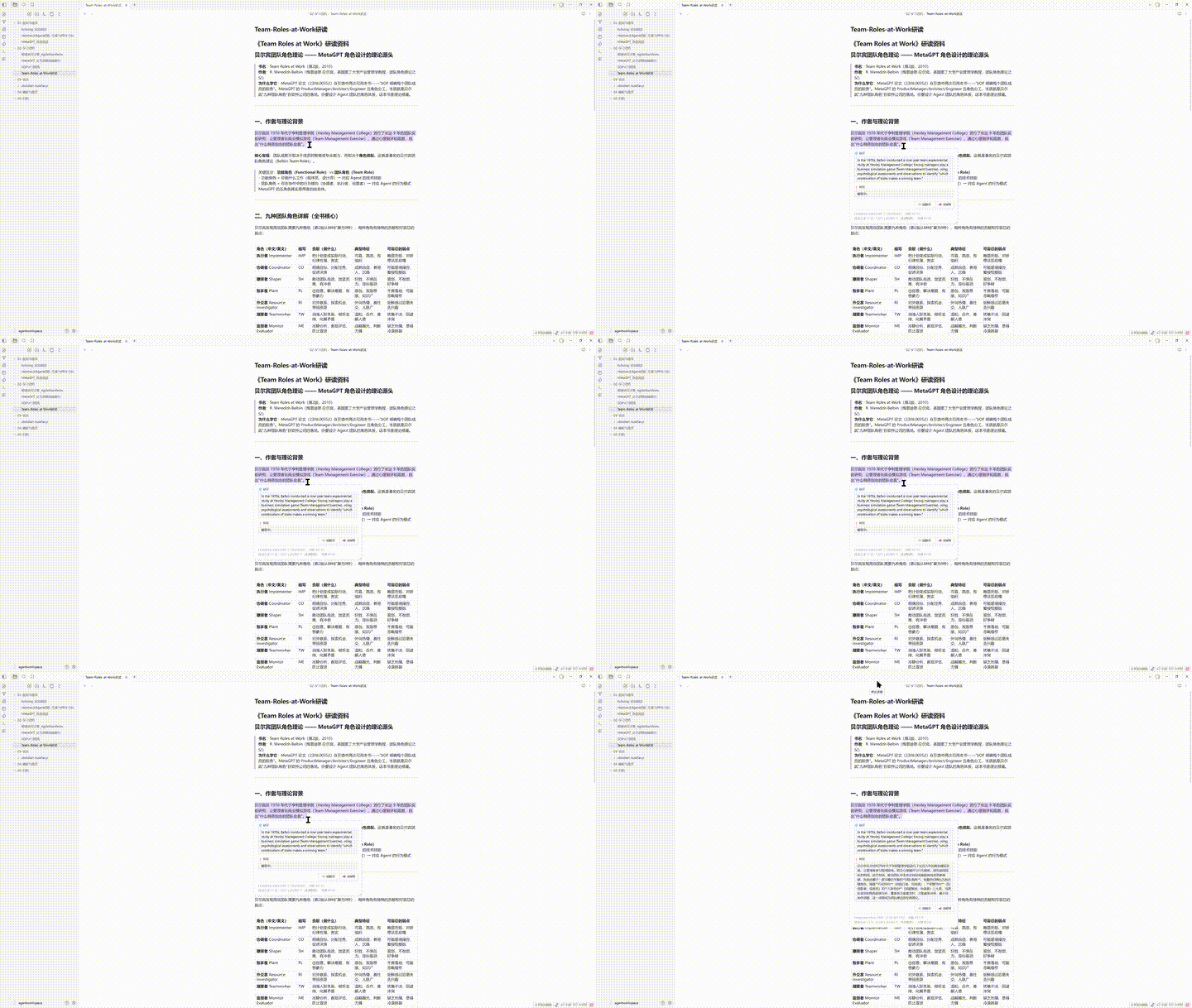
| 🎯 双模式智能切换 | 短词/缩写自动走词典模式(音标 + 多领域释义 + 例句);长句走流式翻译,打字机逐字渲染 |
| 🌐 多语言翻译 | 9 种语言可选(中/英/日/韩/法/德/西/葡/俄),源语言和目标语言独立设置,弹窗内一键 ⇄ 交换方向 |
| 💡 AI 解释(独立语言) | 翻译和解释并行流式请求,互不阻塞;解释语言独立于翻译语言,弹窗内 ⇄ 一键切换中/英 |
| 🔊 豆包神经语音 | 火山引擎大模型语音合成,16 个音色(中文 10 + 英文 3 + 多语种 3),支持声音克隆(粘贴 S_xxx ID),朗读时按目标语言自动匹配音色 |
| 🪟 智能弹窗 | 跟随选区、滚动实时追踪、可拖拽、可调大小;显示翻译/解释语言指示器 |
| 🤖 模型自动发现 | 填入 API Key 自动拉取可用模型列表,下拉选择翻译/解释模型 |
| 🔌 多提供商 | DeepSeek / 千问(阿里云) / 豆包(火山方舟) / Kimi(月之暗面) / 智谱 GLM / 自定义 OpenAI 兼容端点 |
| ⚡ 灵活触发 | 直接选中触发 / Ctrl+选中触发,延迟可调(100-2000ms) |
| 💾 本地缓存 | JSON 索引持久化,翻译/解释/TTS 全量缓存,跨会话复用,重复选中秒出结果 |
| 📊 用量可视化 | 弹窗底部显示 Token 用量 + API 余额 + TTS 字符用量 |
📦 安装
插件市场安装(推荐): Obsidian → 设置 → 社区插件 → 浏览 → 搜索 "Kuaifanyi" → 安装
手动安装:
- 从 Releases 下载
main.js、manifest.json、styles.css - 放入
<vault>/.obsidian/plugins/kuaifanyi/ - 重启 Obsidian → 设置 → 社区插件 → 启用
⚙️ 配置
1. 翻译 API(必填)
| 提供商 | 获取 Key |
|---|---|
| DeepSeek(默认) | platform.deepseek.com/api_keys |
| 千问(阿里云) | DashScope 控制台 |
| 豆包(火山方舟) | 火山方舟控制台 |
| Kimi(月之暗面) | Moonshot 控制台 |
| 智谱 GLM | 智谱开放平台 |
| 自定义 | 任意 OpenAI 兼容端点(如 Ollama、local LLM) |
2. 火山 TTS(可选,推荐)
- 火山引擎控制台 → 开通「语音合成大模型」
- 创建应用 → 获取 AppID 和 Access Token
- 插件设置 → 朗读 → 填入凭证 → 选择音色
- 声音克隆:控制台 → 声音复刻 → 录制 10 秒 → 获取
S_xxxID → 音色选「自定义克隆」
3. 语言设置
| 设置项 | 默认值 | 说明 |
|---|---|---|
| 源语言 | 自动检测 |
翻译的源语言,支持自动检测 |
| 目标语言 | 中文 |
翻译的目标语言 |
| 解释语言 | 中文 |
AI 解释的输出语言 |
💡 弹窗内也有 ⇄ 按钮可快捷切换,切换后立即重新翻译/解释
🇺🇸 English
Kuaifanyi (快翻译)
Select-to-translate Obsidian plugin: dictionary lookup + streaming translation + AI explanation + Volcano neural TTS
✨ Features
| Feature | Description |
|---|---|
| 🎯 Dual Mode | Short words → dictionary (phonetics, multi-domain definitions, examples); Long text → streaming translation with typewriter effect |
| 🌐 Multilingual Translation | 9 languages (zh/en/ja/ko/fr/de/es/pt/ru); independent source/target settings; one-click ⇄ swap in popup |
| 💡 AI Explanation (Independent Lang) | Translation + explanation stream in parallel; explanation language independent from translation; ⇄ toggle in popup |
| 🔊 Neural TTS | Volcano Engine big model, 16 voices (10 zh + 3 en + 3 multi); voice cloning (S_xxx ID); auto-select voice by target language |
| 🪟 Smart Popup | Selection-following, scroll-tracking, draggable, resizable; language indicators in header |
| 🤖 Auto Model Discovery | Fetches available models from API into dropdown selector |
| 🔌 Multi-Provider | DeepSeek / Qwen / Doubao / Kimi / Zhipu / Custom OpenAI-compatible |
| ⚡ Flexible Trigger | Direct select or Ctrl+Select; adjustable debounce (100-2000ms) |
| 💾 Local Cache | JSON-indexed persistence; full translation/explanation/TTS caching; instant replay across sessions |
| 📊 Usage Stats | Token usage + API balance + TTS character usage in popup footer |
📦 Install
Plugin Marketplace (recommended): Obsidian → Settings → Community Plugins → Browse → Search "Kuaifanyi" → Install
Manual:
- Download
main.js,manifest.json,styles.cssfrom Releases - Copy to
<vault>/.obsidian/plugins/kuaifanyi/ - Restart Obsidian → Settings → Community Plugins → Enable
⚙️ Setup
1. Translation API (required)
| Provider | Get API Key |
|---|---|
| DeepSeek (default) | platform.deepseek.com |
| Qwen (Alibaba) | DashScope Console |
| Doubao (Volcano) | ARK Console |
| Kimi (Moonshot) | Moonshot Console |
| Zhipu GLM | Zhipu Platform |
| Custom | Any OpenAI-compatible endpoint (Ollama, local LLM…) |
2. Volcano TTS (optional)
- Volcano Console → activate Speech Synthesis
- Create app → get AppID + Access Token
- Plugin settings → TTS → paste credentials → select voice
- Voice cloning: Console → Sound Replication → record 10s → get
S_xxxID
3. Language Settings
| Setting | Default | Description |
|---|---|---|
| Source Language | Auto Detect |
Source language for translation |
| Target Language | Chinese |
Target language for translation |
| Explain Language | Chinese |
AI explanation output language |
💡 In-popup ⇄ buttons allow quick switching; re-translates/re-explains immediately
🛠 Development
npm install          # install dependencies
npm run dev          # watch mode (auto-rebuild)
npm run build        # production build
Tech Stack: TypeScript · esbuild · Obsidian API (requestUrl / SSE streaming / Web Speech / Volcano TTS HTTP API) · JSON cache
📄 License
MIT © wjzixi
HealthExcellent
ReviewSatisfactory
About
Translate and read aloud selections instantly, using dictionary lookups for short words and streaming translation for longer text. Display parallel AI explanations, auto-detect language direction, and play neural TTS (Volcano Engine) with optional voice cloning in a draggable, resizable popup.Details
Current version
1.0.7
Last updated
2 months ago
Created
2 months ago
Updates
1 release
Downloads
320
Compatible with
Obsidian 1.0.0+
Platforms
Desktop only
License
MIT