Knowledge Overview
 obafgkm42635 downloads
Generate structured subject overviews using AI.
- Overview
- Scorecard
- Updates11
Knowledge Overview turns a subject name into a structured Obsidian course: one outline, one note per chapter, and review questions tied to the material that was actually taught.
It is designed for quick learning, revision, interview preparation, research preparation, and cross-disciplinary work that needs a usable map of an unfamiliar subject.
What It Creates
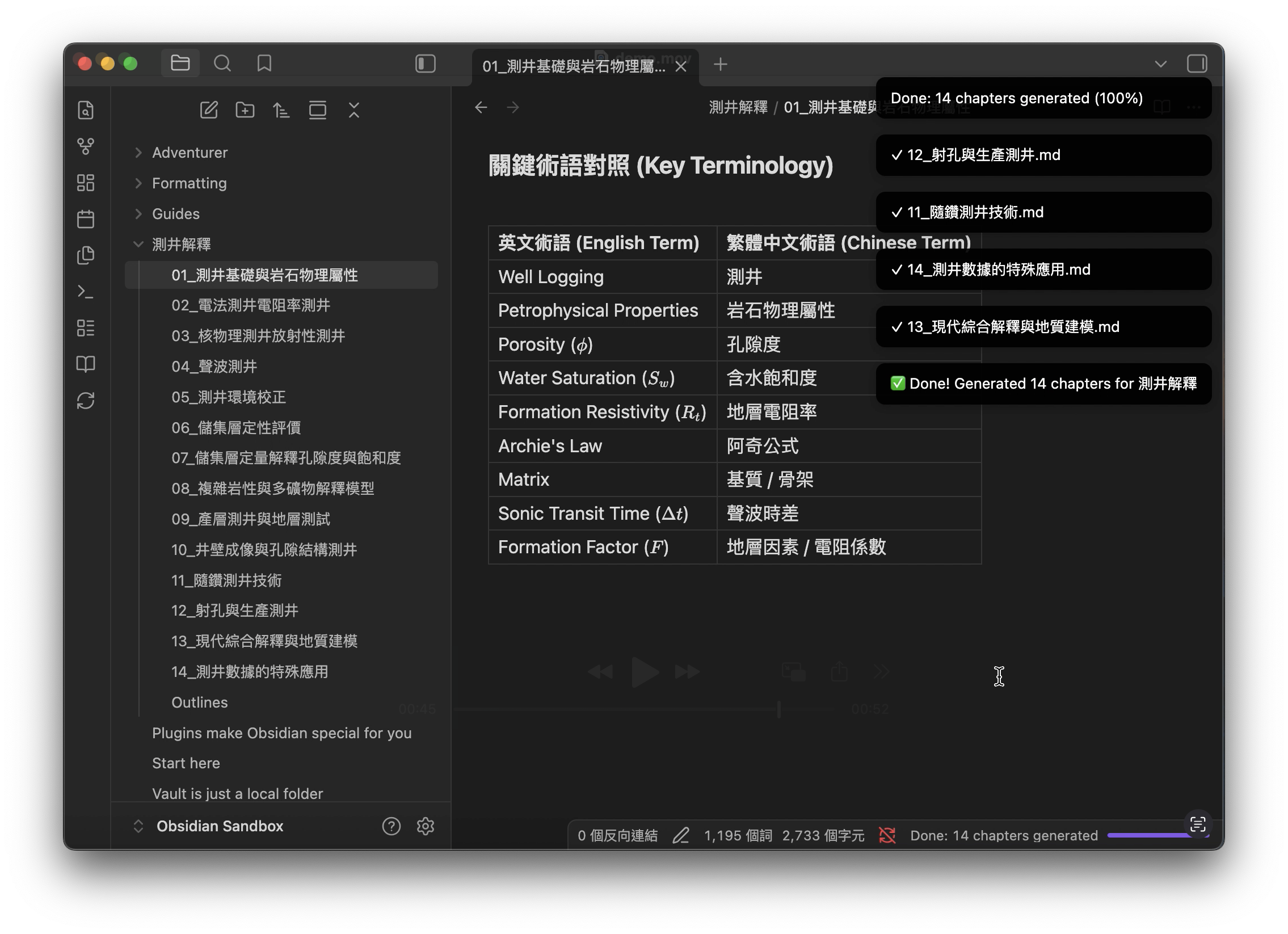
- A textbook-like course outline with clear chapter coverage.
- One Markdown note per chapter.
- Numbered sections such as
3.1and3.1.1. - Explanations, examples, formulas, common mistakes, and review questions.
- Important terms introduced naturally with their English equivalents, plus a compact user-language/English terminology table at the end of each chapter.
- A model and token-usage footer at the end of each chapter.
- A failed-chapter list that can be resumed later.
It can also build the background needed before reading papers, planning a research project, or working with specialists from another field.
Both STEM and humanities subjects are supported. The generated structure changes automatically for mathematical, historical, interpretive, argumentative, procedural, and other kinds of knowledge.
Requirements
- Obsidian 1.12.7 or later.
- An API key from an OpenAI-compatible provider.
The plugin works on desktop and mobile. For a long mobile or iPad generation, keep Obsidian in the foreground when possible: the operating system may suspend network activity after the app is moved to the background. If a chapter fails, you can resume it later without regenerating the completed chapters.
Installation
Manual installation
- Download
main.js,manifest.json, andstyles.cssfrom the latest release. - Create
<vault>/.obsidian/plugins/knowledge-overview/. - Copy the three files into that folder.
- Reload Obsidian.
- Enable Knowledge Overview under Settings → Community plugins.
Build from source
git clone https://github.com/obafgkm42/obsidian-knowledge-overview.git
cd obsidian-knowledge-overview
npm install
npm run build
Copy main.js, manifest.json, and styles.css into the plugin folder in
your vault.
Quick Start
[!WARNING] Check the bill before generating a complete subject. A full subject uses one outline request plus one request for every chapter. In this project's tests, generating a complete subject with
gpt-5.6-solcan cost around US$3. This is an estimate, not a spending cap: the actual bill depends on chapter count, output length, reasoning tokens, provider pricing, and gateway markup. Test one outline or chapter first and check your provider dashboard before starting several subjects.
- Open Settings → Knowledge Overview.
- Enter the API base URL, API key, outline model, and chapter model.
- Open the command palette and run Generate Knowledge Overview.
- Enter a subject and choose a chapter depth.
- Wait for the outline and chapter notes to finish.
Example:
Signal Processing/
├── Outlines.md
├── 01_Fourier_Analysis.md
├── 02_Signal_Filtering.md
└── 03_Wavelet_Transform.md
Use Resume Failed Chapter Generation to retry only failed chapters. Use Cancel active knowledge generation to stop queued work. A request that is already being processed may finish before cancellation takes effect.
Chapter Depth
Choose the depth that matches what you need now:
| Mode | Course size | Chapter size | Use case |
|---|---|---|---|
| Map only | 8–12 chapters | 7,000–10,000 characters | Quickly understand the shape of a subject |
| Usable overview | 10–14 chapters | 8,500–12,000 characters | Prepare for research or enter a neighboring field |
| Teach me properly | 11–16 chapters | 10,000–15,000 characters | Study the subject as a detailed course |
| Review mode | 10–14 chapters | 7,000–11,000 characters | Refresh existing knowledge efficiently |
These are flexible targets, not hard truncation limits. The plugin allows up to 20 chapters and will not silently cut a long chapter just to meet a target.
Provider Setup
The plugin uses the OpenAI-compatible /chat/completions format. Enter the
base URL below; the plugin adds the endpoint path automatically.
| Provider | API base URL | Model ID example |
|---|---|---|
| Google Gemini | https://generativelanguage.googleapis.com/v1beta/openai |
gemini-3.5-flash |
| OpenAI | https://api.openai.com/v1 |
gpt-5.6-sol |
| Anthropic Claude | https://api.anthropic.com/v1/ |
claude-opus-4-8 |
| Other compatible gateway | The URL shown by the gateway | The exact ID shown by the gateway |
Provider and gateway catalogs may expose different model IDs. Always use the ID shown by the endpoint connected to your API key.
Gemini free-tier limits
Some Gemini models may show 20 requests per day (20 RPD) on the Google AI Studio free tier. Limits are model-specific, so different models can have separate daily quotas when AI Studio lists them. This is not a guaranteed 20-call allowance for every model or account: limits depend on the project, model, and usage tier and may change. Check your project's active rate limits in Google AI Studio before generating a complete subject.
Gemini can also return 503 UNAVAILABLE or “This model is currently
experiencing high demand” even when daily quota remains. This usually means the
service is temporarily short of capacity, not that the API key is configured
incorrectly. Wait and resume later, lower concurrency, or temporarily select
another available model. A 429 RESOURCE_EXHAUSTED error more commonly means a
request, token, daily, or spending limit was reached. See Google's
Gemini API troubleshooting guide.
Settings
Most users only need to set these fields:
| Setting | Meaning |
|---|---|
| API key | Key supplied by your provider |
| API base URL | Provider or gateway URL |
| Outline model | Creates the course outline |
| Chapter model | Writes the chapter notes |
| Language | Language of the generated course |
| Chapter concurrency | Number of chapter requests sent in parallel; default 1 |
The remaining settings are optional:
- Knowledge type: leave on
Autounless you need a specific teaching structure. - Minimum chapter characters: a local quality target; it does not trigger another paid request.
- Max completion tokens: the provider output limit. Increase it if a chapter is stopped for reaching the token limit.
- Temperature: blank by default, so no temperature is sent.
- Reasoning effort, verbosity, and thinking mode: provider-specific. Blank
or
Autoomits unsupported controls.
Requests, Cost, and Token Usage
For N chapters, a normal run makes 1 + N logical requests: one course
outline and one request per chapter. Local quality checks do not call a model,
and the plugin does not automatically regenerate a whole chapter.
A complete gpt-5.6-sol subject can cost about US$3 based on this project's
test runs. It may cost more. Higher chapter counts, larger output limits,
reasoning tokens, long chapters, provider pricing, and gateway markup all
increase the bill. Always check the provider's current pricing and account
usage before a large run.
Chapter concurrency only changes how many chapter requests run at the same
time. It does not reduce the number of requests, token usage, or total bill.
Setting concurrency to 3 can spend the same total amount faster than
concurrency 1.
For a new model or provider, generate one chapter first. Confirm its visible length, reported token usage, and dashboard charge before generating the full subject.
Each chapter ends with the model ID and provider-reported prompt, completion, and total token counts. If the provider returns no usage data, the note says that usage is unavailable instead of estimating it.
Troubleshooting
The response reached its output token limit
Increase Max completion tokens, choose a provider with a larger output limit, and run Resume Failed Chapter Generation. Truncated chapters are not saved as complete notes.
Generation stopped on mobile or iPad
Return to Obsidian and resume the failed chapters. Mobile operating systems can suspend Obsidian's network request while the app is in the background.
A provider rejects temperature, reasoning, or thinking settings
Clear the optional field or set Thinking mode to Auto. Different
providers accept different request parameters.
Some chapters failed
Open Failed_Chapters.md in the generated subject folder, then run Resume
Failed Chapter Generation. Completed chapters are kept.
Privacy
The API key is stored in Obsidian plugin data inside your vault. The plugin sends the subject and generation prompts only to the API endpoint you configure. It includes no analytics or telemetry.
Do not publish plugin data files, logs, or screenshots that contain API keys.
Languages
The plugin includes presets for English, Simplified Chinese, Traditional Chinese, Japanese, Korean, Vietnamese, Thai, Indonesian, Malay, Hindi, Arabic, German, French, Spanish, Italian, Portuguese, Dutch, Swedish, Finnish, Polish, Turkish, and Russian.
Development
npm install
npm run test
npm run build
npm run release:verify
The live generation quality framework is documented in tests/eval/README.md. It is separate from normal plugin use and requires an explicit request and token budget before it calls a model.
Release files:
main.jsmanifest.jsonstyles.css
License
MIT