Search...Search plugins and themes...
⌘K
Sign in
  • Get started
  • Download
  • Pricing
  • Enterprise
  • Account
  • Obsidian
  • Overview
  • Sync
  • Publish
  • Canvas
  • Mobile
  • Web Clipper
  • CLI
  • Learn
  • Help
  • Developers
  • Changelog
  • About
  • Roadmap
  • Blog
  • Resources
  • System status
  • License overview
  • Terms of service
  • Privacy policy
  • Security
  • Community
  • Plugins
  • Join the community
  • Discord
  • Forum / 中文论坛
  • Merch store
  • Brand guidelines
Follow us
DiscordTwitterBlueskyThreadsMastodonYouTubeGitHub
© 2026 Obsidian

GPT Notes

micahkemicahke37k downloads

Generate notes on any subject using OpenAI's GPT-3.5 and GPT-4 language models.

Add to Obsidian
  • Overview
  • Scorecard
  • Updates9

To download Obsidian: Click here

To view the plugin page: Click here

This plugin improves your Obsidian workflow by helping you generate notes using OpenAI's GPT-3 language model. The plugin also has support for older language models as well.

Setup

In order to configure up the plugin, you must first set your OpenAI API key in the plugin settings.

  1. Generate an OpenAI API key here.
  2. In Obsidian, go to Settings and select GPT-3 Notes from the Community Plugins folder in the left menu.
  3. Set your key in the OpenAI API Key field.

Usage

GPT-3 is capable of generating many different types of notes. As of now, the output may need a small amount of reformatting after being inserted into the Obsidian document. The plugin can be accessed through the Obsidian ribbon on the left. The plugin is also available through the Obsidian command "Create GPT-3 Note". This can also be mapped to a keyboard shortcut. Some helpful prompts are:

Write bullet points about...

Write 5-10 dashed notes about..

Write an article about ... with sources

Write 3 paragraphs about...

Write an essay outline about

Loading time has been cut out a bit but here's an example:
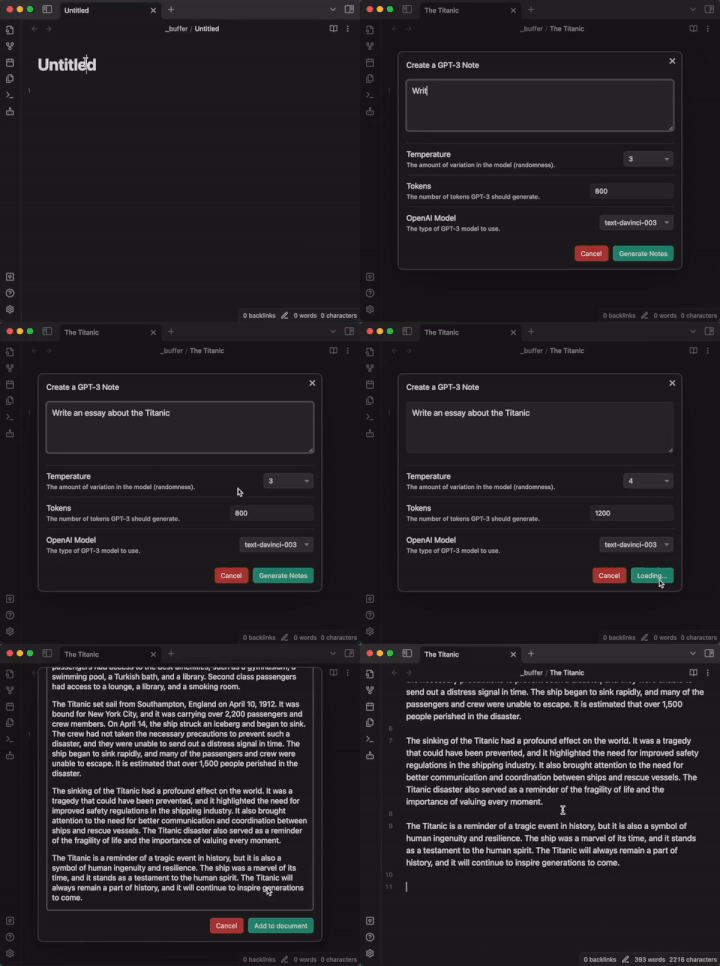
usage

Contributing

I'm not very smart so community help would go a long way in making sure new ideas can be added to the plugin. To get started, clone the repo to the plugins folder in an Obsidian vault. You can find more about this on the main Obsidian developer's page. To install dependencies, run:

npm install

That's basically it for now.

67%
HealthFair
ReviewCaution
About
Generate notes from natural-language prompts using OpenAI GPT-3 or older models. Create outlines, articles, bullet lists, or essays and insert AI-generated drafts into your vault. Access the tool from the command palette or the ribbon to produce content quickly.
AIWritingCommands
Details
Current version
0.2.8
Last updated
3 years ago
Created
3 years ago
Updates
9 releases
Downloads
37k
Compatible with
Obsidian 0.15.0+
License
MIT
Report bugRequest featureReport plugin
Sponsor
Buy Me a Coffee
Author
micahkemicahke
www.micahelias.com
GitHubmicahke
  1. Community
  2. Plugins
  3. AI
  4. GPT Notes

Related plugins

Text Generator

Generate text content using GPT-3 (OpenAI).

Smart Composer

AI chat with note context, smart writing assistance, and one-click edits for your vault.

Local GPT

Local Ollama and OpenAI-like GPT's assistance for maximum privacy and offline access.

ChatGPT MD

A seamless integration of ChatGPT, OpenRouter.ai and local LLMs via Ollama into your notes.

BMO Chatbot

Generate and brainstorm ideas while creating your notes using Large Language Models (LLMs) such as OpenAI's "gpt-3.5-turbo" and "gpt-4".

Typing Assistant

Support multiple shortcut menus to improve input efficiency.

Mesh AI

Enables you to store AI prompts as patterns and run them seemlessly with most providers.

Smart Connections

AI link discovery copilot. See related notes as you write. Lookup using semantic (vector) search across your vault. Zero-setup local model for embeddings, no API keys, private.

Copilot

Your AI Copilot: Chat with Your Second Brain, Learn Faster, Work Smarter.

Commander

Customize your workspace by adding commands everywhere, create macros and supercharge your mobile toolbar.