Keep View Explorer
 kgway25 downloads
Browse, filter, and organize notes in a Google Keep-style card view. Narrow results with Boolean tag queries, folders, dates, and full-text search, then move or retag notes in bulk.
- Overview
- Scorecard
- Updates3
Browse, filter, and organize notes in a Google Keep-style card view. Narrow results with Boolean tag queries, folders, dates, and full-text search, then move or retag notes in bulk.
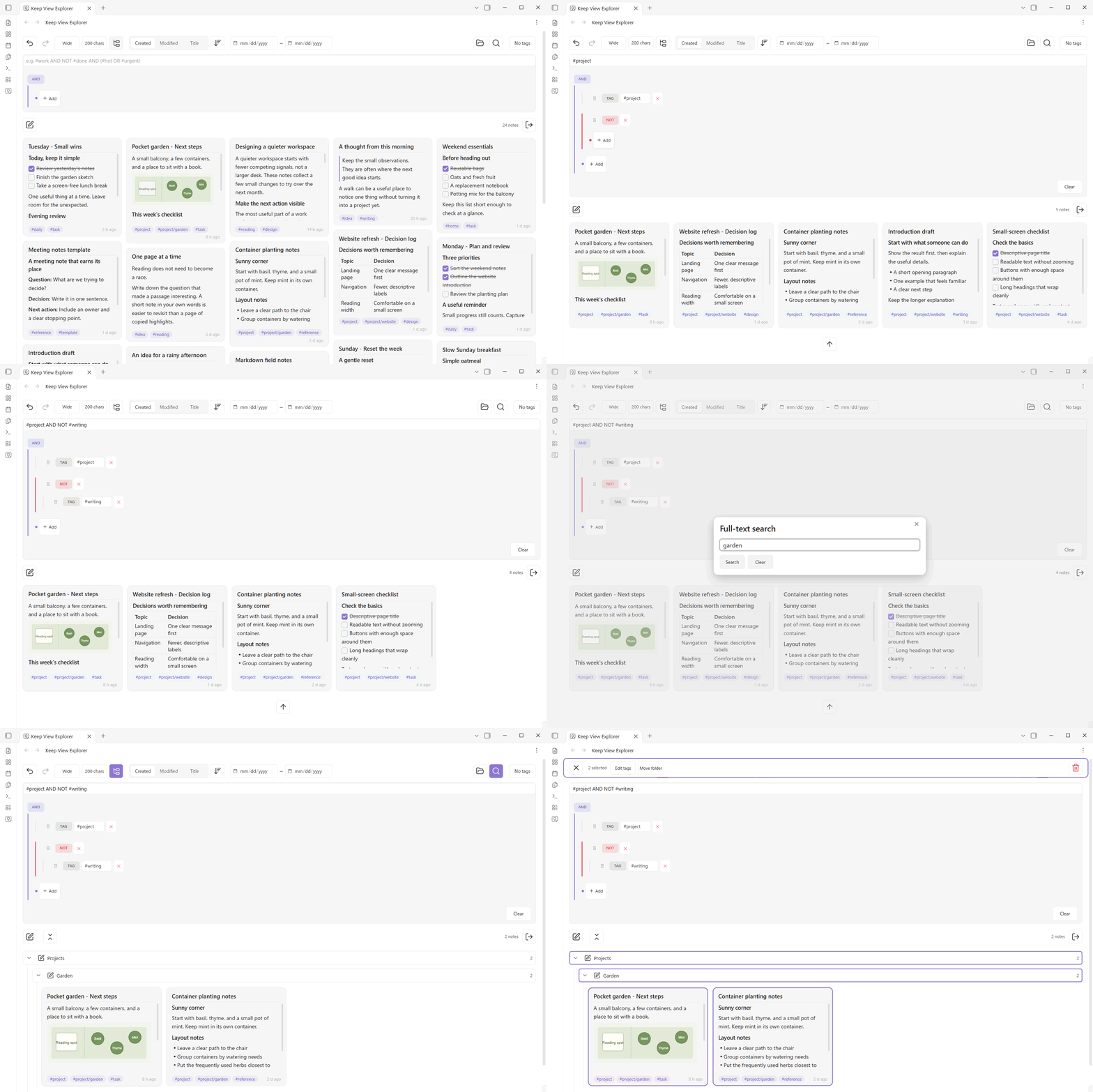
One workflow: 24 notes → project tags → exclude writing → search garden → select the two matches.
- Markdown previews with checklists, images and links.
- Visual tag trees with AND, OR and NOT.
- Folder navigation and bulk tag edits or moves.
Find the notes for a project
Start with the Markdown notes already in your vault. In the demo, select #project, add NOT #writing, then search for garden. Each condition narrows the same result set: 24 → 5 → 4 → 2 notes. Expand the Projects/Garden folder and select the two matching notes to prepare a bulk action.
Get started
- Run Open Keep View Explorer from the command palette, or use its ribbon icon.
- Build a tag tree, choose folders or dates, and add full-text search. Tag filters include nested tags; you can also type an equivalent expression such as
#project AND NOT #writing. - Select the matching notes with Ctrl/Command-click on desktop or a long press on mobile. Use the selection toolbar to edit frontmatter tags or move notes. Inline body tags are preserved.
Your notes remain ordinary Markdown files. English and Japanese interfaces; desktop and mobile layouts. No additional account, advertising or telemetry. See the README for trash behavior, undo limits, local search-cache storage and Markdown external resources.
Detailed usage and data handling
Cards with tasks, images and Markdown previews · Build tag conditions visually · Expand Projects/Garden while keeping the filters · Select notes and organize them together · Mobile layout


Features
- Cards with Markdown or source previews and adjustable density.
- AND, OR and NOT tag expressions, folder filters, untagged notes and date ranges.
- Literal substring search in note names and full Markdown text, including frontmatter. English matching ignores case; Japanese single characters and partial words are supported.
- Creation date, modification date and title sorting.
- Create notes, edit frontmatter tags, move notes or folders, and trash selected notes using Obsidian's configured deletion behavior.
- Export all matching note paths as JSON or text. Relative paths are the default.
- Import creation timestamps from filenames of Markdown notes migrated from Google Keep.
- English and Japanese interfaces, with desktop and mobile layouts.
Installation
Requires Obsidian 1.8.7 or later. Install Keep View Explorer from the community directory, or open Settings → Community plugins → Browse and search for Keep View Explorer. Enable the plugin after installation. New listings can take up to 24 hours to appear in the app search.
For manual installation, use the built release assets:
- Download
main.js,manifest.jsonandstyles.cssfrom the GitHub release, or build them locally. - Place them in the vault's configured plugin directory under
keep-view(normally.obsidian/plugins/keep-view/). - Enable community plugins and Keep View Explorer in Obsidian settings.
- Open Keep View Explorer using its ribbon icon or the Open Keep View Explorer command.
When updating manually, disable the plugin, replace these three files, then enable it again. Preserve data.json. The repository's source main.js uses local modules; install the release assets or the files in dist/keep-view/.
Usage
Use the toolbar to combine tags, folders, date ranges and full-text search. For example, #work AND NOT #done AND (#important OR #urgent) matches work notes that are unfinished and important or urgent. Full-text search starts only when requested; it does not scan the vault at startup.
New views start with modification time, newest first. Saved sorting choices are retained. Creation dates come from a frontmatter property, created by default. Missing or invalid creation dates use file creation time and sort together with notes that have a valid property, in the selected direction. Equal times use the path as a tie-breaker. Creation-date ranges use the same file creation time fallback. No property is changed. Modification dates use file modification time. Date ranges use the device timezone.
When creation dates are in use, a dialog explains missing or invalid values once per app session for each date property. It shows the counts and, when a supported timestamp filename is available, offers the import preview. The dialog does not change notes. Check Don't show again and close it to save that choice across reloads and skip the extra guidance checks. Turn Creation date guidance back on in settings to restore it. Ordinary card filtering and manual date import remain available.
Click or tap a card to open its note. Long-press to select it; on desktop, Ctrl/Command-click or Space on a focused card also selects it. The selection toolbar lets you draft tag edits and a destination folder, then apply them. Inline body tags are preserved. Folder selection moves the entire folder, including hidden notes, attachments and empty folders. File collisions receive numbered names; folder collisions and moves into their own descendants are rejected.
Trash asks for confirmation by default. Undo/redo covers filters, selection and tag edits; moving and deleting are outside that history. Test file operations on synthetic notes before using them on important data.
Export includes every matching note, including cards that have not been rendered yet. Absolute device paths are included only when explicitly selected and supported by the device. Exported JSON also includes the vault name and filter conditions; review exports before sharing them.
For migration from Google Keep, first import Markdown notes with Obsidian's Importer. The optional timestamp tool recognizes date-shaped filenames and previews changes before applying them. It preserves existing properties, note bodies and filenames; Obsidian's YAML writer may reformat frontmatter.
Data and privacy
Keep View Explorer adds no accounts, advertising or telemetry. It does not send notes or search queries to external services and does not access files outside the vault.
Settings and view conditions are saved in the plugin's data.json. Optional fast search stores compressed, unencrypted note text and update metadata in search-cache-v1 inside the installed plugin directory. Only candidate notes requested by a search are indexed. Cache storage uses up to eight files and bounded memory; changed or damaged entries are rebuilt from the notes. Disable fast search to search notes directly, or use the cache deletion setting to remove stored cache data. Original notes are preserved. Any synchronization of the plugin folder follows your vault and device configuration.
Markdown previews use Obsidian's renderer. External images or other remote resources referenced by your notes may cause network requests when rendered.
Development
Use Node.js 24 and pnpm 11.19.0:
pnpm install --frozen-lockfile
pnpm release:prepare
pnpm exec playwright install chromium
pnpm test:ui
Build assets are generated in dist/keep-view/. The only external runtime module is obsidian; source modules are bundled into readable CommonJS JavaScript. Development packages are not shipped.
See architecture and contributing. UI text is editable in Japanese and English; keep keys and numbered placeholders intact, then rebuild.
The interface initially follows Obsidian's language. A manual language choice remains until Obsidian's language changes, including across reloads. Other host languages use English.
License
MIT. See third-party notices. Keep View Explorer is an independent project and is not affiliated with Google or Obsidian.
The installed JavaScript retains the MIT copyright and permission notice. README and license documents are available in the source repository; installation requires only the three runtime files.