Keep Lists
 Rafael Marques37 downloads
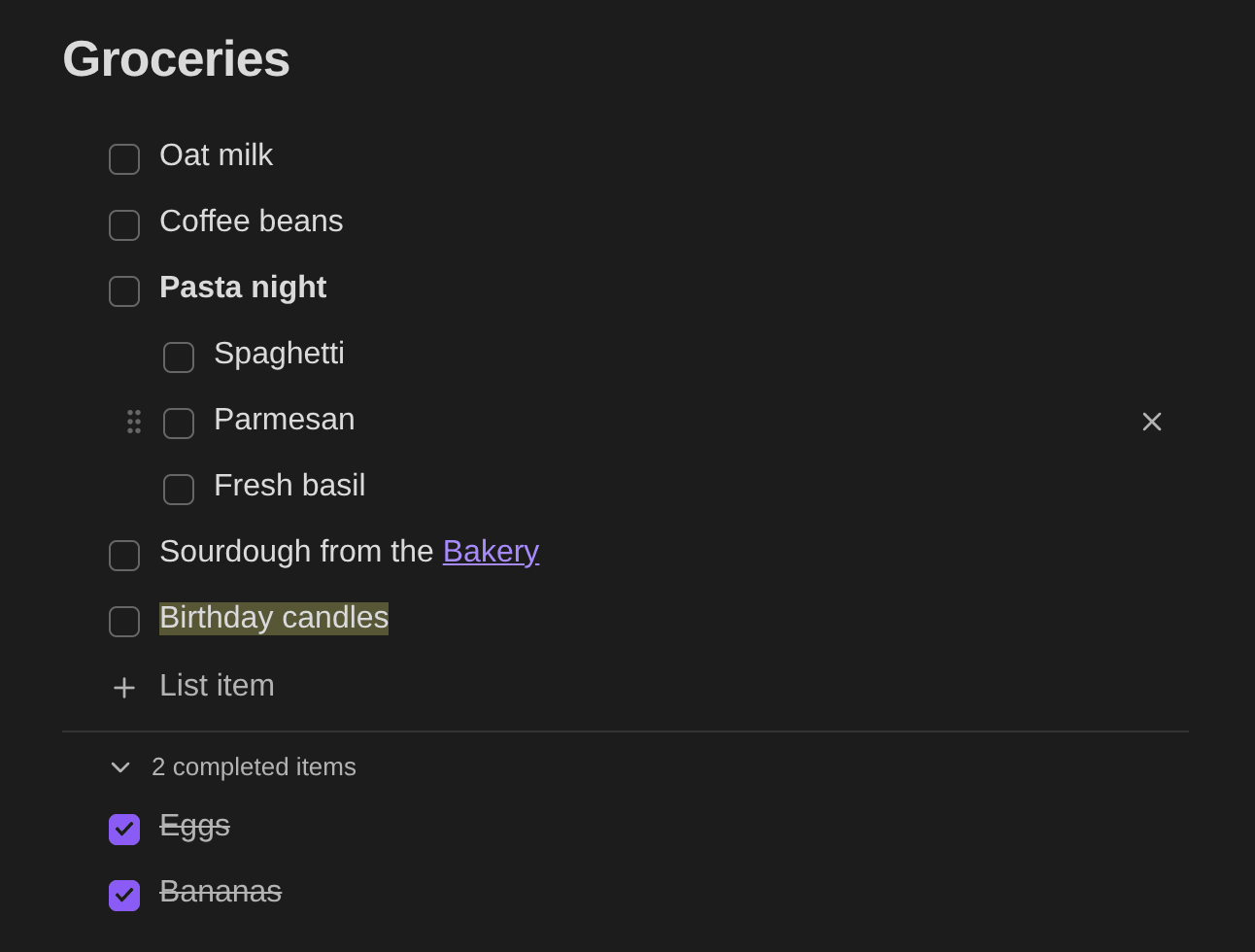
Google Keep-style checklists: drag to reorder, drag right to nest, checked items move to a completed section.
- Overview
- Scorecard
- Updates2
Google Keep-style checklists for Obsidian. Drag items to reorder or nest them, and checked items move to a collapsible completed section.
Usage
Run Keep Lists: Insert list from the command palette, or type a keep code block:
```keep
- [ ] list item 1
- [ ] list item 2
    - [ ] nested under item 2
- [x] done item
```
The block holds plain markdown checkboxes, so the note stays readable without the plugin.
- + List item adds an item. Enter splits the item or adds one below, and Backspace on an empty item deletes it.
- Drag the grip to the left of the checkbox to reorder. Drag slightly right to nest an item, or left to un-nest it.
- Tab and Shift+Tab nest and un-nest. ↑ and ↓ move between items.
- Checked items move to the collapsible completed section, and unchecking returns them to where they were.
- Checking a parent checks its nested items. Pasting several lines creates one item per line.
- Item text is markdown. It shows formatted (bold, highlights, links…) and switches to raw markdown while you edit it.
- Your Obsidian hotkeys for Bold, Italic, Strikethrough, Highlight, Code, Math, Comment, Insert link, Insert wikilink, Set heading and Clear formatting apply to the item you're editing. Right-click an item for the same options.
Installing
Search for Keep Lists in Settings → Community plugins → Browse once the plugin is listed in the community directory.
To install by hand, download main.js, manifest.json and styles.css from the latest release into <your vault>/.obsidian/plugins/keep-lists/, then enable Keep Lists under Settings → Community plugins.
Building
npm install
npm run build    # writes main.js
npm run lint
VAULT=/path/to/vault npm run install-vault   # build and copy into a vault
License
HealthExcellent
ReviewPassed
About
Create Google Keep–style checklists with draggable items you can reorder or nest, and move checked items into a collapsible completed section. Keep lists as plain Markdown so notes stay readable, show formatted text and switch to raw Markdown while editing, and restore items to place when unchecked.Details
Current version
1.0.1
Last updated
2 weeks ago
Created
2 weeks ago
Updates
2 releases
Downloads
37
Compatible with
Obsidian 1.6.0+
Platforms
Desktop, Mobile
License
MIT