Search...Search plugins and themes...
⌘K
Sign in
  • Get started
  • Download
  • Pricing
  • Enterprise
  • Account
  • Obsidian
  • Overview
  • Sync
  • Publish
  • Canvas
  • Mobile
  • Web Clipper
  • CLI
  • Learn
  • Help
  • Developers
  • Changelog
  • About
  • Roadmap
  • Blog
  • Resources
  • System status
  • License overview
  • Terms of service
  • Privacy policy
  • Security
  • Community
  • Plugins
  • Themes
  • Discord
  • Forum / 中文论坛
  • Merch store
  • Brand guidelines
Follow us
DiscordTwitterBlueskyThreadsMastodonYouTubeGitHub
© 2026 Obsidian

Just Vertical Tabs

Roman SorianoRoman Soriano61 downloads

Moves the tab bar from the top to a vertical orientation on the left or right side of the editor pane.

Add to Obsidian
  • Overview
  • Scorecard
  • Updates2

Enables you to have note tabs aligned vertically instead of horizontally.
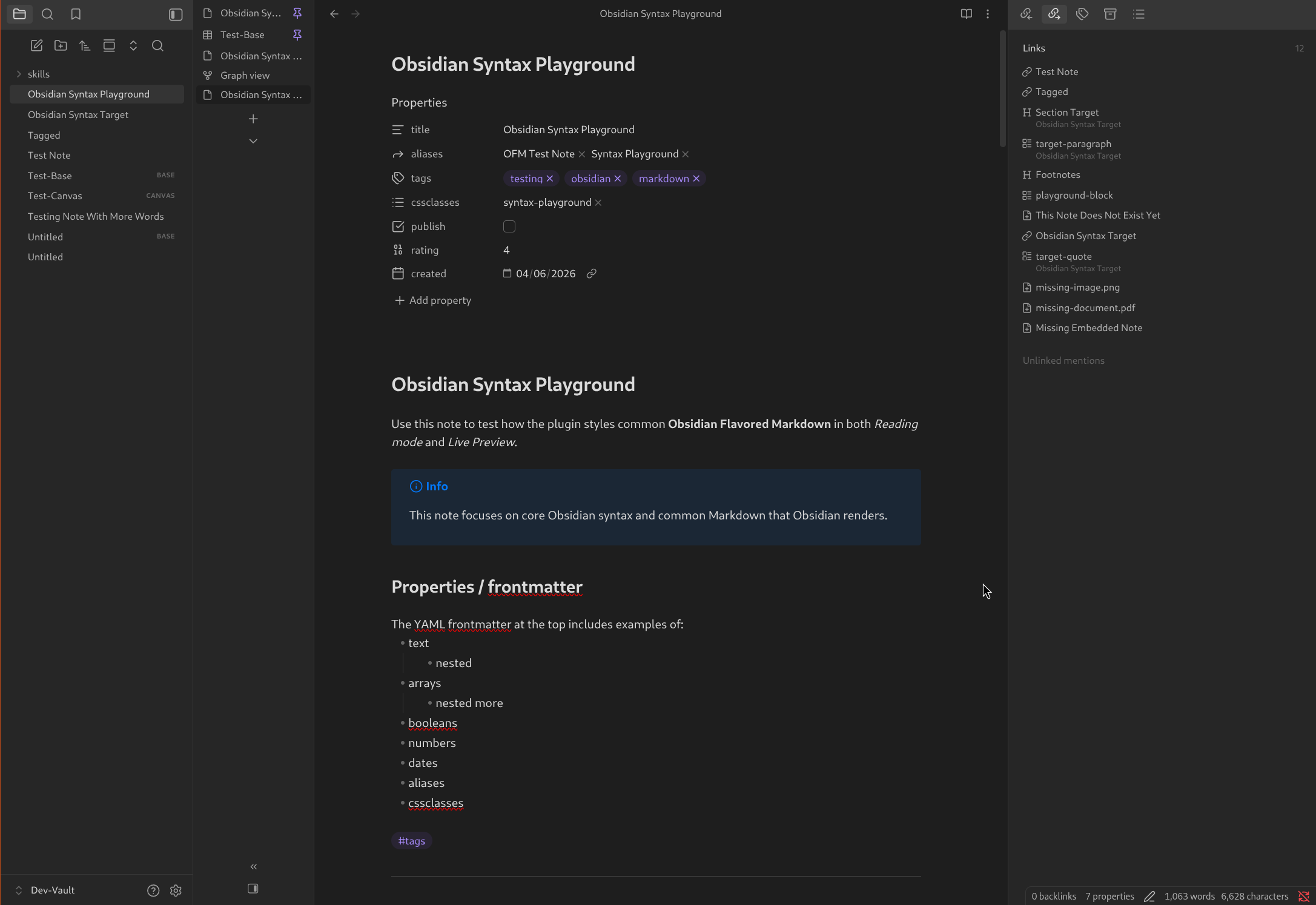
Features

  • Vertical Tabs
  • Orient tab bar on the left, or the right
  • Right-sidebar toggle placement options: default, note header, or bottom of the vertical tab bar
  • Optional tab icons toggle
  • Command + setting to collapse the tab bar down to icons, or title initials when icons are hidden
  • Collapse/expand button in the vertical tab bar above the right sidebar toggle
  • Optional toggle to hide/show the collapse/expand button

Installation

  1. Install and enable BRAT through the Community Plugins
  2. Open the Obsidian settings, and navigate to the BRAT settings page
  3. Click the "Add beta plugin" button
  4. Paste the link to this repository in the Repository field
  5. Make sure the "Enable after installing the plugin" box is checked
  6. Click the "Add plugin" button
84%
HealthExcellent
ReviewCaution
About
Align note tabs vertically on the left or right side of the app. Place the right-sidebar toggle in default, note header, or bottom of the tab bar, show optional tab icons, and collapse the tab bar to icons or title initials with a single command.
InterfaceSidebarNavigation
Details
Current version
1.1.0
Last updated
2 weeks ago
Created
Last month
Updates
2 releases
Downloads
61
Compatible with
Obsidian 1.5.0+
Platforms
Desktop only
License
MIT
Report bugRequest featureReport plugin
Author
Roman SorianoRoman Sorianoroam
GitHubnarwhai
  1. Community
  2. Plugins
  3. Interface
  4. Just Vertical Tabs

Related plugins

Notebook Navigator

A better file browser and calendar inspired by Apple Notes, Bear, Evernote and Day One.

Recent Files

Display a list of recently opened files.

TagFolder

Show tags as folder.

Hover Editor

Transform the Page Preview hover popover into a fully working editor instance.

Reveal Active File Button

Add a button to the top of the File Explorer, to reveal the active file.

Hide Sidebars on Window Resize

Automatically hides the sidebars when your window is narrow on window resize.

Graph Banner

Display a local graph view to the note header

Dragger

Drag and drop any block (paragraphs, headings, lists, etc.) to rearrange content like Notion.

Portals

Pin folders and tags as customizable tabs with icons, colors, and folder notes for easier navigation.

Homepage

Open a note, base, or workspace on startup, or set it for quick access later.