Jira Weaver
 HJ406 downloads
Sync Jira issues into your vault and weave them into your knowledge graph via wiki-links, Frontmatter, and Dataview.
- Overview
- Scorecard
- Updates4
Jira Weaver is a community plugin that syncs Jira issues directly into your Vault. Like weaving threads, it interlinks Jira issues with wiki links, Graph View, and Dataview into a rich knowledge network.
Language: 한국어 README
Features
- One-click sync — pull Jira issues into Markdown files with structured YAML Frontmatter
- Custom field mapping — map any Jira system or custom field to an Obsidian Frontmatter key
- Multiple JQL profiles — sync different queries into different folders simultaneously
- Memo protection — a section marker preserves your personal notes below the Jira block
- Wiki-link wrapping — turn field values into
[[wiki links]]for Graph View and Dataview queries - Sync log panel — per-profile history of created / updated / skipped / error counts
- Field preset export / import — share field mapping configurations across vaults or with teammates
- Multilingual UI — English, 한국어, 日本語, 中文(简体); auto-detects your Obsidian language
- Flexible auth — Bearer token (Jira Server / Data Center) or Basic auth email + API token (Jira Cloud)
- Sync triggers — manual, on startup, or on a configurable interval
Installation
From Community Plugins (recommended)
- Open Settings → Community plugins → Browse.
- Search for Jira Weaver and click Install.
- Enable the plugin.
Manual installation
- Download
main.js,manifest.json, andstyles.cssfrom the latest release. - Copy them into your vault's
.obsidian/plugins/jira-weaver/folder. - Reload and enable the plugin under Settings → Community plugins.
Screenshots
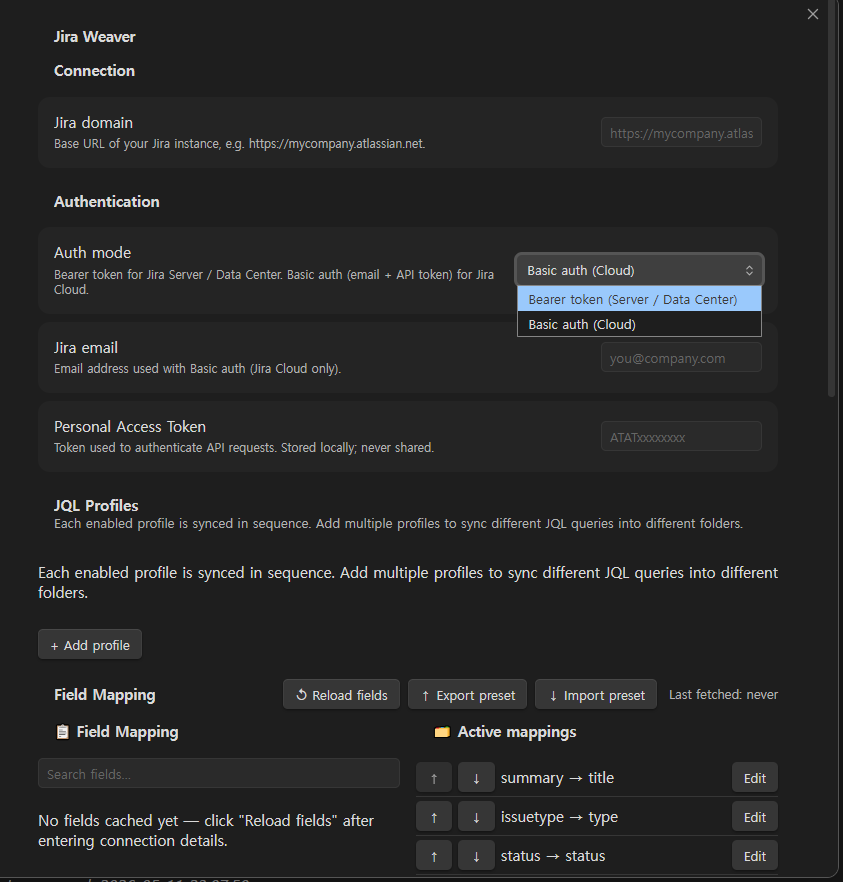
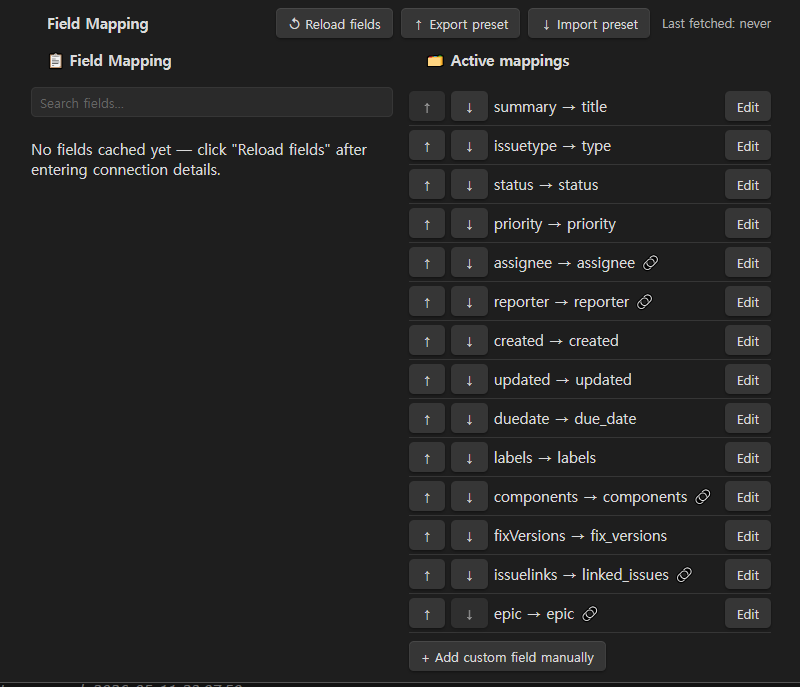
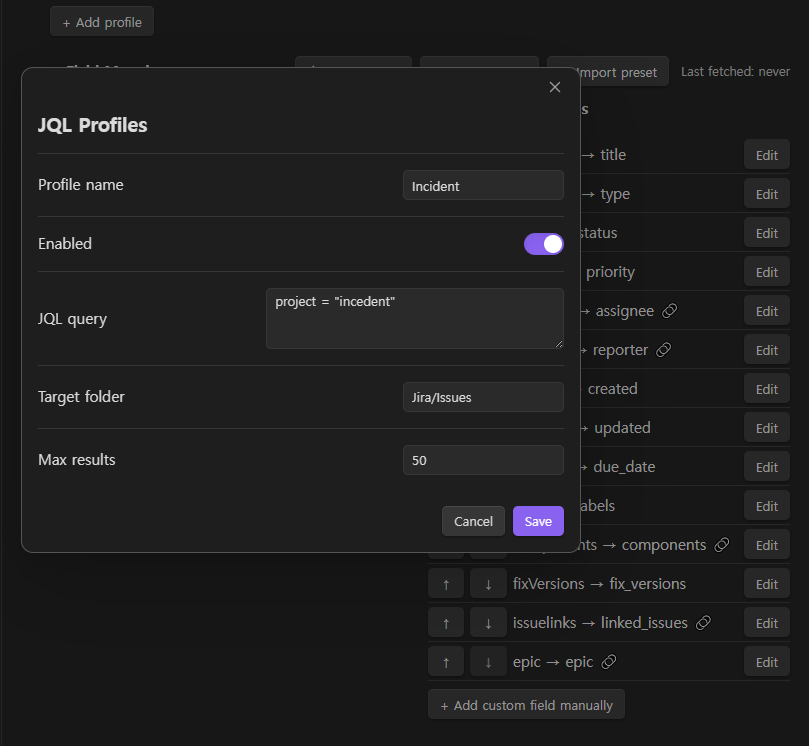
Quick Start
1. Configure connection
Open Settings → Jira Weaver.
| Field | Description |
|---|---|
| Auth mode | Bearer token for Server/Data Center; Basic auth for Cloud |
| Jira email | (Cloud only) the email address on your Atlassian account |
| Jira domain | Base URL of your Jira instance (e.g. https://acme.atlassian.net for Cloud, https://jira.internal for DC) |
| Personal Access Token | API token; stored locally, never transmitted elsewhere |
2. Add a JQL profile
Under JQL Profiles, click Add profile. Fill in:
- Profile name — a label shown in the sync log
- JQL query — e.g.
assignee = currentUser() AND sprint in openSprints() - Target folder — Vault folder where issue files are saved (created automatically)
- Max results — upper limit per sync run (default 50)
Enable the profile with the toggle and save.
3. Run a sync
Use the command palette (Ctrl/Cmd+P) and search for:
| Command | Description |
|---|---|
Sync Issues |
Normal sync (skips unchanged issues) |
Force Sync Issues (Overwrite All) |
Overwrites every file regardless of update time |
Reload Field List |
Fetches the current Jira field list (needed for custom fields) |
Open Sync Log |
Opens the sync history panel |
Generated File Format
Each issue is saved as a Markdown file named KEY_summary-slug.md (e.g. PRJ-123_fix-login-bug.md).
---
jira_key: PRJ-123
title: "Fix login bug on SSO redirect"
status: In Progress
priority: High
assignee: "alice"
reporter: "bob"
created: "2025-01-15"
updated: "2025-04-01"
jira_url: "https://acme.atlassian.net/browse/PRJ-123"
---

# PRJ-123: Fix login bug on SSO redirect

Users are redirected to a blank page after SSO login when the
session cookie is missing.

| Field    | Value        |
|----------|--------------|
| Assignee | alice        |
| Reporter | bob          |
| Created  | 2025-01-15   |

---
Last synced: 2025-05-10 09:30:00

[jira-weaver section end — notes below are preserved]

## My Notes

Notes written here are preserved across every sync.
Memo Protection
A hidden section marker is written at the end of the Jira-managed block. On each sync, only the content above the marker is rewritten — everything below is left untouched.
If the marker is missing, the Memo protection → When the marker is missing setting controls the behaviour:
| Setting | Behaviour |
|---|---|
| Overwrite (default) | Rewrites the whole file |
| Skip the file | Leaves the file untouched and logs a warning |
| Append | Appends a new Jira block to the end of the file |
Field Mapping
Go to Settings → Jira Weaver → Field Mapping to customise which Jira fields are written to Frontmatter.
- Click Reload fields to fetch your Jira instance's full field list (including custom fields).
- Toggle any field on/off; drag to reorder.
- Click Edit to configure:
- Obsidian key — YAML key name in Frontmatter
- Value type — how the raw value is normalised (string, number, array, …)
- JSON path — custom extraction path for nested values (e.g.
fields.sprint[0].name) - Wiki link — wrap the value as an Obsidian
[[wiki link]]
Preset export / import
Use Export preset / Import preset buttons to save or restore your field mapping configuration as jira-weaver-preset.json in the Vault root.
Sync Triggers
| Trigger | Description |
|---|---|
| Manual | Only runs when you invoke a command |
| On startup | Runs once when Obsidian opens |
| Interval | Runs every N minutes (1–1440) |
Privacy & Security
- Your domain URL, token, and email are stored in the plugin's local data file. They are never sent anywhere other than your Jira instance.
- Network requests go only to the domain you configure.
Troubleshooting
| Symptom | Solution |
|---|---|
| "Authentication failed" notice | Verify your PAT hasn't expired; Cloud users must also set Jira email |
| "JQL error" notice | Test your JQL in Jira's issue search first |
| Custom fields not appearing | Click Reload fields after entering connection details |
| No files created | Check that the JQL query returns issues and that the target folder path is valid |
| Notes lost after sync | Make sure not to remove the section marker line at the end of the Jira block |
Contributing
See CONTRIBUTING.md for development setup, coding conventions, and PR guidelines.