Japanese Invoice Helper
 e8dev13 downloads
Write Japanese invoices (適格請求書) in Markdown. Calculates consumption tax by rate, withholding tax and payment due dates, and renders a printable invoice.
- Overview
- Scorecard
- Updates1
An Obsidian plugin for writing Japanese invoices (適格請求書) in Markdown. It calculates consumption tax per rate, withholding tax (源泉徴収) and payment due dates, and renders a printable invoice you can export to PDF.
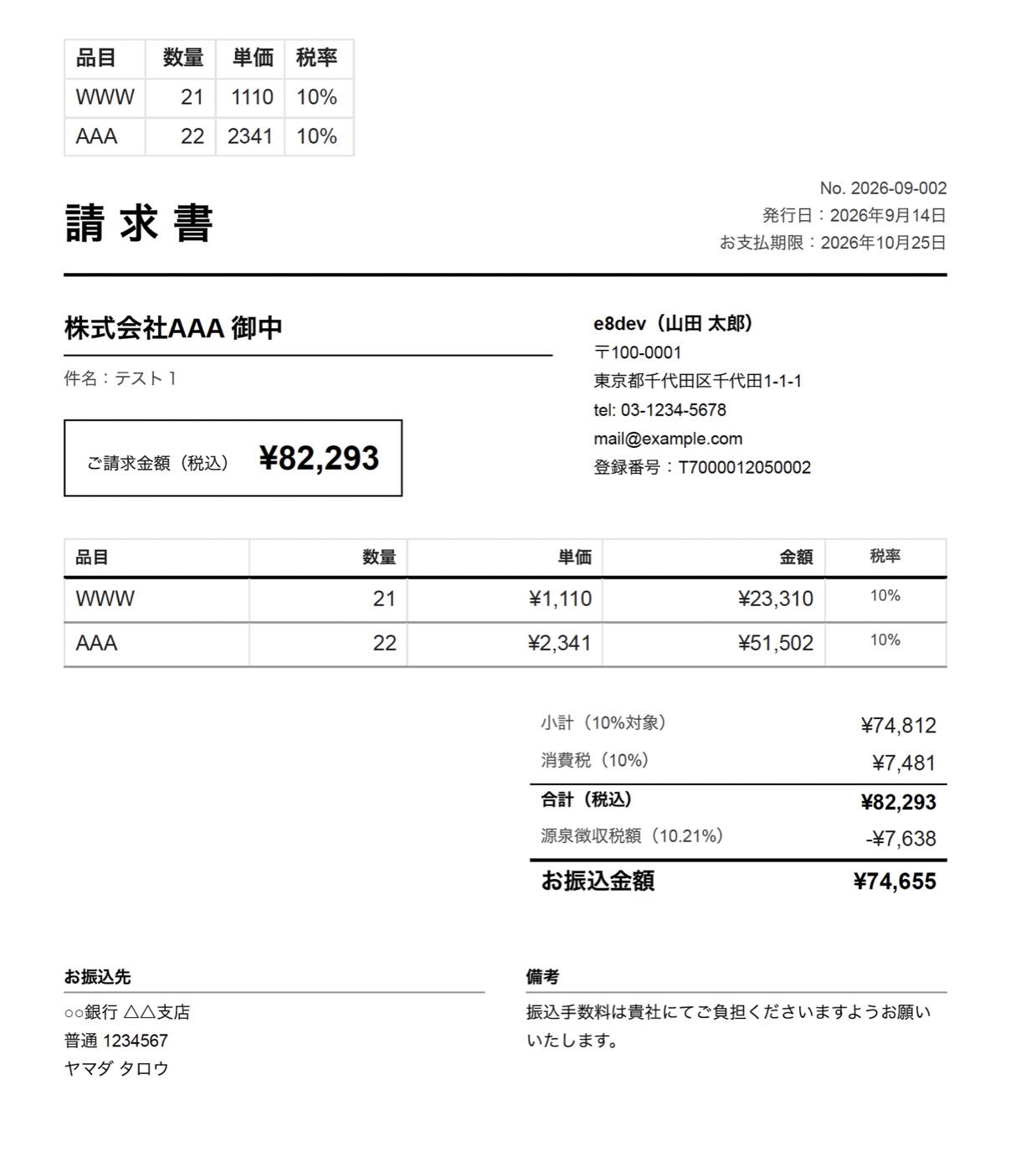
Features
- Invoice in a note — metadata in frontmatter, line items in a Markdown table, and an
invoicecode block that renders the finished document - Correct tax arithmetic — consumption tax summarized per rate (10% / 8% reduced / exempt) and rounded once per rate per invoice, as the qualified-invoice rules require; rounding mode is configurable
- Withholding tax — 10.21% up to ¥1,000,000 and 20.42% above, on the pre-tax or tax-inclusive amount; optional deduction for bank transfer fees
- Registration number check — format check for
T+ 13 digits, plus the corporate-number check digit for corporations - New invoice command — client name suggestions from past invoices, automatic sequential numbering (
2026-09-001), due date from payment terms such as 月末締め翌月末払い - Amount helpers — format a selected number as
¥1,234,567,123万4567円, or 大字 (金壱拾弐万参千四百五拾六円也) for receipts - Print-ready — issuer details, registration number and bank account come from settings; Export to PDF produces a clean invoice
- Works offline; no external services, no telemetry
Usage
- Open Settings → Japanese Invoice Helper and fill in the issuer section (name, address, registration number, bank account).
- Run the command Create new invoice. A note like the one below is created in your invoice folder and opened.
- Edit the table; switch to reading view (or export to PDF) to see the invoice.
---
type: invoice
number: "2026-09-001"
client: "株式会社サンプル"
issued: 2026-09-30
due: 2026-10-31
withholding: true
status: unpaid
---

| 品目 | 数量 | 単価 | 税率 |
|---|---:|---:|---|
| 記事執筆(3本) | 3 | 30,000 | 10% |
| 取材交通費 | 1 | 5,000 | 10% |

```invoice
### Frontmatter keys

| Key (aliases) | Meaning |
| --- | --- |
| `number` (`請求番号`) | Invoice number |
| `client` (`宛先`, `取引先`) | Client name; the honorific (御中) comes from settings or `client_suffix` |
| `issued` (`発行日`), `due` (`支払期限`) | Dates (`YYYY-MM-DD`) |
| `subject` (`件名`) | Subject line |
| `withholding` (`源泉徴収`) | `true` / `false` |
| `withholding_base` | `excl` (before tax, default) or `incl` |
| `deduction` (`振込手数料`) | Amount deducted from the payable |
| `status` | `unpaid` / `paid` — shown as a badge on screen only |
| `note` (`備考`) | Remarks printed at the bottom |
| `title` | Document title (default 請求書; use 見積書 etc.) |

The same keys can be written inside the `invoice` code block as `key: value` lines, and a table inside the block takes precedence over the note's table, so a self-contained block also works.

### Table columns

Headers are matched by name: 品目/内容/item, 数量/qty, 単価/unit price, 金額/amount, 税率/rate. Rate cells accept `10%`, `8%`, `軽減`, `非課税`, or blank (default rate from settings). Negative amounts work as discounts.

## Disclaimer

This plugin performs arithmetic according to publicly documented rules; it is not tax advice. Rates and thresholds are settings so they can be adjusted when the law changes. Verify invoices with your accountant or the National Tax Agency guidance where needed.

## Development

```bash
npm install
npm run dev
npm test
npm run lint
License
MIT
日本語
Markdown で請求書(適格請求書)を書き、消費税・源泉徴収・支払期限を自動計算して、そのまま PDF に出力できる Obsidian プラグインです。
機能
- frontmatter にメタ情報、本文に明細テーブル、
invoiceコードブロックで請求書を描画 - 消費税は税率ごと(10%/8%軽減/非課税)に集計し、税率ごとに1回だけ端数処理(切り捨て・四捨五入・切り上げを選択可)
- 源泉徴収税(100万円まで10.21%、超過分20.42%)を税抜または税込ベースで計算。振込手数料などの控除にも対応
- 登録番号(T+13桁)の形式チェック。法人の場合は法人番号のチェックデジットも検証
- 「新しい請求書を作成」コマンド:過去の宛先を候補表示、連番の自動採番、支払条件(月末締め翌月末払い など)から支払期限を計算
- 選択した数値を
¥1,234,567/123万4567円/大字(金壱拾弐万参千四百五拾六円也)に変換 - 発行者情報・登録番号・振込先は設定に一度入れれば全請求書に印字。「PDFにエクスポート」でそのまま送付可能
- 通信なし・外部サービスなし
使い方
- 設定 → Japanese Invoice Helper で発行者情報(氏名/屋号、住所、登録番号、振込先)を入力
- コマンド 新しい請求書を作成 を実行すると、請求書ノートが作成されて開きます
- 明細テーブルを編集し、閲覧モードに切り替えると請求書が表示されます
免責
本プラグインは公開されているルールに基づく計算を行うものであり、税務上の助言ではありません。税率やしきい値は法改正に備えて設定で変更できます。必要に応じて税理士や国税庁の案内でご確認ください。
HealthExcellent
ReviewSatisfactory
About
Write Japanese invoices in Markdown, render print-ready PDFs, calculate consumption tax per rate with rate rounding, compute withholding tax (10.21%/20.42%), set due dates, validate registration numbers, auto-number invoices with client suggestions and format amounts as ¥, 万 or 大字.Details
Current version
1.0.0
Last updated
7 days ago
Created
7 days ago
Updates
1 release
Downloads
13
Compatible with
Obsidian 1.13.0+
Platforms
Desktop, Mobile
License
MIT