Japanese Calendar
 dualyze-ai4k downloads
Japanese public holiday calendar with wareki (Japanese era) and rokuyo. Click any date to auto-create daily notes. Substitute holidays and weekend coloring included.
- Overview
- Scorecard
- Updates30
A beautifully crafted calendar for Obsidian featuring multiple calendar views, Japanese holidays, lightweight event management, and the ability to link any note to any date.
More Obsidian Plugins by DualyzeAI
• AI Context Pack — Turn your Obsidian notes into reusable AI knowledge for ChatGPT, Claude, Gemini, NotebookLM, Claude Code, and more.
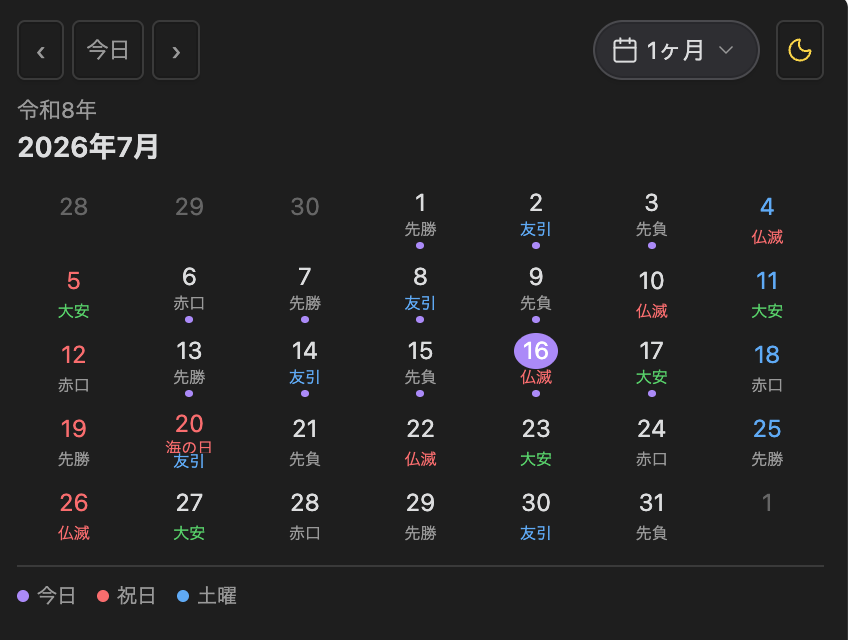
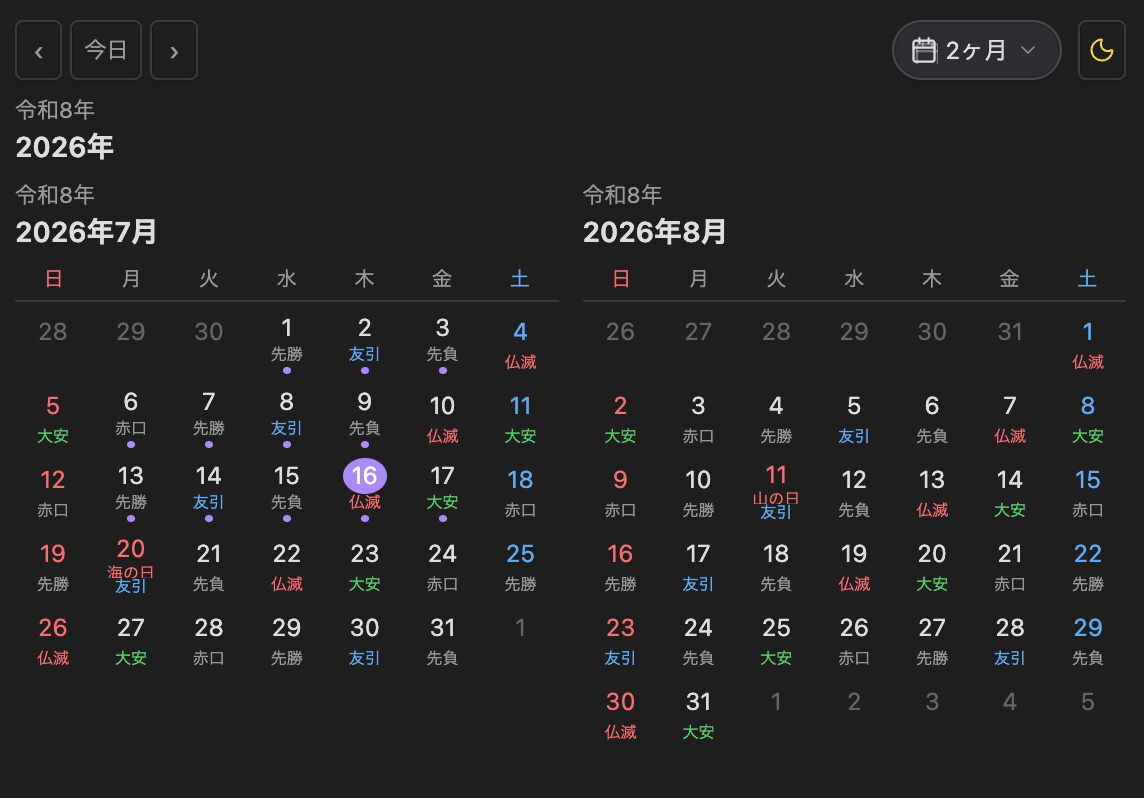
Month View · 2-Month View
 |
 |
|---|
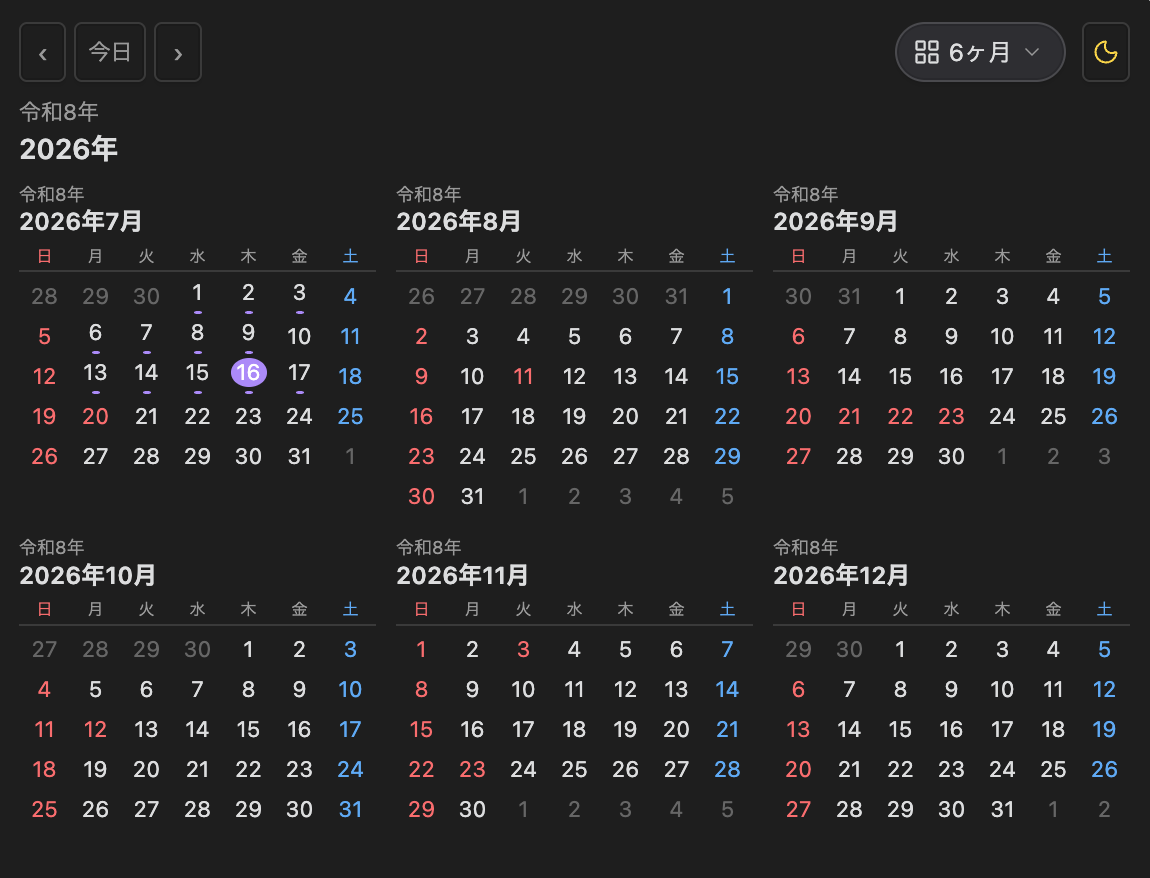
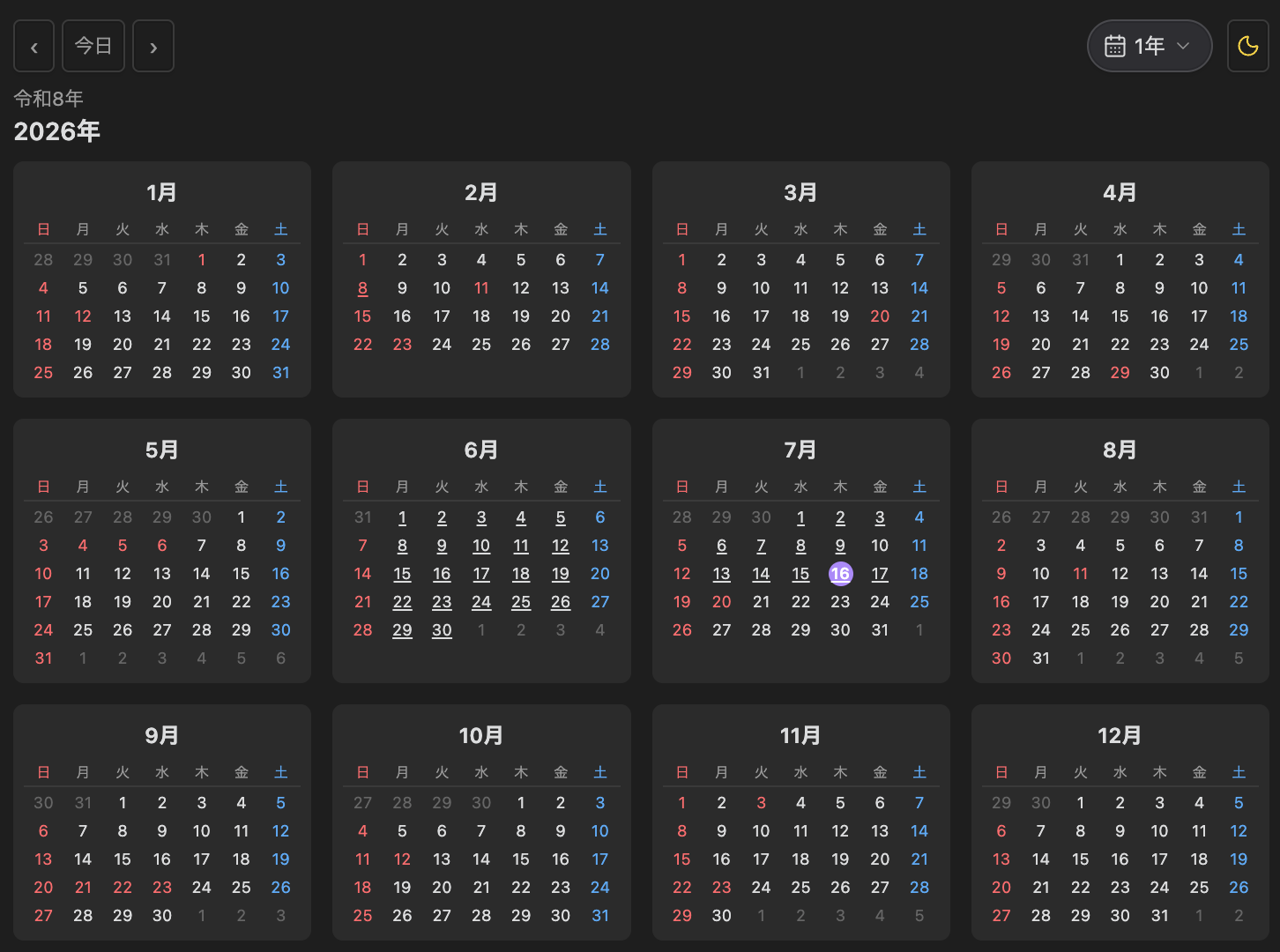
6-Month View · Year View
 |
 |
|---|
Events & Note Links
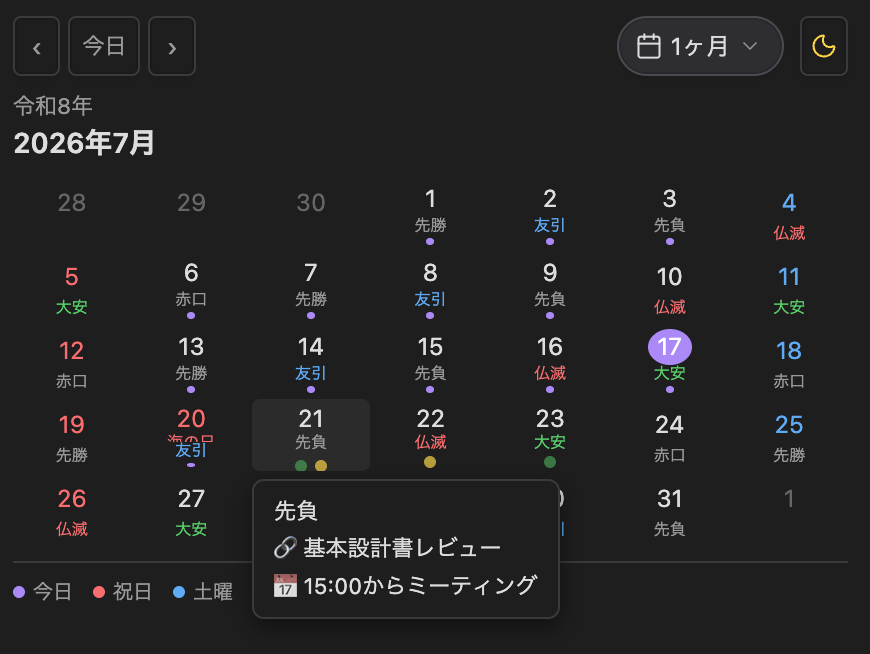
✨ New in v1.3.0
- Event markers — lightweight event management on any date
- Event popovers — see event details at a glance
- Related notes — associate an Obsidian note with any event
- Multiple calendar views — Month, 2-Month, 6-Month, and Year
- Responsive sidebar layouts — every view adapts to your sidebar width
Features
- Event markers — lightweight events on any date with colored markers
- Event popovers — hover to see event details instantly
- Related notes — attach any Obsidian note to an event
- Month View — the familiar monthly calendar with holidays, rokuyo, and kichijitsu
- 2-Month View — responsive two-month layout for short-term planning
- 6-Month View — compact six-month layout for mid-term tracking
- Year View — responsive 12-month grid inspired by macOS Calendar
- Japanese public holidays — official Cabinet Office data, highlighted in red
- Holiday names — displayed inside each cell
- Wareki (Japanese era) — Reiwa, Heisei, Showa in the header
- Rokuyo — Taian, Butsumetsu, and the six-day cycle
- Kichijitsu (auspicious days) — Tenshanichi, Ichiryū Manbai-nichi, Fujōju-nichi
- Daily notes integration — click any date to create or open a daily note
- Note links — attach any existing note to a date
- Note link markers — visible in every view
- Hover tooltips — holidays, rokuyo, kichijitsu, events, and links at a glance
- Light/Dark theme toggle — independent of Obsidian's own theme
- Display mode persistence — your last mode is restored after restart
- Week start — Sunday or Monday, applied consistently
- Color-coded weekends — Saturday in blue, Sunday in red
Event Management
Add lightweight events to any date on the calendar. Event markers appear as colored dots — green for note links, yellow for events. Hover any date to see event details in the popover.
- Create an event — right-click (or long-press on mobile) a date and select "Add event"
- Edit an event — right-click an existing event and select "Edit event"
- Delete an event — use the Delete button in the event dialog
- Related note — optionally attach any Obsidian note to the event
- Event markers — colored dots visible in all views
- Event popovers — hover any date to see event title and linked note
|
|---|
Display Modes
Month View
The default view. A traditional single-month calendar showing holidays, holiday names, rokuyo, kichijitsu, daily note indicators, and note link markers. Hover any date for a detailed tooltip.
|
|---|
2-Month View
See the current month plus the next month. The responsive grid adapts to your sidebar width — two columns when wide, one column when narrow. Navigation moves one month at a time — perfect for keeping track of upcoming events and deadlines without losing context.
|
|---|
6-Month View
A compact six-month view for medium-term planning. Each month section is proportionally smaller to fit comfortably in the sidebar while remaining readable.
|
|---|
Year View
All twelve months laid out in a responsive CSS Grid. The grid automatically adjusts between 1 and 4 columns depending on the available width. Click any month name to jump to that month in Month View.
|
|---|
Note Links
Link any existing Markdown note in your vault to any date on the calendar. Note links are independent of daily notes — you can link project notes, reference materials, or people notes to dates without affecting your daily note workflow.
- Link a note — right-click (or long-press on mobile) a date cell and select "Link note"
- Open linked notes — click the dot marker on any date to open the linked note
- Multiple links — associate several notes with the same date
- Manage links — open the link manager to view, open, or remove individual links
When a date has linked notes, a small dot appears below the date number in all views. Click it to open the note directly.
|
|---|
Sidebar Optimization
Designed for Obsidian's sidebar from the ground up. Every display mode maximizes readability even in narrow sidebars — no horizontal scroll, no overflowing cells, no clipped content.
- Month and 2-Month views use the full sidebar width
- 6-Month view compresses proportionally without losing essential information
- Year view automatically adjusts its column count based on available space
- All views respect the sidebar's natural width and scale gracefully when resized
Installation
Community plugins
- Open Settings → Community plugins → Browse
- Search for "Japanese Calendar"
- Click Install, then Enable
Manual installation
Download main.js, manifest.json, and styles.css from the latest Release, then place them in your vault under .obsidian/plugins/japanese-calendar/.
Commands
All commands are accessible from Obsidian's Command Palette (Cmd/Ctrl+P):
| Command | Description |
|---|---|
| Japanese Calendar: Show month view | Switch to Month View |
| Japanese Calendar: Show 2-month view | Switch to 2-Month View |
| Japanese Calendar: Show 6-month view | Switch to 6-Month View |
| Japanese Calendar: Show year view | Switch to Year View |
| Japanese Calendar: Go to today | Return to the current month/year |
| Japanese Calendar: Open calendar | Open the calendar panel |
| Open today's daily note | Open today's daily note directly |
Settings
| Setting | Default | Description |
|---|---|---|
| Daily note folder | Daily Notes | Folder where daily notes are saved |
| Filename format | YYYY-MM-DD | Date format (same tokens as Moment.js) |
| Template file path | (empty) | Path to a custom template |
| Show wareki | ON | Show the Japanese era (Reiwa, etc.) in the header |
| Show holiday name | ON | Show holiday names inside cells |
| Show rokuyo | OFF | Show Taian, Butsumetsu, etc. |
| Show kichijitsu | ON | Show Tenshanichi, Ichiryū Manbai-nichi, Fujōju-nichi |
| Tenshanichi | ON | Show Tenshanichi (auspicious day) |
| Ichiryū Manbai-nichi | ON | Show Ichiryū Manbai-nichi (auspicious day) |
| Fujōju-nichi | ON | Show Fujōju-nichi (inauspicious day) |
| Show tooltip on hover | ON | Show holiday, rokuyo, and kichijitsu on hover |
| Display mode | Month | Month, 2-Month, 6-Month, or Year |
| Week start | Sunday | Sunday or Monday |
| Auto-insert holiday callout | ON | Insert a callout into holiday daily notes |
| Show holiday count in status bar | ON | Show this month's holiday count |
Tip: The
.mdextension is appended automatically — do not include it in the filename format.
Daily Notes
Click any date to create or open a daily note. The file path and format are fully configurable:
Daily Notes/2026-07-20.md
If a template is specified, it is applied to new daily notes with the following variables:
| Variable | Description |
|---|---|
{{date}} |
Date in the configured format |
{{date:YYYY}} |
Year |
{{date:MM}} |
Month |
{{date:DD}} |
Day |
{{holiday}} |
Holiday name (empty if not a holiday) |
{{rokuyo}} |
Rokuyo |
{{wareki}} |
Japanese era (e.g. Reiwa 8) |
When enabled, holiday callouts are automatically inserted into the daily note of any public holiday.
Holiday Features
Japanese Public Holidays
Powered by @holiday-jp/holiday_jp — the official Cabinet Office dataset. Substitute holidays are included automatically.
Rokuyo (六曜)
The traditional six-day cycle: Taian (大安), Shakku (赤口), Sensho (先勝), Tomobiki (友引), Senbu (先負), and Butsumetsu (仏滅). Each day is color-coded and shown beneath the date when enabled.
Kichijitsu (吉凶日)
Auspicious and inauspicious days calculated from the lunar calendar:
| Type | Description | Cycle |
|---|---|---|
| Tenshanichi | 5–6 times a year. The most auspicious day | Sexagenary (60-day) cycle × season |
| Ichiryū Manbai-nichi | Several times a month. Small things grow into great ones | Lunar month × day's earthly branch |
| Fujōju-nichi | Several times a month. Nothing is said to succeed | Lunar month × day's earthly branch |
Tech Stack
- TypeScript
- Obsidian Plugin API
- @holiday-jp/holiday_jp — Japanese holiday data (official Cabinet Office data)
- dayjs — lightweight date handling
Changelog
v1.3.7
- CI and the release workflow now fail if
package-lock.jsonis not on the same version aspackage.json - No changes to plugin behaviour in this release
v1.3.6
- Release workflow now fails early if the pushed tag does not match the version in
manifest.json versions.jsonis now updated for every release again (the version-bump script was skipping entries)- No changes to plugin behaviour in this release
v1.3.4
- Synced
package-lock.jsonwithpackage.json(fixednpm cifailing in release builds)
v1.3.3
- Fixed the "today" marker not updating when the calendar view is left open across midnight
v1.2.0
- Added Month, 2-Month, 6-Month, and Year display modes
- Added responsive year view with auto-grid columns
- Added multi-month views optimized for the sidebar
- Added date-to-note links for existing Markdown notes
- Added note-link markers and link management UI
- Added display-mode persistence across restarts
- Added mode selector (pill-style dropdown) and mode commands
v1.1.4
- Switched language detection to Obsidian's official
getLanguage()API (requires Obsidian 1.8.7+)
v1.1.3
- Fixed day-of-week tokens (
ddd/dddd) in daily note filenames always rendering in English (#4) - Fixed empty filename format silently failing to create notes
v1.1.2
- Added light/dark mode screenshots to the README
- Added English sections for Settings, Kichijitsu, Template Variables, Tech Stack, and Changelog
v1.1.1
- Replaced
momentwithdayjs(same format tokens, no impact on settings) - Tooltip positioning now uses
setCssStyles
v1.1.0
- Added independent light/dark mode toggle
- Fixed daily note creation with date-based subfolders in filename format
v1.0.12
- Added Kichijitsu display (Tenshanichi, Ichiryū Manbai-nichi, Fujōju-nichi)
- Added hover tooltips
v1.0.9
- Fixed cell height shifting when holiday names wrap
v1.0.8
- Initial community plugin release
日本語
インストール方法 · 表示モード · ノートリンク · イベント管理 · コマンド · デイリーノート · 設定 · 吉凶日について · テンプレート変数 · 技術スタック · 更新履歴
インストール方法
コミュニティプラグイン経由
- Obsidian の 設定 → コミュニティプラグイン → 検索
- "Japanese Calendar" を検索
- インストール → 有効化
手動インストール
最新の Release から main.js / manifest.json / styles.css をダウンロードし、Vault 内の .obsidian/plugins/japanese-calendar/ に配置してください。
表示モード
- 1ヶ月表示 — 従来の月間カレンダー。祝日・六曜・吉凶日を表示
- 2ヶ月表示 — 縦か横に2ヶ月を重ねたレスポンシブ表示。前後の予定確認に最適
- 6ヶ月表示 — 中期的な計画向けのコンパクトな6ヶ月表示
- 年表示 — 12ヶ月を一覧できるレスポンシブグリッド
ノートリンク
既存のMarkdownノートを任意の日付に関連付けられます。デイリーノートとは独立して動作し、複数ノートの関連付けやリンク解除も可能です。
- 日付を右クリック(モバイルは長押し)→ 「ノートをリンク」
- 日付セルのマーカードットをクリックしてリンク先を直接開く
- 複数リンクがある場合は選択メニューが表示される
- リンク管理画面で追加・解除・開くが可能
イベント管理
カレンダーの任意の日付に予定を登録できます。予定がある日付には黄色いマーカーが表示され、ホバーで内容を確認できます。
- 予定を追加 — 日付を右クリック → 「予定を追加」
- 予定を編集 — 既存の予定を右クリック → 「予定を編集」
- 予定を削除 — ダイアログの削除ボタン
- 関連ノート — 任意のObsidianノートを予定に関連付け可能
- 予定マーカー — 全表示モードで黄色いドットを表示
コマンド
コマンドパレット(Cmd/Ctrl+P)から利用可能なコマンド:
| コマンド | 説明 |
|---|---|
| Japanese Calendar: Show month view | 月表示に切り替え |
| Japanese Calendar: Show 2-month view | 2ヶ月表示に切り替え |
| Japanese Calendar: Show 6-month view | 6ヶ月表示に切り替え |
| Japanese Calendar: Show year view | 年表示に切り替え |
| Japanese Calendar: Go to today | 現在の月/年に戻る |
| Japanese Calendar: Open calendar | カレンダーパネルを開く |
| Open today's daily note | 今日のデイリーノートを開く |
デイリーノート
日付をクリックするとデイリーノートを作成または開きます。ファイルパスとフォーマットは設定で変更可能です:
Daily Notes/2026-07-20.md
テンプレートを指定している場合、新規ノート作成時に以下の変数が適用されます:
| 変数 | 説明 |
|---|---|
{{date}} |
設定されたフォーマットの日付 |
{{date:YYYY}} |
年 |
{{date:MM}} |
月 |
{{date:DD}} |
日 |
{{holiday}} |
祝日名(祝日以外は空) |
{{rokuyo}} |
六曜 |
{{wareki}} |
和暦(例:令和8年) |
祝日が有効な場合、デイリーノートに祝日calloutが自動挿入されます。
設定
| 設定名 | デフォルト | 説明 |
|---|---|---|
| デイリーノートの保存フォルダ | Daily Notes | ノートの保存先フォルダ |
| ファイル名フォーマット | YYYY-MM-DD | Moment.js 形式の日付フォーマット |
| テンプレートファイルのパス | (空欄) | カスタムテンプレートのパス |
| 和暦を表示する | ON | ヘッダーに令和〇年を表示 |
| 祝日名を表示する | ON | セル内に祝日名を表示 |
| 六曜を表示する | OFF | 大安・仏滅などを表示 |
| 吉凶日を表示する | ON | 天赦日・一粒万倍日・不成就日を表示 |
| 天赦日 | ON | 天赦日の表示 |
| 一粒万倍日 | ON | 一粒万倍日の表示 |
| 不成就日 | ON | 不成就日の表示 |
| ホバーで詳細を表示する | ON | マウスオーバーで祝日・六曜・吉凶日をポップアップ |
| 表示モード | 1ヶ月 | 1ヶ月、2ヶ月、6ヶ月、1年から選択 |
| 週の開始曜日 | 日曜日 | 日曜 or 月曜始まり |
| 祝日を自動挿入する | ON | 祝日のノートに callout を挿入 |
| ステータスバーに祝日数を表示する | ON | 今月の祝日数を表示 |
ヒント:
.md拡張子は自動的に付与されるため、ファイル名フォーマットに含める必要はありません。
吉凶日について
| 種類 | 説明 | 周期 |
|---|---|---|
| 天赦日 | 年に5〜6回。すべての罪が許される最上の大吉日 | 干支60日サイクル×季節 |
| 一粒万倍日 | 月に数回。小さな物事が大きく育つとされる吉日 | 旧暦月×日の地支 |
| 不成就日 | 月に数回。何事も成就しないとされる凶日 | 旧暦月×日の地支 |
テンプレート変数
| 変数 | 説明 |
|---|---|
{{date}} |
設定されたフォーマットの日付 |
{{date:YYYY}} |
年 |
{{date:MM}} |
月 |
{{date:DD}} |
日 |
{{holiday}} |
祝日名(祝日以外は空) |
{{rokuyo}} |
六曜 |
{{wareki}} |
和暦(例:令和8年) |
技術スタック
- TypeScript
- Obsidian Plugin API
- @holiday-jp/holiday_jp — 日本の祝日データ(内閣府公式)
- dayjs — 軽量日付処理ライブラリ
更新履歴
v1.3.7 — package-lock.jsonのバージョンがpackage.jsonと一致しない場合に、CIとリリースワークフローが失敗するように変更(プラグイン本体の変更なし)
v1.3.6 — リリースワークフローにタグとmanifest.jsonのバージョン一致検証を追加、versions.jsonが更新されない不具合を修正(プラグイン本体の変更なし)
v1.3.4 — package-lock.jsonをpackage.jsonと同期(リリースビルドでnpm ciが失敗していた問題を修正)
v1.3.3 — カレンダーを開いたまま日付をまたいでも"今日"のマークが更新されない不具合を修正
v1.3.0 — イベント管理機能(登録・編集・削除)、イベントマーカー表示、イベントポップオーバー、関連ノート対応
v1.2.0 — 4種類の表示モード(1ヶ月/2ヶ月/6ヶ月/1年)、ノートリンク機能、表示モード永続化、モードセレクター、コマンド追加
v1.1.4 — 言語検出を Obsidian 公式 API getLanguage() に変更(Obsidian 1.8.7+ 必需)
v1.1.3 — 曜日トークンが強制的に英語表記になる不具合修正、空フォーマット時のフォールバック修正
v1.1.0 — ライト/ダークモード切り替え追加
v1.0.12 — 吉凶日表示追加、ホバーツールチップ追加
v1.0.8 — 初回公開
License
MIT