AI Context Pack
 dualyze-ai1k downloads
Create AI Briefs, AI MOCs, Context Packs, Knowledge Books, and Notion Workspaces from your Obsidian notes.
- Overview
- Scorecard
- Updates68
Turn your Obsidian vault into an AI-ready knowledge workspace.
Create AI Briefs, AI MOCs, Context Packs, Knowledge Books, and Notion Workspaces — all from one Workspace View.
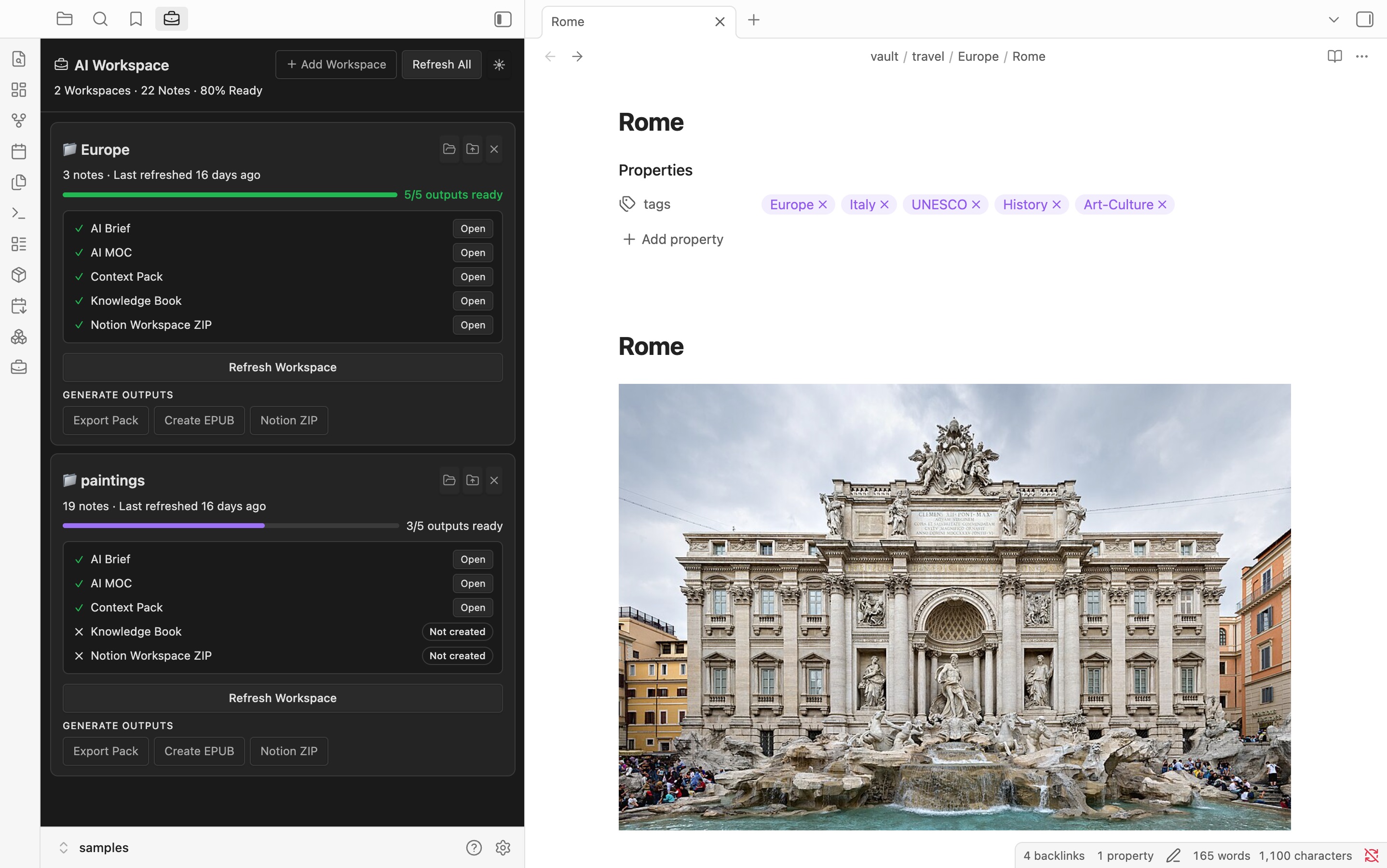
New in v4.0: AI Workspace View
Manage all AI outputs for each folder from a single dashboard.
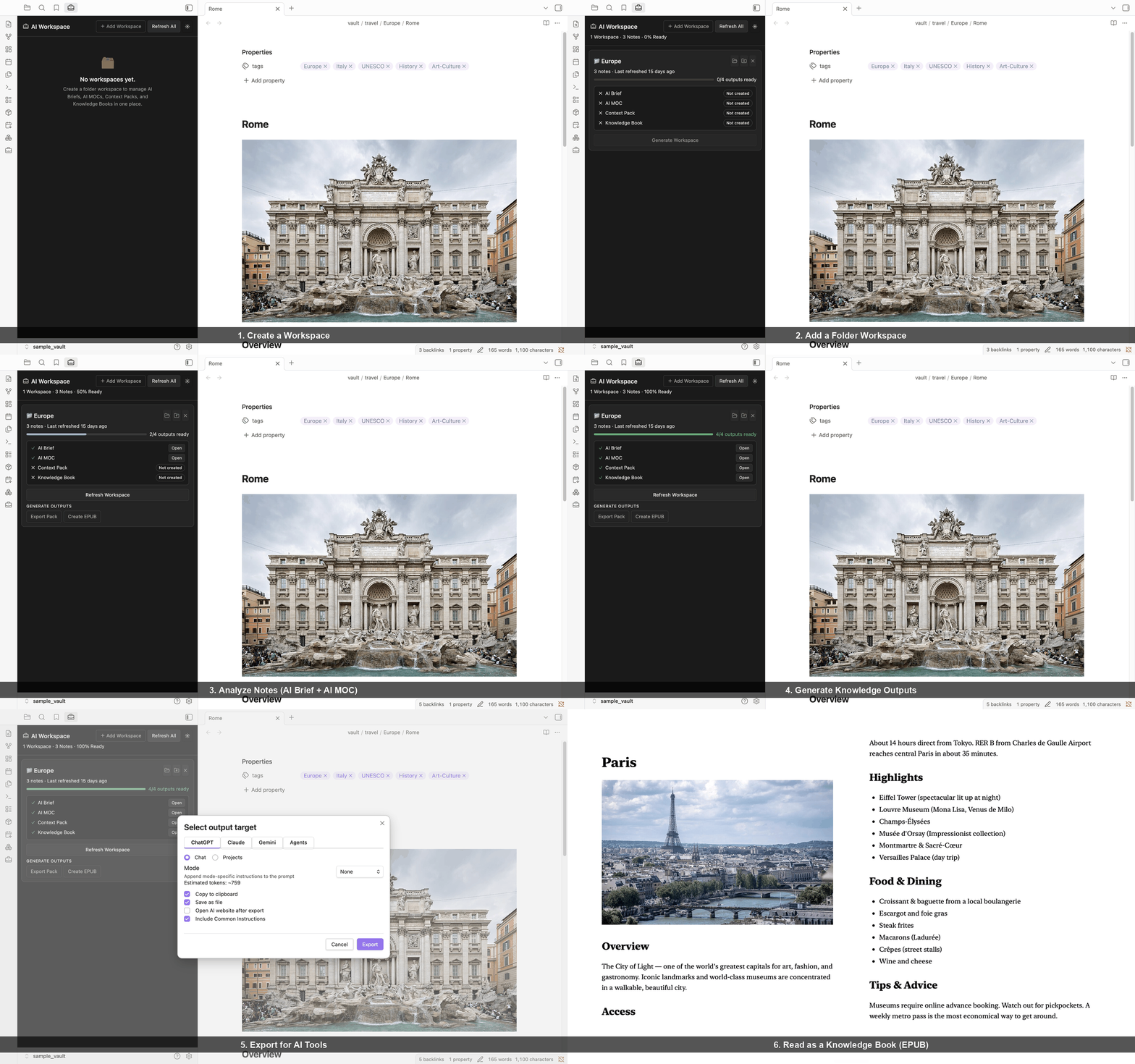
New in v4.1.0: Notion Workspace Export
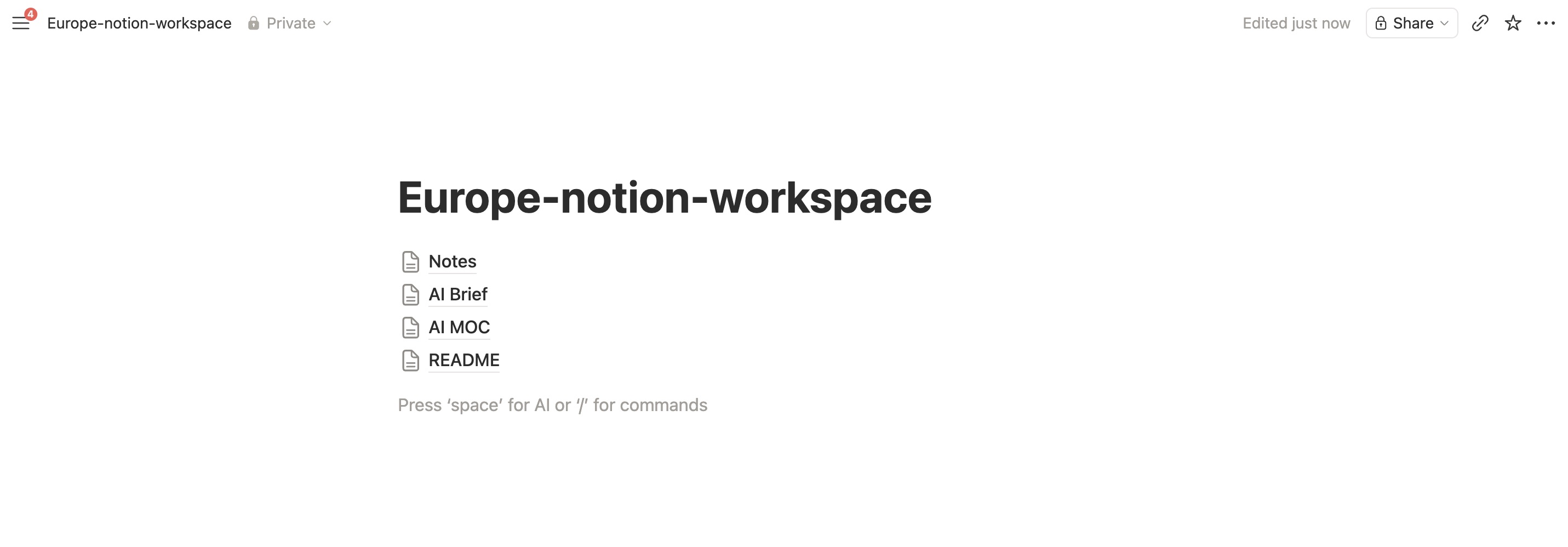
Imported Notion Workspace containing AI Briefs, AI MOCs, notes, and assets.
Export an entire workspace as a Notion-ready ZIP.
Import it into Notion to create a shareable workspace containing:
- AI Briefs
- AI MOCs
- Source Notes
- Images
Build in Obsidian. Share in Notion.
What Can I Do?
✅ Manage AI Workspaces
✅ Generate AI Briefs
✅ Create AI MOCs
✅ Export Context Packs
✅ Generate Knowledge Books (EPUB)
✅ Export entire workspaces to Notion
✅ Share AI-ready knowledge outside Obsidian
✅ Track Workspace Completion
✅ Refresh Outputs When Notes Change
Core Workflow
Obsidian Notes
      ↓
AI Workspace
      ↓
AI Brief + AI MOC
      ↓
Context Pack / Knowledge Book / Notion Workspace ZIP
      ↓
ChatGPT / Claude / Gemini / NotebookLM / Notion
Core Features
AI Workspace View — Track and manage all AI outputs per folder from one panel.
AI Brief — Analyze a folder: topic clusters, knowledge map, and suggested prompts.
AI MOC — Structured Map of Content from your AI Brief, ready to export.
Context Pack — Clean Markdown bundle for ChatGPT, Claude, Gemini, NotebookLM, and Claude Code.
Knowledge Book (EPUB) — Structured EPUB with cover and TOC. Read in Kindle, Apple Books, or Kobo.
Notion Workspace ZIP — Export an entire workspace as a Notion-ready ZIP. Import into Notion to create a shareable workspace with AI Briefs, AI MOCs, source notes, and images. Perfect for team sharing, project documentation, and knowledge publishing.
Quick Start
- Install AI Context Pack
- Open AI Workspace View
- Add a Folder Workspace
- Click Generate Workspace (creates AI Brief + AI MOC)
- Export a Context Pack or create a Knowledge Book
- Click Notion ZIP to export the workspace for Notion
Tutorial
Learn the complete workflow from notes to AI-ready outputs.
👉 Tutorial: Create Your First AI Workspace
Alice: How do I get started?
Bob: Add a folder as a Workspace, then click Generate Workspace. It creates an AI Brief and AI MOC automatically.
Alice: Can I share this workspace with my team?
Bob: Sure. Click Notion ZIP.
Alice: What happens next?
Bob: AI Context Pack creates a Notion-ready workspace ZIP. Import it into Notion and you'll get AI Briefs, AI MOCs, notes, and images as pages.
Screenshots
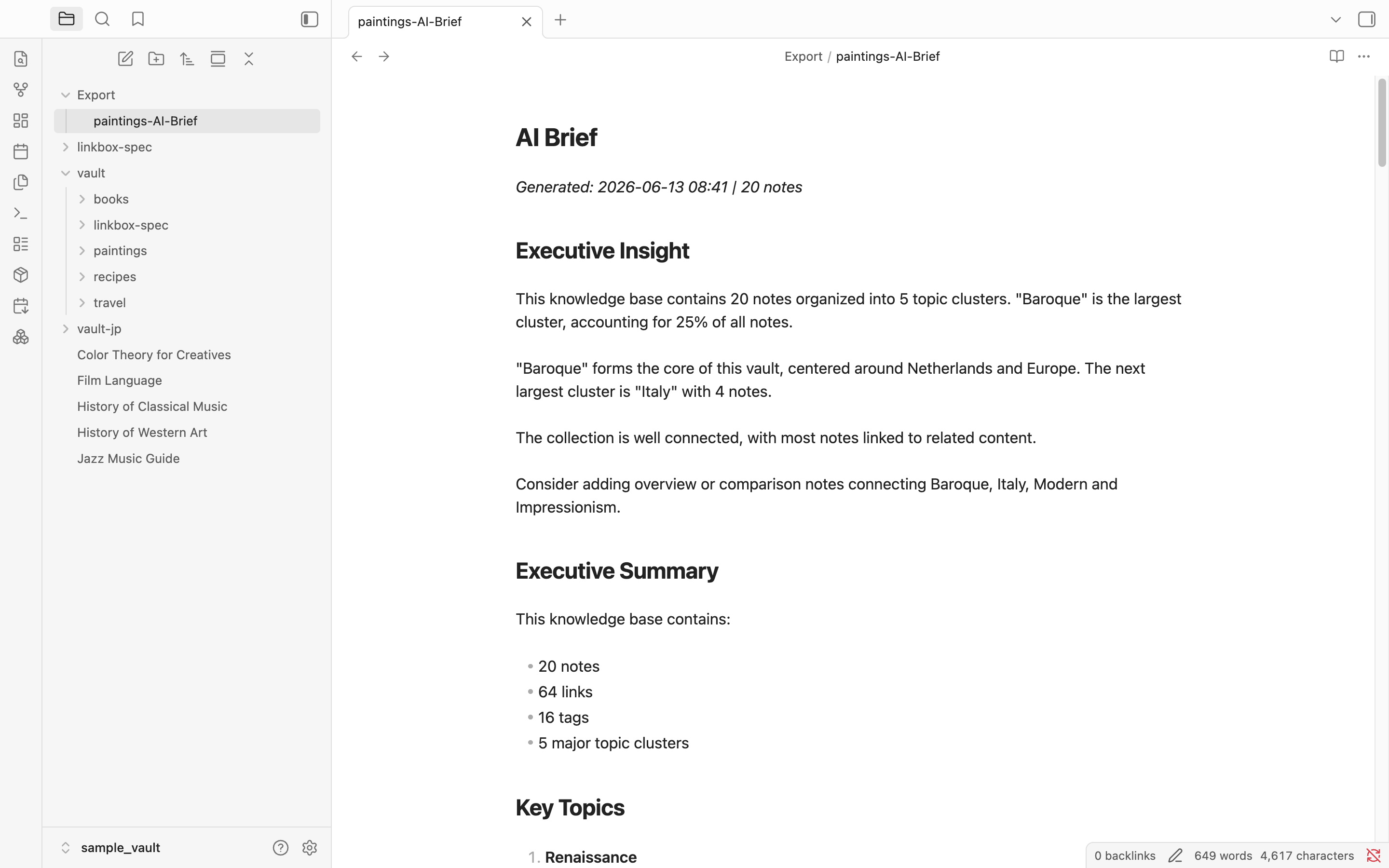
AI Brief — understand your vault before exporting
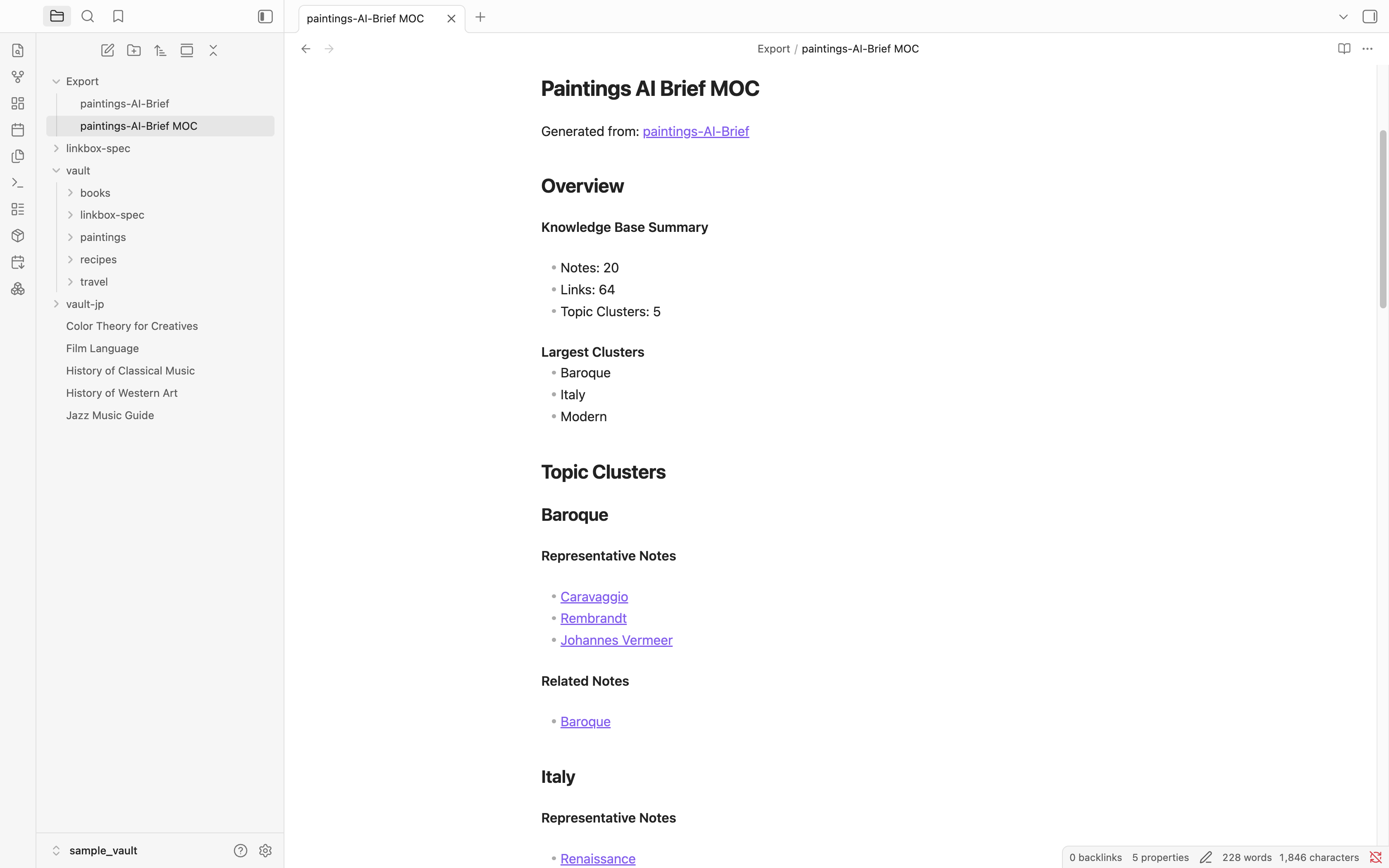
AI MOC — organize insights into a navigable structure
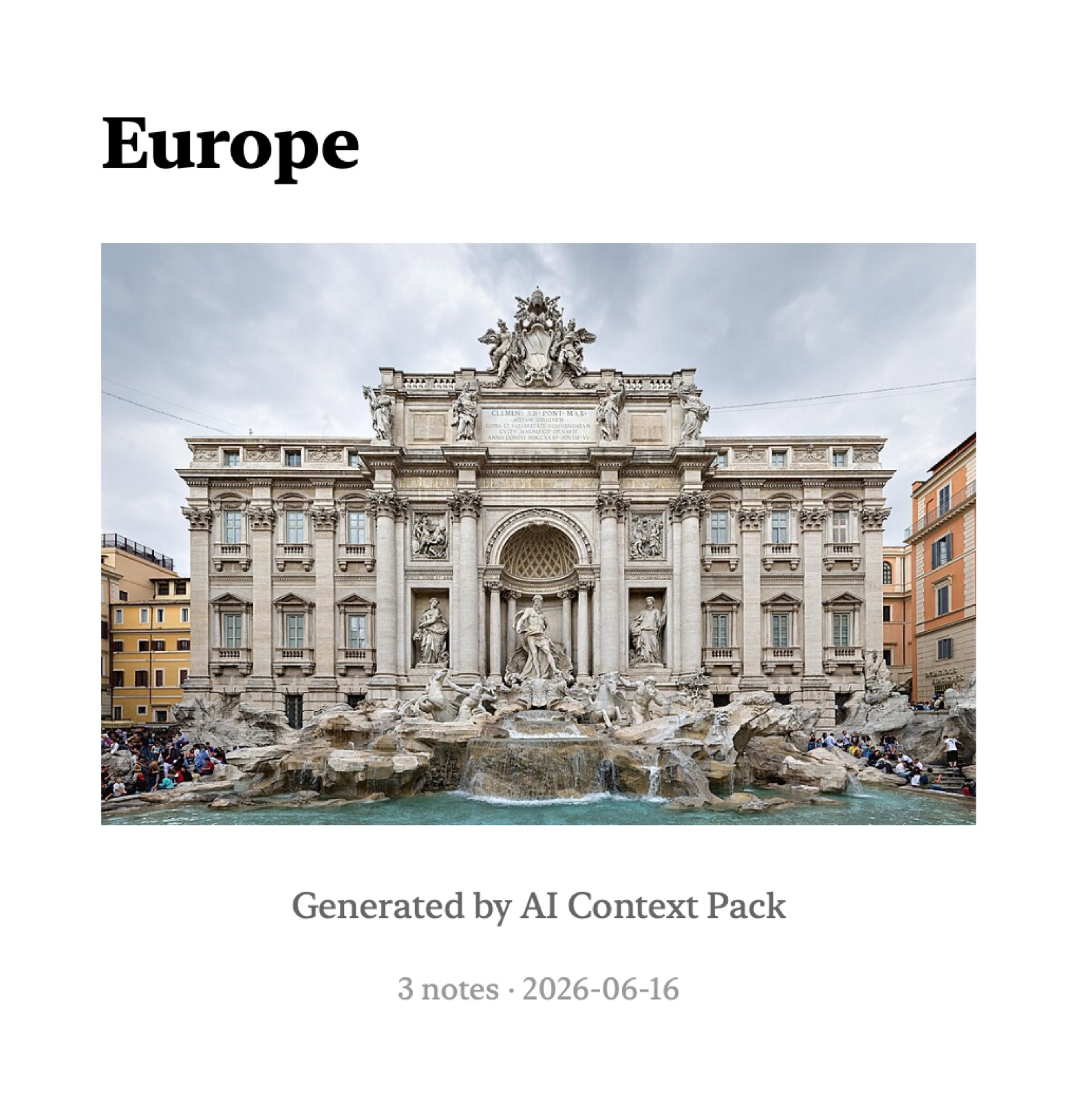
Knowledge Book — read your notes in Kindle, Apple Books, or Kobo
Example Use Cases
Research — Notes → AI Brief → ChatGPT. Ask deep questions about your research.
Learning — Study notes → Knowledge Book → Kindle. Read your notes as a structured book.
Project — Docs → Context Pack → Claude Code. Package specs for AI-assisted development.
Team sharing — Workspace → Notion ZIP → Notion. Share AI-ready knowledge with your team.
Installation
Community Plugins (Recommended)
- Open Settings → Community plugins → Browse
- Search for AI Context Pack
- Install and enable
Manual Installation
Download the latest release and copy main.js, manifest.json, and styles.css to:
.obsidian/plugins/context-pack-for-notebooklm/
Sample Vaults
| Vault | Notes | Download |
|---|---|---|
| 🇺🇸 English | 86 notes | vault-sample-en.zip |
| 🇯🇵 Japanese | 86件 | vault-sample-jp.zip |
Part of the Dualyze Ecosystem
| Tool | Role |
|---|---|
| DualyzeAI | Compare & Analyze |
| Obsidian | Save & Organize |
| AI Context Pack | Package & Prepare |
| Dualyze Notes | Capture & Sync |
| Dualyze Structure | Structure & Visualize |
Details
AI Brief — full details
AI Brief analyzes a folder and generates:
- Executive Insight — one-paragraph knowledge summary
- Topic Clusters — groups of related notes with representative examples
- Knowledge Map — Mermaid diagram showing cluster relationships
- Relationship Map — similarity scores between individual notes
- Knowledge Health — orphan notes, duplicate candidates, connectivity score
- Suggested Prompts — ready-to-use AI prompts for your content
AI Brief is saved as a Markdown file with frontmatter, making it reusable across all workflows.
AI MOC — full details
AI MOC (Map of Content) is generated from an AI Brief or any note.
It follows wikilinks outward to build a structured navigation layer:
Root Note
    │
    ├── Core Concepts
    │       └── Related Notes
    │
    └── Referenced By
AI MOC can be used directly as Context Pack source material.
Notion Workspace Export — full details
Export an entire Obsidian workspace as a Notion-ready ZIP.
What's included:
README.md— import guide and workspace overviewAI Brief.md— workspace analysisAI MOC.md— structured map of contentNotes/— all source notes with Obsidian syntax convertedassets/— local images collected from notes
Obsidian syntax conversions:
![[image.jpg]]→(copied to assets)→ kept as-is (no download needed)[[page]]→[page](page.md)[[page|alias]]→[alias](page.md)- Frontmatter stripped
How to import into Notion:
- Open Notion
- Go to Settings → Import
- Choose ZIP
- Upload the generated ZIP
Knowledge Book (EPUB) — full details
Knowledge Books are generated from an AI Brief and its source notes.
Structure:
- Cover page with title, cover image (if found), note count, and date
- AI Brief as a preface (diagnostic sections removed)
- Hierarchical table of contents from AI Brief clusters
- Source notes as book chapters
- Embedded images from note content
Supported readers: Kindle, Apple Books, Kobo, Calibre, and any EPUB reader.
How to create a Knowledge Book
- Generate an AI Brief from a folder.
- Right-click the generated AI Brief.
- Choose Create Knowledge Book (EPUB).
Context Pack format
Context Packs are single Markdown files that bundle related notes.
Each pack includes:
- A structured header with source, date, and note count
- Clean note content (frontmatter stripped, Obsidian syntax removed)
- AI-specific instructions for the selected output target
- Token count estimate
Source options: folder, tag, MOC, AI MOC, selected notes, daily notes.
Supported AI Assistants
| AI | Chat | Project / Notebook |
|---|---|---|
| ChatGPT | ✓ | ✓ Projects |
| Claude | ✓ | ✓ Project |
| Gemini | ✓ | ✓ Notebook |
| Claude Code | ✓ | — |
| NotebookLM | — | ✓ |
Project Knowledge Packs — freshness tracking
Track which notes were sent to ChatGPT Projects, Claude Projects, Gemini, or NotebookLM.
Know when notes were updated, new notes added, or files renamed. Re-export only when needed.
Daily Notes Pack
Create AI-ready packs from daily notes with date range selection, weekly summaries, and tag exclusion.
Changelog
Contributing
Issues and pull requests welcome on GitHub.
License
MIT