Search...Search plugins and themes...
⌘K
Sign in
  • Get started
  • Download
  • Pricing
  • Enterprise
  • Account
  • Obsidian
  • Overview
  • Sync
  • Publish
  • Canvas
  • Mobile
  • Web Clipper
  • CLI
  • Learn
  • Help
  • Developers
  • Changelog
  • About
  • Roadmap
  • Blog
  • Resources
  • System status
  • License overview
  • Terms of service
  • Privacy policy
  • Security
  • Community
  • Plugins
  • Themes
  • Discord
  • Forum / 中文论坛
  • Merch store
  • Brand guidelines
Follow us
DiscordTwitterBlueskyThreadsMastodonYouTubeGitHub
© 2026 Obsidian

Iris Companion

Markos NarinianMarkos Narinian13 downloads

Distinguish agent-authored notes with a banner and explorer dot.

Add to Obsidian
Iris Companion screenshot
  • Overview
  • Scorecard
  • Updates3

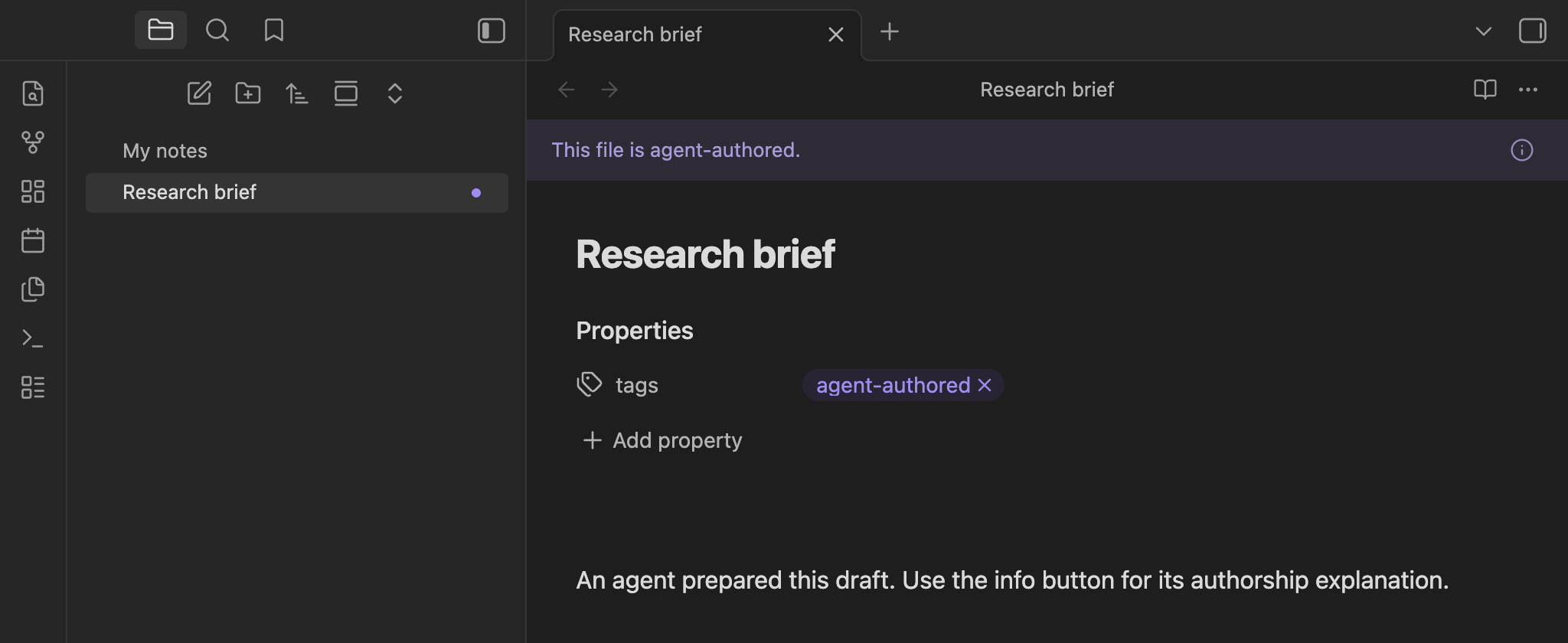
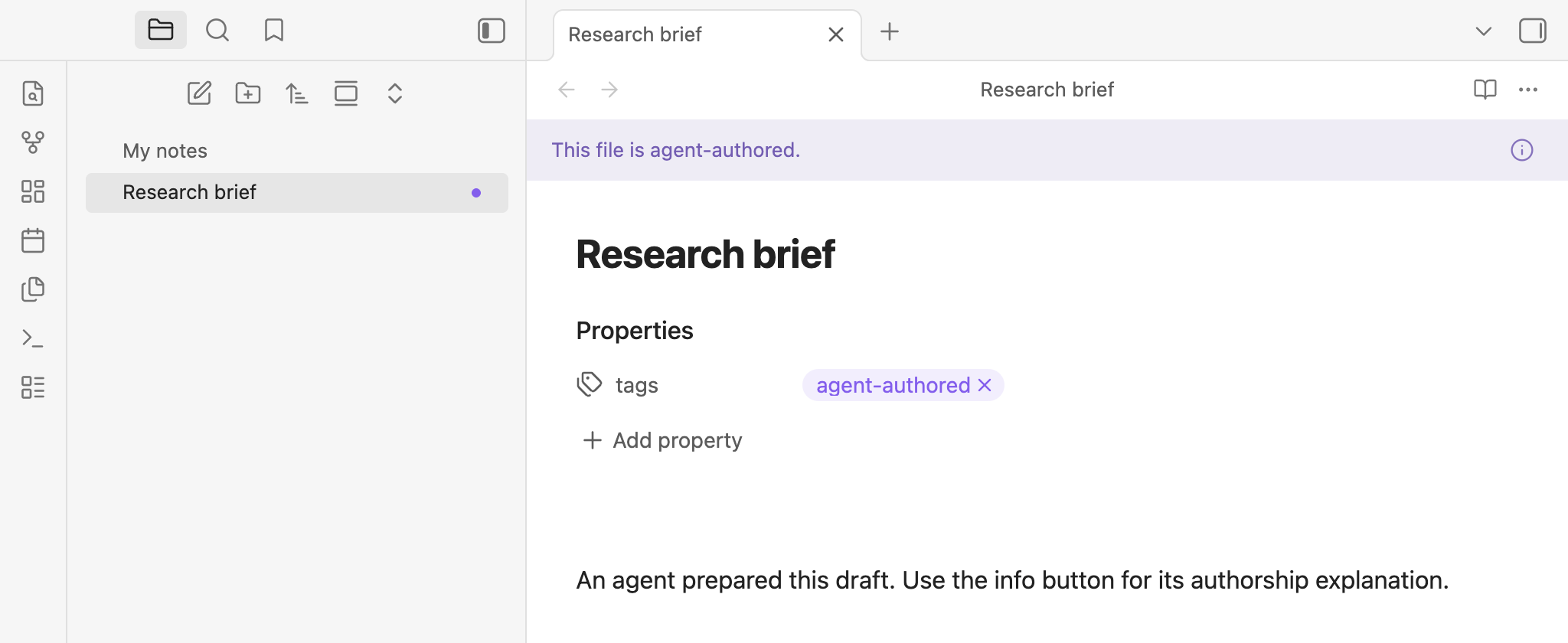
Spot agent-authored notes at a glance in Obsidian.

Dark theme Light theme
Agent-authored banner and explorer markers in dark mode Agent-authored banner and explorer markers in light mode

Features

  • Recognize the note you're reading. A compact banner identifies agent-authored files in reading and editing views. Its info button explains why it appears.
  • Find them in the explorer. Right-aligned dot markers use your theme's accent color and work alongside Color Tags.
  • Choose your indicators. Toggle the banner and explorer markers independently in Settings → Iris Companion.
  • Keep your vault private. No network requests or telemetry. Notes change only when you run a tagging command.

Tagging notes

Add #agent-authored inline or agent-authored to the note's tags property. Nested tags such as #agent-authored/reviewed also qualify; matching is case-insensitive. Tags inside code do not count. Iris uses explicit tags, not AI detection.

Two command-palette actions edit file properties only:

  • Iris Companion: Add agent-authored tag to file properties adds the exact root tag without duplicating it or removing existing nested tags.
  • Iris Companion: Remove agent-authored tag from file properties removes the root tag and all its descendants, preserving unrelated tags and properties.

Neither command changes inline tags or the note body. A matching inline tag will keep the indicators visible after property tags are removed. Obsidian may reformat YAML when updating properties.

Install locally

Requires Obsidian 1.8.7+. Not yet listed in the community directory.

  1. Build from source using the commands below.
  2. Copy main.js, manifest.json, and styles.css into <vault>/.obsidian/plugins/iris-companion/.
  3. Enable Iris Companion in Settings → Community plugins.

Development

Use Node.js 22.12+ or 24+ and a separate development vault.

npm ci
npm test
npm run lint
npm run build

npm run dev rebuilds on changes. Reload Iris in your development vault to test updates. See Obsidian's plugin tutorial for setup guidance.

For releases and community-directory submission, see Publishing.

License

MIT. Build tooling is adapted from the official Obsidian sample plugin (0-BSD).

HealthExcellent
ReviewPassed
About
Spot agent-authored notes at a glance in reading and editing views. Display a compact banner and right-aligned dot-and-ring explorer markers that use your theme's accent color. Tag notes with #agent-authored (inline or in YAML) and run commands to add/remove the property tag without altering the note body or sending data off-device.
TagsPropertiesAppearance
Details
Current version
0.2.1
Last updated
Yesterday
Created
2 days ago
Updates
3 releases
Downloads
13
Compatible with
Obsidian 1.8.7+
Platforms
Desktop, Mobile
License
MIT
Report bugRequest featureReport plugin
Author
Markos NarinianMarkos Narinianmarkosnarinian
markosnarinian.com
GitHubmarkosnarinian
  1. Community
  2. Plugins
  3. Tags
  4. Iris Companion

Related plugins

Colored Bases Properties

Color property lists and formula properties in Bases.

Supercharged Links

Add attributes to internal links with the values of target note's frontmatter attributes.

Colored Tags

Colorize tags in different colors to visually distinguish them from each other.

Pretty Properties

Makes note properties look more fun: adds side image, banners, list property colors and allows to hide specific properties.

Badges

Add inline badges/callouts to notes.

Tags Overview

An extended tags panel where tagged files can be easily viewed, filtered, and accessed.

Bases CMS

Manage your notes in bases like a content management system.

Advanced Canvas

Supercharge your canvas experience. Create presentations, flowcharts and more.

Minimal Theme Settings

Control the colors and fonts in Minimal Theme.

Hider

Hide interface elements such as tooltips, status bar, titlebar, and more.