InsightMesh Viewer
 aucontraire122 downloads
Browse InsightMesh provenance read-only: the conversations, checkpoints, decisions, and diffs behind each generated wiki page.
- Overview
- Scorecard
- Updates3
A read-only Obsidian plugin that visualizes the provenance behind the wiki pages produced by InsightMesh. For any generated page, it shows which conversations and checkpoints produced it, the decisions and rationale behind each edit, and how the page changed over time.
This is to InsightMesh's provenance data what a repository browser is to a git repo: the raw history lives underneath, and this plugin is the domain-aware layer on top. It never writes anything, runs entirely locally, and makes no network requests.
You generate the provenance data by running insightmesh-core over your AI chat transcripts. This plugin only reads and displays that data; it does not generate it. Without an InsightMesh history in your vault, there is nothing for the plugin to show.
Features
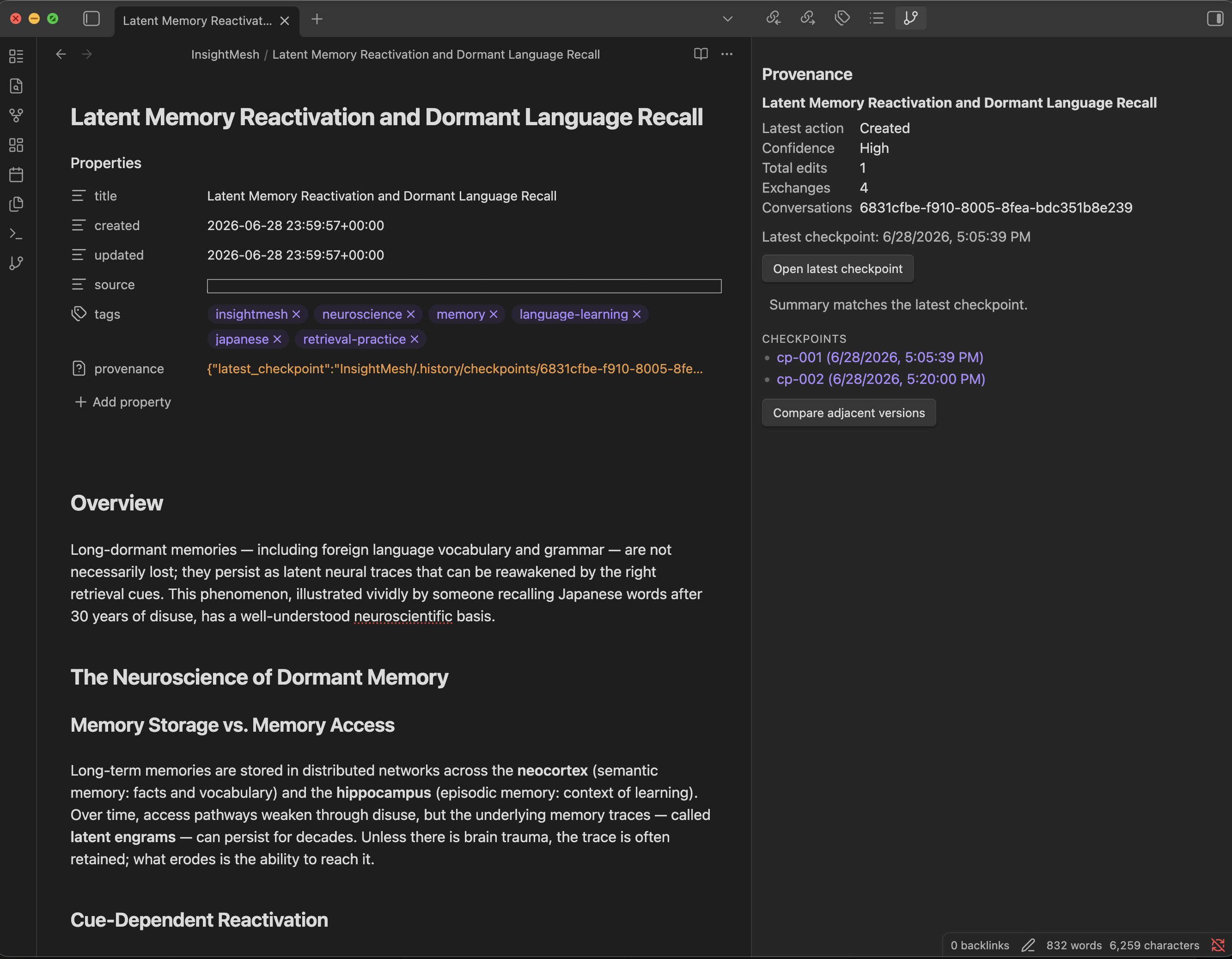
- Provenance summary for the active page: latest action, confidence, total edits, contributing exchanges and conversations, and the latest checkpoint time.
- Drift flag when the page's summary diverges from its latest checkpoint (for example, after a manual edit).
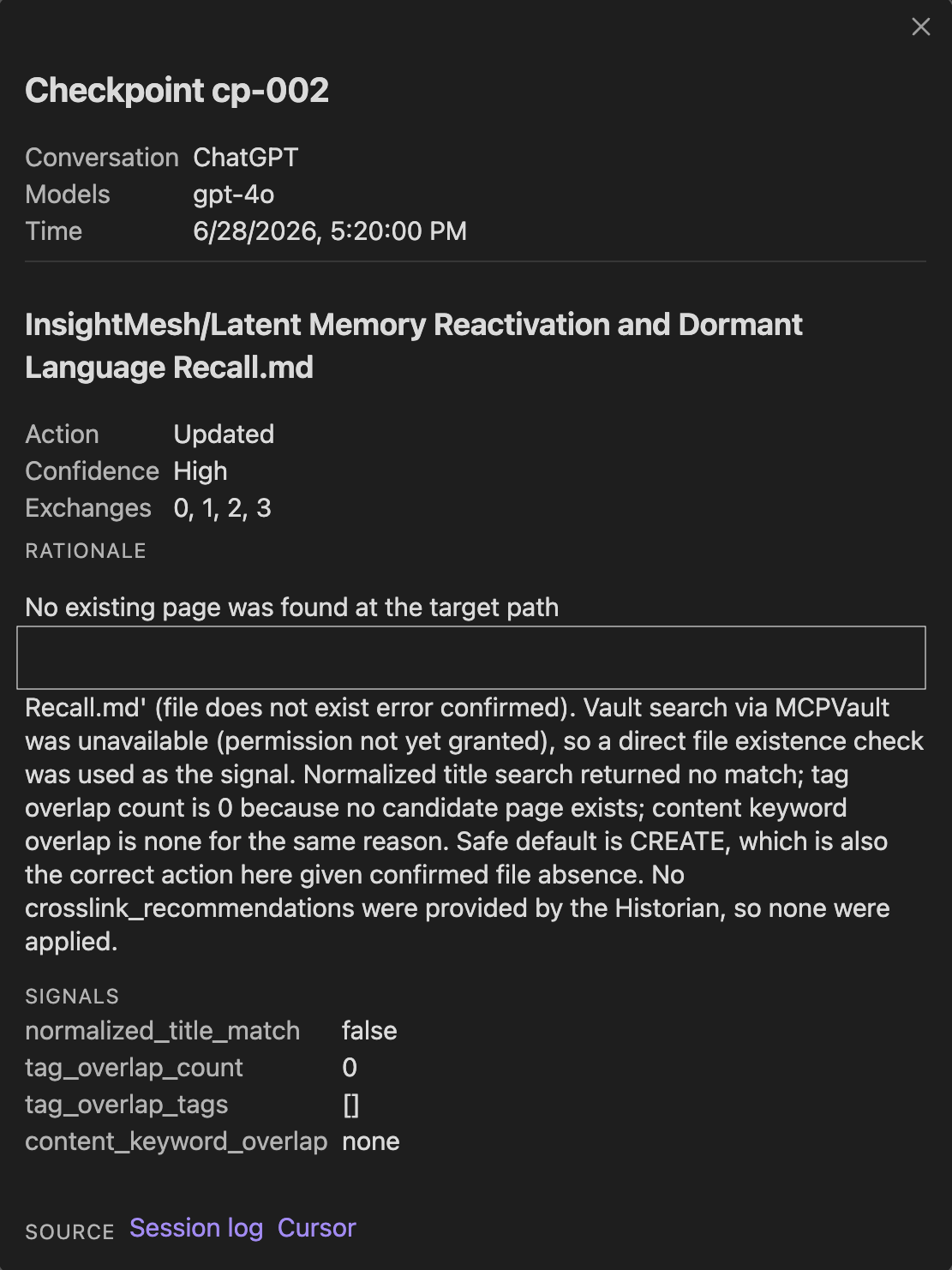
- Readable checkpoint detail: each editor decision with its rationale rendered as markdown, confidence, action, exchanges, and signals, plus a friendly provider label (Claude, ChatGPT, or Local transcript) and the models used.
- Checkpoint list: every checkpoint that touched the page, across all conversations, time-ordered.
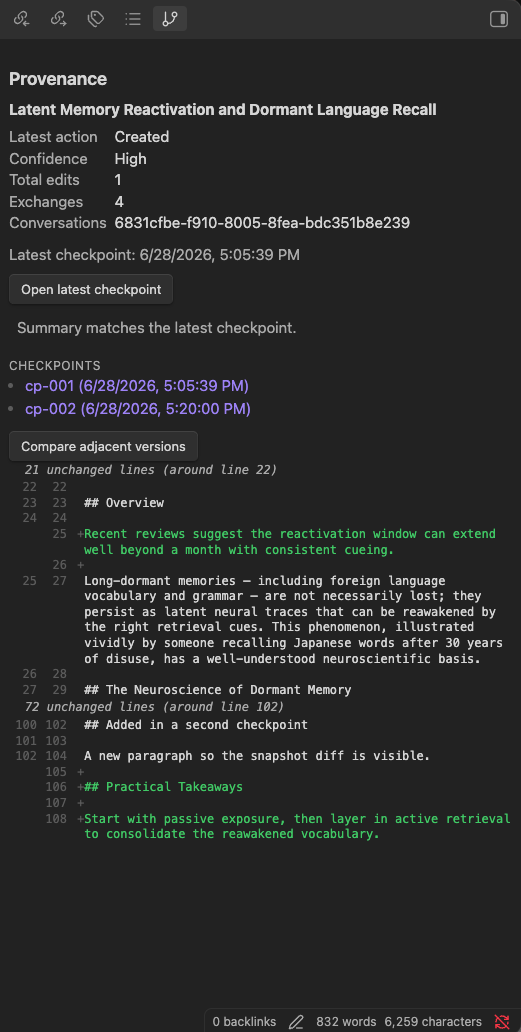
- Snapshot diff: a GitHub-style unified diff between the two most recent recorded versions of the page, with collapsed hunks and old/new line numbers.
- Run log and cursor views: click a checkpoint's source links to open a structured run log (the pipeline trace of what each agent did during the batch, including drafts that did not land) and a readable cursor (status, checkpoint number, last-updated time, and the topics-covered digest), each with a Show raw toggle.
Screenshots
The provenance panel for the active page, with its contributing checkpoints:
A checkpoint rendered as a readable view: the decision, its rationale, the signals behind it, and links to the source:
A unified diff between two recorded versions of a page:
Requirements
- Obsidian desktop, version 1.7.2 or later. This plugin is desktop only for v0.1.
- A vault containing the InsightMesh history produced by insightmesh-core (the
InsightMesh/.history/folder), at schema version 1. - A
gitbinary on your PATH (used read-only, for the snapshot diff only).
Install
Community plugins (recommended)
- In Obsidian, open Settings, then Community plugins.
- Select Browse, search for "InsightMesh Viewer", and Install.
- Enable "InsightMesh Viewer".
BRAT (for pre-release builds)
To track the latest build before it reaches the registry:
- Install BRAT from Community plugins.
- In BRAT settings, choose "Add Beta Plugin" and paste:
aucontraire/insightmesh-obsidian - Enable "InsightMesh Viewer".
Manual
- Download
manifest.json,main.js, andstyles.cssfrom the latest release. - Copy them into
<vault>/.obsidian/plugins/insightmesh-viewer/. - Reload Obsidian and enable "InsightMesh Viewer" in Community plugins.
Usage
- Open a vault that contains an
InsightMesh/folder with generated pages. - Open the provenance panel: click the ribbon icon, or run the command "Open provenance view".
- Open any generated page that carries a
provenance:frontmatter block. The panel shows the summary; use "Open latest checkpoint" or the checkpoint list for detail, and "Compare adjacent versions" for the diff.
Pages without a provenance: block show a clear empty state.
Read-only by design
The plugin never writes to, modifies, creates, deletes, stages, or commits any file in your vault or in the provenance history. There is no UI action anywhere that mutates anything.
The snapshot diff is the only feature that reaches outside the Vault API: it runs the system git binary to read two recorded revisions of a page from the shadow repository. The community plugin directory flags this as a shell-execution capability; in practice it is tightly bounded:
- Read-only: only
git logandgit showrun. Nothing is ever written, staged, or committed. - No shell: git is invoked directly with a fixed argument list (Node's
execFile, not a shell command string), so the plugin cannot run arbitrary commands and there is no command-injection surface. - Desktop only and guarded: every call is behind a filesystem-adapter check, which is why the plugin is
isDesktopOnly. If git is unavailable the diff degrades to a clear message and the rest of the plugin works normally. - Small by choice: bundling a JavaScript git implementation was rejected to keep the plugin lightweight.
The plugin makes no network requests and contains no telemetry. Everything it reads stays on your machine.
Compatibility
| InsightMesh Viewer | insightmesh-core schema_version |
|---|---|
| 0.x | 1 |
A future core schema change would trigger a coordinated plugin release.
The run-log and cursor views support the insightmesh-core session-log and cursor shape as of core v0.5.0. These are informal artifacts (the session log is unversioned), so a future core change to them may require a plugin update; the views parse defensively and fall back to Show raw when a field is missing or unexpected.
Settings
- History location: vault-relative path to the provenance history (default
InsightMesh/.history). - Diff display: show the snapshot diff inline in the panel or in a modal.
Troubleshooting
- The panel is empty or missing: open it with the ribbon icon or the "Open provenance view" command. It opens as a tab in the right sidebar; it does not open automatically.
- "No provenance for this page": the page was not generated by insightmesh-core, or its
provenance:frontmatter block is absent. Open one of the generated pages underInsightMesh/. - "Nothing to compare yet": the page has only one recorded snapshot. The diff needs at least two committed revisions of the page in the shadow repository.
- The diff reports git is unavailable: install
gitand make sure it is on your PATH. The diff is the only feature that needs it. - Wrong or missing data after moving the history: set the correct path in the plugin settings if your history is not at the default
InsightMesh/.history.
Limitations and roadmap
The plugin is intentionally small. Known limitations and planned improvements:
- Desktop only; mobile support is out of scope for now.
- The run-log and cursor views consume informal core artifacts; if a future core version changes their shape, the structured view degrades to Show raw until the plugin is updated.
- The drift flag reports divergence but does not offer to reconcile, by design (the plugin is read-only).
- Planned for later versions: a cross-conversation timeline, filtering by confidence or action, and search across checkpoints.
Development
npm install
npm run dev     # watch-mode build
npm run build   # production build (typecheck + bundle)
npm run lint
npm test        # unit tests for the pure data layer
For live development, symlink this repo into a vault at <vault>/.obsidian/plugins/insightmesh-viewer/ and run npm run dev.
Acknowledgements
Thanks to obsidian-sample-plugin and obsidian-git for showing what good Obsidian plugin code looks like.
Contributing
Issues and feature requests are welcome at the issue tracker. Note that the provenance data format is owned by insightmesh-core, so a problem with the underlying data may belong in that project's tracker.
License
0BSD