Search...Search plugins and themes...
⌘K
Sign in
  • Get started
  • Download
  • Pricing
  • Enterprise
  • Account
  • Obsidian
  • Overview
  • Sync
  • Publish
  • Canvas
  • Mobile
  • Web Clipper
  • CLI
  • Learn
  • Help
  • Developers
  • Changelog
  • About
  • Roadmap
  • Blog
  • Resources
  • System status
  • License overview
  • Terms of service
  • Privacy policy
  • Security
  • Community
  • Plugins
  • Themes
  • Discord
  • Forum / 中文论坛
  • Merch store
  • Brand guidelines
Follow us
DiscordTwitterBlueskyThreadsMastodonYouTubeGitHub
© 2026 Obsidian

Inkdown

Cheng HeCheng He4 downloads

Write by hand on a tablet and get Markdown at the cursor: text, LaTeX and Mermaid, read from your handwriting by Claude or another vision model.

Add to Obsidian
  • Overview
  • Scorecard
  • Updates7

Write by hand on an iPad; get Markdown in your note.
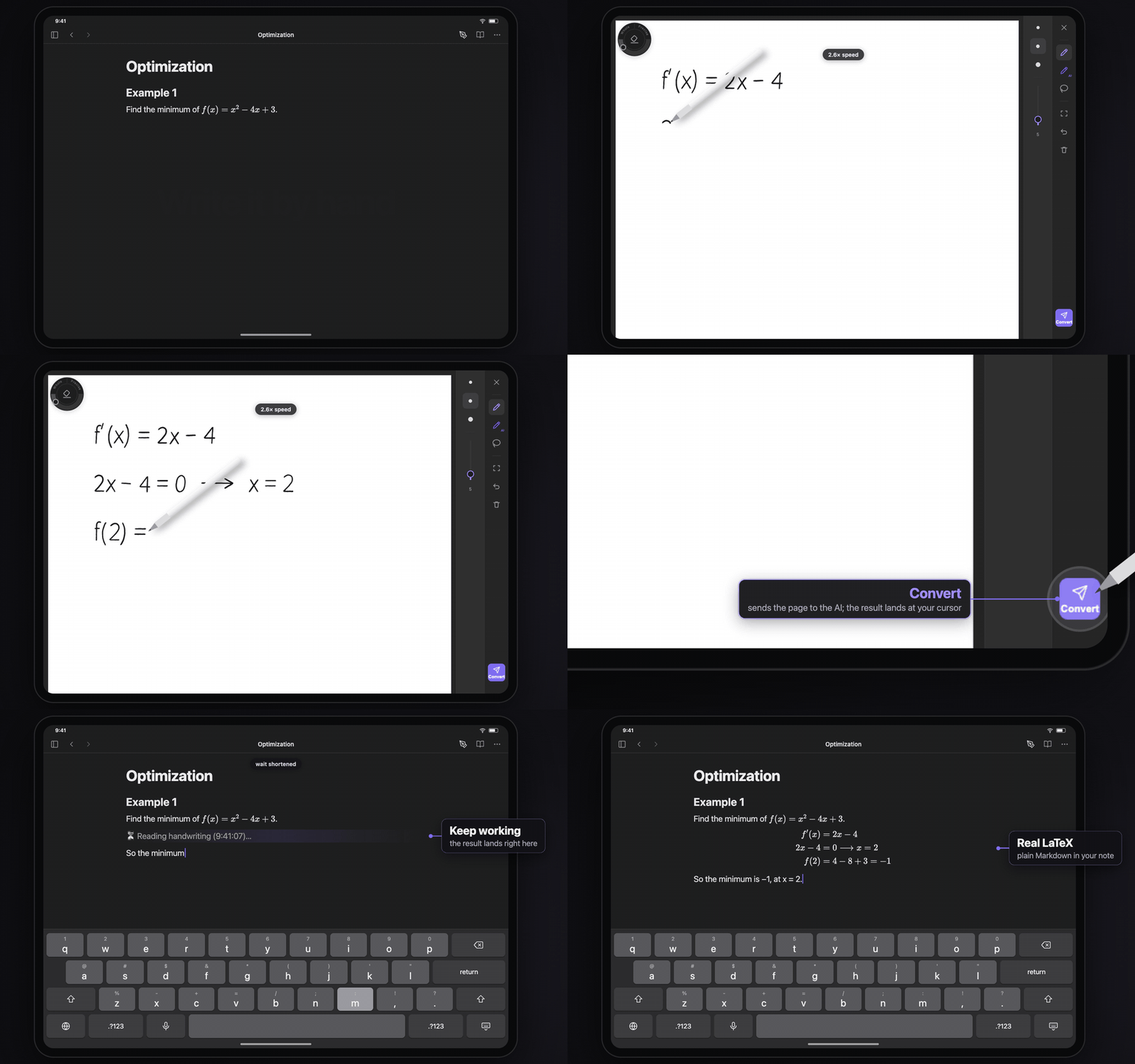
A derivation written by hand on the pad; after Convert it is in the note as LaTeX

What lands is plain Markdown: text in your language, maths as LaTeX, drawings as Mermaid or SVG. The ink is not kept.

How to use
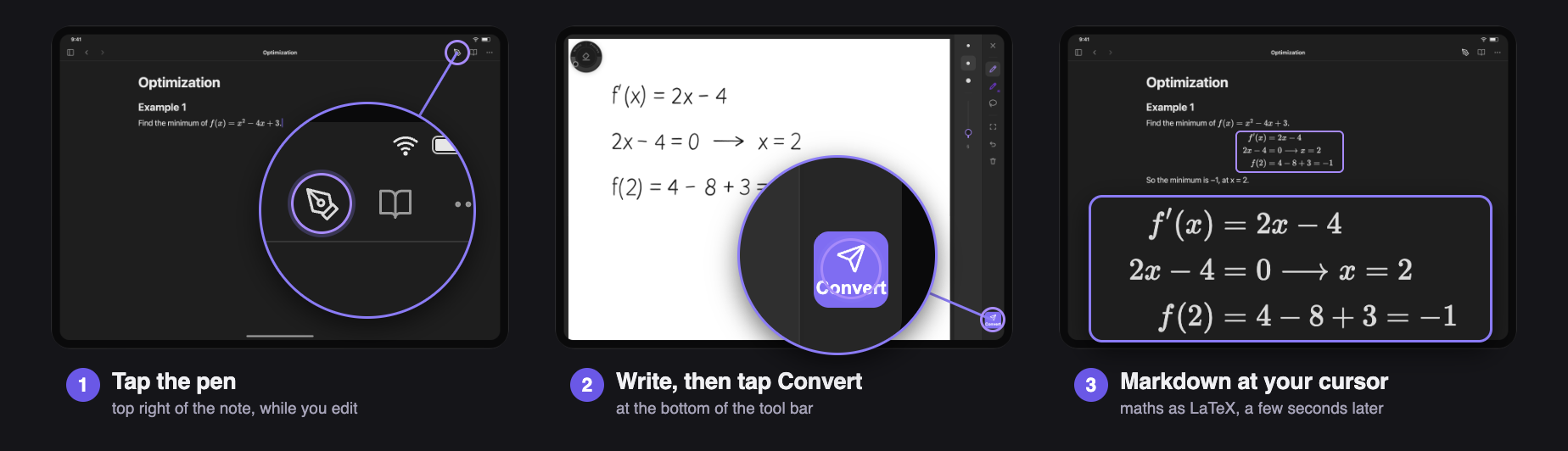
1. Tap the pen at the top right of the note. 2. Write, then tap Convert at the bottom of the tool bar. 3. The Markdown appears at your cursor.

The pad also opens from the editor's right-click / long-press menu and the command Handwrite at the cursor.

What it reads

Graphs become an SVG
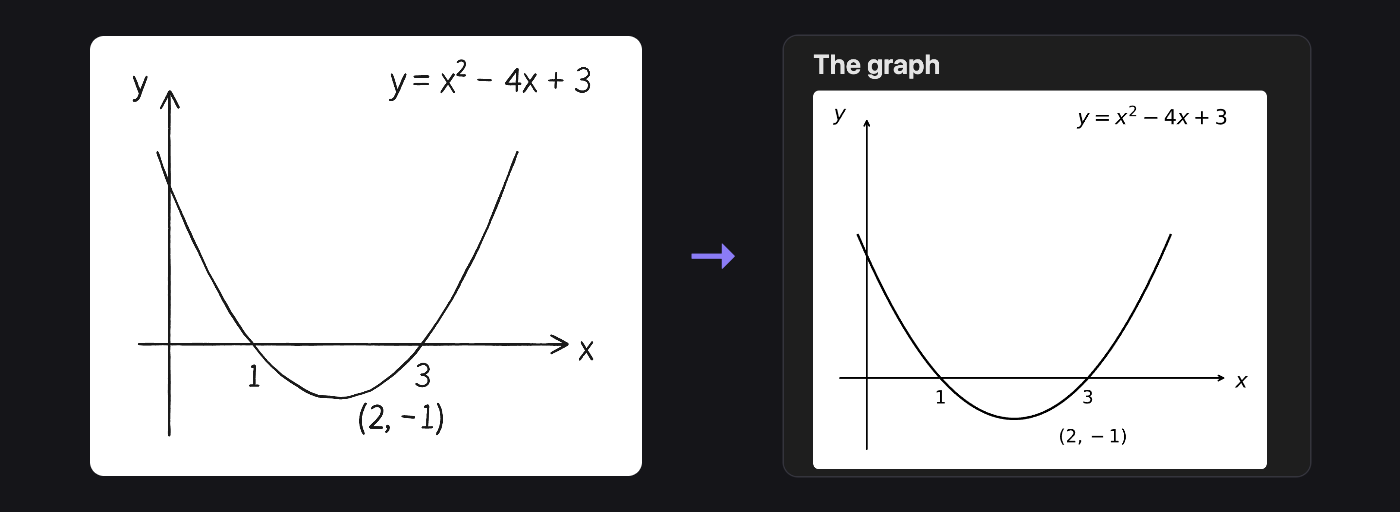
A parabola sketched by hand, and the SVG it became

Diagrams become Mermaid

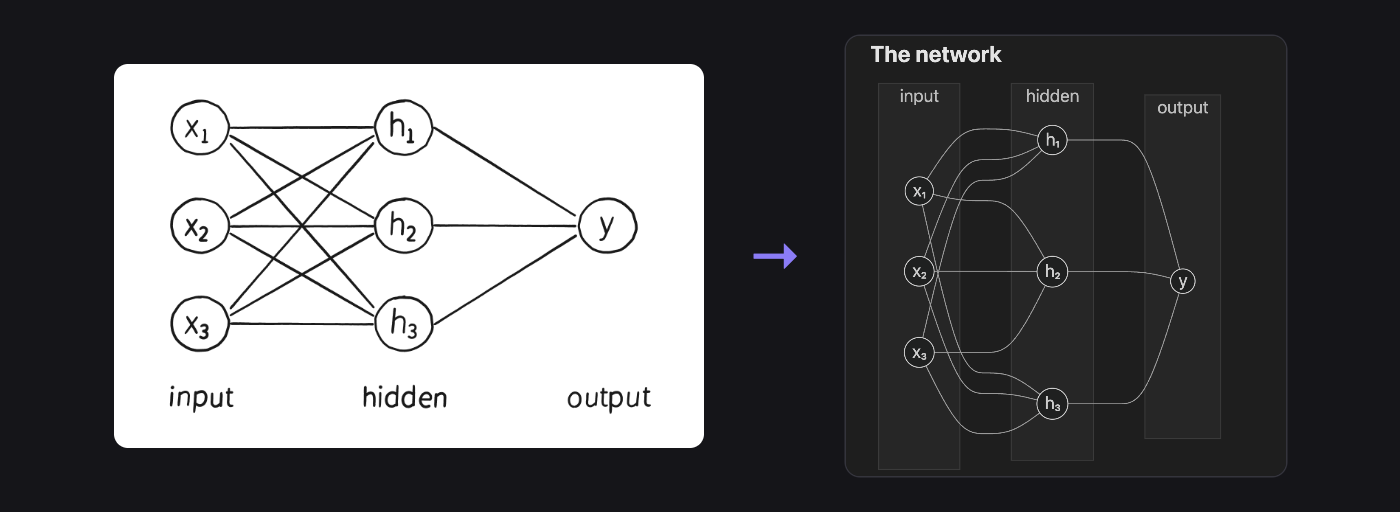
A small neural network drawn by hand, and the Mermaid diagram it became

Mistakes are flagged, never fixed

What you wrote stays as you wrote it; a warning under it says what looks wrong and why.
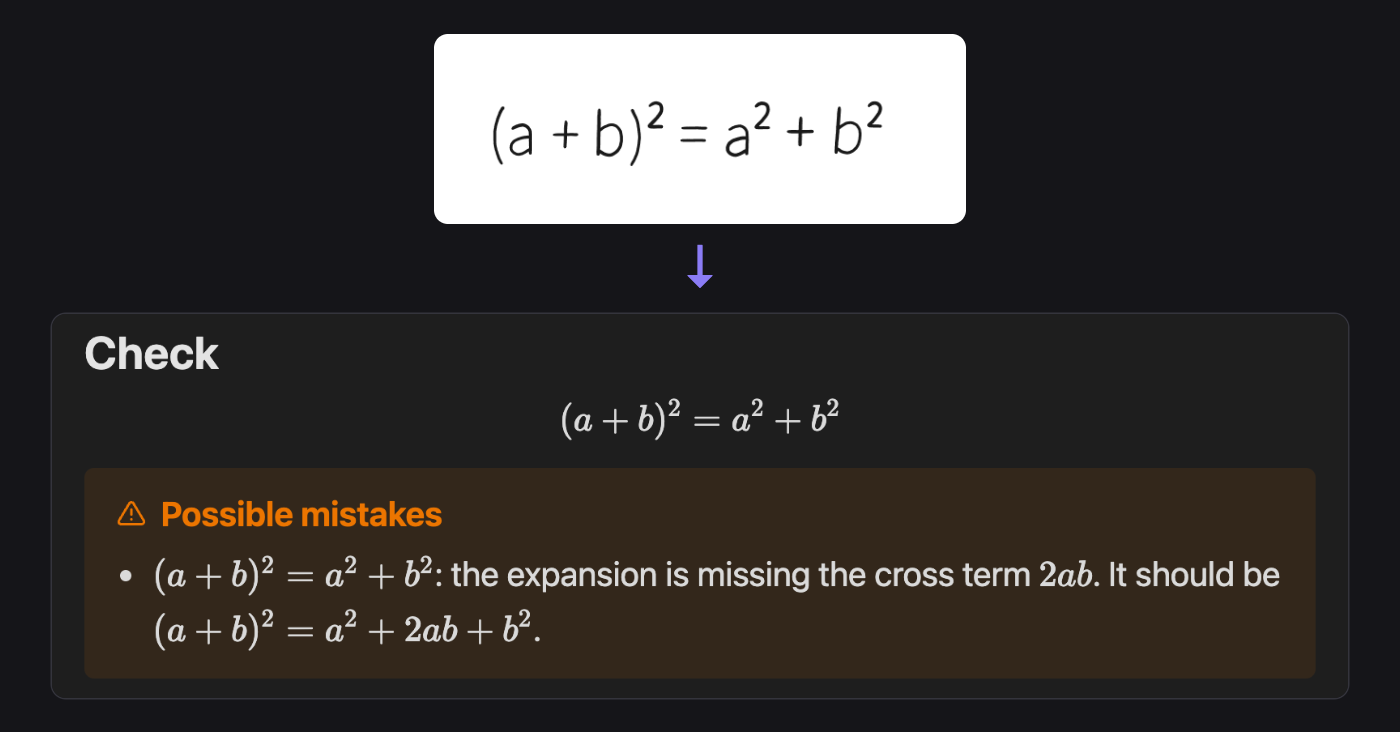
(a + b)² = a² + b², transcribed as written, with a warning that the cross term 2ab is missing

Two pens: one for your content, one for talking to the AI
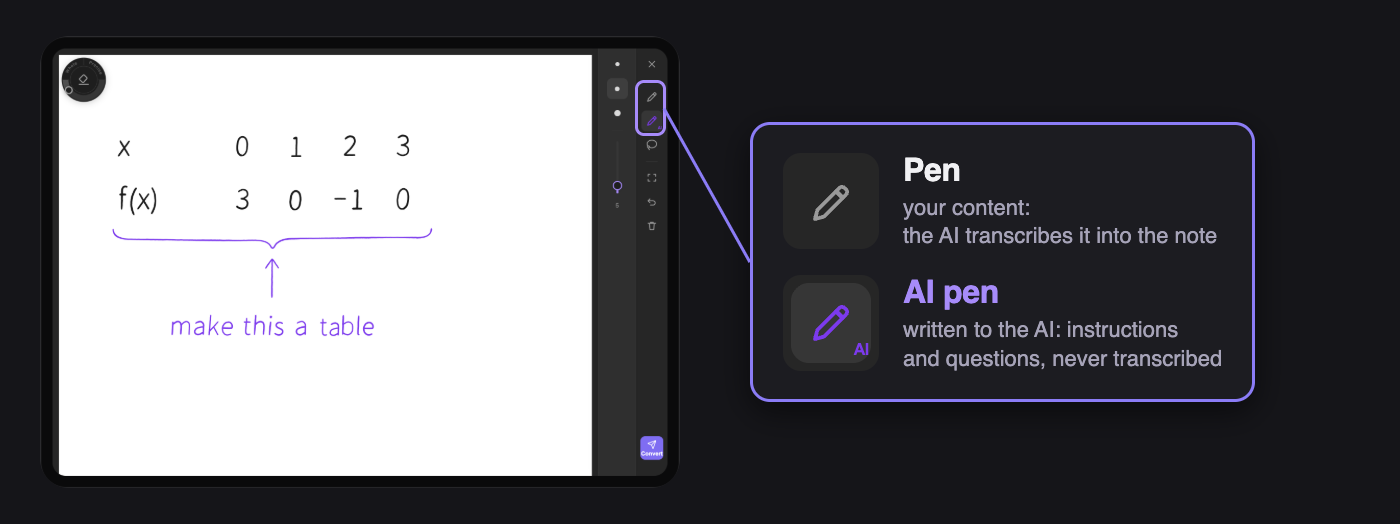
The pad's tool bar has two pens: the Pen, for content the AI transcribes, and the AI pen, for instructions and questions written to the AI, never transcribed

What you write with the Pen is your content, and the AI transcribes it. What you write with the AI pen (violet) the AI knows is written to it, so you can annotate the page freely and none of it is mistaken for your content. There are two ways to use it.

Tell it what to do with what you wrote, such as "make this a table", "skip this" or "this symbol is ξ":
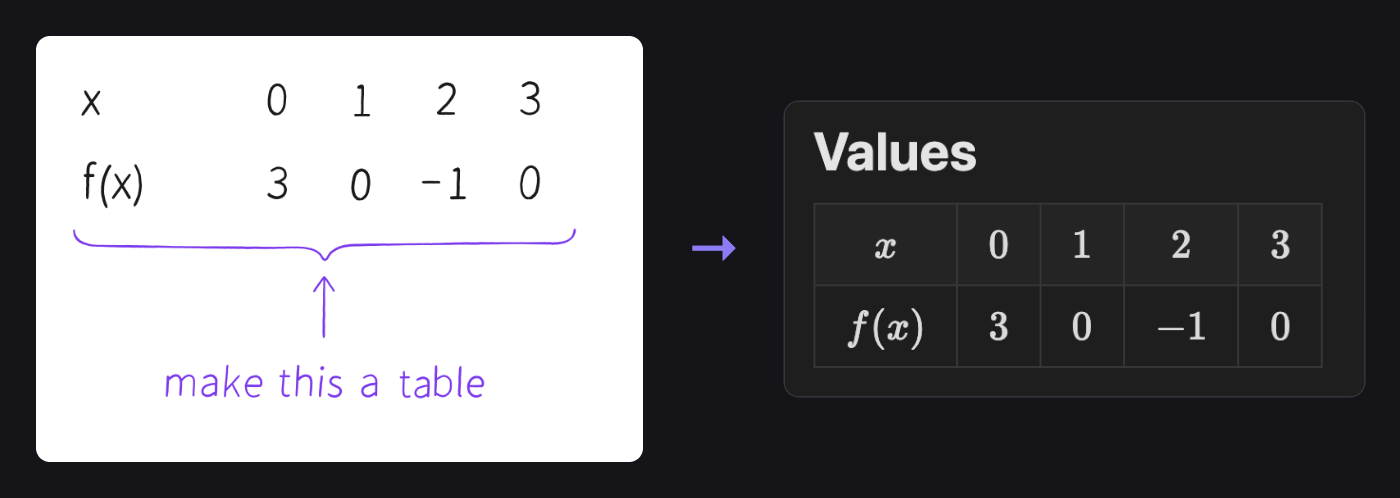
Values with "make this a table" written under them with the AI pen, and the Markdown table they became

Ask a question on the side: write "btw, ..." and the answer comes back in a callout under the result.
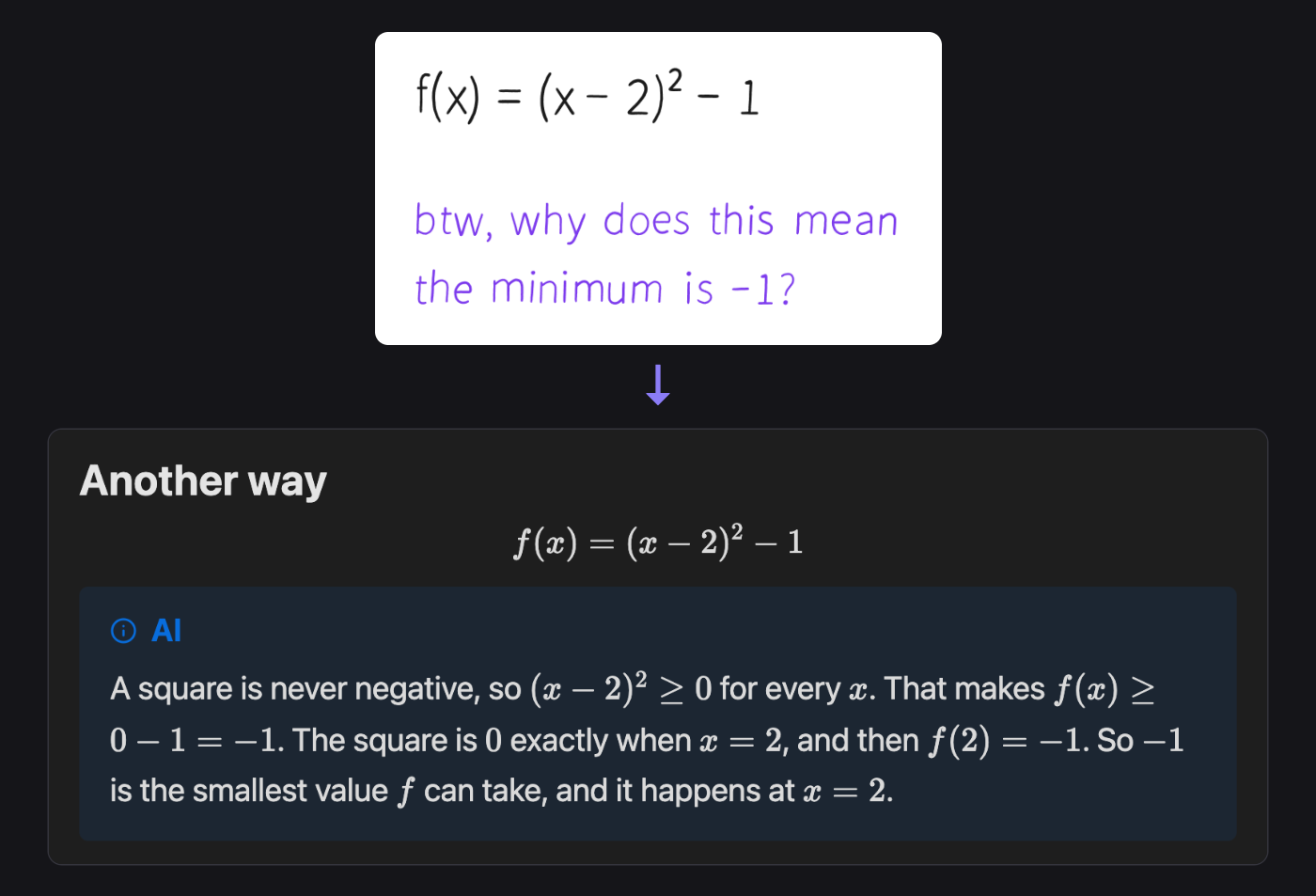
f(x) = (x − 2)² − 1, with "btw, why does this mean the minimum is −1?" written with the AI pen; the note gets the formula, and the answer in a callout under it

Setting up

  1. Settings -> Community plugins -> Browse: install and enable Inkdown.
  2. In its settings, pick Claude or an OpenAI-compatible service.
  3. Under API key: Link... -> Add secret..., and paste your key.

The key stays in Obsidian's keychain on the device, never in the vault. Requires Obsidian 1.11.4 or later.

Privacy and cost

  • Only when you tap Convert, one image of the ink and a little of the note around the cursor go to the provider, with your own key.
  • With Claude Opus 5.5 a page costs one to three US cents.
  • The only clipboard use is a Copy button, shown if you delete a placeholder before its result arrives.

Good to know

  • Built for the iPad and Apple Pencil; a mouse works on desktop.
  • Recognition is as good as the model, so read what lands.
  • With an OpenAI-compatible service, drawings are described in words.
  • English and Chinese, following Obsidian's language.

Development notes · MIT license

HealthExcellent
ReviewSatisfactory
About
Write by hand on iPad with Apple Pencil and convert ink to Markdown: prose in your language, maths as LaTeX ($...$, $$...$$), and diagrams as Mermaid. Open the full-screen sheet from the note header and tap Convert to replace a placeholder at the cursor with the generated Markdown while discarding the raw ink.
AIWritingLaTeX
Details
Current version
1.0.1
Last updated
5 hours ago
Created
2 months ago
Updates
7 releases
Downloads
4
Compatible with
Obsidian 1.11.4+
Platforms
Desktop, Mobile
License
MIT
Report bugRequest featureReport plugin
Author
Cheng HeCheng Hestanh123h
GitHubstanh123h
  1. Community
  2. Plugins
  3. AI
  4. Inkdown

Related plugins

ChatGPT MD

A seamless integration of ChatGPT, OpenRouter.ai and local LLMs via Ollama into your notes.

Text Generator

Generate text content using GPT-3 (OpenAI).

BMO Chatbot

Generate and brainstorm ideas while creating your notes using Large Language Models (LLMs) such as OpenAI's "gpt-3.5-turbo" and "gpt-4".

Claudian

Embeds Claude Code/Codex and other local Agents as AI collaborators in your vault.

LanguageTool Integration

Advanced grammar and spell checking, powered by LanguageTool.

Smart Connections

Find related notes and excerpts while writing. Your AI link building copilot displays relevant content in graph + list view. A local embedding model powers semantic search. Zero setup. No API key.

Latex Suite

Make typesetting LaTeX math as fast as handwriting through snippets, text expansion, and editor enhancements.

Fast Note Sync

Real-time sync of your vaults across server, mobile, and web; shareable with anyone; supports REST and MCP integrations to build your personal AI knowledge base.

Copilot

Run AI agents such as Claude Code, Codex, and OpenCode inside your vault. Turn your second brain into a smart assistant that gets knowledge work done.

Karpathy LLM Wiki

Karpathy's LLM Wiki implementation plugin for Obsidian - turns notes and PDFs into a linked, LLM-powered knowledge base with entity pages, concept pages, graph-powered Q&A, and local-first privacy.