Influx
 jensmtg31k downloads
A bullet journaling plugin that aggregates a terse stream of backlinked clippings in the footer of notes.
- Overview
- Scorecard
- Updates28

Transform your Obsidian backlinks from simple links into rich context. Influx shows you the actual content surrounding each link, turning your note connections into genuine insights. Customize what you see and how you see it, making backlinks actually useful for research and discovery.
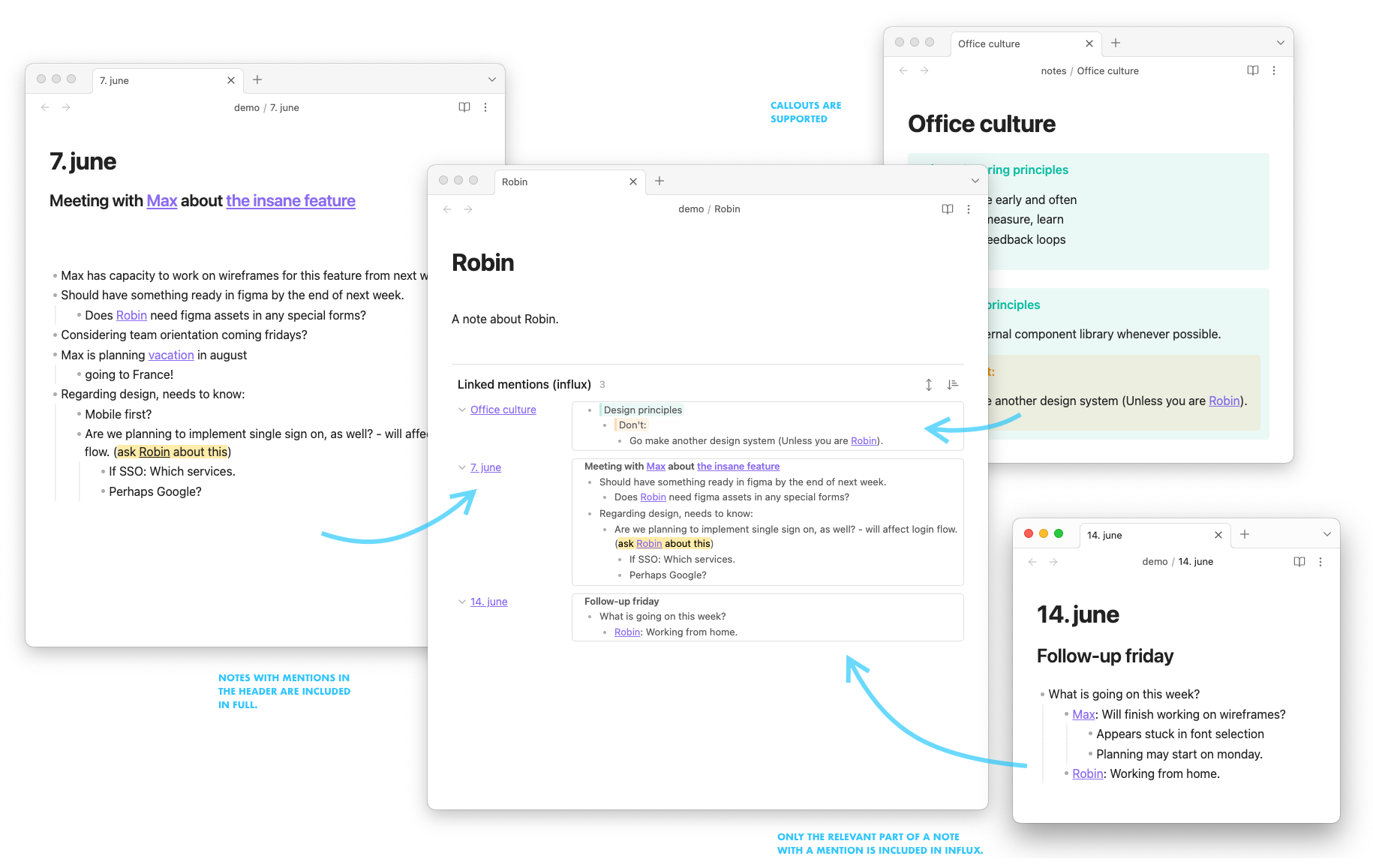
Why Influx over core backlinks?
- Rich context: See excerpts instead of just link titles
- Smart organization: Groups related content automatically
- Full control: Customize sorting, layout, and filtering
- Research ready: Perfect for academic work and deep knowledge discovery
Perfect for:
- Academic researchers: Trace citations and ideas across your knowledge base
- Knowledge managers: Build interconnected webs of understanding
- Writers: Track character development, themes, and plot points
- Lifelong learners: Discover unexpected connections in your notes
"I much prefer Influx over the core Backlinks plugin - it transforms how I discover connections in my research."
Join thousands of users who've discovered that seeing your connections shouldn't mean losing the context.
Installation
- Open Obsidian Settings → Community Plugins → Browse
- Search for "Influx" and click Install
- Enable the plugin
- Influx will automatically appear at the bottom of your notes
Tip: If you don't see Influx after installation, try restarting Obsidian or check that your notes have incoming links.
Getting Started
Once installed and enabled, Influx automatically appears at the bottom of your notes showing contextual backlinks. You'll see actual excerpts from linked notes instead of just empty titles.
Quick setup:
- Go to
Settings → Community Plugins → Influxto customize your experience - Open any note that has backlinks
- Scroll to the bottom to see Influx in action
- Try clicking on different backlinks to see the context
- Explore the settings to adjust excerpt length and grouping
Recommended settings for beginners:
- Excerpt Length: 150 characters (good balance of context vs brevity)
- Grouping: By hierarchy (organizes content logically)
- Max Items: 10 (keeps view manageable)
📖 Need more help? Check out our complete documentation for advanced configuration and usage examples.
Community & Support
- 📖 Documentation: Complete user guide
- 🐛 Bug Reports: Open an issue
- 💬 Feature Requests: Start a discussion
Maintainers
- Currently maintained by @semanticdata (Miguel Pimentel)
- Originally created by @jensmtg (Jens M Gleditsch)
Contributors & Sponsors
Thanks to everyone who has contributed to the development of Influx:
- @kenlim - Contributed to development through pull requests
- @funamorikeitou - Fixed compatibility with Obsidian's Map-based backlinks data structure
- ericlpeterson, alranel, FilSalustri, Josh2K, mrkuramoto, and Mat4m0 - Sponsors and supporters of ongoing maintenance
Transform your backlinks into insights. Install Influx today and see your notes in a whole new way.