Search...Search plugins and themes...
⌘K
Sign in
  • Get started
  • Download
  • Pricing
  • Enterprise
  • Account
  • Obsidian
  • Overview
  • Sync
  • Publish
  • Canvas
  • Mobile
  • Web Clipper
  • CLI
  • Learn
  • Help
  • Developers
  • Changelog
  • About
  • Roadmap
  • Blog
  • Resources
  • System status
  • License overview
  • Terms of service
  • Privacy policy
  • Security
  • Community
  • Plugins
  • Themes
  • Discord
  • Forum / 中文论坛
  • Merch store
  • Brand guidelines
Follow us
DiscordTwitterBlueskyThreadsMastodonYouTubeGitHub
© 2026 Obsidian

Notes Organizer

Jinay PatelJinay Patel

Automatic notes organization for Obsidian

Add to Obsidian
  • Overview
  • Scorecard
  • Updates1

This plugin automatically links and structures your notes into a second brain. Runs fully locally on your machine.

What it solves

I've always wanted to be able to jot down a thought, idea from a book/website, or a fix to an issue I might encounter later, but I've always found myself getting stuck on how to organize these notes.

I then end up going down a rabbit hole of trying to find different note-taking methods to organize these thoughts and spend more time doing that than actually creating the notes.

This plugin removes the friction of having to manually organize your notes. It uses the Zettelkasten method to automatically tag and link your notes to other relevant notes. This allows you to focus on just the note content and not the organization.

Installation

Make sure you have Obsidian installed. Then, download the latest release of the plugin from Obsidian's community plugins page.

Usage

LLM

Using the Gemini API

If you have a Gemini API key then you can put it into the plugin settings and it will use it to organize and query your notes.

Using Ollama

If you want to run everything locally, then simply run ollama locally on http://localhost:11434 and the plugin will automatically detect it and start using the LLM. Prior to running ollama though, you'll need to download the models, so run the following commands:

ollama pull qwen3:1.7b
ollama pull qwen3:4b
ollama pull nomic-embed-text # For the vector embeddings

Organizing notes

  1. Click the "Create New Note" button in the sidebar to create a note with a template applied.
  2. Write down your content in the note. Try to keep notes atomic meaning that they should be focused on a single idea or topic.
  3. When you're done, click the "Organize Note" button in the sidebar. It will automatically tag and link your note to other relevant notes.

You can also move notes around, update tag names, references, etc, and the Graph and Vector database will automatically update.

Querying notes

  1. Simply enter your question in the textarea in the sidebar.
  2. Click the "Submit" button to see the results.

How it works

Here is a diagram showing the architecture and flow of the plugin: Architecture diagram
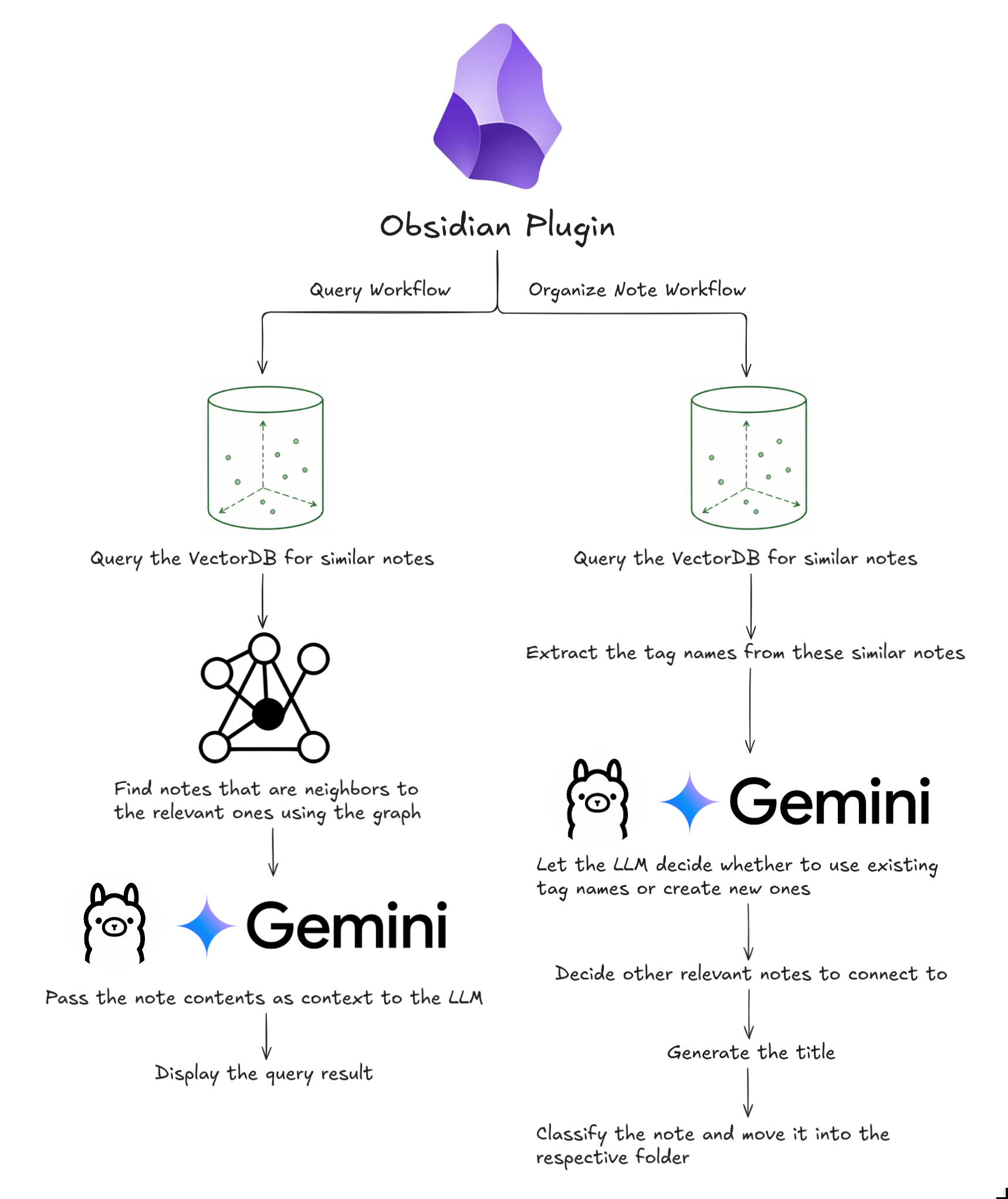
The code for both the workflows can be found in the workflows folder.

Tech Stack

  • Obsidian
  • Ollama
  • Langchain
  • Graphology
  • Typescript
  • Svelte
HealthExcellent
ReviewCaution
About
Automate note organization by letting an LLM pick the tags, title, and connections to other notes following the Zettelkasten note taking method.
DevelopersCommandsInterface
Details
Current version
1.0.1
Last updated
12 hours ago
Created
2 days ago
Updates
1 release
Compatible with
Obsidian 1.0.1+
Platforms
Desktop only
License
0BSD
Report bugRequest featureReport plugin
Sponsor
Support
Author
Jinay PatelJinay Patelgithub11200
GitHubgithub11200
  1. Community
  2. Plugins
  3. Developers
  4. Notes Organizer

Related plugins

Lean Terminal

Embedded terminal panel powered by xterm.js and node-pty - no external windows.

Commander

Customize your workspace by adding commands everywhere, create macros and supercharge your mobile toolbar.

Note Toolbar

Add customizable toolbars to your notes.

Hotkey Helper

Easily see and access any plugin's settings or hotkey assignments (and conflicts) from the Community Plugins tab.

Tray

Run Obsidian from the system tray for customisable window management and global quick notes.

Slash Commander

Customize the slash command list, assign each command an icon.

Notice logger

Logs all notices to the developer console, with optional prefix.

Claudian

Embeds Claude Code/Codex and other local Agents as AI collaborators in your vault.

Hider

Hide interface elements such as tooltips, status bar, titlebar, and more.

BRAT

Easily install a beta version of a plugin for testing.