Search...Search plugins and themes...
⌘K
Sign in
  • Get started
  • Download
  • Pricing
  • Enterprise
  • Account
  • Obsidian
  • Overview
  • Sync
  • Publish
  • Canvas
  • Mobile
  • Web Clipper
  • CLI
  • Learn
  • Help
  • Developers
  • Changelog
  • About
  • Roadmap
  • Blog
  • Resources
  • System status
  • License overview
  • Terms of service
  • Privacy policy
  • Security
  • Community
  • Plugins
  • Themes
  • Discord
  • Forum / 中文论坛
  • Merch store
  • Brand guidelines
Follow us
DiscordTwitterBlueskyThreadsMastodonYouTubeGitHub
© 2026 Obsidian

Image Share

iqijuniqijun471 downloads

Share selected text as beautiful images.

Add to Obsidian
  • Overview
  • Scorecard
  • Updates3

This image-sharing plugin for Obsidian (https://obsidian.md) allows you to share selected text as beautiful images.
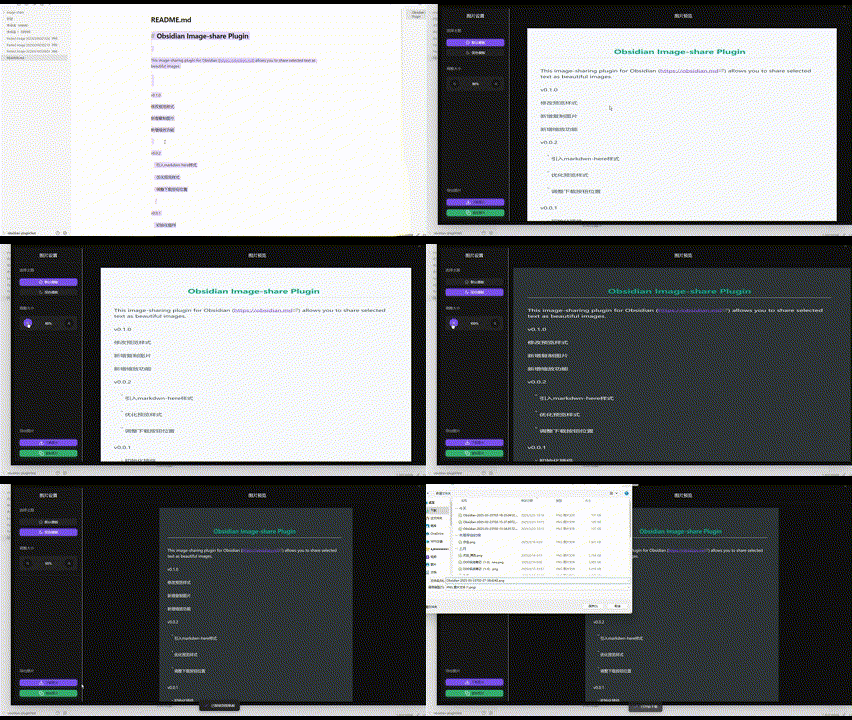
howtoUser

v0.1.0 修改预览样式 新增复制图片 新增缩放功能

v0.0.2

  • 引入markdwn-here样式
  • 优化预览样式
  • 调整下载按钮位置

v0.0.1

  • 初始化插件
62%
HealthGood
ReviewRisks
About
Share selected text as styled images directly from your notes. Copy images to clipboard, download them, and zoom previews to adjust appearance before saving.
ImagesExportAppearance
Details
Current version
0.1.2
Last updated
Last year
Created
Last year
Updates
3 releases
Downloads
471
Compatible with
Obsidian 1.8.0+
Platforms
Desktop, Mobile
License
Apache-2.0
Report bugRequest featureReport plugin
Sponsor
Buy Me a Coffee
Author
iqijuniqijun
github.com/iqijun
GitHubiqijun
  1. Community
  2. Plugins
  3. Images
  4. Image Share

Related plugins

Pretty Properties

Makes note properties look more fun: adds side image, banners, list property colors and allows to hide specific properties.

Pixel Banner

Enhance your notes with customizable banner images.

Heading Level Indent

Indenting content under headers based on their level.

Export Image plugin

Easily convert your article to image.

Minimal Theme Settings

Control the colors and fonts in Minimal Theme.

Hider

Hide interface elements such as tooltips, status bar, titlebar, and more.

Style Settings

Adjust theme, plugin, and snippet CSS variables.

Image Converter

Convert, compress, resize, annotate, markup, draw, crop, rotate, flip, align, drag-resize, rename with variables, and batch process images: WEBP, JPG, PNG, HEIC, TIF

Link Favicons

See the favicon for a linked website.

Image Context Menus

Image context menus (mostly on right click): Copy to clipboard, Open in default app, Show in system explorer, Reveal file in navigation, Open in new tab.