ICAP Learning Agent
 parapple564 downloads
Learn inside your notes: contextual explanations, recall with feedback, and in-document interaction, powered by the Pi agent runtime.
- Overview
- Scorecard
- Updates12
An Obsidian plugin for learning inside your own notes. There is no chat panel: explanations, questions and feedback appear in the note you are reading, and whatever you keep is plain Markdown. Its agent is Pi, built into the plugin and connected to your own model provider.
中文说明 · Obsidian 1.11.4+ on desktop, iPhone, iPad and Android · English and Chinese interface
Features
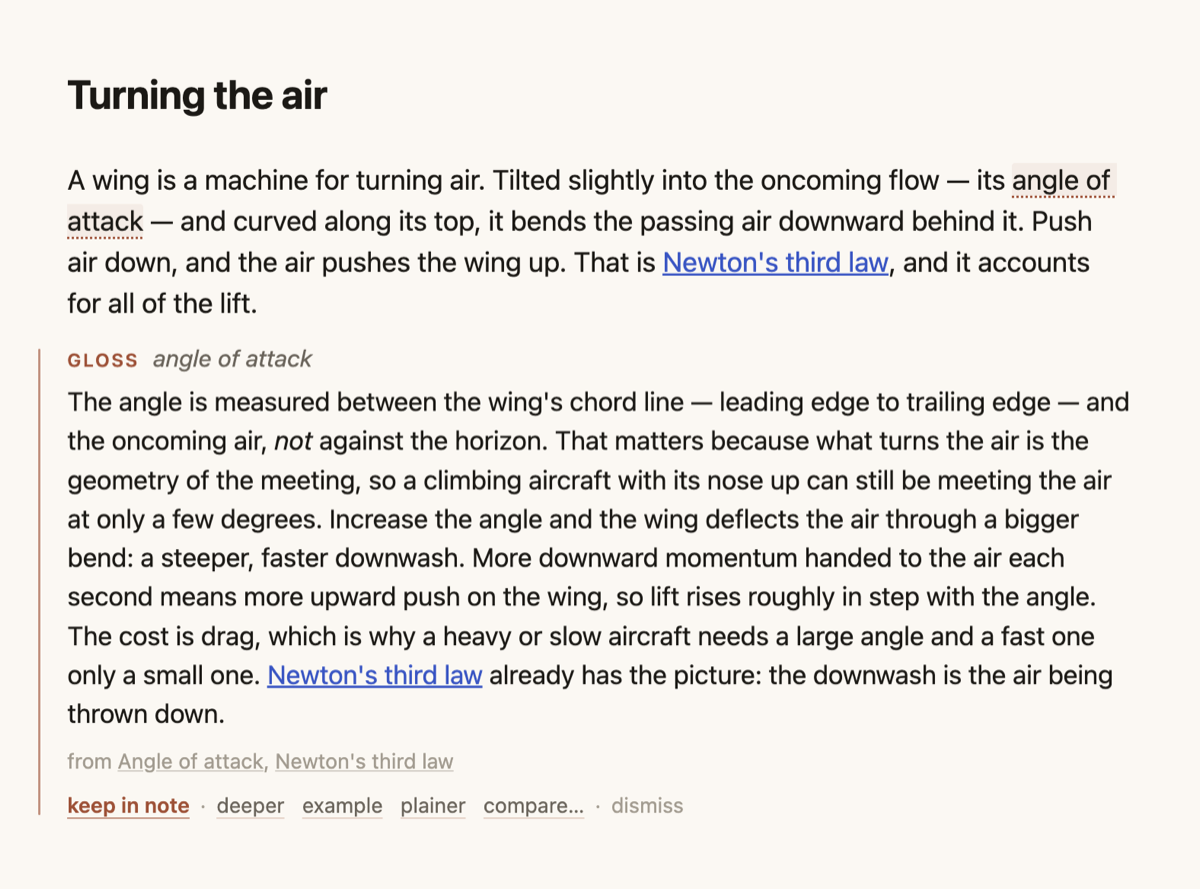
- Explain. Select a word or passage; the explanation appears under it. Ask for deeper, an example, plainer, or a comparison, and keep it if it helped.
- Recall. Explain a section from memory. The agent answers what you actually wrote and asks a follow-up.
- Check. A few questions on a section or a whole note, with feedback on your answer.
- Ask the agent here. A request block anywhere in a note. Point at files with
[[or@; use your Pi skills and commands with/. - Documents. PDFs, EPUBs and Word files in the vault become readable trees: the agent opens a book's table of contents, reads only the chapters it needs, and cites pages you can click.
- Interactive visuals. Sliders and diagrams you can drag, in a sandbox with no network.
- Activity. The status bar shows what the agent is doing and lists recent tasks: their status, what they cost (tokens, cache hits, price), and every file they created or changed. Turn on Record tasks as notes and every task that does real work also gets a note with properties, listed in a native Base (
ICAP/Activity.base) you can filter, group and change; a task's name leads back to where you asked.
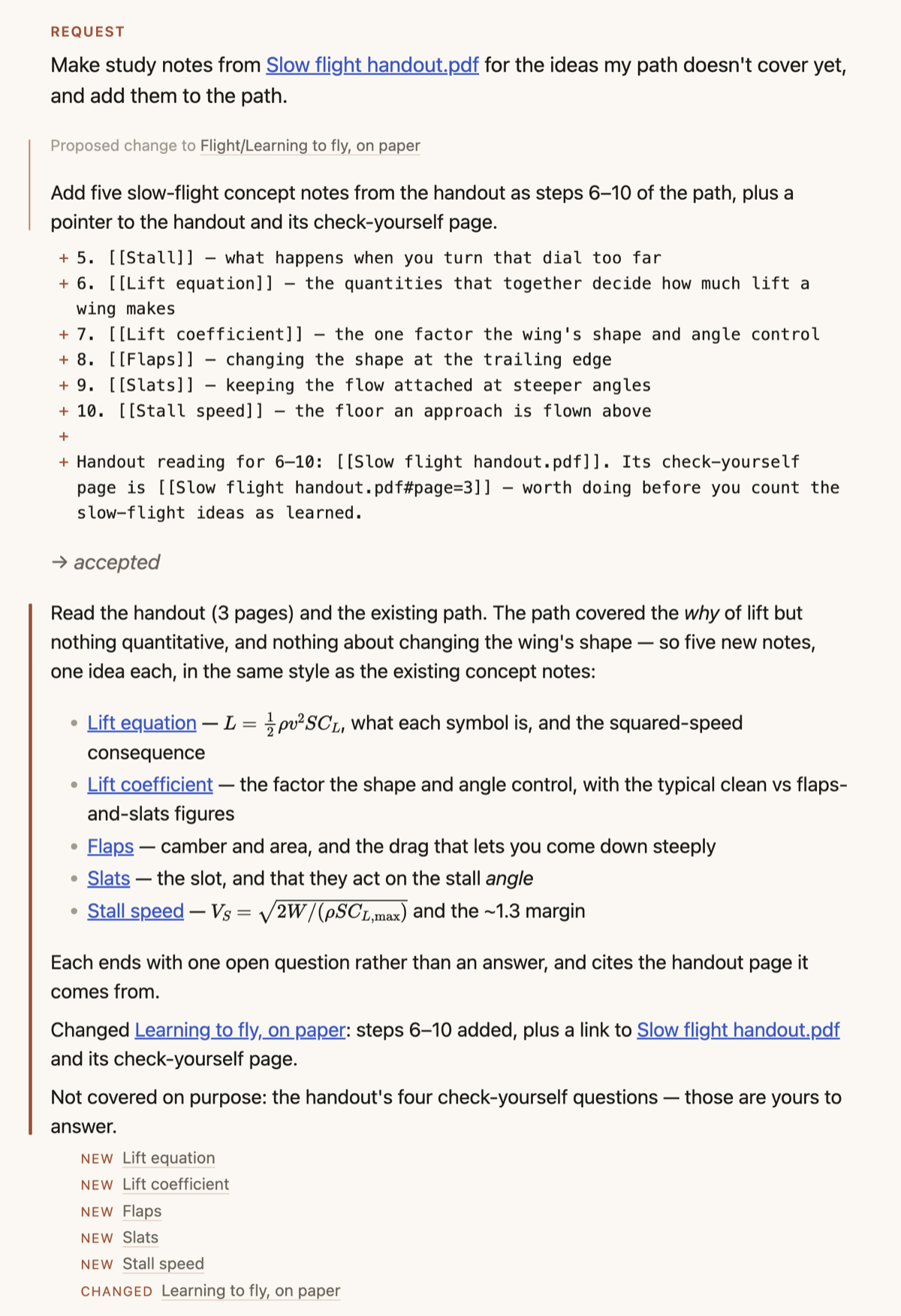
Edits to your existing notes are proposed as a diff and applied only when you accept them. Notes stay readable without the plugin. The name comes from the ICAP framework (Chi & Wylie, 2014): learning deepens from Passive to Active, Constructive and Interactive.
Install
In Obsidian, open Settings → Community plugins → Browse, search for ICAP Learning Agent, then Install and Enable.
To install by hand instead, download main.js, manifest.json and styles.css from the latest release into <your vault>/.obsidian/plugins/icap-agent/, and enable the plugin there.
The first launch opens a guide note that walks through every interaction. Coming from ICPA (icpa-agent)? ICAP imports its settings on first start; then remove the old plugin.
Connect a model
Open Settings → ICAP Learning Agent → Model providers → Log in…, then sign in with a subscription (Claude Pro/Max, ChatGPT, GitHub Copilot…) or paste an API key. Pi stores it in ~/.pi/agent/auth.json, shared with the Pi CLI. A key exported in your shell profile also works.
For a service Pi does not list (Ollama, LM Studio, vLLM, a proxy, any OpenAI-compatible API), use Custom endpoint… next to it: a name, base URL, key and model ids. It is saved in Pi's ~/.pi/agent/models.json (%USERPROFILE%\.pi\agent\models.json on Windows), shared with the Pi CLI. A key written there is plain text; enter $NAME to read an environment variable instead.
On a phone or tablet. Pi needs Node, which Obsidian mobile does not have, so there ICAP runs its own agent on Pi's model libraries, with ICAP's tools only. Open Settings → ICAP Learning Agent → Model providers and add an API key for Anthropic, OpenAI, Google Gemini, OpenRouter, DeepSeek, Mistral, Groq or xAI. Keys are kept in Obsidian's keychain on that device only: never in the vault, never synced, so each device gets its own. Add endpoint… connects Ollama or LM Studio on your network, a proxy, or any OpenAI- or Anthropic-compatible API. When saved, ICAP checks once whether the server allows the app to stream from it. If it doesn't, replies go through Obsidian and arrive whole: you see "waiting for the complete reply" instead of text appearing, and stopping only stops the wait (the request is still billed). Subscription logins, Bedrock and Vertex are desktop only. The model you choose on mobile is separate from the desktop's.
Agent setup. By default the agent runs with your own Pi setup (skills, extensions, MCP servers, shell) and can edit files directly; every change is listed in Activity. Choose ICAP only (isolated) for read-only tools inside the vault and the folders you allow.
Network, accounts and files outside the vault
- Network. Requests, with the parts of your notes and documents the agent reads, go only to the model provider you choose. ICAP has no server, no telemetry and no analytics. Visuals have no network access. In the default setup your own Pi extensions and MCP servers may contact their own services.
- Accounts. You need an account with a model provider, which bills you directly. ICAP needs no account.
- Files outside the vault. ICAP reads Pi's folder
~/.pi/agent/(settings, credentials, extensions, skills) and writes there when you sign in, add a custom endpoint, change the model or trust a project, as the Pi CLI does. On first use it runs your login shell once to pick up missing environment variables such as provider keys. In isolated mode the agent reads only the outside folders you allow; in the default setup it has Pi's shell. - On mobile. Nothing outside the vault is read. API keys are in Obsidian's keychain on the device.
- In the vault. Settings and sessions live in
.obsidian/plugins/icap-agent/; so does the document cache (docs/). The vault gets task notes andActivity.baseonly if you turn on Record tasks as notes.
Troubleshooting and limitations
- "No model has credentials": log in under Model providers. A key added to
~/.zshrcreaches Obsidian on its next launch; then press ↻. main.jsis about 13 MB: Pi for the desktop and the model libraries the mobile agent uses; a phone loads only the latter.- On mobile: no Pi setup (your skills, extensions, MCP servers,
/compact), no file or shell tools, no folders outside the vault. Each turn of a request block replays the conversation to the model, since sessions are not cached there. If iOS suspends Obsidian while a reply is coming in, the task pauses; open it again and press continue. - Scanned PDFs without a text layer can't be read (no OCR).
- An explanation you haven't kept disappears when the plugin reloads.
More
DESIGN.md (how it works) · FORMAT.md (what it writes into notes) · CONTRIBUTING.md · MIT