HTML Docs
 Sam2k downloads
A zero-dependency minimal plugin to enable html docs in Obsidian
- Overview
- Scorecard
- Updates8
A zero-dependency minimal plugin to enable .html docs inside Obsidian. Inspired by Thariq's "unreasonable effectiveness of HTML".
- HTML is rendered in a sandboxed
<iframe>, and works across tabs, embeds (![[doc.html]]), and Canvas. - JS can run inside the HTML for interactivity but the iframe is isolated from your other notes and Obsidian's own data.
- No other bells and whistles.
The plugin maintains a small TypeScript surface, no runtime dependencies, and cli-driven E2E tests.
Demo
A demo page (test/fixture.html) demonstrates all the passing HTML features.
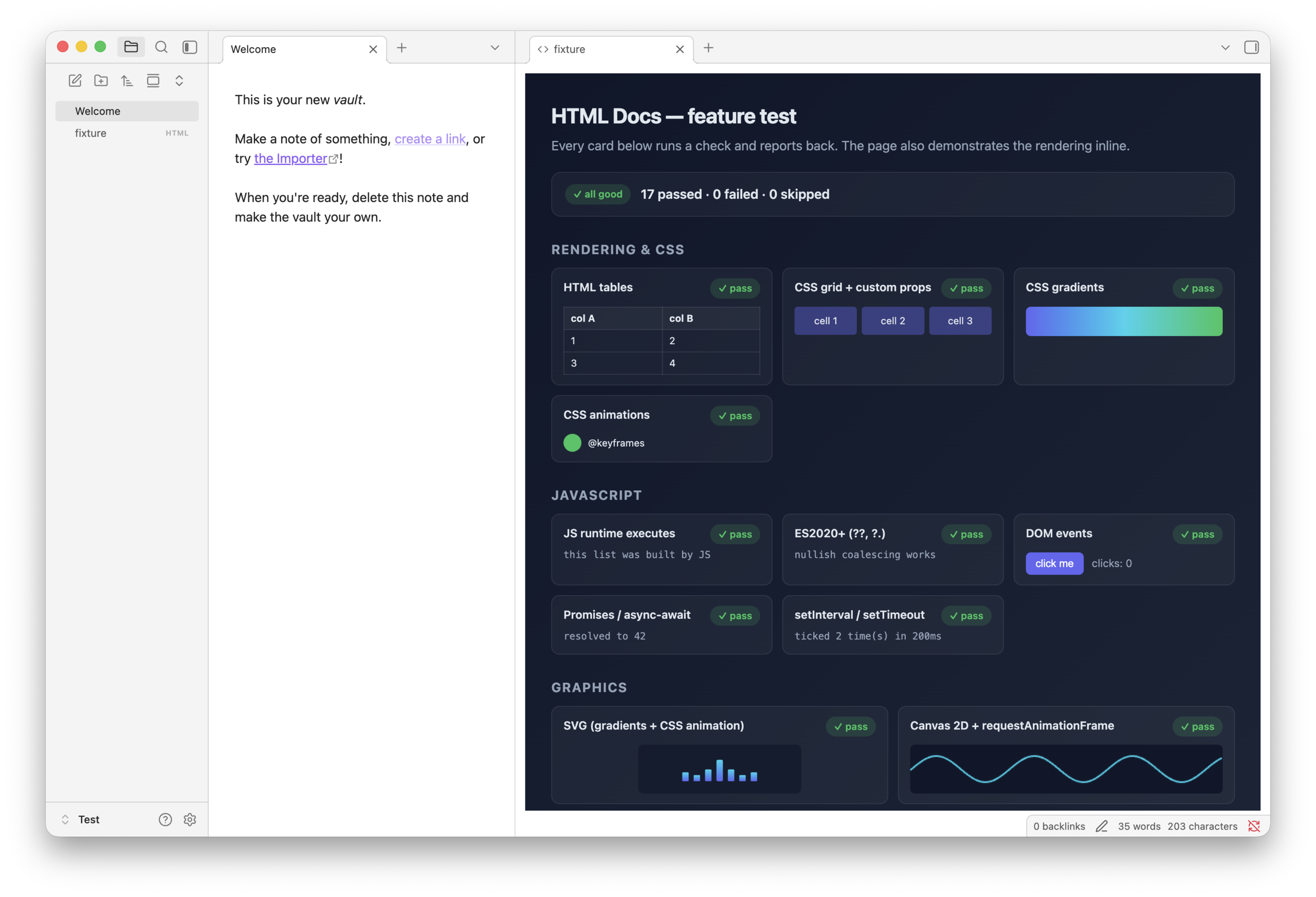
Install Obsidian Plugin
- Install from Obsidian Community: HTML Docs
- Build and install from source:
git clone https://github.com/smcllns/obsidian-plugin-html-docs/
bun install
bun run dev      # watch + rebuild
bun run build    # production bundle at `dist/html-docs/`
Download Agent Skill (optional)
There is an optional agent skill so your agent can author HTML that fits this plugin's sandbox, theme tokens, assets, and embeds.
- Skills CLI:
npx skills add smcllns/skills --skill obsidian-html-docs - Manual: SKILL.md (~850 tokens)
Test
An E2E test runner validates features, embeds, Canvas cards, and sandboxing are working correctly. Requires obsidian-cli, Obsidian running with a vault open, the plugin installed and enabled, and jq available.
bun run test
bun run release:check
bun run release:check runs the production build, the official Obsidian plugin lint rules, and the E2E test. The E2E script builds the current plugin, copies it into the active vault's plugin folder, reloads it, copies test/fixture.html into the vault temporarily, opens it in Obsidian, verifies the tab view plus markdown and Canvas embeds, collects the iframe’s own self-test results via postMessage, then cleans up.
See test/fixture.html for the full list of features exercised — and the inline notes for what is intentionally blocked.
Usage
After installing the plugin, you can open .html files in Obsidian tabs (like a doc), embedded files, and canvas cards.
Link to HTML docs with the explicit .html extension:
See: [[my-doc.html]]
Embed HTML docs like other Obsidian embeds. Embeds default to about 600px tall; adjust size with Obsidian's embed syntax:
![[doc.html]]
![[doc.html|600x400]]
Obsidian Plugin Docs
- Developer docs: docs.obsidian.md
Known trade-offs
This HTML Docs plugin prioritizes a simple security boundary: HTML runs in a sandboxed iframe with JavaScript allowed, but without same-origin access to Obsidian or the vault.
That keeps HTML documents isolated from your notes and Obsidian internals, with the following trade-offs accepted:
- Wikilinks to HTML docs need the explicit extension (
[[doc.html]]). Extensionless non-Markdown links are not first-class in Obsidian's link index, and click-only plugin handling would leave backlinks and unresolved-link state inconsistent. - Links from HTML to Obsidian docs should use Obsidian URI links plus
target="_blank". They hand off to Obsidian without letting the iframe navigate the parent window directly; direct same-tab navigation would require top-navigation sandbox permissions and weaken the boundary. - Cookies,
localStorage,sessionStorage, andIndexedDBare intentionally unavailable. Enabling them would require same-origin privileges, which would also let HTML share origin with Obsidian instead of staying isolated. - Context must be passed into the iframe, the iframe cannot reach out and pull in. HTML receives curated theme tokens, but cannot inspect Obsidian, other notes, snippets, or local vault files. Use inline CSS/assets,
data:URLs, or browser-allowed HTTPS URLs instead of vault-relative asset paths.
Feedback / Support
This plugin will stay simple and do this one thing well.
File issues here, or message me on X: @smcllns.
If you want more features, please fork and customize as you need.