Hoverlay
 zspatter635 downloads
Preview links on hover in a floating window: live page, reader view, or metadata card, with embedded media players.
- Overview
- Scorecard
- Updates7
Link previews on hover for Obsidian that work on real websites.
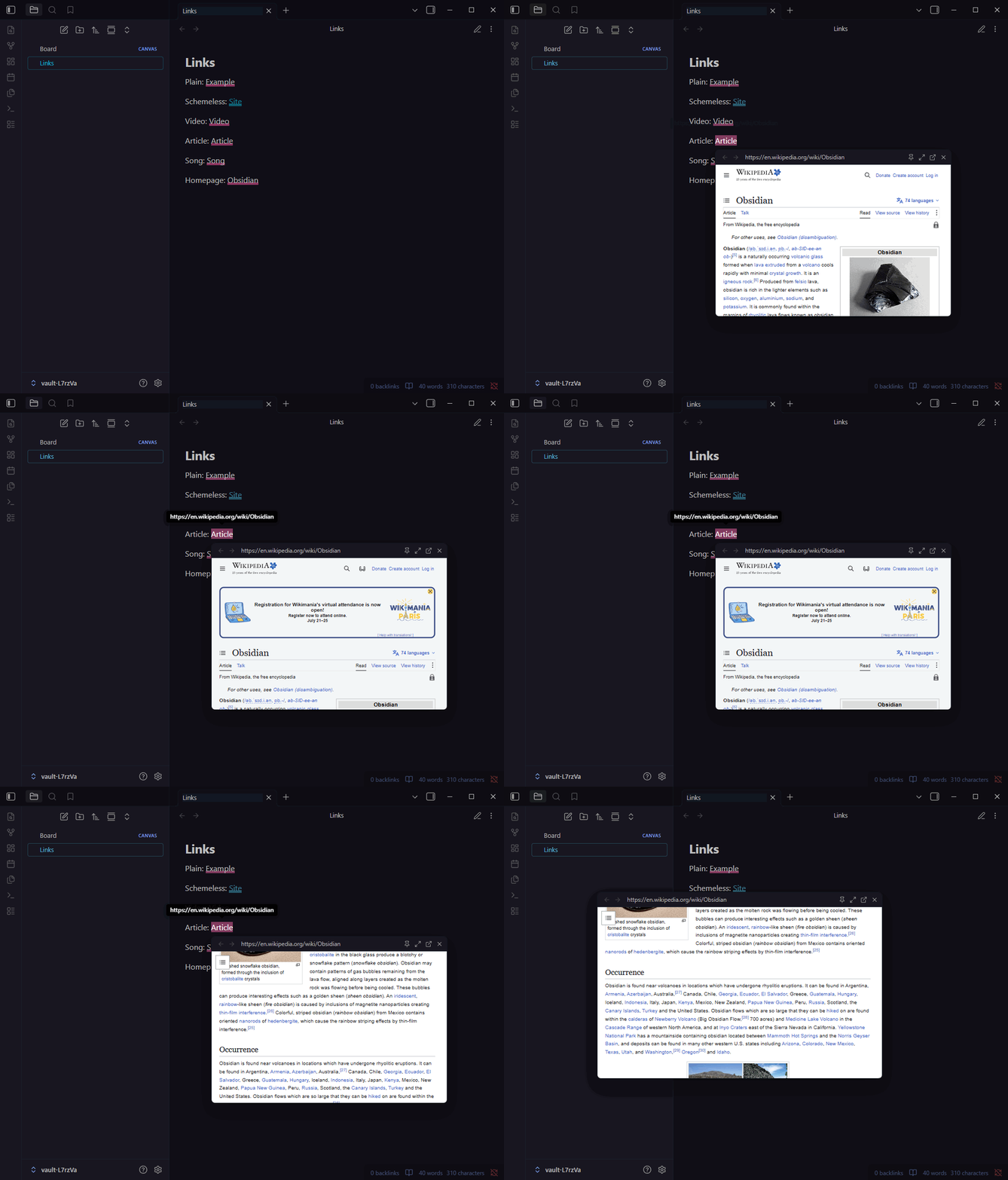
Hover any external link, in a note, a Canvas card, or a pop-out window, and a floating preview opens: the live page, a clean reader view, or a metadata card, with embedded players for media links. Browse inside it, type into it, pin it while you write, resize it, or send it to your browser.
Why another link preview plugin
Existing hover-preview plugins render pages in an <iframe>. Any site that sends X-Frame-Options or a CSP frame-ancestors header (GitHub, Reddit, Wikipedia, most of the web you actually link to) silently refuses to render there, leaving a blank pane. Hoverlay sidesteps that class of failure entirely:
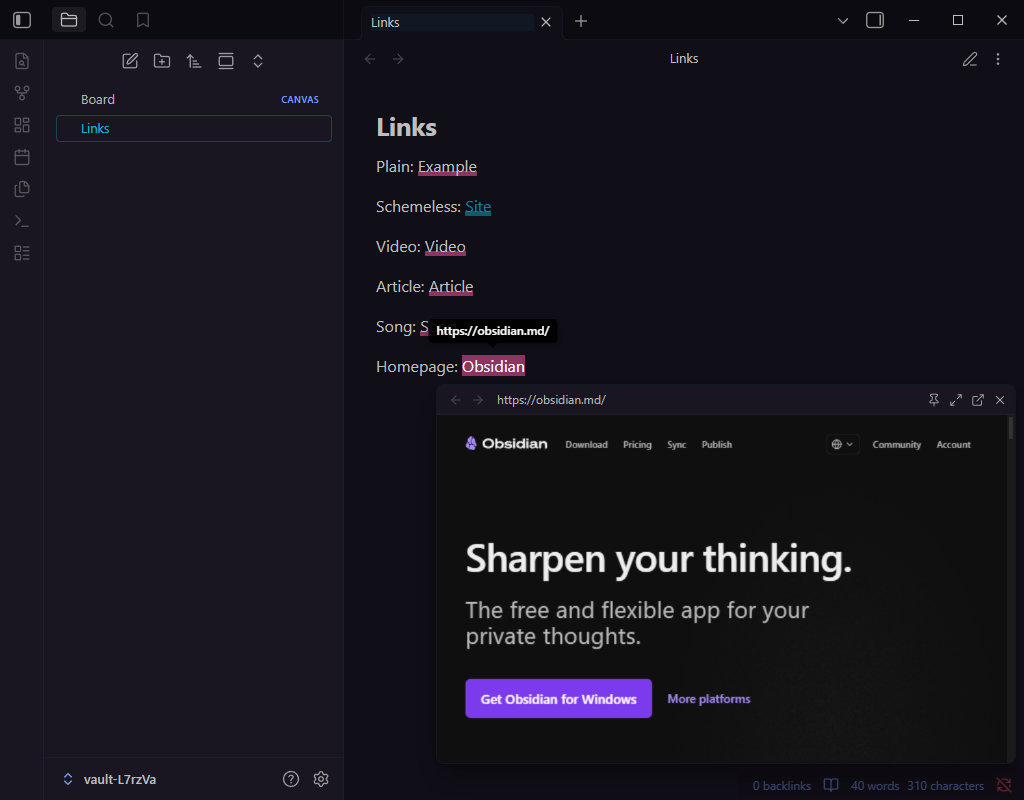
- Live page (desktop): previews render in an Electron
<webview>, a separate guest page doing top-level navigation. Framing headers don't apply to it, so real sites load. - Reader view: fetches the page, extracts the article with Mozilla Readability, sanitizes it, and renders just the text in your theme's typography. No scripts or trackers ever run.
- Metadata card: OpenGraph/Twitter card with title, description, image and favicon, fetched through Obsidian's own request pipeline (immune to CORS, no third-party preview APIs, no keys). The automatic fallback whenever a richer mode can't render, and the default on mobile.
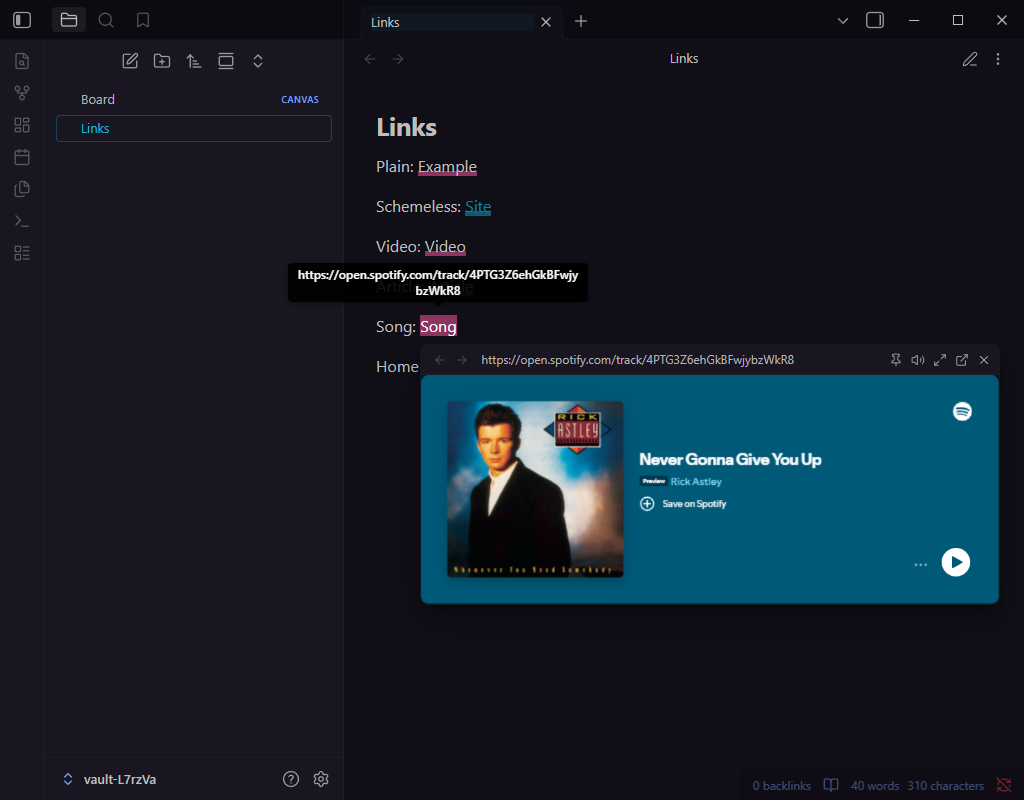
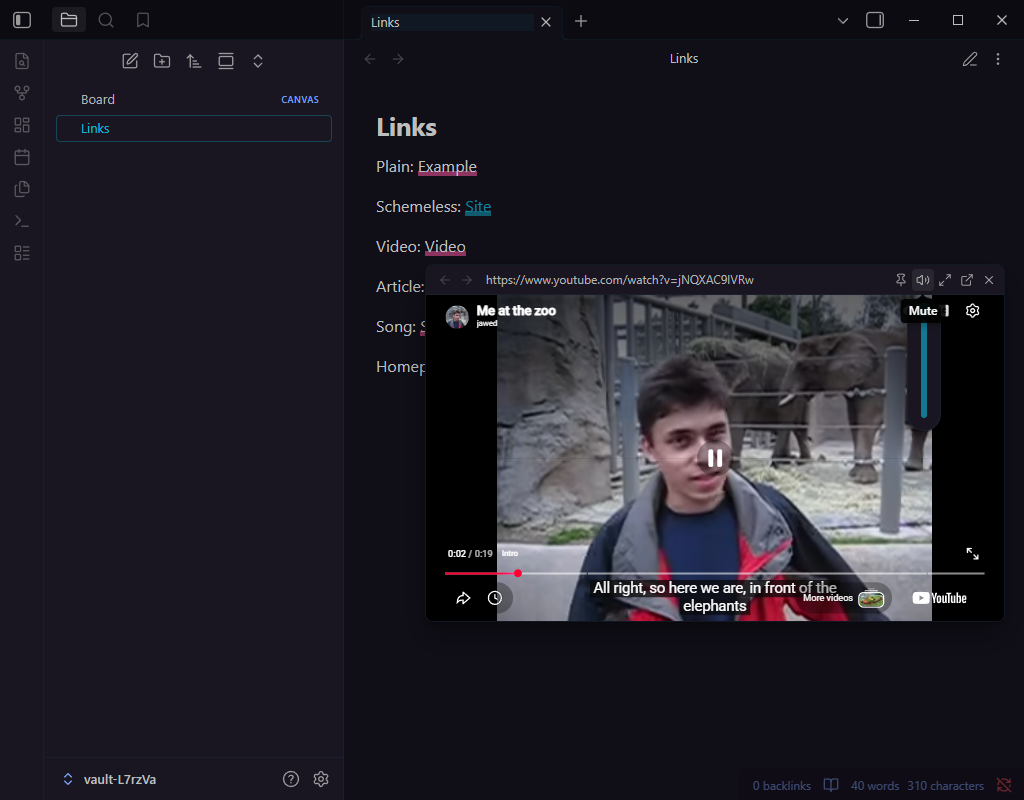
- Embedded players: media links (YouTube, Vimeo, Dailymotion, Streamable, Loom, Spotify, SoundCloud, Deezer, Apple Music, Apple Podcasts) load the provider's embed player instead of the full page: lighter, no cookie walls, playlists and timestamps preserved. The popover trims itself to the player's natural size, so there's no dead space below a Spotify card or letterboxing around a video.
Using the popover
- Hover an external link (optionally behind a modifier combination), wait the configured delay, get a preview. Works in reading view, live preview and source mode; editor links are resolved from the document itself, so live preview's folded
[text](url)links work. - Canvas: links inside Canvas text cards preview too. Canvas covers cards with an event shield, so Hoverlay hit-tests the link under your pointer through it; no need to enter the card first.
- Pop-out windows: hovers in a pop-out open the preview in that window, sized to that window, with all the same controls.
- Header controls: back/forward history, the current URL, maximize/restore, pin (keep open until you close it, even while you type, click and scroll in your notes), mute with a volume slider on hover, open in browser, close.
- Interact with the page: click into a live preview to hand it the keyboard and type: sign into a site, use its search box, dismiss its banners. The preview stays open while the page has your keyboard, and Escape still closes it. Pages that try to grab the keyboard on load without a click are refused, so hovering never interrupts your typing.
- Move and size it: drag the header to reposition; drag any edge or corner to resize (optionally remembered as the new default).
- Zoom: hold the zoom key and scroll over the preview; a percentage badge appears, and clicking it resets to 100%.
- Mouse back/forward buttons navigate the preview's history when over it, and keep navigating your notes when not.
- Keyboard: bind the "Preview link under cursor" command to a hotkey to open previews without the mouse. Escape closes by default; a toggle turns that off for Vim users, where Escape is part of typing.
- Audio: embedded players start audible; ordinary pages stay muted (no autoplay noise) until you unmute via the speaker button, which appears whenever a page plays media.
Settings
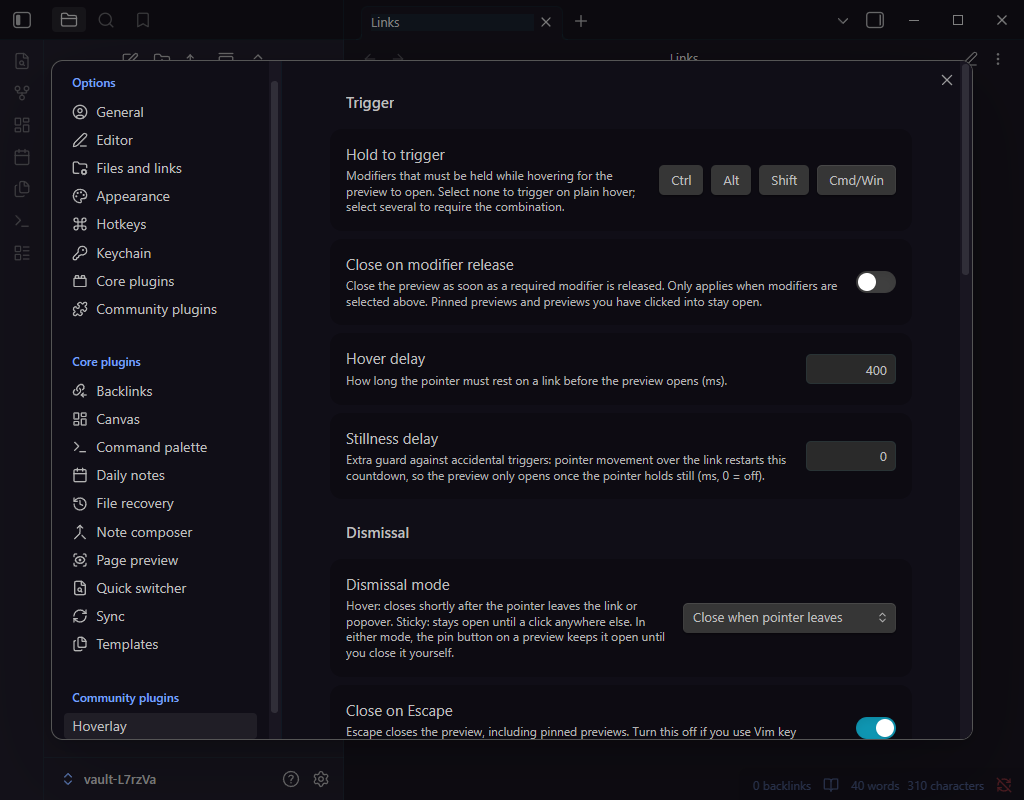
- Trigger: modifier combination (any of Ctrl/Alt/Shift/Cmd, or none for plain hover), close on modifier release, hover delay, and an optional stillness delay so sweeping the pointer across text never triggers.
- Dismissal: hover mode (closes when the pointer leaves, with a grace period) or sticky mode (click elsewhere to close), plus a close-on-Escape toggle. Pinning a preview overrides either mode until you close it yourself.
- Preview: mode (auto, live page, reader, card), popover size, remember-resized-size, page zoom, zoom key (Ctrl/Alt/Shift or Off), embedded players toggle, media volume.
- Privacy: remember preview logins (off by default; see the behavior notes below).
- Filtering: per-domain preview modes (
host: mode, subdomains inherit, most specific wins,embedandwebviewavailable as forcing overrides) and a domain blocklist.
Behavior notes
- Internal links are never touched; core Page Preview owns those. Scheme-less targets (
[site](www.example.com)) are normalized to https, gated behind a known-TLD list, and resolved against your vault first so notes are never mistaken for web domains. - Privacy: live page previews load the real page (scripts and all) inside the sandboxed webview. Reader and card modes only ever fetch the page HTML. If you prefer fetch-only behavior for certain sites or globally, per-domain modes and the global mode setting cover both.
- Cookies and logins: live previews browse in their own cookie storage, isolated from Obsidian and from your system browser, and Hoverlay itself never reads or stores credentials. By default that storage is in-memory: sign into a site inside a preview and you stay signed in until Obsidian quits, with nothing written to disk. The "Remember preview logins" setting switches to an on-disk store (managed by Electron, not synced anywhere) so logins survive restarts. Toggling it either way starts previews from a fresh cookie jar.
- Login limitations: sites whose sign-in opens a separate popup window (some OAuth "Sign in with..." flows) can't complete inside a preview, because Obsidian denies popup windows from embedded pages; sign-in flows that redirect within the same page work fine. HTTP basic-auth prompts aren't available either. For those sites, use "Open in browser".
- Mobile: webviews don't exist there, so previews use the metadata card (or reader mode).
- Canvas: with hover dismissal, the preview stays open while the pointer is anywhere on the card (the card's event shield means Hoverlay can't see the exact moment you leave the link text); leaving the card or pressing Escape closes as usual.
- Some videos restrict embedded playback (typically major-label music); the player shows "Video unavailable" with a Watch on YouTube link in that case.
host: webviewin per-domain modes forces the full page for a site if you prefer.
Installation
Install Hoverlay from the community plugin directory (in Obsidian: Settings, Community plugins, Browse, search "Hoverlay"), then enable it.
Manual install also works: download main.js, manifest.json and styles.css from the latest release into <vault>/.obsidian/plugins/hoverlay/, then enable it in Community plugins.
Development
npm install
npm run dev        # watch build
npm run build      # typecheck + production build
npm test           # unit + component tiers (vitest)
npm run test:e2e   # end-to-end against real Obsidian (wdio-obsidian-service)
To test in a vault, copy or symlink manifest.json, main.js, and styles.css into <vault>/.obsidian/plugins/hoverlay/.
Testing
npm test runs two tiers: pure-module unit tests, including exhaustive permutation sweeps for modifier combinations, zoom-key conflict resolution, renderer selection, popover geometry and the dismissal policy, and jsdom tests covering the popover's interaction behavior (dismissal permutation matrix and guest-focus handling included), metadata parsing and the reader's sanitization pipeline. New decision logic should arrive as a pure function with a permutation sweep.
npm run test:e2e runs the third tier: end-to-end specs under e2e/ driving real Obsidian via wdio-obsidian-service (hover previews across every preview mode, dismissal, embeds, scheme-less normalization, the cursor command, Canvas cards, pop-out windows, and guest interaction: typing into previews, focus-steal refusal, pinning, session partitions). Set OBSIDIAN_VERSIONS="latest/latest" to narrow the version matrix locally.
CI gates every push and pull request with the unit/component tiers (ci.yml) and runs the e2e matrix (e2e.yml) on PRs and main, across obsidian-version (earliest supported and latest, catching installer-pinned Chromium differences) and OS (Windows, macOS, Linux). Both reschedule weekly to catch upstream drift.
Roadmap
- Additional embed providers on request (the transform table makes new ones cheap)
- Multiple simultaneous pinned popovers (investigation planned; today a new hover is suppressed while a popover is pinned)
Explored and dropped: wrapping embeds in a framed host page. Tested in a real webview; label-restricted YouTube videos show "Video unavailable" framed or not, so the idea buys nothing (it would unlock Twitch, but at the cost of a second embed pathway with degraded audio controls).