Horizontal Scroll View
 Daivik Karbhari303 downloads
Splits a note on H1/ H2/ H3 headings into resizable side-by-side columns. Each column scrolls vertically; the whole view scrolls horizontally.
- Overview
- Scorecard
- Updates3
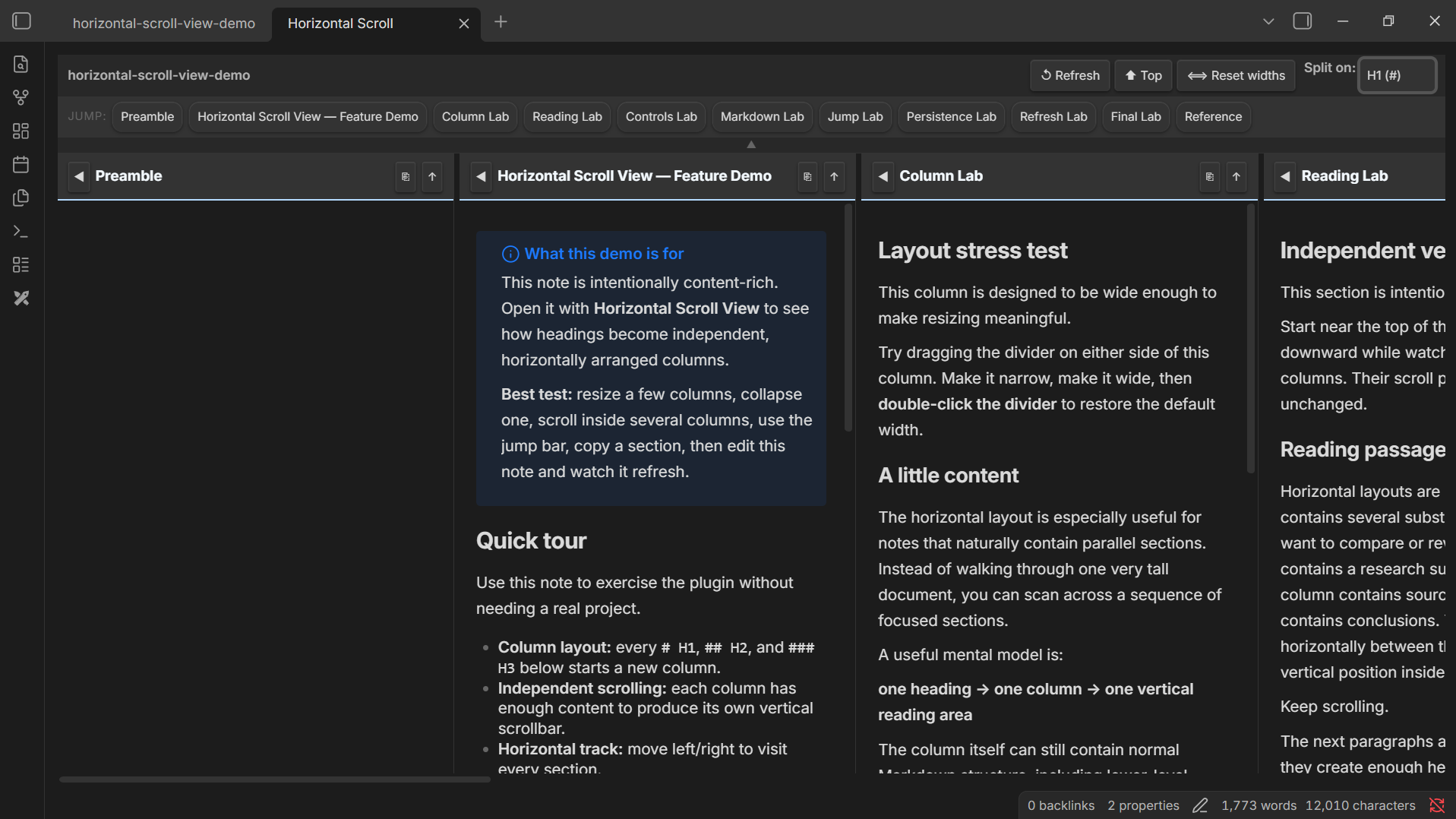
An Obsidian plugin that transforms long notes into a side-by-side column layout — each # H1, ## H2, ### H3 heading becomes its own independently scrollable column. Navigate wide instead of scrolling endlessly down.
Demo
Features
| Feature | Details |
|---|---|
| Column layout | Every # H1/ ## H2/ ### H3 heading splits into a separate column |
| Independent vertical scroll | Each column scrolls on its own |
| Horizontal track | Scroll across all columns in one row |
| Resizable columns | Drag the handle between columns to resize; double-click to reset |
| Width persistence | Column widths are saved per-file and restored on reopen |
| Collapse / expand | Collapse any column to a slim sliver; the heading stays visible rotated |
| Jump bar | One-click chips below the toolbar snap-scroll to any column instantly |
| Copy section | Copy any column's full Markdown (heading + body) to clipboard |
| Per-column scroll-to-top | ↑ button in each column header |
| Global scroll-to-top | ⬆ Top button scrolls every column at once |
| Auto-refresh | Debounced — re-renders 600 ms after you stop typing in the editor |
| Text selection | All rendered content is fully selectable |
How to use
- Open any Markdown note with
# H1/ ## H2/ ### H3headings. - Click the columns icon (⊞) in the left ribbon, or open the Command Palette (
Ctrl / Cmd + P) and run "Open Horizontal Scroll View". - The view opens in a new tab. Each
# H1/ ## H2/ ### H3becomes a column.
Column controls (in the column header)
| Button | Action |
|---|---|
◀ / ▶ |
Collapse / expand the column |
↑ |
Scroll this column to top |
⎘ |
Copy the section as Markdown |
Toolbar buttons
| Button | Action |
|---|---|
| ↺ Refresh | Manually re-render the current file |
| ⬆ Top | Scroll every column to its top |
| ⟺ Reset widths | Restore all column widths to default |
Resizer
- Drag the vertical handle between two columns to resize.
- Double-click the handle to reset that column to the default width.
Installation
From the Obsidian Community Plugin browser (recommended)
- Open Obsidian → Settings → Community Plugins.
- Disable Restricted Mode if prompted.
- Click Browse, search for Horizontal Scroll View, and click Install → Enable.
Manual installation
- Download
main.js,manifest.json, andstyles.cssfrom the latest release. - Copy them to
<your-vault>/.obsidian/plugins/horizontal-scroll-view/. - In Obsidian: Settings → Community Plugins → reload, then enable Horizontal Scroll View.
Notes on document structure
- Content before the first
# H1/ ## H2/ ### H3is gathered into a Preamble column (if non-empty). - H2–H6 headings are rendered normally inside the column they belong to.
- The view is read-only — edit your note in the standard editor; the view refreshes automatically.
Contributing
Issues and pull requests are welcome on GitHub.
License
MIT — see LICENSE.
HealthExcellent
ReviewSatisfactory
About
Transform long notes into a side-by-side column layout where every # H1, ## H2 and ### H3 becomes its own independently scrollable column. Navigate horizontally across columns, resize or collapse columns, jump to sections, copy a column's Markdown, and preserve column widths per file with live re-rendering and selectable text.Details
Current version
1.0.2
Last updated
Last month
Created
Last month
Updates
3 releases
Downloads
303
Compatible with
Obsidian 1.0.0+
Platforms
Desktop, Mobile
License
MIT
Sponsor