HiLighter
 PandoraReads2k downloads
A powerful highlight note manager with multi-color annotations, AI-assisted notes, and smart review
- Overview
- Scorecard
- Updates8
HiLighter is an Obsidian plugin focused on highlight note management. It transforms highlighted content into manageable note cards with support for multiple color annotations, AI-powered analysis, and intelligent search features, making your note organization more efficient. 中文
✨ Core Features
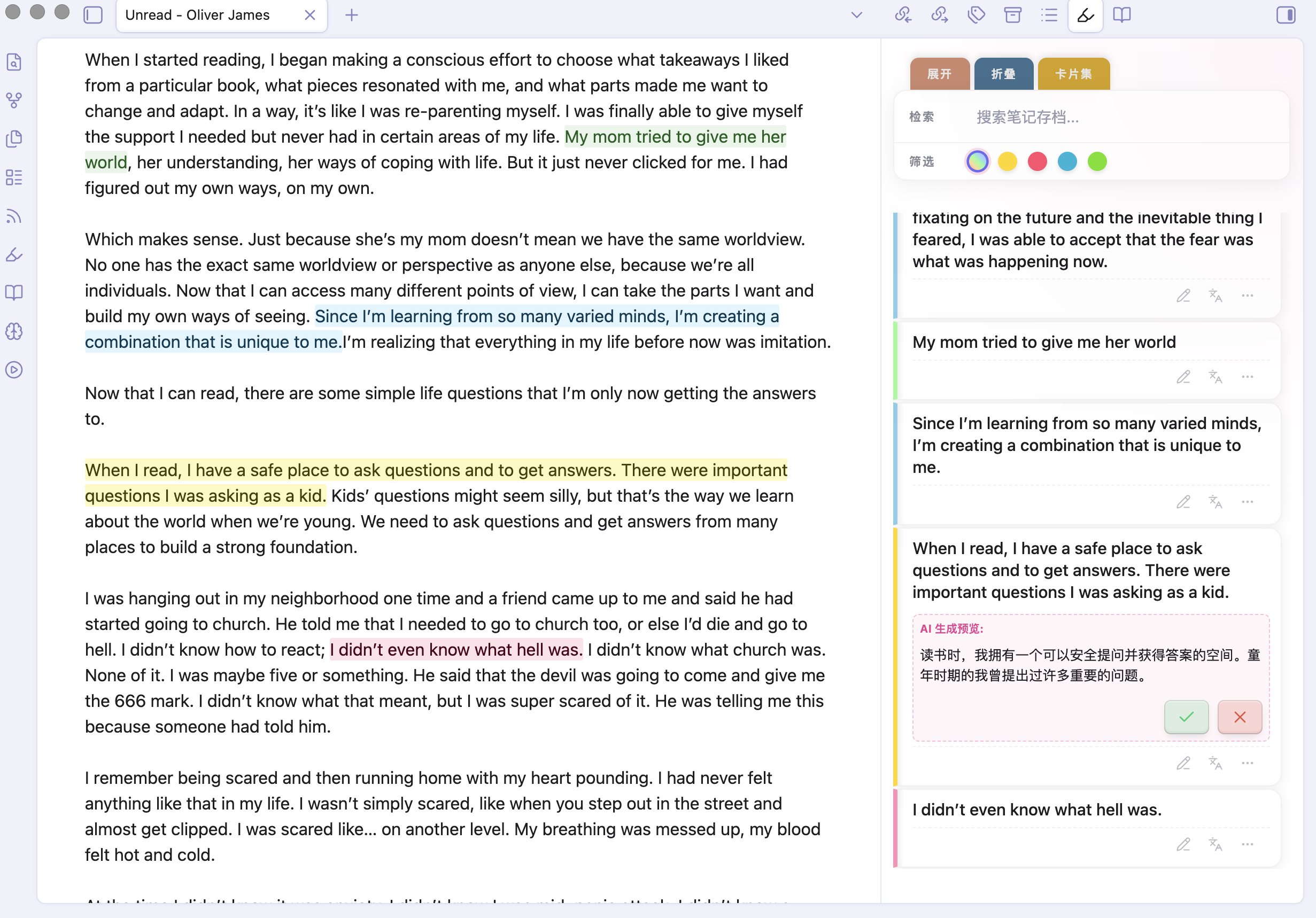
🎨 Highlight Note Cards Management
- Sidebar Management: Aggregates
<mark>highlighted content from current document or entire library, supporting instant navigation to original text via card click. - Multi-Dimensional Filtering:
- Color Filter: Quick categorization by four highlight colors: yellow, pink, blue, and green.
- Keyword Search: Real-time filtering of note content via top search bar.
- AI-Powered Intelligence:
- AI Translation (Languages): One-click precise translation of highlighted sentences.
- AI Research (Microscope): Comes with multiple built-in research prompt templates (philosophical analysis, concise summary, critical analysis) and supports custom research prompts — freely add, edit, and switch between prompts to suit different deep reading scenarios.
- Flexible Interaction:
- Quick Edit: Click pencil icon to directly edit notes on cards with auto-adjusting height.
- Tag System: Support for custom tags with built-in intelligent recommendation algorithm.
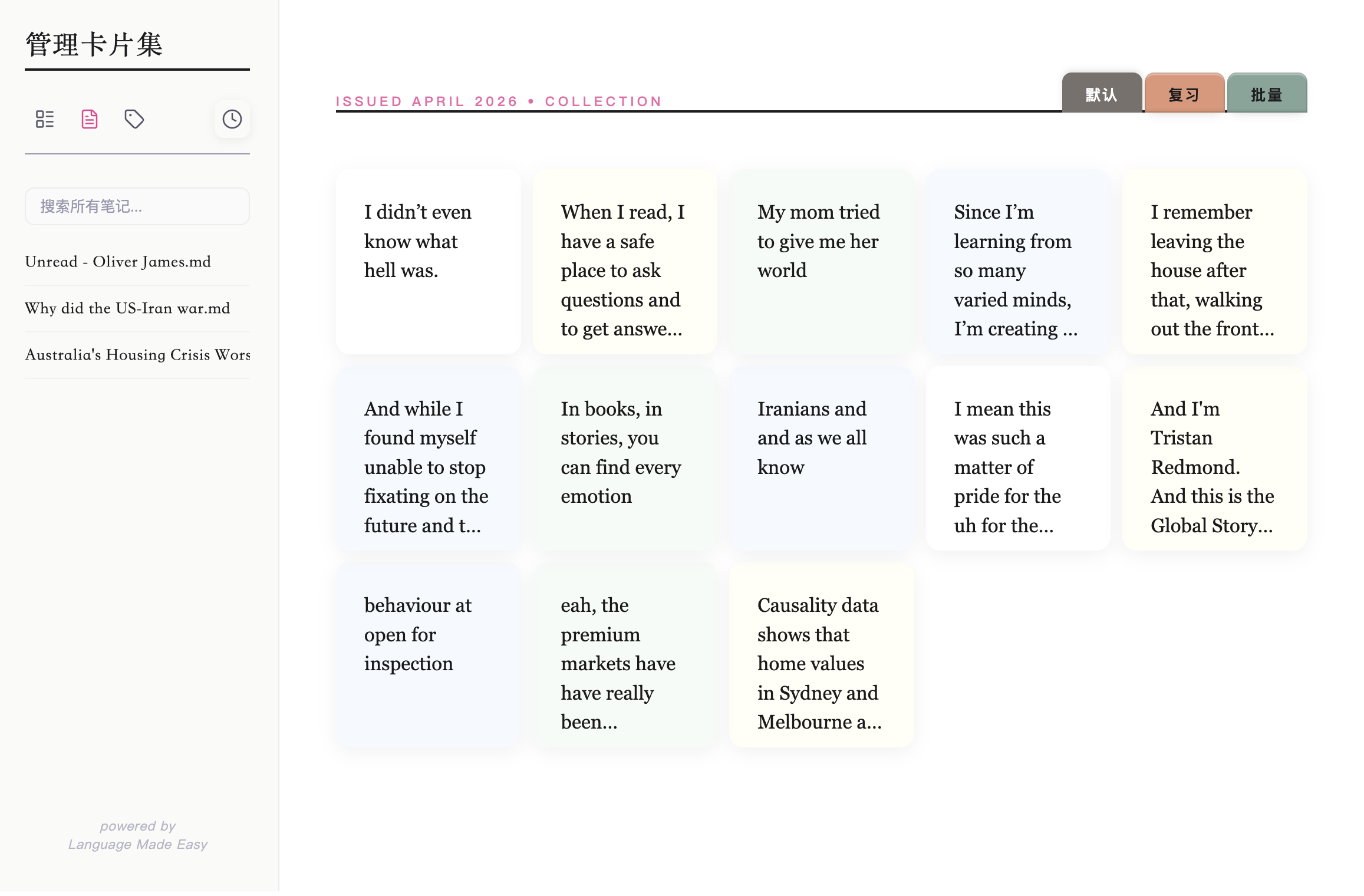
- Card Collection Navigation: One-click switch to full-screen "Card Studio" mode for centralized inspiration management.
- Note Card Management:
- Locate Original Text: Click a card to instantly jump to the highlighted position in the source note for quick context recovery.
- Classification Tags: Add tags to each card for organized categorization, with support for batch tag operations.
- Batch Deletion: Enter batch mode to multi-select cards and delete them in one click for efficient cleanup.
- Review Mode: Shuffle cards randomly for review and consolidation, with an archive option for mastered content.
🚀 Quick Start
Installation
- Manual Installation (Recommended):
- Obtain the latest version's three main files:
main.js,manifest.json, andstyles.css. - Place them in your vault folder:
.obsidian/plugins/hilighter/. - Enable the plugin in Settings > Third-party plugins.
- Obtain the latest version's three main files:
- Community Plugins (Coming Soon): Search for
HiLighterin the Obsidian Community Plugins market and install.
Basic Configuration
- AI LLM API (Important): To use AI Translation and AI Research features, configure an AI LLM API in plugin settings. Supports mainstream providers including DeepSeek, Google Gemini, and Volcano Engine (Ark).
- Ribbon Icon: You can control whether to display the sidebar highlight notes icon in settings.
🛠 Development & Build
Developers are welcome to contribute to improving this project!
- Requirements: NodeJS (v16+)
- Install Dependencies:
npm install - Development Mode:
npm run dev - Production Build:
npm run build
❤️ Support & Feedback
If you enjoy this plugin, you can show your support through:
- Follow Official Account: 潘多拉的数字花园 (Pandora's Digital Garden)
- Multi-Platform Support: Also available on Weibo, Xiaohongshu (Little Red Book), and Knowledge Planet under the same name
- Contact & Feedback: Feel free to add VX: PandoraReads
"Let highlighted notes become the catalyst for inspiration." — HiLighter
HealthExcellent
ReviewCaution
About
Transform highlights into color-coded note cards with AI translation and built-in research templates for quick analysis. Search and filter cards in real time, jump to source notes, tag and batch-manage or archive cards, and open Card Studio for focused review.Details
Current version
1.3.2
Last updated
3 weeks ago
Created
5 months ago
Updates
8 releases
Downloads
2k
Compatible with
Obsidian 1.0.0+
Platforms
Desktop, Mobile
License
MIT