Hermes Studio
 Guilherme Ceschiatti B. Moreira21 downloads
Chat with Hermes Agent in Obsidian — with sessions, model & mode pickers, inline diffs, skills hub, memory review, and live subagent panels.
- Overview
- Scorecard
- Updates18
Hermes Studio for Obsidian (rea-hermes-studio)
Hermes Studio AI chat, workspace assistant, and diff workbench brought seamlessly into Obsidian.md.
A standalone Obsidian plugin inspired by the VSCode Hermes Studio extension and patterns from Obsidian Copilot.
📸 Screenshots
| AI Chat & Context Workbench | Learning & Skills Hub |
|---|---|
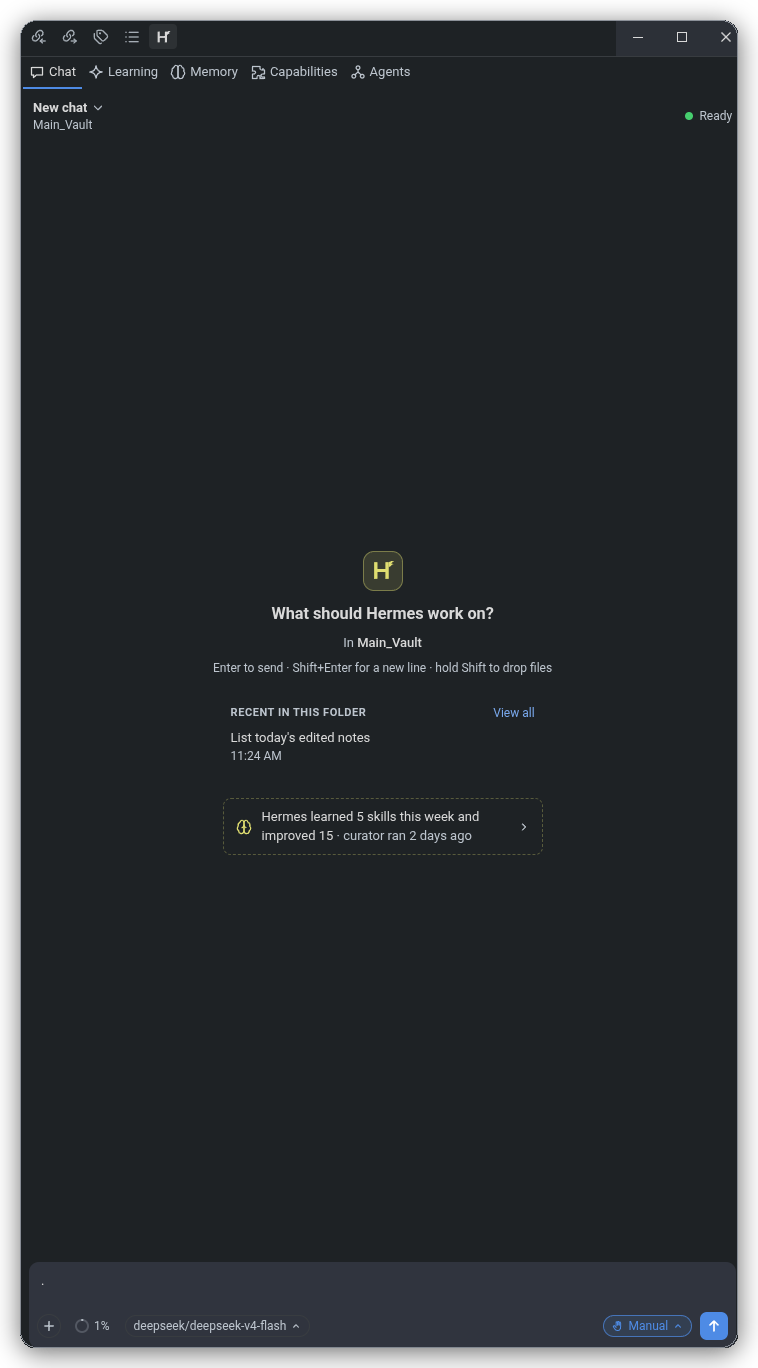 |
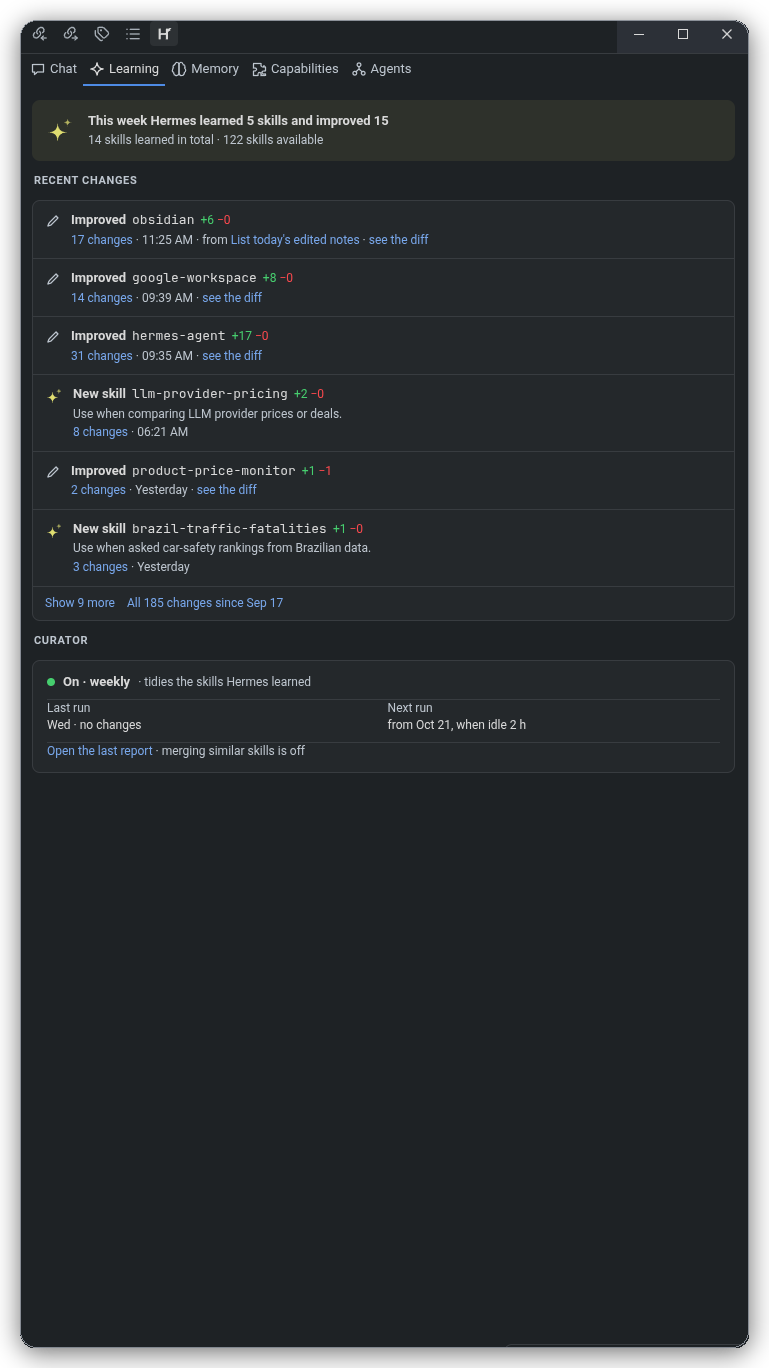 |
✨ Features
- Obsidian Theme Harmony: Seamlessly adapts to Obsidian's active theme (dark/light, accent colors, typography, background variables) via dynamic CSS variable injection into an isolated Shadow DOM.
- Svelte 5 Reactive Webview: Fast, fluid, modern UI architecture mounted inside an Obsidian View or floating Modal dialog.
- VSCode API Bridge for Obsidian: Complete compatibility shim that maps VSCode editor and workspace primitives to Obsidian's
App,Vault, andWorkspaceLeaf:- Active note tracking and real-time selection updates.
- Contextual markdown insertions and active editor line navigation.
- Bidirectional WikiLink (
[[Note]]) and Obsidian URL scheme (obsidian://open?vault=...&file=...) generation.
- Unified Diff Engine & Workbench: Side-by-side and unified diff visualization for AI-generated code and note edits before applying changes.
- Dual Display Modes:
- Sidebar / Right Leaf View: Keep Hermes Studio docked alongside your notes for persistent conversational context and references.
- Floating Modal View: Quick pop-out assistant callable anytime with a hotkey command (
Hermes Studio: Open assistant modal).
- Flexible AI Endpoint Integration: Configurable server host and port (defaulting to
http://localhost:8080), API keys, model selections, and custom temperature settings.
🏗️ Architecture
src/
├── core/
│   ├── hermes-bridge.ts         # Bidirectional postMessage event protocol
│   ├── hermes-core.ts           # State machine, chat history & engine
│   └── unified-diff-view.ts     # LCS / Line diff visualizer & chunk applicator
├── host/
│   ├── note-tracker.ts          # Active file watcher & selection listener
│   ├── obsidian-host.ts         # VSCode Workspace/Window API shim for Obsidian
│   └── wikilink-resolver.ts     # Markdown link & Obsidian URI handler
├── plugin/
│   ├── hermes-modal.ts          # Floating pop-out modal view
│   ├── hermes-view.ts           # Dockable Sidebar WorkspaceLeaf view
│   └── settings-tab.ts          # Plugin settings UI in Obsidian options
├── webview/
│   ├── obsidian-theme-bridge.ts # Syncs Obsidian CSS vars into Webview Shadow DOM
│   └── svelte-mount.ts          # Svelte 5 Webview component lifecycle mount
├── main.ts                      # Plugin entrypoint & lifecycle manager
└── types.ts                     # Protocol and Host type definitions
🚀 Getting Started
Prerequisites
Building from Source
Clone this repository:
git clone https://github.com/6qat/rea-hermes-studio.git
cd rea-hermes-studio
Install dependencies:
npm installBuild the plugin:
npm run buildRun unit and integration tests:
npm test
📥 Installation in Obsidian
- Create a
hermes-studiofolder in your Obsidian vault's plugin directory:mkdir -p /path/to/your/vault/.obsidian/plugins/hermes-studio - Copy
main.js,manifest.json, andstyles.cssinto that directory:cp main.js manifest.json styles.css /path/to/your/vault/.obsidian/plugins/hermes-studio/ - Open Obsidian, go to Settings → Community Plugins, reload plugins, and enable Hermes Studio.
⌨️ Commands
Hermes Studio: Open sidebar view- Opens or focuses the Hermes Studio assistant in the right sidebar.Hermes Studio: Open assistant modal- Displays the assistant in a modal overlay over your active note.Hermes Studio: Insert active note context- Sends current file content and highlighted text into the assistant session.
🧪 Testing
Comprehensive test suites verify the host API shim, vault and adapter compliance, note tracking, diff generation, and WikiLink resolution:
npm test
All 11 tests across all test suites are automated with Vitest.
🚀 Releasing
Bump version in manifest.json (and package.json), commit, then:
npm run release
The script tags the current version exactly as written in manifest.json (e.g. 0.6.11 — no v prefix) and pushes it, which triggers the release workflow. The plain tag is required: Obsidian's plugin release check looks for a GitHub release whose tag equals the manifest version exactly. Push exactly this one tag — extra duplicate tags fire duplicate workflow runs and create duplicate releases.
🔒 Security & System Permissions
Hermes Studio is configured with "isDesktopOnly": true and adheres strictly to Obsidian's Developer Policies:
- Obsidian Vault & DataAdapter APIs (
app.vault&app.vault.adapter):- All vault file interactions (reading note contents, listing files, tracking note creation/modification/deletion events, resolving WikiLinks, and displaying diffs) are executed through Obsidian's official
VaultandDataAdapterAPIs. This preserves Obsidian's in-memory caching, atomic write safety, and full compatibility with Obsidian Sync.
- All vault file interactions (reading note contents, listing files, tracking note creation/modification/deletion events, resolving WikiLinks, and displaying diffs) are executed through Obsidian's official
- Child Process Execution (
child_process):- Hermes Agent CLI (
hermes acp): Spawns the localhermesCLI binary viachild_process.spawn()to communicate with the local agent daemon over standard input/output (stdio) via the Agent Client Protocol (ACP). The CLI path is user-configurable in plugin settings (hermesStudio.path). - Git Diff Inspection (
git diff): Spawnsgitviachild_process.spawnSync()exclusively with fixed argument arrays (["diff"]or["diff", "--cached"]) inside Git-versioned vaults to display unified diff proposals. - Interactive Terminal Launches: Spawns the user's preferred desktop terminal emulator (e.g.
gnome-terminal,kitty,alacritty,Terminal.app) passing discrete command arguments strictly when the user requests interactive model setup (hermes model) or memory review (hermes /memory). - Command Injection Prevention: All process executions pass discrete string argument arrays (
args: string[]) directly to executables without shell interpretation (shell: false). No unvalidated shell strings or remote shell scripts are ever executed.
- Hermes Agent CLI (
- External Filesystem Access (
fs/fs/promises):- Scoped strictly outside the Obsidian vault: Direct filesystem access via Node.js
fsis used solely to interact with the external Hermes Agent configuration, memories, and skills located in the user's home directory (~/.hermes/or$HERMES_HOME), and to verify the path of the localhermesCLI binary. No vault files are modified or read using rawnode:fs.
- Scoped strictly outside the Obsidian vault: Direct filesystem access via Node.js
- Clipboard Access (
navigator.clipboard):- Used exclusively when the user clicks the "Copy" action button on AI chat responses, code blocks, or prompt templates.
📜 License
MIT License. Inspired by Hermes Studio and Obsidian Copilot.