Search...Search plugins and themes...
⌘K
Sign in
  • Get started
  • Download
  • Pricing
  • Enterprise
  • Account
  • Obsidian
  • Overview
  • Sync
  • Publish
  • Canvas
  • Mobile
  • Web Clipper
  • CLI
  • Learn
  • Help
  • Developers
  • Changelog
  • About
  • Roadmap
  • Blog
  • Resources
  • System status
  • License overview
  • Terms of service
  • Privacy policy
  • Security
  • Community
  • Plugins
  • Join the community
  • Discord
  • Forum / 中文论坛
  • Merch store
  • Brand guidelines
Follow us
DiscordTwitterBlueskyThreadsMastodonYouTubeGitHub
© 2026 Obsidian

HelpMate

tfthackertfthacker16k downloads

Add a sidebar view to see help sites for the plugins and themes you have installed.

Add to Obsidian
  • Overview
  • Scorecard
  • Updates19

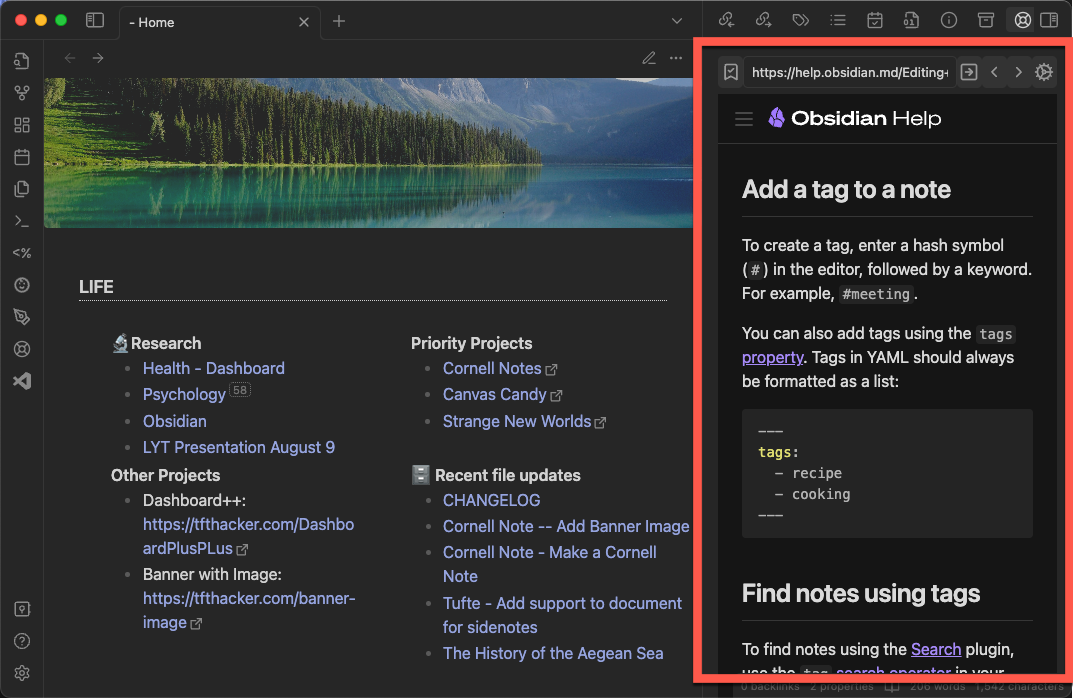
A plugin that adds a sidepane to Obsidian to view help sites for the plugins and themes you have installed.
preview

More Information

https://tfthacker.com/HelpMate

Use of Internet

This plugin is an embedded web browser. It will connect to the internet to retrieve the help sites for the plugins and themes you have installed. It will not connect to the internet for any other reason. It requires a live internet connection to function.

Ways to connect with me and more information on my work

You can find me on Twitter @TfTHacker

My website https://tfthacker.com/

78%
HealthExcellent
ReviewCaution
About
View help pages for installed plugins and themes in a dedicated side pane within Obsidian. Load help sites with an embedded web browser and keep a live internet connection to retrieve content.
SidebarInterface
Details
Current version
1.0.26
Last updated
3 weeks ago
Created
2 years ago
Updates
19 releases
Downloads
16k
Compatible with
Obsidian 1.9.14+
License
MIT
Report bugRequest featureReport plugin
Sponsor
Support
Author
tfthackertfthacker
github.com/TfTHacker/Obsidian-WordNet
GitHubtfthacker
  1. Community
  2. Plugins
  3. Sidebar
  4. HelpMate

Related plugins

Hide Sidebars on Window Resize

Automatically hides the sidebars when your window is narrow on window resize.

Hider

Hide interface elements such as tooltips, status bar, titlebar, and more.

Notebook Navigator

Alternative file browser with folders, tags, properties, shortcuts, previews, keyboard navigation, drag and drop, and pinned notes.

Meta Bind

Make your notes interactive with inline input fields, metadata displays, and buttons.

Commander

Customize your workspace by adding commands everywhere, create macros and supercharge your mobile toolbar.

Recent Files

Display a list of recently opened files.

Iconic

Customize your icons and their colors directly from the UI, including tabs, files & folders, bookmarks, tags, properties, and ribbon commands.

TagFolder

Show tags as folder.

Hover Editor

Transform the Page Preview hover popover into a fully working editor instance.

Checklist

Consolidate checklists across all files into a single view.