Gyazo Viewer
 nota736 downloads
Display your Gyazo captures and embed them into your notes.
- Overview
- Scorecard
- Updates5
This Obsidian plugin integrates with Gyazo, allowing you to view and embed your Gyazo captures directly in your notes. Gyazo is a screenshot and image sharing service that makes capturing and sharing visual information quickly and easily.
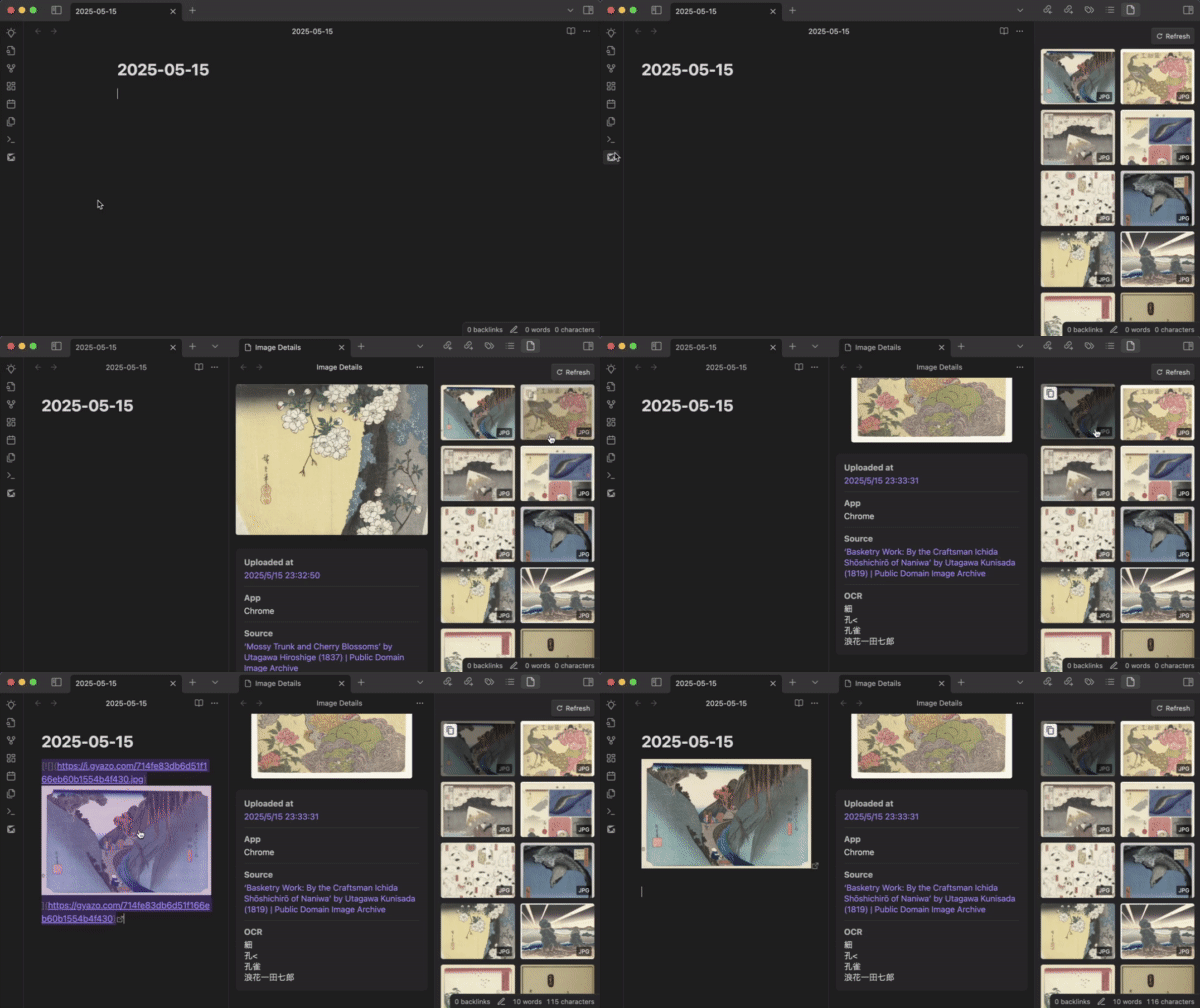
Features
- Sidebar Gallery: View your Gyazo captures in a dedicated sidebar
- Drag & Drop Embedding: Drag images directly into your notes
- Markdown Copying: Copy markdown for images with hover actions
- Context Menu Options: Right-click on captures for additional actions
- Detail View: View captures with their metadata including OCR
- Free & Pro Support: Works with both free and Pro Gyazo accounts
- Free accounts can access the latest 10 captures
- Pro accounts can access up to 100
- Internationalization: Full support for English and Japanese interfaces
Installation
From Community Plugins (Recommended)
- Open Obsidian settings > Community plugins.
- Ensure "Restricted mode" is off.
- Click Browse community plugins.
- Search for "Gyazo Viewer".
- Click Install.
- Once installed, click Enable.
Manual Installation
- Download the latest release files (
main.js,manifest.json,styles.css) from the Releases page. - Navigate to your Obsidian vault's plugins folder:
YourVault/.obsidian/plugins/. - Create a new folder named
gyazo-obsidian-plugin. - Copy the downloaded
main.js,manifest.json, andstyles.cssfiles into this new folder. - Reload Obsidian (Ctrl/Cmd+R or close and reopen).
- Go to settings > Community plugins, find "Gyazo Viewer", and enable it.
Configuration
After installing and enabling the plugin, you need to configure it:
Generate API Token:
- Visit Gyazo API and sign in to your Gyazo account.
- Create a new application, then generate a new access token.
- Copy your access token.
Obsidian settings:
- Go to settings > Gyazo Viewer.
- Paste your access token in the Access Token field.
- Select your preferred language (English or Japanese).
- Configure display options like image width and permalink links.
Security Note
Your Gyazo access token allows access to your Gyazo captures. The token is stored locally in your Obsidian vault and is not shared with any third parties.
Usage
Sidebar Grid View
- Click the Gyazo icon in the left ribbon to open the captures view.
- Your captures will appear as a grid of thumbnails in the right sidebar.
- Hover over captures to see copy options.
- Refresh your captures by clicking the refresh button at the top of the sidebar.
Embedding Captures
- Drag & Drop: Drag a capture from the sidebar and drop it into your note.
- Copy Markdown: Hover over a capture and click the copy button to copy its markdown.
Context Menu
Right-click on a capture to access additional options:
- Copy URL
- Open in Browser
Free vs Pro Account Differences
- Free Gyazo users can access their 10 most recent captures
- Pro users can access up to 100 captures with full functionality
Development
Setup
- Clone this repo.
- Make sure your NodeJS is at least v22 (
node --version). npm cito install dependencies.npm run devto start compilation in watch mode.
Build
npm run build- Builds the production version.npm run lint- Checks code quality with ESLint.
License
This project is licensed under the GNU GPL v3.0 - see the LICENSE file for details.
HealthGood
ReviewCaution
About
View and embed Gyazo captures directly in your notes using a sidebar gallery with drag-and-drop embedding and a detailed preview showing metadata and OCR. Copy ready-to-use Markdown, use context-menu actions for captures, and access the latest 10 captures on free accounts or up to 100 with Pro; supports English and Japanese.Details
Current version
1.0.4
Last updated
Last year
Created
Last year
Updates
5 releases
Downloads
736
Compatible with
Obsidian 0.15.0+
Platforms
Desktop, Mobile
License
GPL-3.0
Sponsor