Gjetr
 Lasse Jellum74 downloads
Run persistent agents in your vault locally or remotely using herdr or herdr-core.
- Overview
- Scorecard
- Updates10
Obsidian as an agentic workspace for knowledge work. Your agents work in your vault, next to your notes: open any one as a live terminal tab, or, for Claude Code, as a native view that renders the session as Markdown.
The plugin doesn't own the harness. Agents run in herdr or herdr-core with your own CLIs, flags and config, and keep running when Obsidian closes.
No herdr yet? Run Claude Code directly from Obsidian to get up and running straight away.
Get it: Gjetr in Obsidian's community plugins.
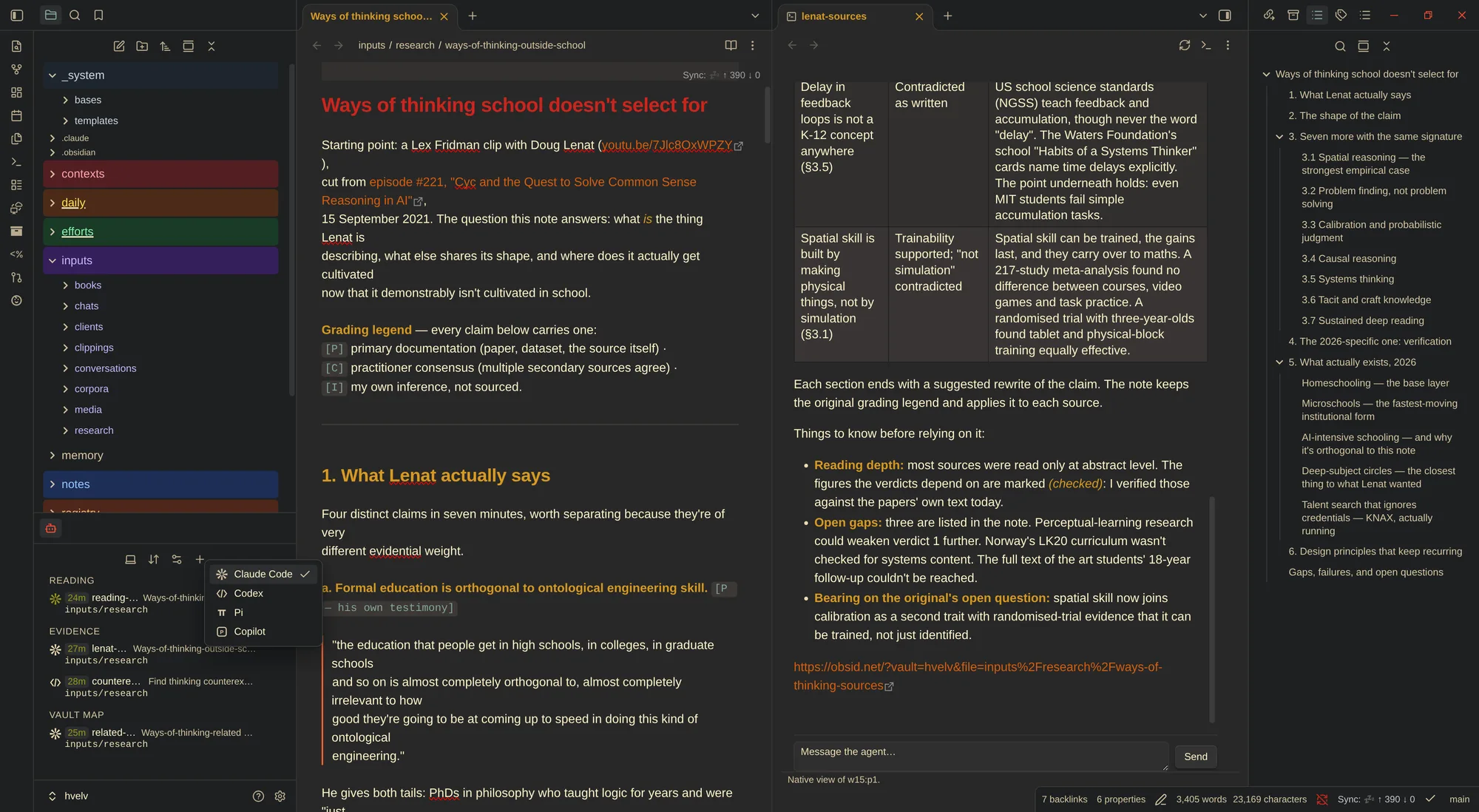
Remote: run agents on another machine over SSH, with the vault kept in sync there. See the remote guide.
What you get
- Terminals: any agent's live terminal as an Obsidian tab, to type in or watch read-only, beside the note you are working on.
- Native view: a Claude Code session as Obsidian Markdown, with wikilinks,
callouts and your theme, tool calls folded into one line per turn, the notes
it changed as links, and its to-do list and subagents as they run. Answer
its questions, permissions and plans from a card in the view. The prompt box
has
/and@completion, images, queued prompts you can send now, edit or discard, and model, effort and permission mode pickers with the context used beside them. - Agent list in the sidebar: the vault's agents with their status and current task, live.
- Starting agents: the + in the list starts your default agent, and a right click offers every agent CLI installed on that machine plus your own entries. Any folder in the file explorer can start one too.
- Notifications when an agent is blocked on you, or done.
Where agents run
| Runtime | Machine | Terminal | Native view | Keeps running when Obsidian closes |
|---|---|---|---|---|
| herdr | this machine | yes | yes | yes |
| herdr | over SSH | yes | no | yes |
herdr-core (hc) |
this machine or over SSH | yes | yes, with the Claude session hook | yes |
| Claude, run by Obsidian | this machine | Linux only | yes | no |
The native view is for Claude Code; every other agent CLI gets the terminal. You can add several runtimes and switch between them; one is active at a time. Details per runtime are in docs/runtimes.md.
Requirements: Obsidian desktop 1.14.4 or newer on macOS or Linux, and one of: herdr 0.8.0 or newer, already running; herdr-core; or Claude Code. Over SSH: key-based login that does not prompt.
Install
Gjetr is in Obsidian's community plugins: open Settings → Community
plugins → Browse, search for Gjetr, then install and enable it, or start
from its page in the directory.
Obsidian keeps it updated from there. The plugin id was herdr through 0.5;
settings saved under that id carry over on the first load as gjetr.
For builds before they reach the directory, add nytafar/obsidian-herdr to
BRAT as a beta plugin.
Or let your coding agent do it, BRAT included (docs/agent-install.md):
Install the Obsidian plugin Gjetr for me: read
https://raw.githubusercontent.com/nytafar/obsidian-herdr/main/docs/agent-install.md
and follow it.
Manual: put main.js, manifest.json and styles.css from a
release into
<vault>/.obsidian/plugins/gjetr/ and reload Obsidian.
Get started
Run Gjetr: Show agents. While no runtime connects, the list shows a Get started card: start Claude Code run by Obsidian at once, install herdr-core with its official installer where you can watch it, or go to herdr's install docs. Settings → Gjetr shows what the plugin found.
For power users
- Your own agent CLI entries (extra arguments on herdr and herdr-core, wrappers on herdr-core), and a default agent per runtime: docs/runtimes.md.
- Remote runtimes, binaries, and pinning a herdr workspace or herdr-core space: docs/runtimes.md.
- Terminal modes, placement, engines and themes: docs/usage.md and docs/settings.md.
What it won't do
- Change how herdr or herdr-core behave outside Obsidian. All scoping to your vault happens in the plugin.
- Download, install or update anything by itself.
- Answer an agent's questions or permission prompts for you.
- Touch an agent's config without asking: the Claude session hook is installed only after you agree.
What it uses on your machine
The plugin is desktop only because agents run outside Obsidian:
- Programs: it starts
herdr,hc,ssh,claudeand the agent CLIs you pick as child processes, and asks your login shell for itsPATHto find them. - Files outside the vault: it reads herdr's socket and Claude Code's
session transcripts, checks which agent CLIs are installed, and keeps
short-lived SSH forwarding sockets in
/tmp. Outside the vault it writes only the Claude session hook and its entry in Claude's settings, after you agree. - The vault's file list: for
@completion in the native view's prompt box. - The clipboard: it writes to it when you press a copy button. It never reads it.
The plugin itself sends nothing over the network, except SSH to the hosts you add. The agents it starts reach whatever their own CLIs reach.
Docs
- docs/usage.md: the list, terminals, the native view, starting agents, notifications.
- docs/native-view.md: what the native view shows, the prompt box, the waiting card, and its limits.
- docs/runtimes.md: adding and switching runtimes, SSH, herdr-core, Claude run by Obsidian.
- docs/settings.md: every setting on one line.
- docs/troubleshooting.md: the messages you may see.
- docs/architecture.md and docs/development.md: how it talks to herdr, and how to build it.
License
MIT. See LICENSE.