
- Overview
- Scorecard
- Updates4
简体中文 README | Usage Guide | 使用指南
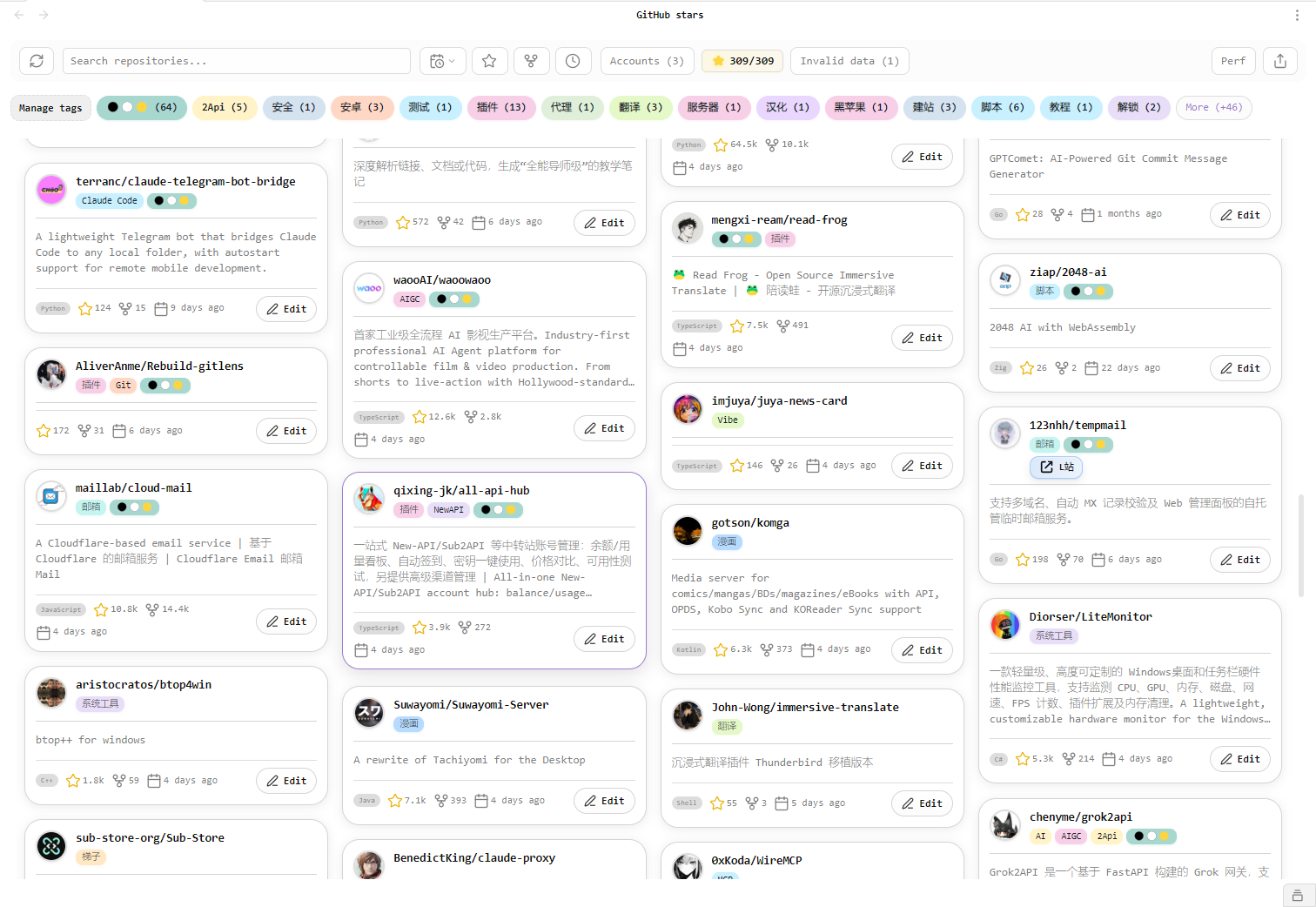
A powerful Obsidian plugin that allows you to manage and view your GitHub starred repositories directly within Obsidian, with multi-account support, custom tags, smart search, and a polished Obsidian-native interface.
✨ Core Features
📊 Repository Management
- 📋 View all your starred GitHub repositories within Obsidian
- 👥 Multi-account support: Manage stars from multiple GitHub accounts simultaneously
- ⭐ Star statistics: Real-time display of total repository count and stars
- 🔄 Smart sync: Automatic or manual synchronization of starred repositories
- 🔄 Account management: Enable/disable sync for specific accounts individually
🏷️ Personalization
- 🏷️ Tag Chips Component: Intuitive tag chip input with quick selection of existing tags
- 📝 Add custom tags and notes to repositories
- 🔗 Link repositories to Obsidian note files
- 💾 All annotation data stored locally for privacy protection
🔍 Smart Search & Filter
- 🔎 Real-time search by name, description, language, tags
- 🎯 Support for regular expressions and fuzzy matching
- 📊 Multi-dimensional sorting: by star time, name, language, star count, etc.
- 🏷️ Advanced filtering based on tags
🎨 Polished Interface
- 🎨 Clean Obsidian-native card layout that follows your vault's light/dark appearance
- 📱 Responsive waterfall layout: Pinterest-style card display
- 🧩 Compact toolbar and tag chips for quick scanning and filtering
- ✨ Smooth hover feedback and readable card styling
🔒 Security & Privacy
- 🔐 Secure authentication using GitHub Personal Access Token
- 💾 GitHub tokens, repository cache, tags, and notes are stored in local plugin data
- 🌐 Only connects to official GitHub services when syncing or validating tokens
- ✅ Passed all eslint-plugin-obsidianmd rule validations
Security & Privacy
GitHub Stars Manager is a local-first GitHub integration. It only connects to GitHub services when you configure an account, validate a token, sync repositories, or open GitHub-related links.
Runtime external services:
api.github.com: validates GitHub tokens, reads the current user, fetches starred repositories, and fetches repository detailsgithub.com: opens repository pages when you click repository linksavatars.githubusercontent.comor other GitHub avatar hosts: displays GitHub user and repository owner avatars
Runtime Obsidian capabilities:
- Vault file enumeration: used only to let you choose an existing Markdown note when linking a repository to a note
- Vault write access: used only when exporting selected starred repositories to Markdown files in the export folder you configure
- Clipboard write access: used only when you click the copy URL action for a repository link
This plugin does not:
- upload vault content or note bodies
- collect analytics or telemetry
- track users
- download or execute remote code
- read clipboard content
- send your GitHub token to any service other than GitHub
GitHub Personal Access Tokens are stored in local Obsidian plugin settings data inside your vault configuration. The plugin does not upload this data, but it is not an encrypted password vault. Use token expiration and the minimum scopes needed for your use case.
Configuration
To use this plugin, you need to provide a GitHub Personal Access Token (PAT) with the necessary permissions to read your starred repositories.
How to get a GitHub Personal Access Token (PAT):
- Login to GitHub: Visit github.com and log in to your account.
- Access Settings: Click your profile picture in the top-right corner, then select "Settings".
- Developer Settings: In the left sidebar, scroll down and click "Developer settings".
- Personal Access Tokens: In the left sidebar, select "Personal access tokens", then choose "Tokens (classic)". (Note: Please select Classic Token, as Fine-grained tokens might require more complex permission setup).
- Generate New Token: Click the "Generate new token" button, then select "Generate new token (classic)".
- Token Description: In the "Note" field, give your token a descriptive name, e.g., "Obsidian Stars Manager".
- Set Expiration: Choose an appropriate expiration duration. For security, "No expiration" is not recommended.
- Select Scopes: Prefer the minimum required scopes. Reading public starred repositories usually only requires
read:userandpublic_repo. Only use the broaderreposcope if you specifically need access to private repository-related data. - Generate Token: Click the "Generate token" button at the bottom of the page.
- Copy Token: Important! GitHub will only show the full token once. Click the copy icon immediately to copy it and store it securely. You won't be able to see the full token again after leaving this page.
- Use in Plugin: Paste the copied token into the "GitHub Personal Access Token (PAT)" field in the "GitHub Stars Manager" settings tab within Obsidian.
Usage
- After installing and enabling the plugin, a GitHub star icon will appear in the left panel
- Click the icon to open the starred repositories view
- Configure your GitHub PAT in the plugin settings on first use
- Click the "Sync" button to fetch your starred repositories
- You can add personal notes, tags, or link repositories to existing Obsidian notes
📖 View Detailed Usage Guide | 中文指南
Interface Layout
The plugin uses one consistent interface style that follows Obsidian's active appearance. There is no separate in-plugin theme switch.
- Responsive waterfall layout similar to Pinterest's card display
- Repository cards include owner avatars, tags, notes, links, stars, forks, and update metadata
- The toolbar keeps sync, search, account filtering, statistics, and tag filtering in one place
Installation
From Obsidian Community Plugins (Recommended)
- Open Obsidian Settings
- Go to "Community plugins" tab
- Search for "GitHub Stars Manager"
- Click Install and enable the plugin
Manual Installation
- Download the latest
main.js,manifest.json, andstyles.css - Copy these files to your vault:
VaultFolder/.obsidian/plugins/github-stars-manager/ - Restart Obsidian
- Enable the plugin in settings
Development
Requirements
- Node.js 16+
- npm or yarn
Development Commands
# Install dependencies
npm install

# Development mode (watch for changes)
npm run dev

# Production build
npm run build

# Version bump
npm run version
Tech Stack
- TypeScript: Type-safe JavaScript superset
- Obsidian API: Plugin development framework
- GitHub REST API: Access GitHub data via @octokit/rest
- CSS3: Modern styling and animation effects
- esbuild: Fast JavaScript bundler
Project Structure
├── src/
│   ├── main.ts          # Main plugin class
│   ├── view.ts          # Starred repositories view
│   ├── settings.ts      # Plugin settings
│   ├── modal.ts         # Edit modal dialogs
│   ├── githubService.ts # GitHub API service
│   └── types.ts         # TypeScript type definitions
├── main.ts              # Plugin entry point
├── manifest.json        # Plugin manifest
├── styles.css          # Stylesheet
└── README.md           # Documentation
Changelog
v0.1.3 (Current Version)
- 📝 Made the root README English-first for Obsidian Community review, while keeping the Simplified Chinese README in
README_zh.md - 🔒 Added explicit runtime capability disclosures for vault file enumeration, vault writes, and clipboard writes
- 🎨 Removed the in-plugin theme switch and standardized the interface on Obsidian's active appearance
- 🔧 Removed direct
eslint-plugin-importandlint-stageddevelopment dependencies that triggered source review warnings
v0.1.2
- 🛡️ Updated the minimum Obsidian version to 1.7.2 to match the official API requirements used by the plugin
- 🔒 Added clearer security and privacy disclosures for GitHub services and local data storage
- 🔑 Changed GitHub token guidance to prefer the minimum
read:userandpublic_reposcopes - 📦 Improved the Release workflow to publish only Obsidian-supported plugin files and generate build provenance attestations
- 🔧 Removed
builtin-modulesanddotenvfrom the build script to reduce review warnings
v0.1.1
- 🏷️ Added Tag Chips input component with quick tag selection
- ⭐ Added total stars count display feature
- 🎨 Enhanced note card visibility and UI styling
- 🔧 Enabled all 25 eslint-plugin-obsidianmd rules
- 🐛 Fixed token error handling and error messages
- 🛡️ Added clearer security and privacy disclosures for Obsidian Community review
- 🤖 Configured pre-commit hooks and GitHub Actions CI/CD
v0.1.0
- ✨ Initial release
- 🎯 Multi-account GitHub Stars management
- 🎨 Liquid Glass theme support at initial release; the in-plugin theme switch was removed in v0.1.3
- 📱 Responsive waterfall layout
- 🔍 Advanced search and filtering
- 🏷️ Custom tags and notes functionality
License
MIT License - see LICENSE file for details
Contributing
Contributions are welcome! Please follow these steps:
- Fork the repository
- Create a feature branch (
git checkout -b feature/AmazingFeature) - Commit your changes (
git commit -m 'Add some AmazingFeature') - Push to the branch (
git push origin feature/AmazingFeature) - Open a Pull Request
Support
If you find this plugin helpful, consider:
- ⭐ Starring the project
- 🐛 Reporting bugs or suggesting improvements
- 💡 Sharing it with other Obsidian users
- 💖 Sponsor the developer