Gantt this
 Altarok2k downloads
Interactive Gantt charts for custom TTRPG calendars, with support for Bases views. Track campaign events, eras, and timestamps directly from note frontmatter.
- Overview
- Scorecard
- Updates49
Obsidian plugin able to show a Gantt chart for multiple fantasy calendars.
See this for more extensive documentation: https://altarok.github.io/quartz/
Hint: This is an automated translation of the German README (
LIESMICH.md).
Welcome to the documentation for the Gantt Timeline Plugin for Obsidian. This plugin allows you to clearly display your notes and events in interactive timelines.
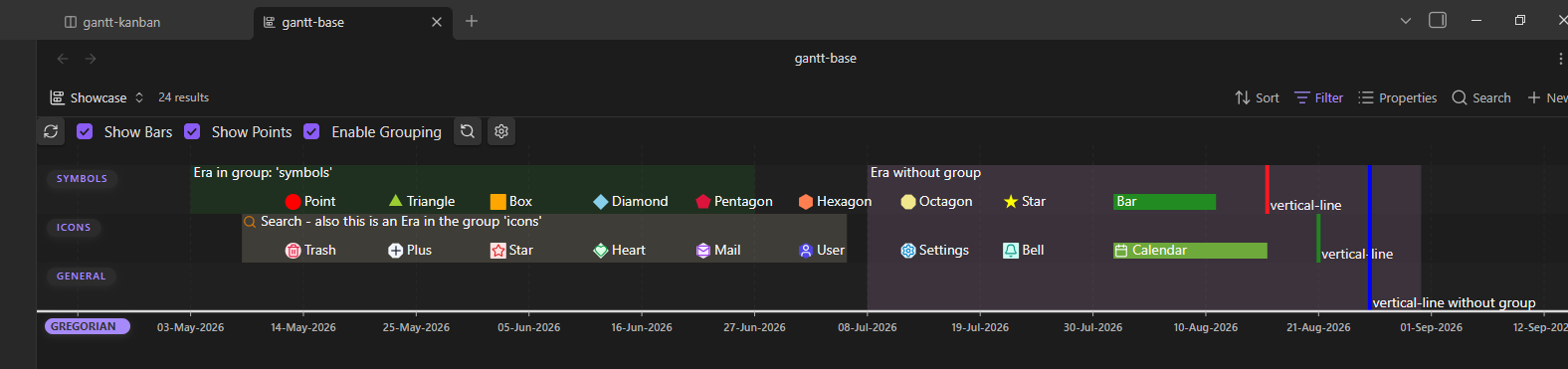
Features & Structure
- Events: Each point or bar in the timeline corresponds to an event.
- Bars: Represent time spans.
- Points / Symbols: Represent specific points in time or milestones.
- Decentralized in FrontMatter: Events are defined directly within the YAML properties of your Markdown files.
- Structuring: Events can be organized, filtered, and sorted by groups and custom calendars.
- Flexible Visibility: Groups, calendars, time spans, and individual points can be shown or hidden independently.
- Custom Styling: Points in time can be customized with icons from Lucide and custom colors.
- Interactivity:
- Mouseover displays relevant metadata in a tooltip (Desktop).
- Clicking an event directly opens the source note—optionally jumping to a specific heading.
- Full navigation via drag & zoom (mouse wheel on Desktop, touch gestures on mobile devices).
Data Safety & Privacy: The plugin reads your notes and can insert a code block into your current file upon request. It never deletes data from your vault and makes no network connections.
Getting Started
Gantt Chart / Timeline Creation
There are two simple ways to embed a timeline into a note:
Option 1: Via Command / Ribbon Icon (Recommended)
- Click the ribbon icon or open the command palette and select:
Gantt this: Open code block creator. - The modal guides you step-by-step through the configuration:
- Folder for Events: Specify where the plugin should search for notes with event data (includes a toggle for recursive search in subfolders).
- Folder for Calendars: Specify where custom calendar definitions are stored.
- By default, the folder of the currently active file is suggested for both.
- At the bottom of the modal, you can copy the generated code block or insert it directly at your current cursor position.
Option 2: Manually in the Editor
Simply paste the following code block into any Markdown file:
```gantt-this
```
Populating Your Gantt Chart / Timeline
To display one or more notes as events in your timeline, add the corresponding properties to the YAML frontMatter of your Markdown file:
---
gantt-item: true           # Marks the note as an event
gantt-start: 2026-01-01    # Start date / point in time
gantt-end: 2026-01-05      # Optional: End date (Fallback is 'gantt-start')
gantt-name: "My Project"   # Optional: Name (Fallback is the file name)
gantt-group: "Development" # Optional: Group (Fallback is 'general')
---
Additional FrontMatter Options
The following table lists all available properties you can use in your notes:
| Property | Type / Values | Optional? | Default / Fallback | Description |
|---|---|---|---|---|
gantt-item |
Boolean | No | true |
Marks the note as an event target for the plugin. |
gantt-start |
String | No | None (Note will be ignored without a start value) | Start date or start value of the event. |
gantt-end |
String | Yes | Value of gantt-start |
End date of the event. If identical to start value, a point is displayed. |
gantt-name |
String | Yes | File name without extension (file.basename) |
Name of the event in the timeline and tooltip. |
gantt-type |
String | Yes | Plugin standard calendar | Determines the assigned calendar type. |
gantt-group |
String | Yes | 'general' |
Group used for row layout and structuring. |
gantt-color |
Color (e.g. #ff0000, red) |
Yes | Group color → Calendar color → Default | Overrides the background color of the event individually. |
gantt-displayIcon |
String | Yes | None | Displays an icon on the event. |
gantt-displayIconColor |
Color (e.g. #ff0000, red) |
Yes | Default icon color | Sets the color of the icon. |
gantt-symbol |
bar, point, icon, ... |
Yes | bar (time span) or point (point in time) |
Sets the visual representation format of the event. |
gantt-linkToHeader |
String | Yes | None (Jumps to top of file) | Links directly to a specific heading when clicked. |
Custom Calendar Definitions
If you use custom time systems or fictional calendars in your vault, you can define them using a separate note:
| Property | Type / Values | Optional? | Default / Fallback | Description |
|---|---|---|---|---|
gantt-type-definition |
String | No | None | Unique identifier of the calendar for referencing via gantt-type. |