Search...Search plugins and themes...
⌘K
Sign in
  • Get started
  • Download
  • Pricing
  • Enterprise
  • Account
  • Obsidian
  • Overview
  • Sync
  • Publish
  • Canvas
  • Mobile
  • Web Clipper
  • CLI
  • Learn
  • Help
  • Developers
  • Changelog
  • About
  • Roadmap
  • Blog
  • Resources
  • System status
  • License overview
  • Terms of service
  • Privacy policy
  • Security
  • Community
  • Plugins
  • Themes
  • Discord
  • Forum / 中文论坛
  • Merch store
  • Brand guidelines
Follow us
DiscordTwitterBlueskyThreadsMastodonYouTubeGitHub
© 2026 Obsidian

Frontmatter to HTML Attributes

illdepenceilldepence196 downloads

Makes YAML frontmatter available as data-* attributes in HTML, enabling metadata based CSS styling.

Add to Obsidian
  • Overview
  • Scorecard
  • Updates1

An Obsidian plugin that makes a note’s YAML frontmatter available in HTML as data-* attributes for metadata based CSS styling.
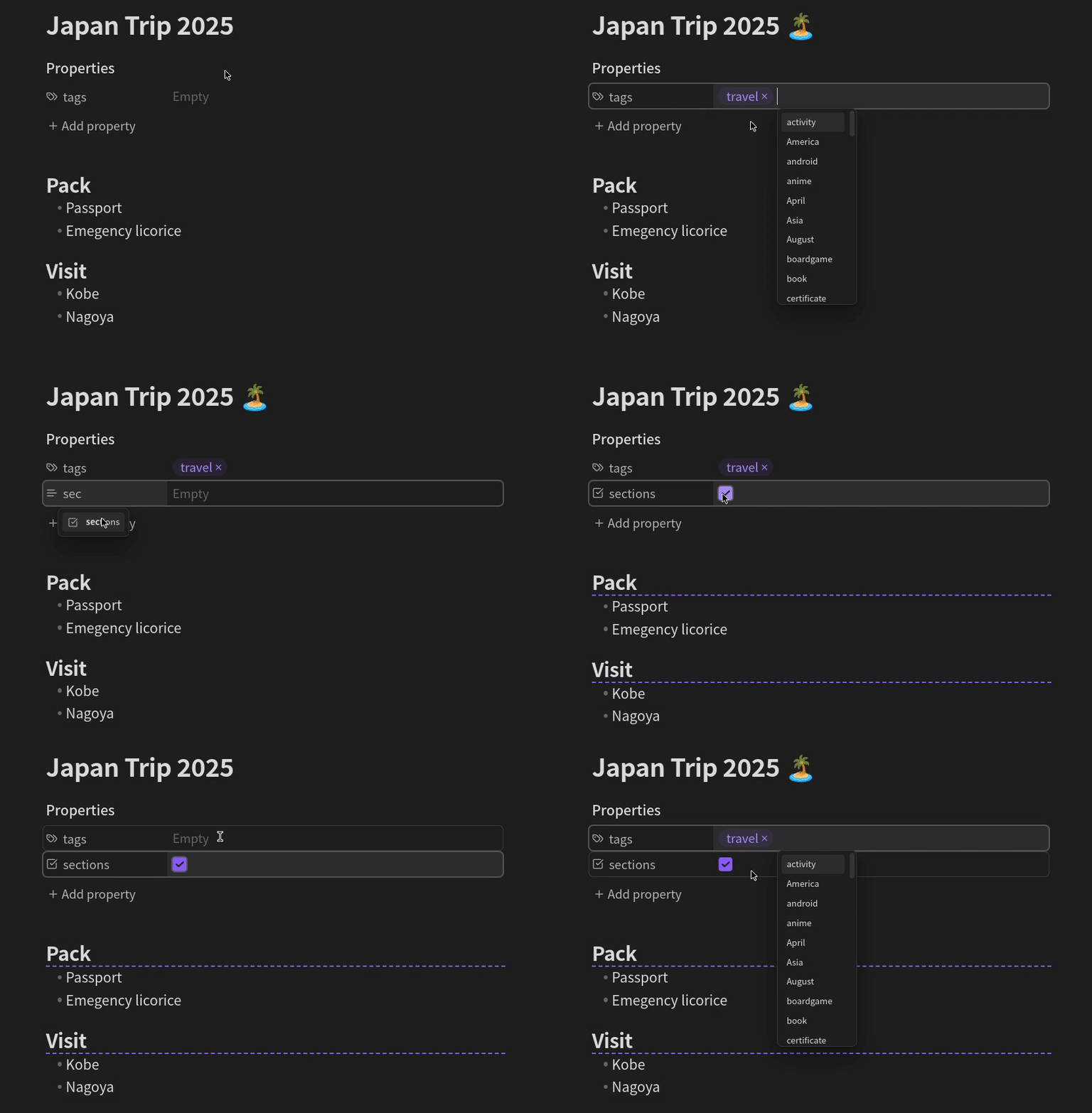
Examples

With the plugin installed, you can use CSS snippets like below

  1. Display an island icon with the title of every note tagged "travel".
    div.workspace-leaf-content[data-tags*='"travel"'] div.inline-title:after {
      content: " \1F3DD\FE0F"; /** 🏝️ */
    }
    
  2. Underline headings in notes with the "sections" attribute checked.
    div.workspace-leaf-content[data-sections="true"] .HyperMD-header-1, /** editing mode */
    div.workspace-leaf-content[data-sections="true"] h1 { /** reading mode */
      border-bottom: dashed 2px var(--interactive-accent); 
    }
    

Usage

For every item in the YAML frontmatter <foo>, an equivalent attribute data-<foo> is added to the note’s HTML container div.workspace-leaf-content. To style notes based on these attributes, create CSS snippets using attribute selectors.

To match a YAML frontmatter item XXX with value YYY, create a CSS rule for the attribute data-XXX like below.

div.workspace-leaf-content[data-XXX="YYY"] /** additional selectors */ {
  /** styling */
}

To match a tag, use *= instead of = and add quotes, as shown below.

div.workspace-leaf-content[data-tags*='"YYY"'] /** additional selectors */ {
  /** styling */
}

Data types

Lists and objects will be turned into JSON, everything else into a simple string.

For example, a note with a YAML frontmatter

---
tags:
  - travel
  - asia
start: 2025-10-27
end:
insurance: true
---

will be rendered in a container with data attributes as follows.

<div
    class="workspace-leaf-content"
    data-tags='["travel","asia"]'
    data-start="2025-10-27"
    data-end="null"
    data-insurance="true"
>
    <!-- content -->
</div>
82%
HealthExcellent
ReviewSatisfactory
About
Expose YAML frontmatter as data-* attributes on a note's HTML container for CSS-based metadata styling. Target those data attributes in CSS selectors to style notes by frontmatter values — lists and objects serialize to JSON while primitives become strings.
CSSPropertiesAppearance
Details
Current version
0.1.0
Last updated
3 months ago
Created
8 months ago
Updates
1 release
Downloads
196
Compatible with
Obsidian 1.9.12+
Platforms
Desktop, Mobile
License
MIT
Report bugRequest featureReport plugin
Author
illdepenceilldepence
github.com/IllDepence
GitHubilldepence
  1. Community
  2. Plugins
  3. CSS
  4. Frontmatter to HTML Attributes

Related plugins

Style Settings

Adjust theme, plugin, and snippet CSS variables.

Lapel

Show the heading levels in the gutter of the editor.

Pretty Properties

Makes note properties look more fun: adds side image, banners, list property colors and allows to hide specific properties.

Snippetor

Create and tweak common snippets.

Colored Bases Properties

Color property lists and formula properties in Bases.

Show Whitespace

CSS styles and CM6 extensions to highlight whitespace in Source and Live Preview modes.

Contextual Typography

Add a data-tag-name attribute to all top-level divs in preview mode containing the child's tag name, allowing contextual typography styling.

Focus Mode

Add a toggle to hide interface elements so you can focus on your note.

Better Bullets

Improves readability of bulleted notes.

Advanced Canvas

Supercharge your canvas experience. Create presentations, flowcharts and more.