Search...Search plugins and themes...
⌘K
Sign in
  • Get started
  • Download
  • Pricing
  • Enterprise
  • Account
  • Obsidian
  • Overview
  • Sync
  • Publish
  • Canvas
  • Mobile
  • Web Clipper
  • CLI
  • Learn
  • Help
  • Developers
  • Changelog
  • About
  • Roadmap
  • Blog
  • Resources
  • System status
  • License overview
  • Terms of service
  • Privacy policy
  • Security
  • Community
  • Plugins
  • Themes
  • Discord
  • Forum / 中文论坛
  • Merch store
  • Brand guidelines
Follow us
DiscordTwitterBlueskyThreadsMastodonYouTubeGitHub
© 2026 Obsidian

Frontmatter Alias Display

notmuhammadnotmuhammad5k downloads

Show frontmatter aliases as display names in the File Explorer.

Add to Obsidian
  • Overview
  • Scorecard
  • Updates2

A plugin for Obsidian.md to show front-matter aliases as display names in the File Explorer. Right now, it only supports the File Explorer but I'm planning to implement it in the Graph View as well.
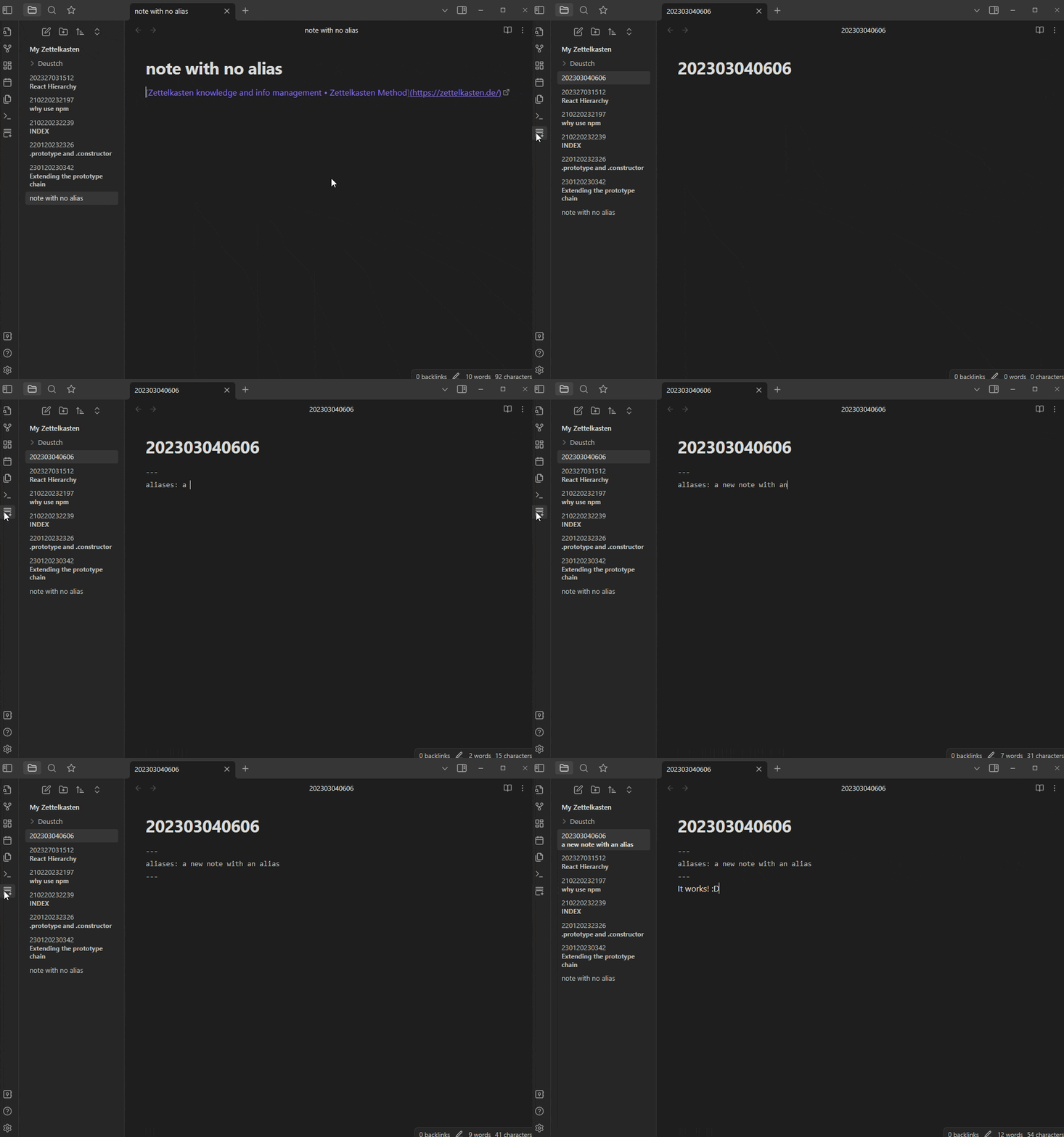
demonstration

Why?

"Why even write the title in frontmatter in the first place?" Many people who are using Obsidian as a Zettelkasten system will immediately realize that it is kind of difficult to navigate the File Explorer when all you see are notes with arbitrary titles (e.g. 202303041748, aka ID) instead of a more informative title such as, say, the difference between .prototype and .constructor.

Those arbitrary titles, or more accurately, IDs, make for easy navigation and linking between notes, which is the core concept of the Zettelkasten method, while also ensuring that no two notes have the same ID.

So now we get to keep the note ID pure while also maintaining an informative title in frontmatter. When we link to another note, we can use Obsidian's helpful link alias by typing [[ID|Alias]] which will link to the note with the ID as its title, but display Alias as the link

![using "[[ID|Alias]]"](IDAlias.gif)

Feedback

I would love to hear from you guys and get constructive criticism about ways to improve this plugin, especially feedback related to the implementation and usage of the API and TypeScript in general.

Warning

This is my first time developing a plugin and working with the Obsidian API. Test the plugin inside a dummy Vault beforehand. Use at your own discretion.

Todo

  • Expand functionality into the Graph View
  • Add a settings menu for customization and other options
66%
HealthFair
ReviewSatisfactory
About
Display frontmatter aliases as File Explorer names to show readable titles instead of IDs. Keep original file IDs intact while showing informative aliases for easier navigation in Zettelkasten-style vaults.
FilesSidebarProperties
Details
Current version
1.0.1
Last updated
3 years ago
Created
3 years ago
Updates
2 releases
Downloads
5k
Compatible with
Obsidian 0.15.0+
Platforms
Desktop, Mobile
License
GPL-3.0
Report bugRequest featureReport plugin
Author
notmuhammadnotmuhammad
github.com/muhammadv-i
GitHubnotmuhammad
  1. Community
  2. Plugins
  3. Files
  4. Frontmatter Alias Display

Related plugins

Notebook Navigator

A better file browser and calendar inspired by Apple Notes, Bear, Evernote and Day One.

Recent Files

Display a list of recently opened files.

Flexplorer

Enhance the file explorer with custom sorting, pinning, and hiding.

Custom File Explorer sorting

Manual or automatic config-driven reordering and sorting of files and folders in File Explorer.

Novel word count

Display a word count, page count, creation date, or other statistics for each file, folder and vault in the File Explorer pane.

Multi Properties

Add properties to multiple notes at once. Either right-click a folder or select multiple notes and right-click the selection.

Reveal Active File Button

Add a button to the top of the File Explorer, to reveal the active file.

File Explorer Note Count

See the number of notes in each folder within the file explorer.

File Tree Alternative

An alternative file tree view with separate folder and file panes.

Local REST API & MCP Server

Unlock your automation needs by interacting with your notes over a secure REST API.