Search...Search plugins and themes...
⌘K
Sign in
  • Get started
  • Download
  • Pricing
  • Enterprise
  • Account
  • Obsidian
  • Overview
  • Sync
  • Publish
  • Canvas
  • Mobile
  • Web Clipper
  • CLI
  • Learn
  • Help
  • Developers
  • Changelog
  • About
  • Roadmap
  • Blog
  • Resources
  • System status
  • License overview
  • Terms of service
  • Privacy policy
  • Security
  • Community
  • Plugins
  • Themes
  • Discord
  • Forum / 中文论坛
  • Merch store
  • Brand guidelines
Follow us
DiscordTwitterBlueskyThreadsMastodonYouTubeGitHub
© 2026 Obsidian

Follow the Money Builder

noop30 downloads

Manually build structured Follow the Money data and upload to OpenAleph instances.

Add to Obsidian
  • Overview
  • Scorecard
  • Updates2

This Obsidian plug-in allows the user to create Follow the Money entities independent of, but optionally for, OpenAleph.

⚠️ This plug-in is in an Alpha stage. It may still contain bugs. If you would like to report a bug or request a feature, please open an Issue.

Installation

You must have Obsidian installed in order to use this plug-in.

Your Obsidian app version must be equal or newer 1.13.0. You can see the version by opening the Settings and navigating to the General section. If you have an older version of Obsidian, upgrade to a more recent version.

This plug-in can be installed directly via the Obsidian Community plug-ins catalogue. Two other installation methods are detailed below.

Install using the BRAT plug-in

If you already have the Beta Reviewers Auto-update Tester plug-in (called BRAT), you can add https://github.com/noop-ptf/FollowTheMoneyBuilder and select the latest version of this plug-in.
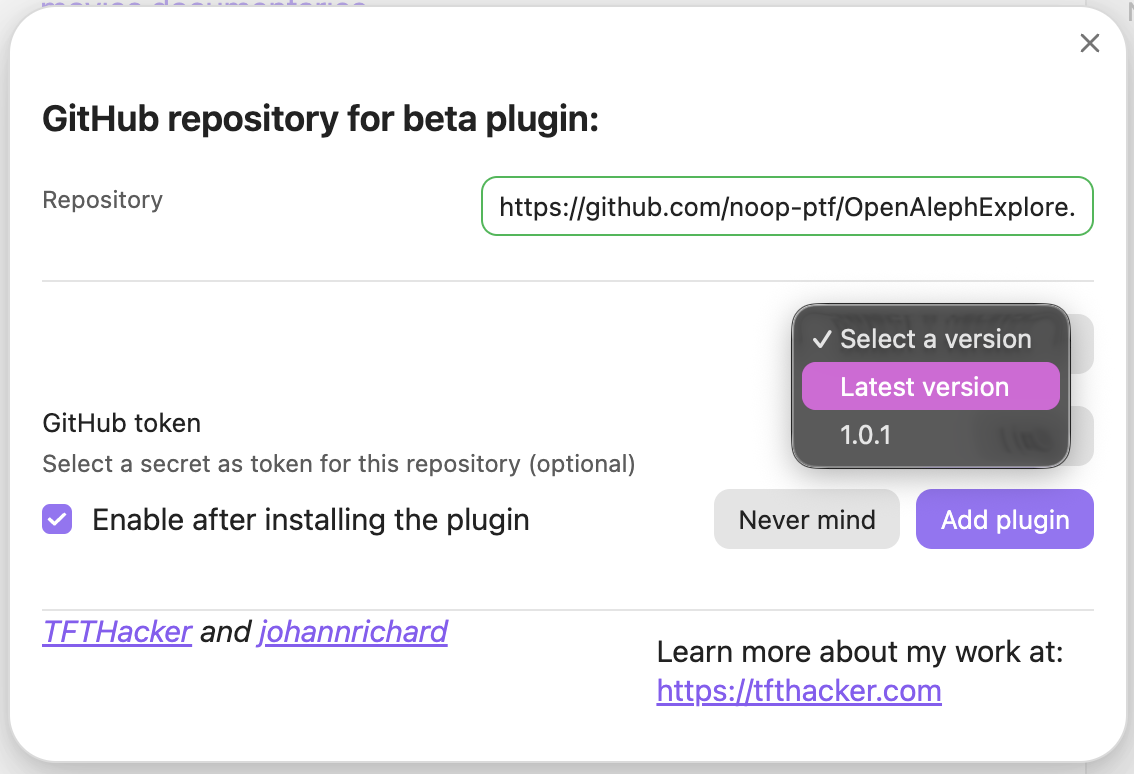
Screenshot demonstrating how to add the GitHub URL for  OpenAleph Explore plug-in to BRAT

Install from source code

  1. Make sure you have NodeJS installed, and that the version is at least v18 (node --version). If you don't have NodeJS installed, follow the official instructions
  2. Navigate to the plug-ins directory of your Obsidian vault (usually located at VaultName/.obsidian/plugins/). Here, run git clone https://github.com/noop-ptf/FollowTheMoneyBuilder.git followthemoney-builder.
  3. Navigate into the newly-created directory, that contains the source code, and install the dependencies: npm i
  4. Run npm run build. This should produce three files: main.js, styles.css, manifest.json.
  5. Open Obsidian, navigate to the Settings > Community plugins and refresh the list of plug-ins. Follow the Money Builder should appear. Enable it.

Related projects

OpenAleph Search allows a user to search through many different OpenAleph instances simultaneously. OpenAleph Explore allows a user to send a note to all the OpenAleph instances they have access to in order to extract structured Follow the Money data and related terms.

Sponsor

Follow the Money Builder: an Obsidian Plug-in is funded by the German Federal Ministry of Research, Technology and Space (BMFTR) through the Prototype Fund under funding code (Förderkennzeichen) 16IS26S15.

Funded by the German Federal Ministry of Research, Technology and Space (BMFTR) Funded through the Prototype Fund
HealthExcellent
ReviewPassed
About
Create and manage Follow the Money entities directly in Obsidian, keeping structured entity records alongside your notes. Link entities to OpenAleph instances when needed to integrate with search and exploration tools.
IntegrationsDataResearch
Details
Current version
0.2.0
Last updated
Last week
Created
4 weeks ago
Updates
2 releases
Downloads
30
Compatible with
Obsidian 1.13.0+
Platforms
Desktop only
License
AGPL-3.0
Report bugRequest featureReport plugin
Author
noopnoop
GitHubnoop-ptf
  1. Community
  2. Plugins
  3. Integrations
  4. Follow the Money Builder

Related plugins

Self-hosted LiveSync

Sync vaults securely to self-hosted servers or WEBRTC.

Zotero Integration

Insert and import citations, bibliographies, notes, and PDF annotations from Zotero.

Charted Roots

Family tree visualization with GEDCOM/Gramps import and Canvas/PDF/Markdown export. Charts, maps, timelines, citations, fictional calendars. For genealogists, worldbuilders, and TTRPG campaigns.

Oura Ring

Import Oura Ring data into a note.

BRAT

Easily install a beta version of a plugin for testing.

LanguageTool Integration

Advanced grammar and spell checking, powered by LanguageTool.

Fast Note Sync

Real-time sync of your vaults across server, mobile, and web; shareable with anyone; supports REST and MCP integrations to build your personal AI knowledge base.

Custom Frames

Turn web apps into panes using iframes with custom styling. Also comes with presets for Google Keep, Todoist and more.

Local REST API with MCP

Unlock your automation needs by interacting with your notes over a secure REST API.

Karpathy LLM Wiki

Karpathy's LLM Wiki implementation plugin for Obsidian - turns notes and PDFs into a linked, LLM-powered knowledge base with entity pages, concept pages, graph-powered Q&A, and local-first privacy.