Search...Search plugins and themes...
⌘K
Sign in
  • Get started
  • Download
  • Pricing
  • Enterprise
  • Account
  • Obsidian
  • Overview
  • Sync
  • Publish
  • Canvas
  • Mobile
  • Web Clipper
  • CLI
  • Learn
  • Help
  • Developers
  • Changelog
  • About
  • Roadmap
  • Blog
  • Resources
  • System status
  • License overview
  • Terms of service
  • Privacy policy
  • Security
  • Community
  • Plugins
  • Themes
  • Discord
  • Forum / 中文论坛
  • Merch store
  • Brand guidelines
Follow us
DiscordTwitterBlueskyThreadsMastodonYouTubeGitHub
© 2026 Obsidian

Folder Graph View

CoCo59 downloads

Replaces the link-formed graph view by a graph following the folder structure.

Add to Obsidian
  • Overview
  • Scorecard
  • Updates3

Let your folder structure be your view graph view!

This is an Obsidian plugin

This plugin, once enabled, will modify your existing obsidian graph view to add named nodes for the parent folders of every node and links between them creating a tree structure.
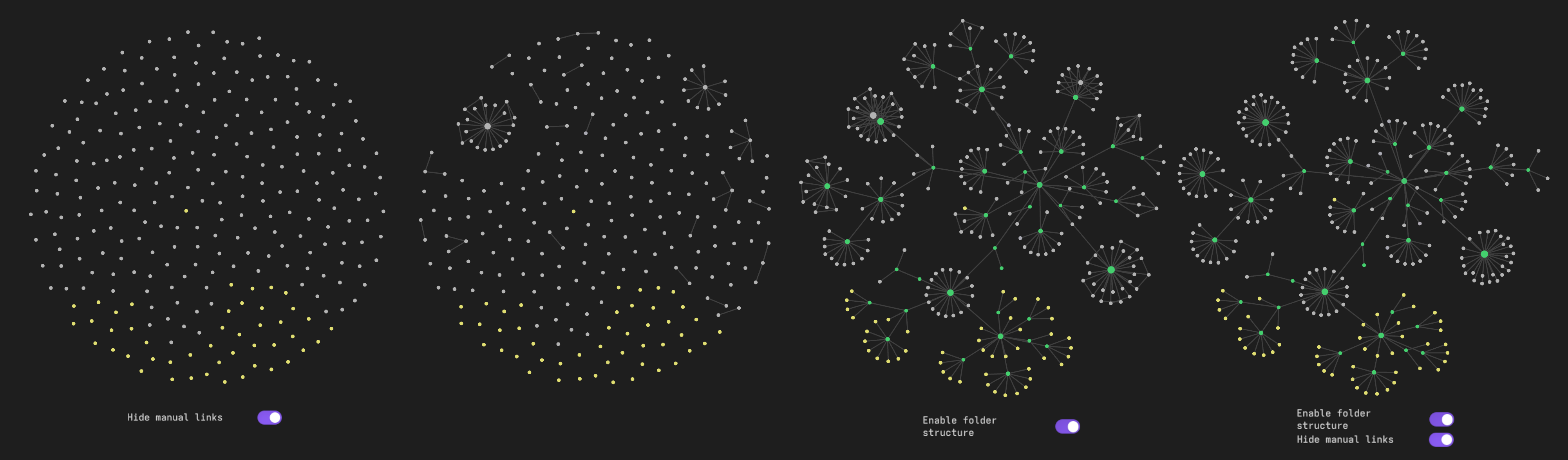
variations of graph view

Important settings

Existing files only should be turned on, otherwise, inexistent files (typically broken links) will not be attached to file containing the link, but to the root folder (or will float around if hide root folder node is disabled). This is less of an issue if hide manual links is disabled since they will be attached to their original origin.

Enable Orphans in the side bar, otherwise, only nodes that would already be displayed in the graph without the plugin will be in the folder tree.

Attachements can be enabled, however if they are stored in a standalone folder, it is recommended to enable hide manual links to prevent them from beeing attached to both the parent folder and the file in which they are linked from.

It is also possible to only hide certain file types (typically images) by enabling Hiden Nodes by strings and adding one or more file extensions separated by spaces.

Manual installation

  • Download the three files main.js, styles.css and manifest.json from the lastest release under the repo releases tab,
  • Add them to a folder in your vault plugins folder (eg. /path/to/your/vault/.obsidian/plugins/),

or

  • Clone the repository in your vault plugin folder
  • run npm install and npm run build

Then enable the plugin under Settings>Community plugins>Installed plugins

Credits

Initially based on https://github.com/ratibus11/folders2graph, which is inspired by https://github.com/drPilman/obsidian-graph-nested-tags apparently also inspired by https://github.com/ratibus11/folders2graph?

99%
HealthExcellent
ReviewPassed
About
This plugin will modify your existing obsidian graph view to add named nodes for the parent folders of every node and links between them creating a tree structure.
GraphFoldersVisualization
Details
Current version
1.0.2
Last updated
5 days ago
Created
7 days ago
Updates
3 releases
Downloads
59
Compatible with
Obsidian 0.15.0+
Platforms
Desktop, Mobile
License
MIT
Report bugRequest featureReport plugin
Sponsor
Support
Author
CoCocodaloc
GitHubcodaloc
  1. Community
  2. Plugins
  3. Graph
  4. Folder Graph View

Related plugins

Folders to Graph

Display your vault folder structure into your graphs.

Habit Tracker 21

A minimalist, elegant habit tracker that helps you build lasting habits with clear progress visualization.

Advanced Canvas

Supercharge your canvas experience. Create presentations, flowcharts and more.

Breadcrumbs

Visualise the hierarchy of your vault using a breadcrumb trail or matrix view.

Excalidraw

Visual PKM powerhouse. Create and edit Excalidraw drawings.

Mermaid Tools

Improved Mermaid.js experience: visual toolbar with common elements and more.

Multi Properties

Add properties to multiple notes at once. Either right-click a folder or select multiple notes and right-click the selection.

Maps

Adds a map layout to bases so you can display notes as an interactive map view.

Flexplorer

Enhance the file explorer with custom sorting, pinning, and hiding.

ExcaliBrain

An interactive, structured mind-map of your Obsidian vault.