Search...Search plugins and themes...
⌘K
Sign in
  • Get started
  • Download
  • Pricing
  • Enterprise
  • Account
  • Obsidian
  • Overview
  • Sync
  • Publish
  • Canvas
  • Mobile
  • Web Clipper
  • CLI
  • Learn
  • Help
  • Developers
  • Changelog
  • About
  • Roadmap
  • Blog
  • Resources
  • System status
  • License overview
  • Terms of service
  • Privacy policy
  • Security
  • Community
  • Plugins
  • Themes
  • Discord
  • Forum / 中文论坛
  • Merch store
  • Brand guidelines
Follow us
DiscordTwitterBlueskyThreadsMastodonYouTubeGitHub
© 2026 Obsidian

Folder Bases

Scott TomaszewskiScott Tomaszewski288 downloads

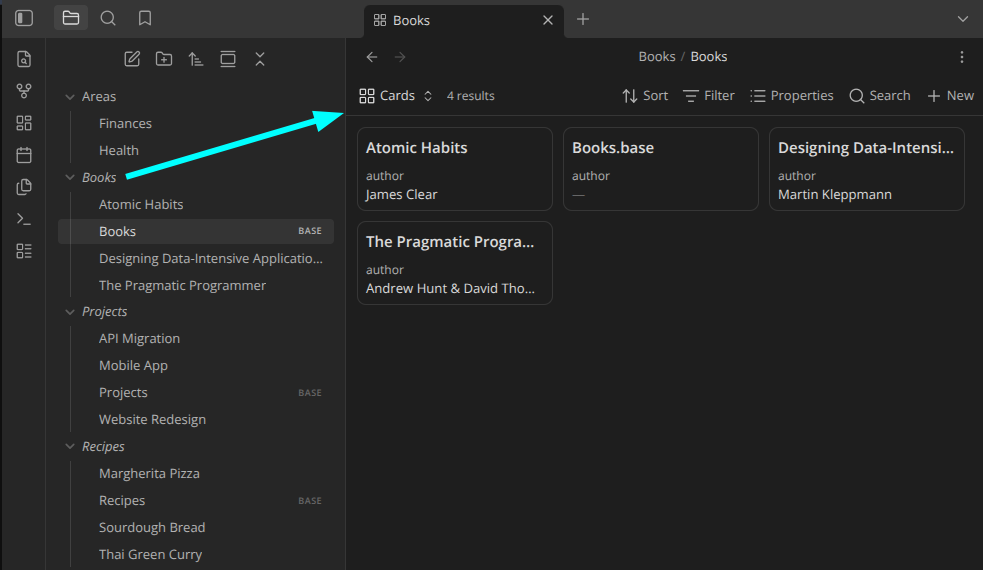
Open a folder's associated Base by clicking it in the file explorer, like Folder Notes but for Bases.

Add to Obsidian
  • Overview
  • Scorecard
  • Updates13

demo

Open a folder's associated Base by clicking it in the file explorer — like the Folder Notes community plugin, but for .base files instead of notes.

Features

  • Click a folder to open its base (plain click or modifier + click — configurable).
  • Configurable base filename, with {{folder_name}} / {{folder_path}} tokens (default: a same-named .base inside the folder).
  • Optionally create a base from a template on modifier + click when none exists.
  • Scope which folders respond with an exclude/include filter (glob patterns, optional subfolder matching).
  • The collapse chevron always expands/collapses, so normal folder navigation is never lost.
  • Right-click a folder for Open folder base / Create folder base.

Install (from source)

devbox run build      # type-check + bundle to main.js
# or: devbox run dev  # watch mode
devbox run test       # run the unit tests

Then enable Folder Bases in Settings → Community plugins. To use in another vault, copy manifest.json, main.js, and styles.css into <vault>/.obsidian/plugins/folder-bases/.

Releasing

devbox run release <version> bumps the version in manifest.json, package.json, and versions.json, builds, commits, pushes, and creates a GitHub release with main.js, manifest.json, and styles.css attached:

devbox run release 1.0.1   # or: just release 1.0.1

Requires a clean working tree and gh authenticated to the repo. Use a plain semver version with no leading v (Obsidian tags omit it). The release promotes the changelog's Unreleased section to the new version header and uses it as the GitHub release notes, so keep CHANGELOG.md up to date as you work.

Documentation

  • Changelog
  • Usage & settings
  • The .base file format
  • Architecture
  • Roadmap

Known limitations

  • The click listener is attached to the main window's document. If you move the file explorer into a popout window, clicks there are not yet intercepted.

License

MIT

HealthExcellent
ReviewPassed
About
Open a folder's associated .base file directly from the file explorer with a click. Configure base filename using {{folder_name}} and {{folder_path}} tokens, optionally create a base from a template via modifier+click, and use right-click options to open or create bases. Keep normal folder navigation intact by preserving the collapse chevron.
FoldersFilesNavigation
Details
Current version
1.9.0
Last updated
Last month
Created
Last month
Updates
13 releases
Downloads
288
Compatible with
Obsidian 1.8.0+
Platforms
Desktop, Mobile
License
MIT
Report bugRequest featureReport plugin
Author
Scott TomaszewskiScott Tomaszewskiscott-tomaszewski
GitHubscotttomaszewski
  1. Community
  2. Plugins
  3. Folders
  4. Folder Bases

Related plugins

Quick Explorer

Perform file explorer operations (and see your current file path) from the title bar, using the mouse or keyboard.

GridExplorer

Browse and organize note files visually in a flexible grid layout.

Notebook Navigator

A better file browser and calendar inspired by Apple Notes, Bear, Evernote and Day One.

Recent Files

Display a list of recently opened files.

Multi Properties

Add properties to multiple notes at once. Either right-click a folder or select multiple notes and right-click the selection.

Folder notes

Create notes within folders that can be accessed without collapsing the folder, similar to the functionality offered in Notion.

Reveal Active File Button

Add a button to the top of the File Explorer, to reveal the active file.

Remember cursor position

Remember cursor and scroll position for each note.

Custom File Explorer sorting

Manual or automatic config-driven reordering and sorting of files and folders in File Explorer.

Open Tab Settings

Adds options to customize how tabs are opened, including open in new tab by default, preventing duplicate tabs, and more.