Search...Search plugins and themes...
⌘K
Sign in
  • Get started
  • Download
  • Pricing
  • Enterprise
  • Account
  • Obsidian
  • Overview
  • Sync
  • Publish
  • Canvas
  • Mobile
  • Web Clipper
  • CLI
  • Learn
  • Help
  • Developers
  • Changelog
  • About
  • Roadmap
  • Blog
  • Resources
  • System status
  • License overview
  • Terms of service
  • Privacy policy
  • Security
  • Community
  • Plugins
  • Themes
  • Discord
  • Forum / 中文论坛
  • Merch store
  • Brand guidelines
Follow us
DiscordTwitterBlueskyThreadsMastodonYouTubeGitHub
© 2026 Obsidian

Fluorite

telehakketelehakke106 downloads

Display images or note on floating panel.

Add to Obsidian
  • Overview
  • Scorecard
  • Updates1

This plugin adds the following features to Obsidian.

  • Display image files from the device on the floating panel.
  • Display Obsidian note on the floating panel.

このプラグインはObsidianに以下の機能を追加します

  • 端末の画像ファイルをフローティングパネルに表示する
  • Obsidianのノートをフローティングパネルに表示する

Installation / インストール方法

Obsidian Settings > Community plugins > Browse > Type 'fluorite' into the search box > Select the 'Fluorite' card > Install > Enable

Obsidianの設定 > コミュニティプラグイン > 閲覧 > 検索ボックスに「fluorite」と入力 > 「Fluorite」のカードを選択 > インストール > 有効

Usage / 使い方

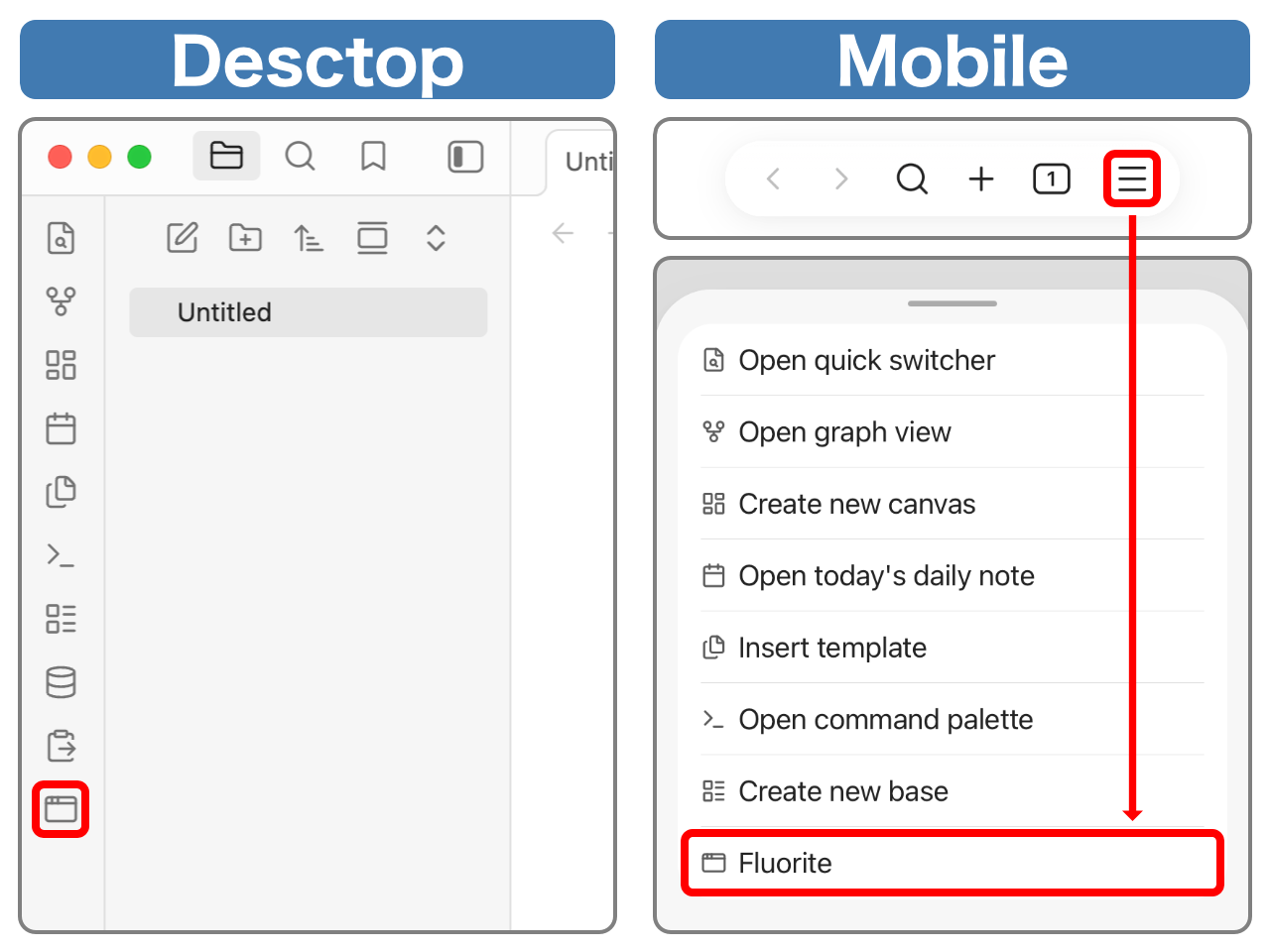
Open the floating panel / フローティングパネルを開く

Desktop: Ribbon menu > Window icon button
Mobile: Menu icon button on the navigation bar > Fluorite

デスクトップ:リボンメニュー > ウィンドウアイコンボタン
モバイル:ナビゲーションバーのメニューボタン > Fluorite
demo02

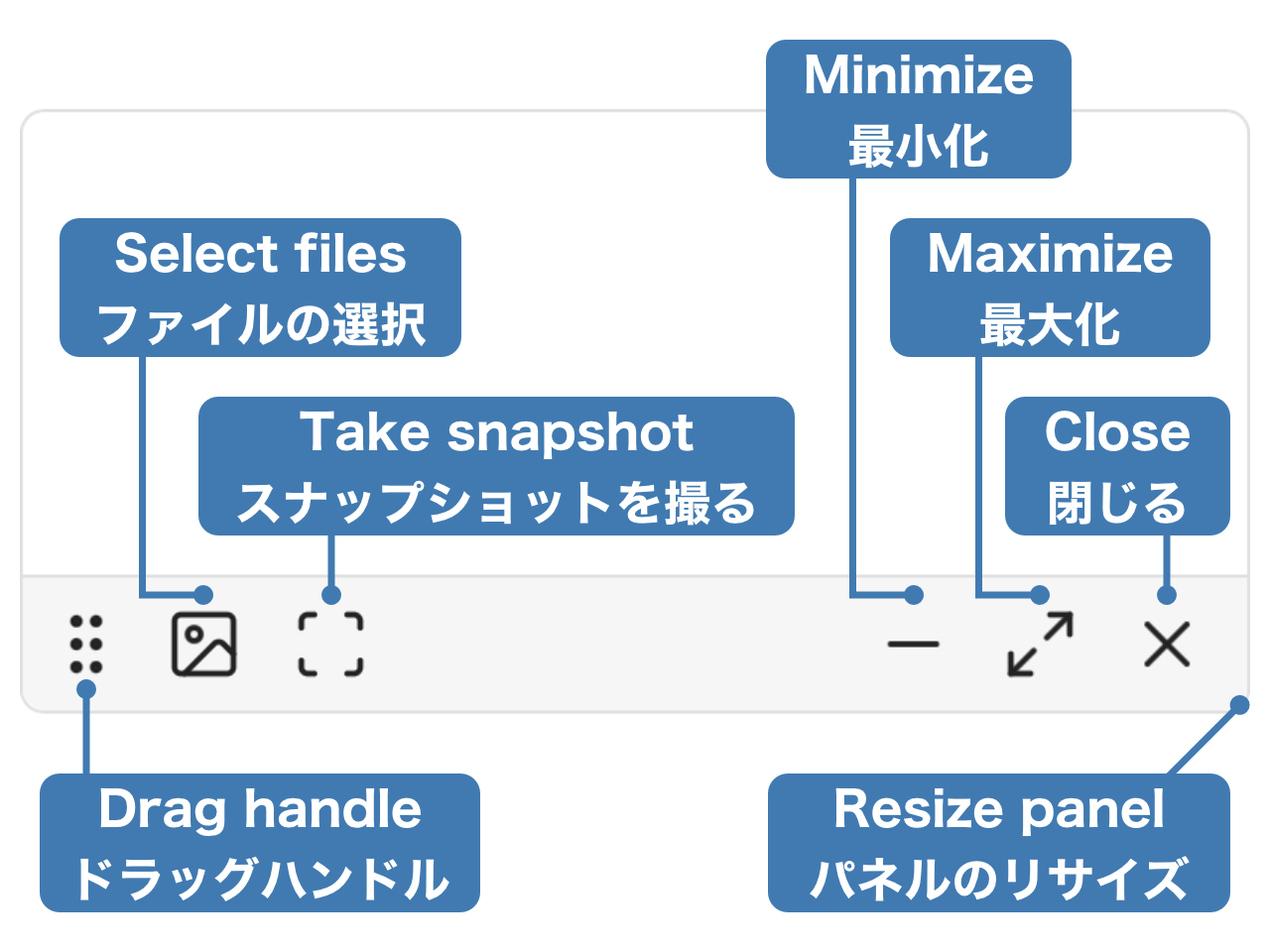
List of Operations / 操作一覧

demo03

Display image files on the device / 端末の画像ファイルを表示

Photo icon Button on the floating panel > Select images to display (multiple selections allowed)

フローティングパネルの写真アイコンボタン > 表示したい画像を選択(複数選択可能)

Display Obsidian note / Obsidianのノートを表示

Open the note to display > Scan icon button on the floating panel

A snapshot of the current state will be taken and displayed. Any edits made to the note will not be reflected in the snapshot. Also, the snapshot is read-only.

表示したいノートを開く > フローティングパネルのスキャンアイコンボタン

その時点でのスナップショットを取得し表示します。ノートに加えた編集内容はスナップショットに反映されません。また、スナップショットは読み取り専用です。

HealthExcellent
ReviewPassed
About
Display local image files in a floating panel with multi-image selection. Show a read-only snapshot of the current Obsidian note in the floating panel; snapshots are static and won’t reflect later edits.
ImagesInterface
Details
Current version
1.0.0
Last updated
2 months ago
Created
2 months ago
Updates
1 release
Downloads
106
Compatible with
Obsidian 1.5.3+
Platforms
Desktop, Mobile
License
MIT
Report bugRequest featureReport plugin
Author
telehakketelehakke
GitHubtelehakke
  1. Community
  2. Plugins
  3. Images
  4. Fluorite

Related plugins

Mousewheel Image zoom

Increase or decrease the size of an image by scrolling.

Image Toolkit

Click images to preview with zoom, move, rotate, flip, invert, and copy.

Hider

Hide interface elements such as tooltips, status bar, titlebar, and more.

Meta Bind

Make your notes interactive with inline input fields, metadata displays, and buttons.

Commander

Customize your workspace by adding commands everywhere, create macros and supercharge your mobile toolbar.

Ink

Handwriting and drawing directly between paragraphs using a digital pen, stylus, or Apple pencil.

Note Toolbar

Add customizable toolbars to your notes.

Agent Client

Chat with Claude Code, Codex, Gemini CLI, and more via the Agent Client Protocol — right from your vault.

Dragger

Drag and drop any block (paragraphs, headings, lists, etc.) to rearrange content like Notion.

Typewriter Mode

Typewriter scroll, writing focus, current line highlight, paragraph dimming, and more!