FitKit
 Paul Chiu2k downloads
Track workouts, exercises, weights and sets, plus interval sessions such as Tabata or EMOM on a full-screen timer. Consolidated into a dashboard and per-exercise trend charts.
- Overview
- Scorecard
- Updates105
FitKit is a workout tracker for Obsidian. Your sets, reps, weight, durations, interval sessions, and bodyweight rungs are stored as plain Markdown in your vault, edited through a form built for use during workouts, with a rolled-up dashboard and per-exercise progression charts when you need it.
Every workout is a normal note with Dataview inline fields. If you uninstall FitKit tomorrow, your training history is still plain text in your vault. You choose where to store the notes and how you use your data.
The workout editor is optimised to be low-touch so you can expend workout effort on reps rather than data entry. Tap to add a set, type the weight, that's it. Once you have a few workouts logged, the dashboard and the per-exercise charts auto-populate.
Install
FitKit needs the Dataview plugin to render history tables and recent-session views. Install it first from Obsidian's community plugins.
FitKit is listed in Obsidian's community plugin directory. To install it from the community plugins browser:
- Open Settings, then Community plugins, then Browse.
- Search for FitKit.
- Select Install, then Enable.
For beta builds with BRAT or a manual install from a GitHub release, see Install.
Log your first workout
The defaults are designed so you can log a workout the moment FitKit is enabled. No setup is required.
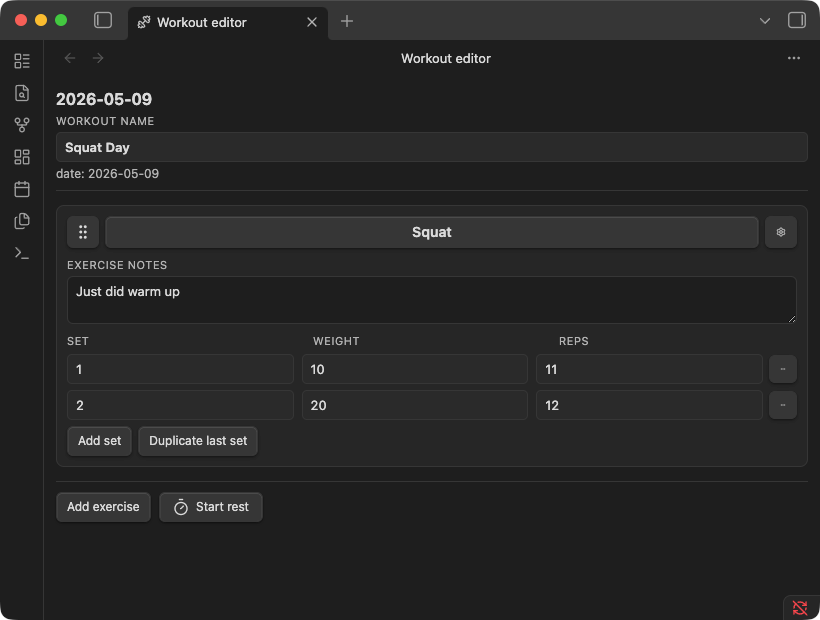
- Run
Open today's workoutfrom the command palette. FitKit creates today's note underFitness/Workouts/and opens it in the editor. - Add an exercise. Type the name, for example
Squat. If it is new, FitKit asks whether to create an exercise note for it; say yes for anything you want to chart and revisit later. - Log your sets: weight and reps for a strength exercise, a duration for a time-based one, or a rung and reps for a bodyweight one. Tap the rest timer between sets if you want it.
- Before you move on, open the card menu and set a plan for next session: increase, keep, or decrease, with an optional weight step. It shows up as a badge on the card, and prefills the weight the next time that exercise comes around.
That is it. The editor autosaves as you go, and the underlying Markdown stays readable:
---
type: workout
date: 2026-05-12
name: Squat Day
---

## [[Squat]]

- [exercise:: [[Squat]]] [set:: 1] [weight:: 50] [reps:: 5]
- [exercise:: [[Squat]]] [set:: 2] [weight:: 55] [reps:: 5]

## [[Push Up]]

- [exercise:: [[Push Up]]] [set:: 1] [level:: 2] [reps:: 8]
- [exercise:: [[Push Up]]] [set:: 2] [level:: 2] [reps:: 6] [load:: 10]
Run an interval session
For timed sessions such as Tabata, over-unders or EMOMs, switch a duration card to interval with Change type... in the card menu. The plan form opens with common sessions to start from, or you can build your own from steps, rests and repeats, with a watts, load or level target on each step.
Start then takes over the tab with a big clock: it counts each step down, beeps the last three seconds, and writes every rep to the note as it finishes, with the time you did and the intensity you held.
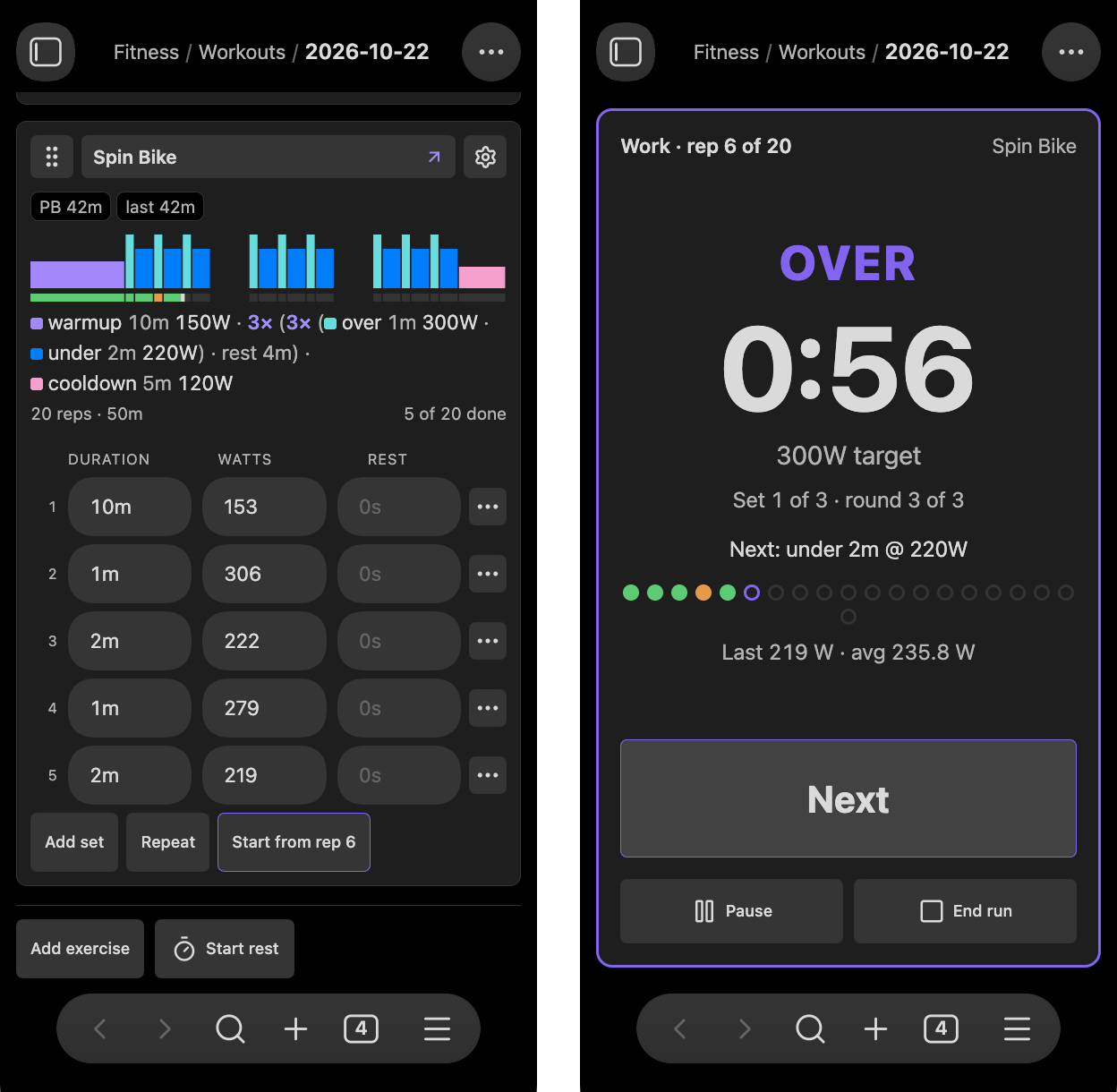
The plan and the rows are plain inline fields too:
## [[Indoor Bike]]

- [exercise:: [[Indoor Bike]]] [plan:: (x 8 (work 20s 400W) (rest 10s))]
- [exercise:: [[Indoor Bike]]] [set:: 1] [step:: work] [duration:: 20] [watts:: 405] [rest:: 10]
- [exercise:: [[Indoor Bike]]] [set:: 2] [step:: work] [duration:: 20] [watts:: 398] [rest:: 10]
Because the run lives in the note, a phone closing Obsidian mid-session does not lose it: reopening the workout picks up from the clock. See Interval training for writing plans, the runner, and managing interval exercises over time.
After a few sessions
Run Sync and repair everything from FitKit's settings to generate Fitness/Fitness Dashboard.md. It lists your recent sessions, a personal best per exercise, and any next-session plans you recorded, followed by a per-exercise section backed by a Dataview query.
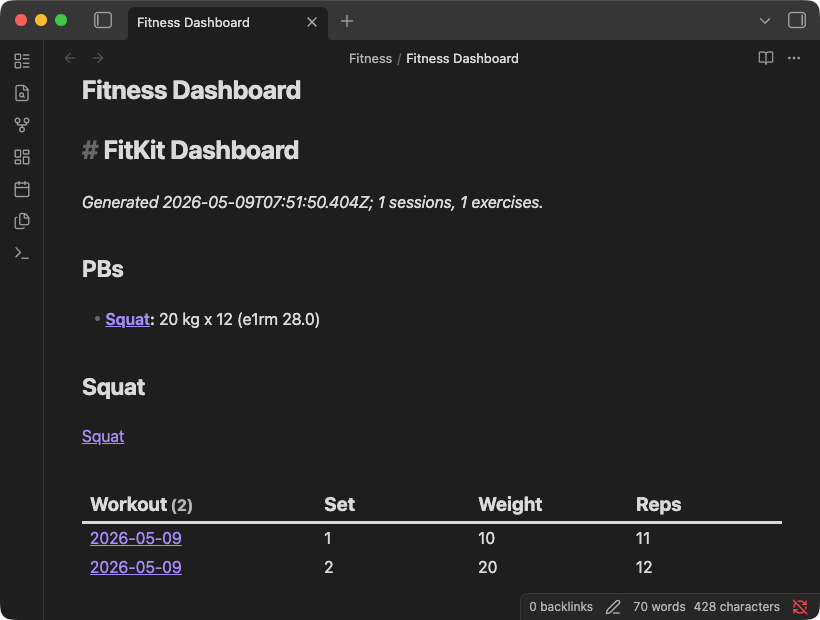
Exercise notes pick up a progression chart and a Recent sessions table without you wiring anything up. They are ordinary notes with type: exercise frontmatter, so the Notes section is yours to write in.
Maintaining your exercise list
Names drift. You log 'Pushup' one week and 'Push Up' the next, or an exercise ends up living only in workout history with no note behind it. The registry in FitKit's settings lists every exercise the plugin knows about, labelled by where it came from, and is where you fix that.
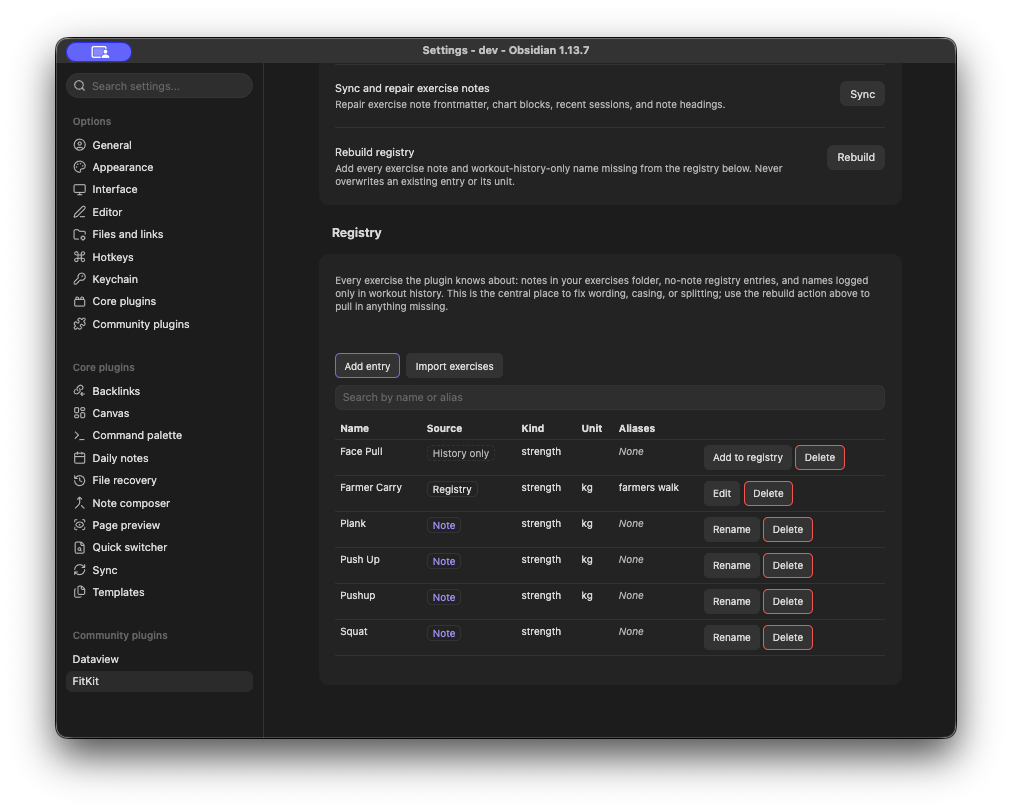
Renaming from here renames the exercise note, rewrites every reference across your workout notes, and keeps the old name as an alias so nothing stops resolving. You see a preview of every file and row that will change, and can cancel before anything is written. Renaming onto a name already in use consolidates the two.
Documentation
| Page | What it covers |
|---|---|
| Workout editor | Cards, sets, durations, the rest timer, next-session plans, autosave. |
| Interval training | Setting up interval cards, writing plans, common sessions, running and managing. |
| Exercise registry | Where exercises come from, rebuilding, renaming, consolidating, kinds and units. |
| Dashboard and charts | What the dashboard generates, how a PB is chosen, fitkit-chart options. |
| Note format | Frontmatter, inline fields, and exactly what survives a save. |
| Settings and maintenance | Every setting, every maintenance action, and the two commands. |
| Install | Installing with BRAT for beta builds, and installing manually from a release. |
Limitations
- Conflict resolution is manual. FitKit detects mid-edit file changes and asks you to reload before further edits.
- Splitting one exercise into two is not implemented. Consolidating two into one is.
- Repeat-last-workout is not implemented.
- Inline fields FitKit does not recognise, such as
[rpe:: 7], are dropped the next time the editor saves that note. Everything else in a workout note is preserved, see Note format. - Interval beeps cannot sound while a phone has Obsidian suspended in the background. The run itself catches up when you return.
- A per-exercise weight unit (
kgorlbs) only changes labels. There is no numeric conversion. - SQL/WASM analytics and a custom fenced source format are not implemented.
Development
See CONTRIBUTING.md for how to propose changes and what a good PR looks like.
Run npm install to install dependencies.
Run npm run dev to start esbuild in watch mode. It produces main.js next to manifest.json at the repo root.
To point a dev vault at the build, symlink main.js, manifest.json, and styles.css from the repo root into <vault>/.obsidian/plugins/fitkit/. Reload Obsidian, or toggle the plugin off and on, to pick up new builds.
The local gate is npm test, npm run lint, and npm run format. Run all three before pushing.
On merge to main, the Release workflow stamps a version using the PR's label (major, minor, patch, or norelease) and publishes a GitHub release with main.js, manifest.json, and styles.css attached.
To test a change through BRAT first, label its open PR beta. Each push then publishes a prerelease that only BRAT installs, and the store keeps the stable release until the PR merges. See CONTRIBUTING.md.
See AGENTS.md for project conventions.
License
MIT.