1st Timeline
 lnabc03497 downloads
A simple, elegant, and Chinese-friendly timeline rendering plugin.
- Overview
- Scorecard
- Updates7
一个简单、优雅、中文友好的 Obsidian 时间轴渲染插件。 A simple, elegant, Chinese-friendly timeline rendering plugin for Obsidian. 当前版本 (Current version): 1.7.0
简介
1st Timeline 是一个 Obsidian 插件,可将简单的文本代码块渲染为精美的时间轴视图。支持多种日期格式(含中文日期优先支持),智能日期解析,优雅的视觉呈现——帮助您轻松创建时间线、项目进度视图或日程规划记录。
1st Timeline renders beautiful timeline views from simple text code blocks. It supports multiple date formats with first-class Chinese date support, intelligent parsing, and elegant visual presentation.
安装
从 Obsidian 社区插件市场(推荐)
- 打开 Obsidian 设置 → 社区插件
- 关闭"安全模式"
- 点击"浏览",搜索 "1st Timeline"
- 安装并启用
从 GitHub Releases 安装
- 前往 Releases 页面
- 下载最新版本的
main.js、manifest.json、styles.css - 在 vault 中创建目录
.obsidian/plugins/first-timeline/ - 将三个文件放入该目录
- 重启 Obsidian,在 设置 → 社区插件 中启用
从源码构建
git clone https://github.com/lnabc03/1st-Timeline.git
cd 1st-Timeline
npm install
npm run build
然后将 main.js、manifest.json、styles.css 复制到 .obsidian/plugins/first-timeline/,重启并启用。
注意: 目标目录名必须与
manifest.json中的id字段一致(first-timeline)。
使用方法
在 Obsidian 笔记中插入 timeline 代码块:
```timeline
2024-01-01  新年第一天(双空格分隔)
2024年3月8日:妇女节(中文冒号分隔)
2024-05-01: 劳动节(英文冒号分隔)
2025-01-28_12:04  精确时间格式
2025年1月29日早上  中文日期+时间词
2026-01-01
新的一年开始了!(多行文本)
- 支持完整的 Markdown 语法
# 标题
> 引用块
> [!NOTE] Callout
| A | B |
|---|---|
| C | D |
```
语法规则
| 格式 | 分隔符 | 示例 |
|---|---|---|
| 双空格 | ␣␣ |
2024-01-01 事件内容 |
| 中文冒号 | : |
2024年3月8日:事件内容 |
| 英文冒号 | : |
2024-05-01:事件内容 |
| 仅日期(多行) | 换行 | 日期独占一行,后续行为事件内容 |
多日期批量添加
同一事件需要记在多个日期时,可在一行内列出所有日期,渲染时每个日期各生成一个相同内容的事件:
```timeline
2026年9月1日和9月10日:任务A
2026年9月1日,9月3日及9月5日:任务B
2026-09-01, 09-03: 任务C
2026-09-01_09:00,09-03_14:00:任务D
2026年9月1日早上和9月3日晚上:任务E
```
- 日期分隔符支持
,、,、、、和、及,可混用 - 第二个及以后的日期可省略年份(与第一个日期同年),中文格式写
9月10日,ISO 格式写09-03 - 支持精确时间(
_HH:MM)和中文时间词(早上/上午/中午/下午/晚上),不同日期可混用不同格式 - 日期列表独占一行时,后续行作为这些日期共同的多行内容
- 重复日期(含相同时间点)自动去重
时间段(日期范围)
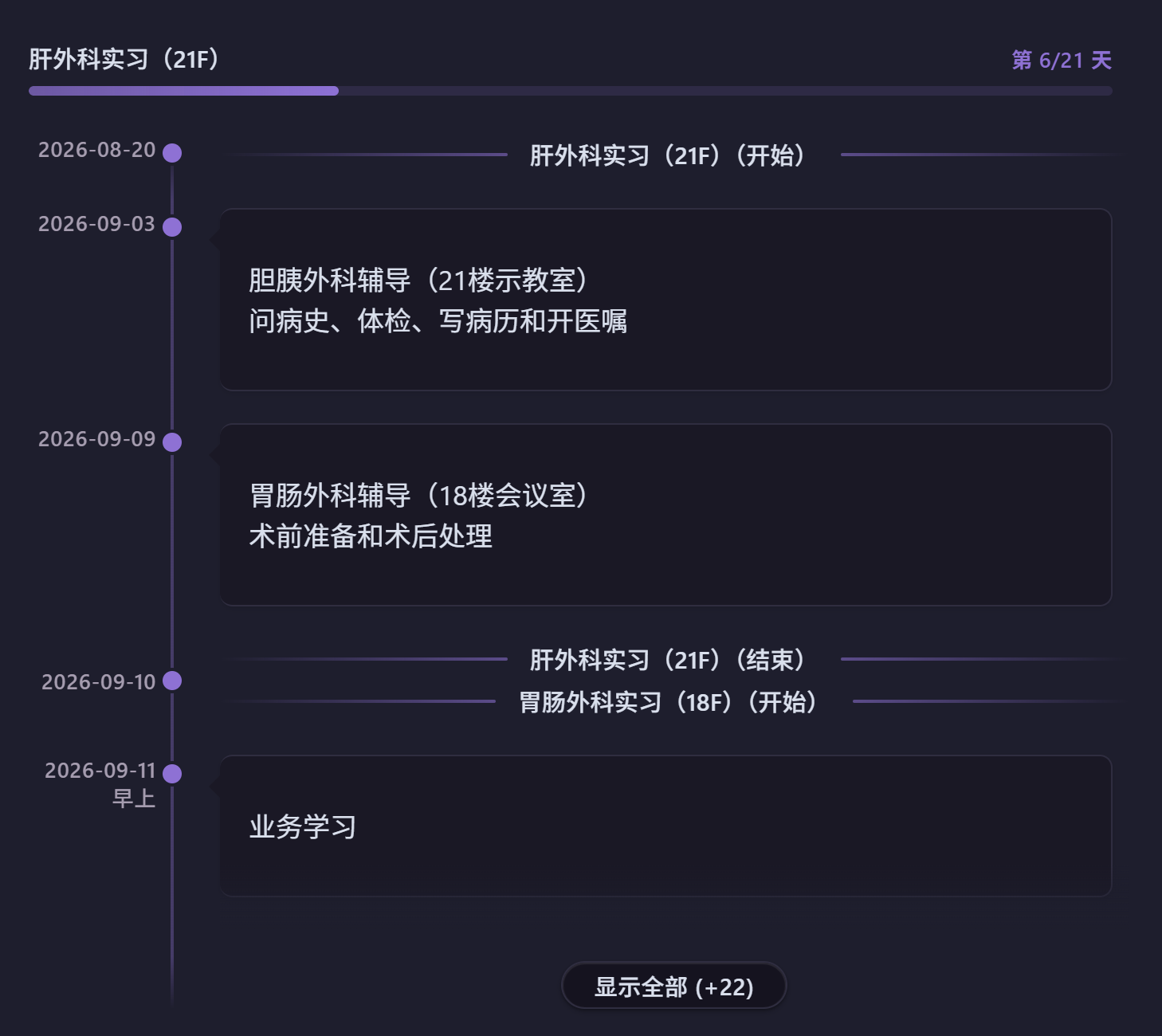
除了时间点事件,还可以用 日期A~日期B:内容 表示一段有明确起止的时间(如实习、项目周期),渲染为时间轴上方的横向进度条:
```timeline
2026-07-01~2026-09-30:暑期实习
2026年8月1日至2026年8月20日:项目冲刺
2026-09-01~2026-09-10  双空格分隔也可以
```
- 起止日期支持
YYYY-MM-DD和YYYY年MM月DD日两种纯日期格式 - 分隔符支持
~、~、至、到四种写法 - 状态自动计算:进行中显示「第 x/n 天」(开始当天为第 0 天),未开始显示「还有 x 天开始」,已结束显示「已结束 x 天」
- 进度条颜色跟随时间轴颜色:未开始不填充,进行中按比例填充,已结束填满并降低透明度
- 起止同一天时退化为普通时间点事件;开始晚于结束时自动交换
- 时间段的开始日和结束日会在时间轴上渲染为主题色水平分隔线(「标题(开始)」「标题(结束)」),与进度条一一对应;开始线自动排在当日所有事件上方、结束线排在下方,可在设置中关闭
- 相邻时间段共享同一天(前段结束日 = 后段开始日)时,两条分隔线合并为一条「A(结束)、B(开始)」;合并线隐含时间为中午,当日正午及之后的事件排在其下方、早上/上午的排在上方
- 自动折叠时只显示进行中的进度条
时间轴链接
用 source: 指令引用另一个笔记中的时间轴,避免在日记模板里重复硬编码相同的事件:
```timeline
source: [[工作安排]]
2026-08-20:只属于本篇笔记的事件
```
- 被引用的笔记中,事件需写在
```timeline代码块内(可混写其他任意内容) - 指令关键字支持
source:和源:(中英文冒号均可),可出现在代码块任意位置,仅第一个生效 - 引用的事件与代码块内的事件合并排序渲染;日期和内容完全相同的条目自动去重(代码块内优先)
- 链接解析与 Obsidian 内链规则一致,文件改名后可自动跟踪;源文件修改后重新打开笔记即可刷新
归档过期事件
在包含时间轴的笔记中执行命令面板的 "归档过期事件 / Archive past events" 命令:
- 当前文件所有
```timeline代码块中,日期早于今天的事件会被移出代码块 - 时间段以结束日期判断:已结束的时间段会被归档,进行中/未开始的保留
- 过期事件追加到同文件的「已归档:」区域(纯文本保留原始格式);区域不存在时在文件末尾自动创建
- 重复执行时识别已有归档区并追加,今天及未来的事件保留在块内
添加新事件
执行命令面板的 "添加新事件 / Add new event" 命令,弹窗中输入时间和事件内容:
- 顶部实时预览新增行(
时间:事件),支持所有日期/时间格式及时间段写法 - 「继续新增」固定当前行并清空输入,可连续添加多条;「保存并退出」将所有新增行写入时间轴末尾
- 当前笔记没有 timeline 代码块时自动在光标处新建;有多个代码块时弹出选择框(附所在行号)
笔记汇总
使用命令面板(Ctrl+P)执行 "笔记汇总 / Notes summary" 命令:
- 输入日期范围(格式:
YYYY-MM-DD,YYYY-MM-DD) - 默认填充当前月份
- 确认后自动生成基于指定 frontmatter 属性的笔记时间轴
设置选项
| 设置项 | 说明 | 默认值 | 范围 |
|---|---|---|---|
| 排序方向 | 事件排列顺序 | 升序 | 升序 / 降序 |
| 笔记日期属性 | frontmatter 字段名 | created |
任意字段名 |
| 时间轴颜色 | 时间轴线条和点的颜色 | #9370DB |
CSS 颜色值 |
| 颜色预设 | 一键切换主题色 | — | 蓝/绿/紫/红/橙 |
| 时间点大小 | 时间轴上点的大小 | 12px | 6–20px |
| 线条宽度 | 时间轴竖线宽度 | 2px | 1–5px |
| 事件间距 | 事件卡片之间的间距 | 20px | 10–40px |
| 悬停提示框 | 是否显示距今天数提示 | 开启 | 开关 |
| 悬停延迟 | 提示框出现前的等待时间 | 500ms | 0–1000ms |
| 当天事件高亮 | 当天事件特殊标记 | 开启 | 开关 |
| 时间段端点标记 | 时间轴中显示时间段起止分隔线 | 开启 | 开关 |
| 自动折叠 | 事件过多时自动折叠 | 开启 | 开关 |
| 折叠阈值 | 触发折叠的事件数量 | 10 | 5–50 |
| 折叠时显示数量 | 折叠后显示的事件数 | 5 | 1–15 |
开发
对齐 Obsidian 官方示例插件 最佳实践:
npm install          # 安装依赖
npm run dev          # 开发模式(watch)
npm run build        # 生产构建(tsc + esbuild)
npm run lint         # ESLint 代码检查
- 语言: TypeScript(strict 模式)
- 构建: esbuild(CJS 输出,ES2021 target)
- 代码检查: ESLint 9 + typescript-eslint + eslint-plugin-obsidianmd
- CI/CD: GitHub Actions(lint + release)
- 最低 Obsidian 版本: 1.8.7(桌面及移动端)
更新日志
1.7.0 — 多日期与快捷添加 (2026-08)
- 新增多日期语法:一行内用
,,、和及(可混用)列出多个日期,同一事件批量添加到各日期;第二个起可省略年份;支持精确时间和中文时间词 - 新增「添加新事件」命令:弹窗输入时间与事件,实时预览新增行,可连续新增后一次写入;无代码块时自动新建,多代码块时选择目标时间轴
- 相邻时间段共享一天时,合并分隔线改为上下两行(结束在上、开始在下),光点与日期标签垂直居中
1.6.1 — 相邻时间段端点合并 (2026-08)
- 修复边缘情况:前一段的结束日与后一段的开始日相同时,时间轴上不再出现两条紧邻的分隔线,而是合并为一条「A(结束)、B(开始)」
- 合并分隔线的隐含时间为中午:当天正午及之后的事件排在其下方,早上/上午的事件排在其上方
1.6.0 — 端点分隔线 (2026-08)
- 时间段起止日期渲染为时间轴上的主题色水平分隔线:文字居中,线条向两端延伸渐隐,悬浮时提亮
- 同日包含排序:开始分隔线自动排在当日所有事件上方,结束分隔线排在下方
- 新增「时间段端点标记」设置开关;移除进度条显示开关(进度条改为常显)
1.5.x — 时间段与生态完善 (2026-07)
- 新增时间段(日期范围)语法
日期A~日期B:内容,渲染为时间轴上方的进度条,自动计算第 x/n 天 - 新增
source:指令引用其他笔记的时间轴、归档过期事件命令 - 通过社区插件审核,适配 Obsidian 1.13.0+ 设置搜索
1.4.x — 正式版发布 (2026-06)
- TypeScript 重构、多模块架构、esbuild 构建,完全对齐 Obsidian 官方模板
- 中英文双语支持,自动检测 Obsidian 语言设置
- 重新设计当天事件高亮(内嵌强调色条 + 徽章)
- 移动端全面适配:响应式布局、日期完整显示、光点精准居中
- 社区插件市场上架并通过审核
1.3.x — 自动折叠与笔记汇总 (2025)
- 新增自动折叠和笔记汇总功能
- 修复日期解析相关问题
1.2.x — 交互增强 (2025)
- 添加悬停提示(距今天数)和当天事件高亮
1.1.x — 中文支持 (2025)
- 增加中文日期格式支持和颜色预设主题
1.0.0 — 初始版本 (2025)
- 基础时间轴渲染
许可证
MIT License
作者
lnabc03 | 弋鹓
1st Timeline
A simple, elegant, Chinese-friendly timeline rendering plugin for Obsidian. 一个简单、优雅、中文友好的 Obsidian 时间轴渲染插件。 Current version: 1.7.0
Description
1st Timeline renders beautiful timeline views from simple text code blocks. It supports multiple date formats with first-class Chinese date support, intelligent parsing, and elegant visual presentation — helping you create timelines, project progress views, or schedule records effortlessly.
1st Timeline 是一个 Obsidian 插件,可将简单的文本代码块渲染为精美的时间轴视图。
Installation
From Obsidian Community Plugin Marketplace (Recommended)
- Open Obsidian Settings → Community plugins
- Disable Safe mode
- Click Browse, search for "1st Timeline"
- Install and enable
From GitHub Releases
- Go to the Releases page
- Download the latest
main.js,manifest.json, andstyles.css - Create the directory
.obsidian/plugins/first-timeline/in your vault - Copy the three files into that directory
- Restart Obsidian and enable the plugin in Settings → Community plugins
From Source
git clone https://github.com/lnabc03/1st-Timeline.git
cd 1st-Timeline
npm install
npm run build
Then copy main.js, manifest.json, and styles.css to .obsidian/plugins/first-timeline/, restart Obsidian, and enable.
Note: The target directory name must match the
idfield inmanifest.json(first-timeline).
Usage
Insert a timeline code block in any Obsidian note:
```timeline
2024-01-01  New Year's Day (two spaces)
2024-03-08: International Women's Day (colon)
2024年5月1日:Labor Day (Chinese date + colon)
2025-01-28_12:04  Precise time format
2025年1月29日早上  Chinese date with time-of-day word
2026-01-01
A new year begins! (multi-line text)
- Full Markdown syntax supported
# Headings
> Blockquotes
> [!NOTE] Callouts
| A | B |
|---|---|
| C | D |
```
Syntax Rules
| Format | Separator | Example |
|---|---|---|
| Two spaces | ␣␣ |
2024-01-01 Event content |
| Chinese colon | : |
2024年3月8日:Event content |
| English colon | : |
2024-05-01: Event content |
| Date only (multi-line) | Newline | Date on one line, content on following lines |
Multiple Dates
When the same event belongs to several dates, list all dates on one line — each date gets its own event with identical content:
```timeline
2026年9月1日和9月10日:Task A
2026年9月1日,9月3日及9月5日:Task B
2026-09-01, 09-03: Task C
2026-09-01_09:00, 09-03_14:00: Task D
```
- Date separators:
,,,,、,和,及— freely mixable - Dates after the first may omit the year (same year as the first): write
9月10日in Chinese format or09-03in ISO format - Precise times (
_HH:MM) and Chinese time-of-day words (早上/上午/中午/下午/晚上) are supported, and formats may be mixed within one line - If the date list occupies the whole line, following lines become the shared multi-line content
- Duplicate dates (including identical times) are deduplicated
Date Ranges
Beyond point-in-time events, use DateA~DateB: content for a span with explicit start and end (e.g. an internship or project phase), rendered as horizontal progress bars above the timeline:
```timeline
2026-07-01~2026-09-30: Summer internship
2026年8月1日至2026年8月20日:Project sprint
2026-09-01~2026-09-10  Two-space separator works too
```
- Start and end accept pure dates only:
YYYY-MM-DDorYYYY年MM月DD日 - Four separators are recognized:
~,~,至,到 - Status is computed automatically: "Day x/n" while active (day 0 on the start date), "Starts in x days" when upcoming, "Ended x days ago" when over
- Bar color follows the timeline color: empty when upcoming, proportional fill while active, full but dimmed when ended
- Identical start and end degrades to a normal point event; a start later than the end is swapped automatically
- Each range's start and end dates render as theme-colored horizontal divider lines on the timeline ("Title (Start)" / "Title (End)"), matching the progress bars one-to-one; the start divider ranks above all same-day events and the end divider below — can be turned off in settings
- When adjacent ranges share one day (one ends the day the next begins), the two dividers merge into a single "A (End), B (Start)" line; it sits at an implicit noon, so same-day events at or after noon rank below it and morning events above
- When collapsed, only active bars are shown
Timeline Source
Use the source: directive to render a timeline stored in another note, avoiding hardcoded duplicates in daily note templates:
```timeline
source: [[Work Schedule]]
2026-08-20: An event unique to this note
```
- In the referenced note, events must live inside a
```timelinecode block (other content is allowed) - The directive accepts
source:or源:(either colon), may appear anywhere in the block, and only the first one takes effect - Referenced events are merged and sorted with inline events; entries with identical date and content are deduplicated (inline wins)
- Link resolution follows Obsidian's internal link rules and survives file renames; reopen the note to refresh after editing the source file
Archive Past Events
Run the "Archive past events / 归档过期事件" command from the command palette in a note containing timelines:
- Events dated before today are moved out of every
```timelinecode block in the current file - Date ranges are judged by their end date: ended ranges are archived, active/upcoming ones stay
- Archived events are appended to an "Archived:" section in the same file (kept as plain text in original format); the section is created at the end of the file if absent
- Running the command again appends to the existing section; today's and future events stay in the block
Add New Event
Run the "Add new event / 添加新事件" command from the command palette and fill in the date/time and the event content:
- The composed line (
time:event) previews live at the top; all date/time formats and the date-range syntax are accepted - "Add another" fixes the current line and clears the inputs for consecutive additions; "Save & exit" writes all pending lines to the end of the timeline block
- If the note has no timeline block, one is created at the cursor; if several blocks exist, a picker asks which timeline to use (with line numbers)
Notes Summary
Use the command palette (Ctrl+P) and run the "Notes summary / 笔记汇总" command:
- Enter a date range (format:
YYYY-MM-DD,YYYY-MM-DD) - The current month is pre-filled by default
- Confirm to insert a timeline of notes based on the configured frontmatter date field
Settings
| Setting | Description | Default | Range |
|---|---|---|---|
| Sort direction | Event sort order | Ascending | Ascending / Descending |
| Date property | Frontmatter field name | created |
Any field name |
| Timeline color | Color of line and dots | #9370DB |
CSS color value |
| Color presets | One-click theme switching | — | Blue / Green / Purple / Red / Orange |
| Dot size | Size of timeline dots | 12px | 6–20px |
| Line width | Width of the timeline line | 2px | 1–5px |
| Event spacing | Spacing between event cards | 20px | 10–40px |
| Hover tooltip | Show days-until/since tooltip | On | Toggle |
| Hover delay | Delay before tooltip appears | 500ms | 0–1000ms |
| Highlight today | Special highlight for today's events | On | Toggle |
| Range start/end markers | Show range endpoints as divider lines on the timeline | On | Toggle |
| Auto collapse | Auto-collapse when above threshold | On | Toggle |
| Collapse threshold | Events needed to trigger collapse | 10 | 5–50 |
| Show when collapsed | Events shown when collapsed | 5 | 1–15 |
Development
Follows Obsidian's official sample plugin best practices:
npm install          # Install dependencies
npm run dev          # Development mode (watch)
npm run build        # Production build (tsc + esbuild)
npm run lint         # ESLint check
- Language: TypeScript (strict mode)
- Build: esbuild (CJS output, ES2021 target)
- Linting: ESLint 9 + typescript-eslint + eslint-plugin-obsidianmd
- CI/CD: GitHub Actions (lint + release)
- Minimum Obsidian version: 1.8.7 (desktop and mobile)
Changelog
1.7.0 — Multiple Dates & Quick Add (2026-08)
- New multi-date syntax: list several dates on one line with
,,、和及(freely mixable) to add the same event to every date; later dates may omit the year; precise times and Chinese time-of-day words supported - New "Add new event" command: a modal with time and content inputs, live preview of the composed line, consecutive additions written in one save; creates a block when absent, asks which timeline when several exist
- The merged divider for adjacent ranges now renders as two stacked rows (End on top, Start below) with the dot and date label vertically centered
1.6.1 — Merged Dividers for Adjacent Ranges (2026-08)
- Fixed an edge case: when one range ends on the same day the next begins, the timeline no longer shows two adjacent divider lines — they merge into a single "A (End), B (Start)" divider
- The merged divider sits at an implicit noon: same-day events at or after noon rank below it, morning events above
1.6.0 — Endpoint Dividers (2026-08)
- Range start/end dates render as theme-colored horizontal divider lines on the timeline: centered text, lines fading out to both sides, brightening on hover
- Same-day inclusion ordering: the start divider ranks above all events on its day, the end divider below
- New "Range start/end markers" setting toggle; removed the progress-bar visibility setting (bars are now always shown)
1.5.x — Date Ranges & Ecosystem (2026-07)
- Added date range syntax
DateA~DateB: content, rendered as progress bars above the timeline with automatic day x/n tracking - Added the
source:directive for referencing timelines in other notes, and the archive past events command - Passed community plugin review; compatible with Obsidian 1.13.0+ settings search
1.4.x — Official Release (2026-06)
- TypeScript rewrite, multi-module architecture, esbuild build system, aligned with Obsidian template
- Bilingual Chinese/English support with automatic language detection
- Redesigned today-event highlighting (inset accent strip + badge)
- Full mobile adaptation: responsive layout, full date display, precise dot centering
- Published to Obsidian community plugin marketplace
1.3.x — Auto Collapse & Notes Summary (2025)
- Added auto-collapse and notes summary features
- Fixed date parsing issues
1.2.x — Interaction Enhancements (2025)
- Added hover tooltips (days until/since) and today highlighting
1.1.x — Chinese Support (2025)
- Added Chinese date format support and color preset themes
1.0.0 — Initial Release (2025)
- Basic timeline rendering
License
MIT License
Author
lnabc03 | 弋鹓