Find-n-Replace
 gapmiss5k downloads
A VSCode-style vault-wide search & replace sidebar view.
- Overview
- Scorecard
- Updates17
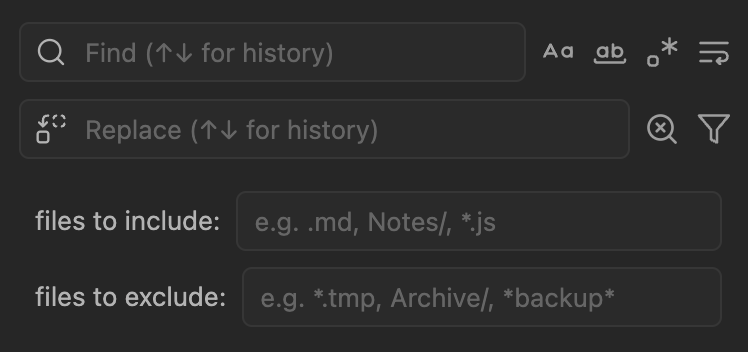
Vault-wide search and replace for Obsidian with regex support, multi-selection, and file filtering.
[!CAUTION] This plugin modifies vault files directly. Maintain backups before bulk replacements.
Features
- Search all text files (md, txt, js, css, json, etc.)
- Regex with capture groups (
$1,$2,$&) - Multiline patterns across lines
- Case-sensitive and whole-word matching
- Multi-select matches with Ctrl/Cmd+click
- File filtering by extension, folder, or glob pattern
- Search history with ↑↓ navigation
- Click results to jump to location
Installation
Install from community.obsidian.md
From Obsidian's settings or preferences:
- Community Plugins > Browse
- Search for "Find-n-Replace"
Manually:
- download the latest release archive
- uncompress the downloaded archive
- move the
find-n-replacefolder to/path/to/vault/.obsidian/plugins/ - Settings > Community plugins > reload Installed plugins
- enable plugin
or:
- download
main.js,manifest.json&styles.cssfrom the latest release - create a new folder
/path/to/vault/.obsidian/plugins/find-n-replace - move all 3 files to
/path/to/vault/.obsidian/plugins/find-n-replace - Settings > Community plugins > reload Installed plugins
- enable plugin
Usage
- Open via Command Palette:
Find-n-Replace: Open - Enter search term (results appear as you type)
- Optional: Click filter icon to limit by file type or folder
- Enter replacement text
- Replace individual matches, selected matches, or all
Search options: Match Case, Whole Word, Regex, Multiline
Selection: Ctrl/Cmd+click to multi-select, Escape to clear
Examples
| Search | Replace | Result |
|---|---|---|
TODO |
DONE |
Simple text replacement |
(\d{4})-(\d{2})-(\d{2}) |
$2/$3/$1 |
Date format conversion |
\[\[(.+?)\]\] |
$1 |
Remove wikilink brackets |
\s{2,} |
|
Collapse multiple spaces |
Commands
- Open
- Focus search/replace input
- Perform search
- Clear search and replace
- Toggle match case/whole word/regex/multiline
- Replace selected/all matches
- Select all results
- Expand/collapse all
Assign hotkeys in Settings → Hotkeys → search "Find-n-Replace"
Settings
- Search history: Enable/disable, max entries (10-200)
- Max results: Limit displayed results (default: 1000)
- Auto search: Toggle search-as-you-type
- Confirm destructive actions: Prompt before Replace All
- Default filters: Set default include/exclude patterns
- Logging level: Silent to Trace for debugging
Development
npm install
npm run dev      # watch mode
npm run build    # production
npm test         # run tests
License
MIT
HealthExcellent
ReviewPassed
About
Search your entire vault and replace matches across multiple files using JavaScript regex with capture-group support. Preview matches in a navigable list, select specific hits or whole files, filter by folders or file types, and jump to any match to review before applying changes.Details
Current version
1.1.1
Last updated
3 months ago
Created
11 months ago
Updates
17 releases
Downloads
5k
Compatible with
Obsidian 1.13.0+
Platforms
Desktop, Mobile
License
MIT